The best home embroidery machine is the one that fits the projects you actually want to make. A compact hoop can handle monograms and small motifs, while larger designs call for more embroidery area—or careful rehooping.
These 10 picks span beginner-friendly embroidery machines, larger-hoop options, and sewing-and-embroidery combos. Start with the guide below to narrow your choice by workspace, workflow, and budget.
Best 10 Embroidery Machines for Home Use Picks for 2026
Largest Embroidery Area

- 11 x 7.9-inch maximum embroidery area
- Four hoops and a seven-inch touchscreen
- USB and wireless LAN design transfer
Best For: Larger home embroidery projects
Beginner-Focused Pick

- 4 x 4-inch and 4 x 9.25-inch hoops
- Seven-inch touchscreen
- Wi-Fi and USB design transfer
Best For: Beginners making personal projects
Lightweight Beginner Pick

- Listed weight of 15 pounds
- 4 x 4-inch and 4 x 9.25-inch sizes
- 130 designs, eight fonts, and Wi-Fi transfer
Best For: Beginners seeking a lighter machine
Sewing-and-Embroidery Combo

- Sewing and embroidery in one machine
- 135 embroidery designs and 103 sewing stitches
- 4 x 4-inch hoop with wireless LAN and USB
Best For: Home crafters who also need sewing
Compact Starter Pick

- 4" x 4" embroidery field
- 80 designs and nine fonts
- USB design importing
Best For: Small designs and personalized lettering
Wireless Design Pick

- 5" x 7" maximum embroidery area
- 193 designs and 13 fonts
- WLAN and USB file transfer
Best For: Larger designs and wireless transfers
Sewing-and-Embroidery Pick
- Sews and embroiders
- 241 designs and 300 stitches
- 5.5" x 5.5" maximum embroidery area
Best For: Sewing and embroidery in one machine
Wireless Starter Pick

- 4" x 4" embroidery field
- Wireless, app, and USB transfers
- 135 designs and 10 fonts
Best For: Wireless embroidery projects that fit a 4" x 4" hoop
Sew-and-Embroider Pick

- Sewing and embroidery in one machine
- 5" x 7" embroidery field
- Wireless transfer and on-screen editing
Best For: Home sewists who want one machine for both crafts
USB Design Pick

- 5" x 7" embroidery field
- 138 designs and 11 fonts
- USB design import
Best For: Larger-hoop embroidery with USB design imports
Largest Embroidery Area – Poolin EOC06
Among embroidery machines for home use, the Poolin EOC06 stands out for its 11 x 7.9-inch maximum embroidery area. Four included hoops give you options for projects ranging from smaller accessories to larger designs on clothing and home textiles.
Best For: Home embroiderers who want room for larger designs and multiple hoop sizes.
Pros:
- Includes two 5.5 x 5.5-inch hoops, one 7.9 x 7.9-inch hoop, and one 7.9 x 11-inch hoop.
- Seven-inch touchscreen, 200 built-in designs, and eight fonts provide on-machine options.
- Accepts DST or DSB designs via USB flash drive or wireless LAN; thread, bobbins, and stabilizer are included.
Cons:
- At 35 pounds and 27 inches wide, it needs more space than the smaller machines here.
- Creating original stitch designs requires digitizing software and file transfer.
Choose the EOC06 if hoop capacity is your priority. Its included supplies help you get started, while the larger footprint is worth planning for before you buy.
Beginner-Focused Pick – Poolin EOC05
The Poolin EOC05 is an embroidery-only option for shoppers comparing embroidery machines for home use. Its 4 x 9.25-inch embroidery area offers space for names and longer designs, while the seven-inch touchscreen is intended to keep everyday operation approachable.
Best For: First-time home embroiderers who want a focused machine for personal projects.
Pros:
- Includes 4 x 4-inch and 4 x 9.25-inch hoops for different project sizes.
- Supports Wi-Fi and USB design transfer and includes access to free design software.
- Starter supplies include thread, stabilizer, bobbins, needles, and a USB drive.
Cons:
- Does not sew; this is an embroidery-only machine.
- Described for personal projects rather than commercial mass production.
The EOC05 makes sense if you want to learn embroidery without paying for a sewing function you will not use. Check that its maximum hoop dimensions fit the designs you have in mind.
Lightweight Beginner Pick – PooLin EOC03
At a listed 15 pounds, the PooLin EOC03 is a relatively light option among these embroidery machines for home use. It pairs an easy-operation Institch system with 4 x 4-inch and 4 x 9.25-inch embroidery sizes for small motifs or longer personalized designs.
Best For: New embroiderers who want built-in designs, two embroidery sizes, and learning support.
Pros:
- Includes 130 built-in designs and eight fonts for projects without importing a pattern.
- Supports Wi-Fi transfer of designs created with the provided free software.
- Comes with thread, stabilizer, prewound bobbins, tutorials, and access to online support.
Cons:
- The 4-inch width limits the size of a single embroidery design.
- The supplied details do not specify USB design transfer.
The EOC03 is worth considering if a guided start matters more than a wide embroidery field. Its included materials and built-in patterns give beginners several ways to try a first project.
Sewing-and-Embroidery Combo – Brother SE700
For shoppers who need both functions from their embroidery machines for home use, the Brother SE700 combines sewing and embroidery in one unit. It includes a 4 x 4-inch embroidery hoop, eight sewing feet, and 103 built-in sewing stitches.
Best For: Home crafters who want to sew garments and add smaller embroidered designs with one machine.
Pros:
- Offers 135 built-in embroidery designs and 10 embroidery lettering fonts.
- Transfers designs by wireless LAN or USB, with Artspira app options for mobile customization.
- Includes a 3.7-inch color touchscreen, automatic needle threader, and drop-in top bobbin.
Cons:
- The 4 x 4-inch embroidery field is smaller than those of the Poolin models listed here.
- Intended for sale only in the US at 120 volts; other use may void the warranty.
The SE700 is the practical choice when sewing capability is as important as embroidery. If larger single-hoop designs are your priority, its 4 x 4-inch field may be restrictive.
Compact Starter Pick – Brother PE535
Among embroidery machines for home use, the Brother PE535 is a compact option for personalizing smaller projects. Its 4″ x 4″ embroidery field, 80 built-in designs, and nine lettering fonts give you a practical starting set without requiring a larger hoop.
Best For: Home embroiderers making small designs and personalized lettering.
Pros:
- Includes a 4″ x 4″ hoop and 80 built-in designs.
- USB port lets you upload designs to the machine’s memory.
- 3.2″ color touchscreen previews designs before stitching.
Cons:
- 4″ x 4″ embroidery field limits the size of a single design.
- Embroidery-only; it cannot handle traditional sewing.
Choose the PE535 if you want built-in designs and USB importing for small-scale embroidery, but plan on a separate machine for sewing.
Wireless Design Pick – Brother PE900
The Brother PE900 suits shoppers comparing embroidery machines for home use who want a larger embroidery field and wireless design transfer. Its 5″ x 7″ maximum area offers more room than a 4″ x 4″ hoop, while WLAN and USB provide two ways to bring in files.
Best For: Embroiderers who want larger designs and wireless file transfer.
Pros:
- 5″ x 7″ maximum embroidery area with an included frame.
- 193 built-in designs and 13 lettering fonts.
- WLAN supports file transfer; USB is also built in.
- Color sorting and jump-stitch trimming help manage multicolor stitching.
Cons:
- Embroidery-only; it does not function as a traditional sewing machine.
The PE900 is a strong fit when design size and transfer options matter more than sewing versatility. Its 3.7″ touchscreen also supports on-screen editing, including resizing and combining designs.
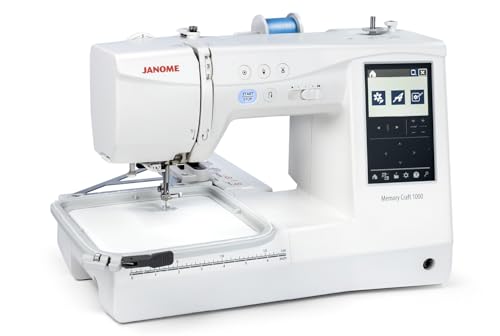
Sewing-and-Embroidery Pick – Janome Memory Craft 1000
For buyers seeking embroidery machines for home use that also sew, the Janome Memory Craft 1000 combines both functions in one machine. It pairs a 5.5″ x 5.5″ maximum embroidery area with 241 built-in embroidery designs and 300 sewing stitches.
Best For: Home makers who want sewing and embroidery without two separate machines.
Pros:
- Handles garment sewing as well as embroidery.
- 241 embroidery designs, 300 stitches, and 12 one-step buttonholes.
- 3.5″ color touchscreen supports resizing, rotating, combining, and monogramming designs.
- Lever-based hoop tightening helps position fabric before locking it in place.
Cons:
- 5.5″ x 5.5″ maximum embroidery area limits larger single-hoop designs.
- At 22 pounds, it is heavier than the 15-pound PE535.
This is the practical all-in-one choice if you regularly switch between stitching seams and adding embroidery. The included square hoop and range of presser feet support that dual-purpose setup.
Wireless Starter Pick – Brother PE545
For shoppers comparing embroidery machines for home use, the Brother PE545 offers wireless design transfer and a compact 4″ x 4″ embroidery field. Its 3.7-inch color touchscreen lets you position, edit, and preview designs before stitching.
Best For: Home embroiderers who want wireless transfers for projects that fit a 4″ x 4″ hoop.
Pros:
- 135 built-in designs and 10 fonts provide options for decoration and lettering.
- Wireless LAN, the Artspira app, and a USB port offer multiple ways to bring in designs.
- Includes a 4″ x 4″ hoop and embroidery accessories.
Cons:
- Embroidery-only; it cannot handle regular sewing.
- The 4″ x 4″ field limits the size of a design stitched in one hooping.
The PE545 makes sense if easy design transfer matters more to you than a larger hoop or sewing capability.
Among embroidery machines for home use, the Brother SE2000 suits buyers who also need a sewing machine. It combines a 5″ x 7″ embroidery field with 241 sewing stitches, wireless design transfer, and a 3.7-inch color touchscreen for on-screen editing.
Best For: Home sewists who want one machine for sewing and embroidery with a 5″ x 7″ hoop.
Pros:
- Handles both sewing and embroidery, with eight sewing feet included.
- Offers over 190 built-in embroidery designs, 50 downloadable designs, and 13 embroidery fonts.
- Advanced Color Sort and automatic jump-stitch trimming help streamline multicolor embroidery.
Cons:
- The embroidery field is limited to 5″ x 7″ per hooping.
- Artspira Thread Sets for the additional thread-inventory features are sold separately.
Choose the SE2000 if you will use its sewing functions as well as its embroidery tools; its combo design is the key distinction here.
If you are comparing embroidery machines for home use and prefer importing designs by USB, the Brother PE800 pairs a USB port with a 5″ x 7″ embroidery field. Its 3.2-inch color touchscreen lets you preview designs before stitching.
Best For: Home embroiderers who want a 5″ x 7″ hoop and USB design imports without sewing functions.
Pros:
- Includes a 5″ x 7″ hoop and embroidery foot for designs that need more room than a 4″ x 4″ field.
- 138 built-in designs offer options including florals, scrollwork, and quilt patterns.
- Eleven built-in fonts support lettering and monogramming.
Cons:
- Embroidery-only; it does not replace a sewing machine.
- The supplied notes list USB import, but do not list wireless design transfer.
The PE800 is a practical choice when hoop size and built-in lettering options matter more than wireless connectivity.
How We Picked These Embroidery Machines for Home Use
We focused on the differences that affect day-to-day ownership: embroidery area, whether a machine also sews, ways to bring in designs, on-screen editing, and the learning curve for home users. The list includes compact machines for small motifs, larger-area options, and combination machines for buyers who want one workspace for sewing and embroidery. Treat included designs and fonts as a starting point, not a substitute for checking whether the machine supports the files and projects you plan to use.
Quick Comparison: Which Type Fits Your Projects?
Small designs and monograms: A 4-by-4-inch embroidery area is a sensible starting point for names, patches, and small accents. The Brother PE535 and PE545 fit this category. More room for artwork: The Brother PE800 has a 5-by-7-inch area, while the Poolin EOC06 lists an 11-by-7.9-inch area. Check the exact usable area and included hoop before planning a large design. Sewing plus embroidery: The Brother SE700 and SE2000 and Janome Memory Craft 1000 are worth considering if you also need to construct or alter garments. The other choices are best assessed primarily as embroidery purchases.
Key Buying Factors
Embroidery Area and Hoop Size
Size your machine for the largest design you expect to stitch regularly—not just the smallest project that sounds fun today. A bigger hoop does not automatically enlarge a machine’s maximum stitch area. If a design exceeds that area, you may need to split it and rehoop, which adds time and alignment work. Also check whether the hoops you want are included or sold separately.
Design Transfer and Editing
USB and wireless transfer can both work well; choose the method that fits your computer and design workflow. Confirm supported file formats, software requirements, and whether you can resize, rotate, combine, or position designs on the machine. Built-in designs are convenient, but easy importing matters more if you plan to buy custom files.
Sewing Capability and Ongoing Supplies
An embroidery-only model will not replace a regular sewing machine. A combo model can save space, though switching between sewing and embroidery takes setup. Budget for stabilizer, embroidery thread, needles, bobbins, and practice fabric, and consider local support and replacement-hoop availability before buying.
Who Should Buy Which Embroidery Machines for Home Use?
First-time embroiderers: Start with a manageable hoop size and straightforward controls; compare the Brother PE535 or PE545 with the beginner-oriented Poolin EOC03 and EOC05. Frequent makers of larger designs: Compare the Brother PE800 and PE900 with the Poolin EOC06, paying close attention to usable embroidery area and design-transfer options. People who also sew: Compare the Brother SE700, Brother SE2000, and Janome Memory Craft 1000 against your sewing needs as well as your embroidery plans. Whichever route you take, verify the current specifications and included accessories for the exact package you purchase.