Choosing the right sticker laminating and cutting machine can make the difference between hobby-grade results and polished, sellable stickers. The best options combine clean cuts, dependable lamination, and an easy workflow.
Below, we focus on machines and supplies that suit different needs, from simple home craft use to faster small-business production.
Best 10 Sticker Laminating and Cutting Machine Picks for 2026
Manual Sticker Maker

- Non-electric manual operation
- Mess-free, acid-free adhesive
- Compact and portable
Best For: Quick sticker and label making for crafts, classrooms, and small projects
All-in-One Laminator
YE381 Thermal & Cold Laminator

- Thermal and cold laminating modes
- Includes trimmer, corner rounder, and 50 pouches
- Supports sizes from business card to A3
Best For: Users who want laminating with built-in trimming and corner finishing
Precision Vinyl Cutter
VEVOR Automatic Edge Detection Cutter

- ±0.1 mm cutting accuracy
- Supports 100+ materials
- Includes design software and design library
Best For: Precise sticker, vinyl, and cardstock cutting for DIY and small-business use
Self-Adhesive Laminate Roll
Frisco Craft Glossy 12" x 30 ft

- Peel-and-stick no-heat laminate
- Glossy, waterproof, UV-protected finish
- Can be trimmed to custom sizes
Best For: Protecting stickers, decals, and photos with a glossy manual laminate
Smart AI Vinyl Cutter
Likcut S41 for Custom Stickers

- AI voice/text design support
- 0.2mm micro-precision cutting
- 8.5-inch width for US Letter materials
Best For: Crafters wanting a simple AI-guided cutter for stickers and vinyl projects
Cold Seal Laminate Sheets

- No-heat, no-machine lamination
- Waterproof glossy protective finish
- 25-sheet pack with squeegee included
Best For: Manual sticker and document protection without heat or a laminator
All-in-One Print-and-Cut Kit

- Prints and cuts in one device
- Auto-laminates for durable stickers
- Includes 180 sheets for frequent use
Best For: Creators who want durable, color sticker printing and cutting in a single machine
No-Machine Lamination
RowinsyDD 50-Pack Self-Adhesive Laminate Sheets

- 50 self-adhesive sheets
- Waterproof, high-gloss finish
- Includes squeegee and grid
Best For: Quick sticker protection without heat or a machine
AI Sticker Cutter
Likcut S501 Smart Vinyl Cutter Machine
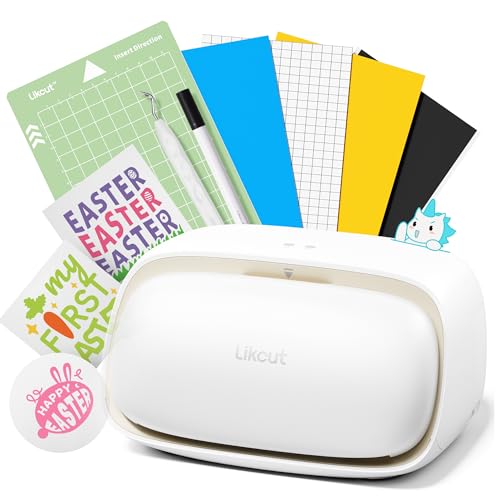
- AI voice/text-to-design features
- Cuts and draws with adjustable pressure
- Bluetooth and USB connectivity
Best For: Custom sticker makers who want guided design and cutting
Bulk Lamination Pack
RowinsyDD 180-Pack Self-Adhesive Laminate Sheets

- 180-sheet value pack
- No heat or machine required
- Waterproof with squeegee included
Best For: Frequent users needing a large supply for stickers and printables
Manual Sticker Maker – Xyron 5" Create-a-Sticker
If you want a sticker laminating and cutting machine-style tool for fast craft labeling, this Xyron unit is built for simple, mess-free sticker making. It uses a non-electric manual process, so there’s no warm-up or cool-down, and it’s ready whenever you are.
Best For: Crafters, teachers, and small-business users who want quick, portable sticker and label creation without electricity.
Pros:
- Manual, non-electric operation means instant use with no warm-up time.
- Feeds a range of materials like photos, ribbon, craft foam, fabric, and paper.
- Odor-free, acid-free, non-toxic adhesive helps keep projects clean.
- Compact and portable for home, office, or classroom use.
Cons:
- Designed for 5-inch-wide projects, so larger pieces won’t fit.
- Uses adhesive application rather than heat lamination or precision cutting.
This is a practical choice if your priority is fast sticker-making in a compact format. It’s especially appealing when you want clean results without the complexity of an electric machine.
All-in-One Laminator – YE381 Thermal & Cold Laminator
This sticker laminating and cutting machine option focuses on document protection and finishing in one desktop unit. It combines thermal and cold lamination with a built-in paper trimmer and corner rounder, making it a useful pick when you want a more complete finishing setup.
Best For: Home, office, school, and teacher use when you want laminating plus trimming and corner finishing in one machine.
Pros:
- Supports multiple pouch sizes from business card up to A3.
- Includes 50 pouches, a paper trimmer, and a corner rounder.
- Double roller design helps deliver smoother, lower-noise lamination.
- ABS release button helps clear jams without damaging the machine.
Cons:
- Warm-up time is 3–5 minutes, so it’s not instant-on.
- Best suited for laminating and trimming, not heavy-duty cutting workflows.
Overall, this is a strong all-in-one finisher for everyday documents, photos, and school materials. The included trimming tools add convenience if you want cleaner edges right out of the machine.
Precision Vinyl Cutter – VEVOR Automatic Edge Detection Cutter
For buyers searching for a sticker laminating and cutting machine alternative with serious cutting capability, this VEVOR model is aimed at precise digital craft work. It uses automatic edge detection, design software, and broad material compatibility to help you cut stickers and more with accuracy.
Best For: DIY crafters and small shops that need precise sticker, vinyl, and cardstock cutting across many materials.
Pros:
- Automatic edge detection supports precise, pattern-based cuts.
- High accuracy at ±0.1 mm with adjustable blade pressure levels.
- Works with 100+ materials, including adhesive vinyl, HTV, cardstock, and EVA foam.
- Includes design software and a built-in library of pre-made designs.
Cons:
- Bulkier than manual sticker tools, with a 16.4-pound footprint.
- Focuses on cutting rather than laminating, so it may not replace a laminator.
This machine makes the most sense if your projects depend on controlled, repeatable cutting rather than simple hand-fed sticker making. The software and material support give it broad creative range.
Self-Adhesive Laminate Roll – Frisco Craft Glossy 12" x 30 ft
If you want a sticker laminating and cutting machine-free way to protect decals and prints, this Frisco Craft roll is a straightforward choice. It’s a peel-and-stick laminate that you can cut to size with scissors or a razor knife, making it flexible for custom projects.
Best For: Crafters who want quick, glossy protection for stickers, decals, photos, and signs without using heat.
Pros:
- Self-adhesive design skips bulky laminating machines.
- Can be trimmed to size for custom fits.
- Glossy finish is smudge-resistant, UV-protected, and waterproof.
- Suitable for indoor and outdoor projects.
Cons:
- Single-use roll, so there’s no cartridge-style refilling.
- Doesn’t cut or laminate automatically; it’s a manual application product.
This is a practical pick when protection matters more than automation. It’s especially useful if you already have your stickers or prints made and just need a durable finish.
Smart AI Vinyl Cutter – Likcut S41 for Custom Stickers
If you want a sticker laminating and cutting machine that prioritizes speed and simplicity, the Likcut S41 is built for streamlined home crafting. It combines print-then-cut workflows, AI-assisted design, and an automatic cutting system so you can move from idea to finished sticker without juggling extra steps.
Best For: Crafters who want an AI-assisted sticker cutter for custom stickers, HTV, cardstock, and room decor.
Pros:
- 3-step workflow and intuitive app help reduce redundant steps and setup time.
- Supports wired and wireless connections for flexible, stable use.
- Micro-precision control targets 0.2mm accuracy for detailed cuts.
- Expanded 8.5-inch cutting width handles US Letter materials in one pass.
Cons:
- Focused on cutting and design workflow, not full-color printing.
- Best suited to users comfortable working through the app-based process.
The S41 stands out if you want a compact cutter with smart guidance and a wider cutting area for sticker sheets and craft projects. Its AI voice/text design features make it especially appealing for beginners who want fewer design hurdles.
Cold Seal Laminate Sheets – RowinsyDD Self-Adhesive Pack
For a sticker laminating and cutting machine setup, these self-adhesive sheets are a simple way to protect finished pieces without heat or a separate laminator. The RowinsyDD pack is aimed at quick, manual sealing: align, peel, apply, and trim as needed for documents, stickers, and craft items.
Best For: Users who want no-heat laminate protection for stickers, documents, and craft projects.
Pros:
- No machine or heat required, making the process beginner-friendly.
- Waterproof, high-gloss finish helps protect and preserve items.
- Acid-free and child-safe for everyday home or school use.
- Includes 25 sheets plus a squeegee for easier application.
Cons:
- Manual application and trimming take more effort than machine lamination.
- Best for flat items that fit within the sheet size.
This is a practical finishing option when you need protection more than automation. It pairs well with handmade stickers or printed materials that benefit from a clear, durable overlay.
All-in-One Print-and-Cut Kit – Liene PixCut S1 Inspire
If you want a sticker laminating and cutting machine that handles printing and cutting in one device, the Liene PixCut S1 is designed for fast, polished output. It prints in color, auto-laminates during production, and uses AI-assisted image extraction to create durable stickers with minimal setup.
Best For: Makers who want an all-in-one color printer and cutter for durable stickers, labels, and custom art.
Pros:
- Print-and-cut workflow keeps sticker creation in one streamlined machine.
- AI image extraction and precision cutting help trace edges accurately.
- 300 dpi thermal dye-sublimation prints deliver vivid color output.
- Four-layer process automatically laminates stickers for waterproof, scratch-resistant results.
Cons:
- Designed around the Liene app workflow, so it is app-dependent.
- More specialized than a basic cutter or separate laminating setup.
The Inspire Kit is a strong choice if you want ready-to-use materials and a compact system for producing finished stickers quickly. Its built-in lamination and generous paper bundle make it especially convenient for frequent creative projects.
No-Machine Lamination – RowinsyDD 50-Pack Self-Adhesive Laminate Sheets
If you want a simple sticker laminating and cutting machine alternative without heat or extra equipment, these self-laminating sheets make it easy to protect printed stickers, labels, and other flat projects. The included grid and squeegee help with alignment and smoothing, while the peel-and-stick design keeps the process beginner-friendly.
Best For: Crafters, home users, and office buyers who want a no-machine way to laminate stickers and small print projects.
Pros:
- No laminating machine or heat required
- Waterproof, high-gloss finish helps protect stickers and documents
- Includes 50 sheets plus a squeegee for easier application
- Acid-free and child-safe for beginners and family use
Cons:
- Manual application takes more effort than a machine
- Best suited to flat items that fit the sheet size
For quick sticker protection at home or in a small workspace, this set offers a straightforward, low-risk option. It is especially useful when you want clarity and durability without investing in powered lamination gear.
AI Sticker Cutter – Likcut S501 Smart Vinyl Cutter Machine
The Likcut S501 is the more hands-on option if you need a sticker laminating and cutting machine that can actually cut custom shapes, not just protect printed sheets. It supports cutting and drawing, works with Bluetooth or USB, and uses voice or text prompts to generate sticker designs, which can simplify setup for beginners.
Best For: Crafters and small makers who want an AI-assisted cutter for custom stickers, vinyl, and paper projects.
Pros:
- AI-powered voice and text-to-design workflow
- Supports cutting and drawing with adjustable pressure settings
- Bluetooth 5.0 and USB 2.0 connectivity for flexible setup
- Large design library with over 1 million designs and 1,200 fonts
Cons:
- More complex than passive lamination sheets
- Designed for crafting and cutting, not for heat-free sealing alone
If your goal is custom sticker creation, this machine is built for speed, flexibility, and design support. It is a stronger fit than basic laminate products when you need to turn ideas into cut-ready artwork.
Bulk Lamination Pack – RowinsyDD 180-Pack Self-Adhesive Laminate Sheets
For larger-volume projects, this 180-pack is a practical sticker laminating and cutting machine substitute when you mainly need durable protection rather than powered cutting. The self-adhesive sheets are made for quick application, and the included squeegee helps press out bubbles while you seal printed pieces, menus, labels, and stickers.
Best For: High-volume home, school, or office users who need lots of cold-lamination sheets for stickers and documents.
Pros:
- Large 180-sheet supply for frequent use
- No machine or heat needed
- Waterproof, high-gloss finish protects finished items
- Includes squeegee and alignment grid for easier use
Cons:
- Manual peel-and-stick application can be time-consuming
- Not a cutting machine, so shapes still need separate trimming
This pack makes sense when you laminate often and want to keep supplies on hand. It is especially appealing for users who value quantity and easy protection over automated cutting features.
How We Picked the Best Sticker Laminating and Cutting Machine
We prioritized products that help create durable, professional-looking stickers with minimal hassle. That means strong cutting accuracy, reliable lamination options, compatibility with common media sizes, and a setup that makes sense for beginners and frequent makers alike.
We also considered whether a product is a true all-in-one Sticker Laminating and Cutting Machine or a supporting supply, since many buyers need both a cutter and lamination materials to complete the workflow.
Quick Comparison
For a fast decision, think in three groups: all-in-one machines for the most streamlined setup, dedicated cutters for more flexible production, and self-laminating sheets or rolls for low-cost finishing without a separate laminator.
If you want the simplest path from design to finished sticker, an integrated printer-cutter or sticker maker is usually the best fit. If you already print elsewhere, a standalone cutter plus laminating sheets may be the more practical choice.
Key Buying Factors for a Sticker Laminating and Cutting Machine
Cutting Accuracy and Media Support
Look for precise edge detection, stable feed control, and support for the materials you actually use, such as vinyl, cardstock, labels, and printable sticker sheets. Better accuracy means cleaner edges and less wasted material.
Lamination Type
Some buyers want a thermal or cold laminator, while others only need self-adhesive laminating sheets or rolls. Thermal units are useful for frequent office-style use, while self-laminating products are easier for small batches and no-machine workflows.
Workflow and Software
Software matters more than many shoppers expect. Easy design tools, print-then-cut support, AI-assisted layout features, and file compatibility can save time and reduce setup frustration, especially for beginners.
Project Size and Volume
Choose based on how many stickers you make at once. Compact machines are convenient for home crafts, while larger-format or more automated systems are better for batch work and small businesses.
Durability and Finish
If your stickers need to resist handling, moisture, or abrasion, prioritize glossy protective lamination and consistent adhesion. For decorative or temporary projects, a simpler finish may be enough.
Who Should Buy Which Sticker Laminating and Cutting Machine?
Beginners and casual crafters should lean toward easy-to-use sticker makers or self-laminating sheets. Small business owners will usually benefit more from a dedicated cutter or an all-in-one printer-cutter that speeds up production. Teachers, offices, and frequent home users may prefer a thermal laminator paired with stickers or labels they already print.
If you want maximum flexibility, build your setup around a reliable cutter and add lamination supplies as needed. If convenience matters most, an integrated Sticker Laminating and Cutting Machine is often worth the higher upfront cost.