If you’re an artist or creative looking to elevate your prints, the right 13×19 printer can make all the difference. With various options available in 2026, it’s crucial to evaluate factors like color accuracy, resolution, and cost-effectiveness. In this guide, you’ll discover some of the top contenders that meet diverse artistic needs. Let’s explore which printers could take your work to the next level and help you stand out in a crowded market.
Epson Expression Photo HD XP-15000 Wireless Wide-Format Printer
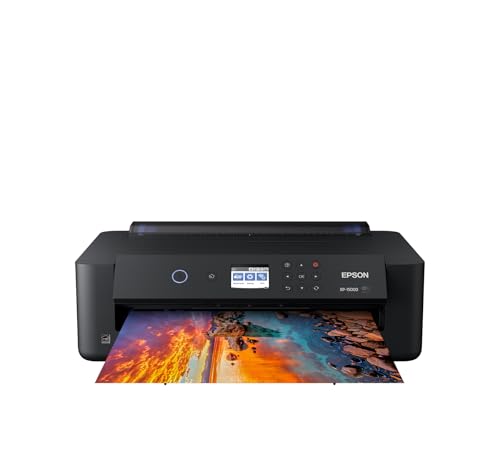
If you’re an artist looking for a printer that delivers stunning, ultra HD photo quality, the Epson Expression Photo HD XP-15000 is a top contender for your needs. This wireless color wide-format printer offers borderless prints up to 13 x 19 inches, making it perfect for your artwork. With its individual 6-color Claria Photo HD ink, including red and gray, you’ll enjoy an impressive color gamut and enhanced black and white prints. Plus, its compact design fits easily on your desk. With features like auto two-sided printing and Dash Replenishment, it keeps your creative flow uninterrupted.
Best For: Artists and photographers looking for a high-quality, wide-format printer that produces stunning color and black-and-white prints.
Pros:
- Ultra HD photo quality with a wide color gamut thanks to the individual 6-color Claria Photo HD ink.
- Compact design that saves desk space while still accommodating larger print sizes up to 13 x 19 inches.
- Features like auto two-sided printing and Dash Replenishment enhance convenience for frequent users.
Cons:
- Exclusively designed for use with Epson Genuine Cartridges, limiting options for ink replacement.
- Slightly heavier at 18.7 pounds compared to other printers in its category, which may affect portability.
- Limited warranty coverage may not address damages caused by non-genuine ink.
Epson EcoTank ET-15000 Wireless Color All-in-One Supertank Printer

The Epson EcoTank ET-15000 Wireless Color All-in-One Supertank Printer stands out as an excellent choice for artists and creative professionals seeking to produce high-quality prints up to 13 x 19 inches. With cartridge-free printing, you’ll enjoy low-cost replacements, saving you money on ink. Each bottle set can print up to 6,000 pages, making it a cost-effective solution. It features wireless connectivity, allowing you to print from mobile devices effortlessly. Plus, with a 250-sheet capacity and duplex printing, managing your projects becomes easy. Its compact design and energy efficiency further enhance its appeal for any creative workspace.
Best For: The Epson EcoTank ET-15000 is best for artists and creative professionals who need high-quality, large-format printing with low ink costs.
Pros:
- Cost-effective with cartridge-free printing, providing up to 6,000 pages per ink bottle set.
- Versatile functionality as an all-in-one device that includes printing, scanning, copying, and faxing.
- Wireless connectivity allows for easy printing from mobile devices and supports voice-activated commands.
Cons:
- Larger footprint may require more space in a work area due to its dimensions.
- Initial cost may be higher compared to traditional inkjet printers, despite savings on ink in the long run.
- Limited maximum media size for printing is 13 x 19 inches, which may not meet the needs of some users requiring larger formats.
Epson Workforce Pro WF-7310 Wireless Wide-Format Printer

For artists and graphic designers seeking high-quality prints, the Epson Workforce Pro WF-7310 is an excellent choice. This wireless wide-format printer handles print sizes up to 13″ x 19″ with ease. Thanks to its PrecisionCore Heat-Free Technology, you’ll enjoy fast print speeds of 25 black and 12 color ISO ppm. The 500-sheet capacity guarantees you won’t constantly refill paper, while the 2.4″ color display makes navigation simple. With Wi-Fi 5 compatibility and the Epson Smart Panel App, controlling your print jobs from your smart devices is effortless. It’s engineered for durability, making it perfect for high-volume printing tasks.
Best For: The Epson Workforce Pro WF-7310 is best for artists and graphic designers who require high-quality wide-format prints.
Pros:
- Fast print speeds of 25 black and 12 color ISO ppm for efficient workflow.
- Large 500-sheet capacity reduces the need for frequent paper refills.
- Wireless connectivity and smart app control enhance convenience and ease of use.
Cons:
- Exclusively designed for use with Epson Genuine Cartridges, limiting ink options.
- Higher upfront cost compared to standard printers may be a consideration for some users.
- The 2.4″ color display may be smaller than some users prefer for navigation.
Epson EcoTank Photo ET-8550 Wireless All-in-One Printer

Designed for artists and photographers seeking high-quality prints, the Epson EcoTank Photo ET-8550 delivers stunning color and detail with a maximum print resolution of 5760 x 1440 DPI. This wireless all-in-one printer can handle media sizes up to 13 x 19 inches and features fast print speeds of 12 ppm in color. With a cartridge-free ink system, you’ll save up to 80% on ink costs, printing around 6,200 pages from one set of bottles. Its intuitive touchscreen and mobile app connectivity make it easy to operate, ensuring your creative workflow remains seamless and efficient.
Best For: Artists and photographers seeking high-quality prints with cost-effective ink solutions.
Pros:
- Cartridge-free ink system significantly reduces printing costs, saving up to 80% on ink expenses.
- Wide-format printing capabilities allow for media sizes up to 13 x 19 inches, perfect for creative projects.
- User-friendly interface with a 4.3-inch touchscreen and mobile app connectivity enhances ease of use.
Cons:
- Relatively large size and weight may require dedicated space in a home or office.
- Limited warranty of only one year could be a concern for long-term reliability.
- Requires internet access for full functionality of mobile features, which may not suit all users.
Canon IP8720 Wireless Printer, AirPrint and Cloud Compatible, Black
With its impressive print resolution of 9600 x 2400 dpi, the Canon IP8720 Wireless Printer stands out as an excellent choice for artists and photographers seeking to produce stunning 13×19 art prints. This wireless inkjet printer features a 6-color ink system, ensuring vibrant and detailed results. You’ll appreciate the fast print speeds of 14.5 ipm for black and 10.4 ipm for color, plus borderless printing capabilities. Enjoy easy connectivity with AirPrint and Google Cloud Print. The My Image Garden software helps you organize projects effortlessly. With a customer rating of 4.1 stars, it’s a reliable option for your creative needs.
Best For: Artists and photographers looking to create high-quality, vibrant prints up to 13×19 inches.
Pros:
- High Print Resolution: Produces stunning prints with a resolution of 9600 x 2400 dpi.
- Wireless Connectivity: Easily print from mobile devices using AirPrint and Google Cloud Print.
- Fast Print Speeds: Capable of printing black documents at 14.5 ipm and color documents at 10.4 ipm.
Cons:
- Noise Level: Operating noise can reach approximately 43.5 dB(A), which may be distracting in quiet environments.
- Weight: At 18.6 pounds, it may be less portable and harder to move compared to lighter printers.
- Limited Warranty: Comes with a 1-year manufacturer limited warranty, which may not be sufficient for heavy users.
Epson Premium Glossy Photo Paper, 13×19 Inches, 20 Sheets (S041289)

Epson Premium Glossy Photo Paper stands out as an exceptional choice for artists and photographers seeking vibrant, high-quality prints. Measuring 13×19 inches and packaged with 20 sheets, this bright-white, resin-coated paper offers a stunning high-gloss finish. Its specially developed ink-absorbing layer guarantees your images appear sharp and color-rich. Optimized for the Epson Stylus Photo 1270 printer, it’s also water-resistant, making it ideal for various artistic projects. With a stellar customer rating of 4.8 out of 5 stars, this paper is a favorite among users, guaranteeing you get professional results every time you print.
Best For: Artists and photographers looking for vibrant, high-quality prints with a high-gloss finish.
Pros:
- High-gloss, bright-white finish enhances color vibrancy and sharpness.
- Water-resistant material ensures durability and longevity of prints.
- Optimized for use with Epson Stylus Photo 1270 printer for best results.
Cons:
- Limited to a specific printer model for optimal performance.
- Higher price point compared to standard photo papers.
- May not be compatible with all inkjet printers.
Epson S041637 Velvet Fine Art Paper, 13 x 19, White (Pack of 20 Sheets)

For artists and photographers seeking a premium medium for their work, the Epson S041637 Velvet Fine Art Paper stands out as an exceptional choice. This 13 x 19-inch, 100% cotton rag paper guarantees museum-quality prints with its bright white surface and enhanced matte finish. With an impressive weight of 16.3, it provides durability and an archival quality, being acid-free and biodegradable. You’ll appreciate the instant drying time and high-resolution printing capability at 1440 dpi, making it perfect for vibrant color reproduction. Packaged in 20 sheets, this paper is ideal for showcasing your art in the best light.
Best For: Artists and photographers looking for a high-quality, archival paper for fine art reproduction.
Pros:
- Excellent color reproduction with a bright white surface and enhanced matte finish.
- Instant drying time and high-resolution printing capability at 1440 dpi for vibrant outputs.
- Made from 100% cotton rag, ensuring durability and a museum-quality feel.
Cons:
- Relatively higher cost compared to standard photo papers.
- Limited to a specific size (13 x 19 inches), which may not suit all projects.
- Requires compatible printers for optimal results, potentially limiting usability.
Canon PIXMA PRO-200S Wireless Photo Printer (6875C002)

The Canon PIXMA PRO-200S Wireless Photo Printer stands out as an exceptional choice for photographers and artists seeking vibrant, high-quality prints. With an 8-color dye ink system, it delivers rich colors and an impressive tonal range, perfect for your fine art projects. You can produce borderless prints up to 13” x 19” in just 90 seconds, ensuring your work is ready in no time. Its user-friendly 3.0-inch color LCD makes managing prints easy, and versatile connectivity options—Ethernet, USB, and Wi-Fi—keep you connected. Plus, Canon’s Professional Print & Layout software guarantees accurate color reproduction for stunning results.
Best For: Photographers and artists looking for a high-quality, versatile printer that delivers vibrant and professional-grade prints.
Pros:
- High-quality 8-color dye ink system provides rich colors and an impressive tonal range ideal for fine art and photography.
- Fast printing speed, producing A3+ prints in 90 seconds and 8” x 10” prints in under a minute, perfect for quick turnarounds.
- Versatile connectivity options including Ethernet, USB, and Wi-Fi, along with an intuitive 3.0-inch color LCD for easy management.
Cons:
- Heavy weight at 42.7 pounds may make it less portable for on-location use.
- Limited warranty information may raise concerns for potential buyers regarding long-term support.
- Initial ink setup costs can be higher due to the need for multiple ink tanks.
Canon Pixma iX6820 Wireless Business Printer

If you’re an artist or photographer looking to produce stunning large-format prints, the Canon Pixma iX6820 Wireless Business Printer stands out with its impressive 9600 x 2400 dpi resolution. Weighing 17.9 pounds, it offers a maximum media size of 13” x 19” and a sheet capacity of 150. With wireless, Ethernet, and USB connectivity, you can easily print from various devices. The five individual ink tank system guarantees vibrant colors, while borderless printing speeds up your workflow. Plus, features like Quiet Mode and Auto Power On enhance your printing experience, making it a reliable choice for your creative projects.
Best For: Artists and photographers seeking high-quality large-format prints with vibrant colors and detailed resolution.
Pros:
- Exceptional Print Quality: Delivers stunning prints with a maximum resolution of 9600 x 2400 dpi and a five individual ink tank system for vibrant colors.
- Versatile Connectivity Options: Easily connects via wireless, Ethernet, or Hi-Speed USB, allowing printing from multiple devices.
- User-Friendly Features: Includes Quiet Mode for noise-sensitive environments and Auto Power On for convenience.
Cons:
- Limited Sheet Capacity: Holds only 150 sheets, which may require frequent reloading for larger printing tasks.
- Weight: At 17.9 pounds, it may be less portable than other lightweight printers.
- Mac Compatibility Limitations: Only compatible with older versions of Mac OS X (up to v10.9), potentially limiting usage for users with newer systems.
HP DesignJet T210 Large Format Color Plotter Printer (24-inch)

Engineers and architects looking to produce precise technical drawings and vibrant posters will find the HP DesignJet T210 Large Format Color Plotter Printer (24-inch) an invaluable tool. This printer excels with its 2400 x 1200 dpi resolution, ensuring crisp details in every print. You can handle various media sizes, including 24-inch wide rolls and 13×19 sheets, with impressive speed—up to 59 A1 prints per hour. Its eco-friendly design uses 30% recycled materials and saves 95% ink during maintenance. With easy connectivity via Wi-Fi or USB, it’s perfect for professionals needing reliable, high-quality printing. Enjoy accessible support and a one-year warranty.
Best For: Professionals such as architects, engineers, and educators who require high-quality, large format printing for technical drawings, posters, and maps.
Pros:
- High Resolution: Produces prints with a stunning 2400 x 1200 dpi for sharp details.
- Fast Printing Speed: Capable of printing up to 59 A1/D size prints per hour, increasing productivity.
- Eco-Friendly: Utilizes 30% recycled materials and significantly reduces ink usage during maintenance.
Cons:
- Limited to 24-inch Width: May not meet the needs of users requiring larger print sizes.
- Initial Ink Cartridges: Comes with introductory ink cartridges that may run out quickly, leading to additional costs.
- Dependency on Software: Requires specific software for optimal functionality, which may not be suitable for all users.
Factors to Consider When Choosing 13X19 Printers for Art Prints
When you’re choosing a 13×19 printer for your art prints, you’ll want to take into account several key factors. Print quality and resolution are vital for capturing every detail, while the ink system type can affect color vibrancy. Additionally, think about media handling capacity, connectivity options, and the overall size and design of the printer to make certain it fits your workspace and workflow.
Print Quality and Resolution
Choosing a 13×19 printer for your art prints involves careful consideration of print quality and resolution, as these factors greatly impact the final product. Look for a printer with a maximum print resolution of at least 5760 x 1440 dpi; higher resolutions yield finer detail and sharper images. An advanced ink system with 6 or 8 colors enhances color gamut, making your prints more vibrant. Opt for borderless printing capabilities to utilize the full 13×19 inch media size without white margins. Additionally, consider using pigment-based inks for better longevity and fade resistance. Fast print speeds, ideally around 20 pages per minute, can also boost your workflow when producing multiple copies of your artwork.
Ink System Type
Understanding the ink system type is essential for achieving stunning art prints, as it directly affects color accuracy and vibrancy. For vibrant images, consider printers with 6-color or 8-color dye ink systems, which provide a wider color gamut than standard 4-color systems. Dye-based inks deliver bright colors and smooth gradients, perfect for photo printing, while pigment-based inks offer longevity and UV resistance, ideal for archival prints. Also, look for cartridge-free systems with supersized ink tanks to save on printing costs. Remember, higher print resolutions, like 5760 x 1440 dpi, yield more detailed images. Finally, verify compatibility with genuine cartridges to maintain performance and print quality, avoiding potential defects from non-genuine inks.
Media Handling Capacity
Selecting the right media handling capacity is essential for producing high-quality art prints, as it directly influences the types of materials you can work with. Start by considering the maximum media size your printer supports; this determines the largest print you can make without cropping. If you plan to use thicker media like cardstock or fine art paper, look for a printer with a dedicated rear specialty-paper feed. Additionally, check the paper capacity of the printer’s trays; a larger capacity means fewer paper refills during extensive print jobs. Support for borderless printing is vital for edge-to-edge prints, while duplex printing capability enhances efficiency for double-sided art portfolios or documentation.
Connectivity Options Available
When it comes to 13×19 printers for art prints, connectivity options play a crucial role in your printing experience. Many printers offer both wired and wireless connections, including USB and Ethernet ports, which lets you set up in various environments. Wireless connectivity usually supports Wi-Fi standards like 802.11b/g/n, enabling mobile printing directly from your smartphones and tablets. Some models even allow voice-activated commands, giving you hands-free printing when connected to smart home systems. Look for mobile printing technologies like AirPrint and Google Cloud Print for seamless use. Advanced features such as Wi-Fi Direct let you print directly from devices without needing a network connection, ensuring flexibility and convenience in your creative workflow.
Size and Design
Finding the right size and design in a 13×19 printer can greatly enhance your art printing experience. Consider compact designs that fit your workspace, especially since many newer models save valuable desktop space. Look for printers with borderless printing capabilities, allowing for stunning edge-to-edge reproductions of your artwork. Weight matters too; heavier models often indicate better durability for ongoing printing tasks. Verify the printer supports maximum media size compatibility of 13×19 inches to meet your specific needs. Finally, evaluate paper handling features like tray capacity and rear specialty-paper feed, as these can greatly boost your workflow efficiency when printing multiple pieces. Choosing wisely here sets the foundation for your creative projects.
Cost of Ink Replacement
Understanding the cost of ink replacement is essential for anyone looking to invest in a 13×19 printer for art prints. Traditional cartridge systems can hit your wallet hard, with costs around 20 cents per page. In contrast, cartridge-free systems can save you considerably, offering ink as low as 1 cent per ISO page. Some ink tank printers even provide enough ink for up to 6,000 pages with just one set of bottles, making them ideal for high-volume printing. While traditional cartridges last for about 200-300 pages, supertank models can last for years. Keep in mind that high-quality art printers might require specific inks, which can affect overall replacement costs, especially if you need to stick to genuine inks for the best results.
Warranty and Support Services
Investing in a 13×19 printer for art prints involves more than just considering ink costs; warranty and support services play a significant role in your decision. Start by checking the warranty coverage, as it varies by manufacturer. Some may offer limited warranties contingent on using genuine ink cartridges. Look for details about duration and what’s covered—some warranties might only cover specific components or a limited number of printed pages. A solid return policy, like a 30-day guarantee, also adds peace of mind. Don’t overlook customer support; reliable manufacturers provide online resources and direct assistance for troubleshooting. Additionally, consider if they offer recycling programs, which promote eco-friendly practices and contribute to sustainable printing.