If you’re an artist looking to elevate your work, choosing the right printer is essential. Canon PIXMA Pro printers are designed to bring your creative vision to life with stunning detail and vibrant colors. With various models available, each offers unique features tailored to your artistic needs. So, which printer will best suit your style and workflow? Let’s explore the top options that can transform your artwork into impressive prints.
Canon PIXMA PRO-200S Wireless Photo Printer (6875C002)

The Canon PIXMA PRO-200S Wireless Photo Printer (6875C002) is perfect for artists who demand vibrant, high-quality prints. With its 8-color dye ink system, this printer delivers stunning colors and tonal range, making your photographs and artwork come alive. You can print borderless images from 3.5” x 3.5” to 13” x 19”, including panoramic sizes, all at a remarkable speed. Its user-friendly interface, featuring a 3.0-inch color LCD, simplifies job management. Plus, with versatile connectivity options like Wi-Fi and USB, you’ll enjoy seamless printing from any device. Release your creativity and elevate your work with this exceptional printer.
Best For: Artists and photographers seeking a high-quality, versatile printer for vibrant, professional-grade prints.
Pros:
- 8-color dye ink system delivers rich colors and a wide tonal range for stunning prints.
- Borderless printing capability allows for a variety of sizes, including custom panoramic lengths.
- User-friendly interface with a 3.0-inch color LCD simplifies print management.
Cons:
- Weighs 42.7 pounds, which may limit portability for on-location use.
- Limited warranty information may raise concerns for long-term use.
- Requires specific Canon ink tanks, which may be more expensive than generic options.
Canon PIXMA PRO-100 Professional Photo Printer
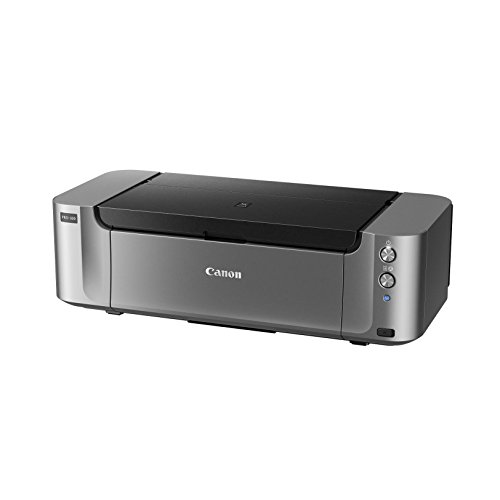
For artists seeking unparalleled color accuracy and vibrancy in their prints, the Canon PIXMA PRO-100 Professional Photo Printer stands out with its advanced 8-dye ink system. This inkjet printer delivers stunning images at a resolution of 4800 x 2400 dpi, ensuring every detail pops. With wireless connectivity and a maximum media size of 13 x 19 inches, it’s perfect for larger projects. The dedicated grayscale inks enhance black and white prints, while the Chromalife 100+ system guarantees vivid colors. Weighing 43.43 pounds, it features two paper trays for versatile media handling, making it a reliable choice for serious artists.
Best For: Artists and photographers seeking high-quality prints with exceptional color accuracy and detail.
Pros:
- 8-dye ink system provides vibrant colors and improved black and white prints.
- High resolution of 4800 x 2400 dpi ensures every detail is captured in prints.
- Wireless connectivity allows for easy printing from various devices without the need for cables.
Cons:
- Heavy weight of 43.43 pounds makes it less portable and difficult to move.
- Print speed of 1 ppm may be slow for bulk printing needs.
- No automatic duplex printing requires manual intervention for double-sided prints.
Canon imagePROGRAF PRO-1100: 17” Professional Wireless Inkjet Photo Printer

Artists looking for a professional-grade printer will find the Canon imagePROGRAF PRO-1100 a standout choice with its impressive 11 pigment-based ink system. This wireless inkjet printer delivers stunning color prints up to 17 x 22 inches, thanks to its wide color gamut and maximum resolution of 4800 x 2400 dpi. The Chroma Optimizer enhances glossiness and expands color range, ensuring your artwork shines. With features like anti-clogging technology and an air feeding system, it maintains precision and prevents paper skewing. Plus, its user-friendly software makes managing prints a breeze. Elevate your artistry with the PRO-1100’s professional capabilities!
Best For: Professional artists and photographers seeking high-quality, large-format color printing for their artwork and photos.
Pros:
- Exceptional print quality with a maximum resolution of 4800 x 2400 dpi and a wide color gamut.
- Advanced ink system featuring 11 pigment-based inks and Chroma Optimizer for enhanced glossiness and color range.
- User-friendly management tools that facilitate color calibration and media configuration.
Cons:
- High weight of 83 pounds may make it difficult to move and install.
- Limited print speed at 1 page per minute for both color and black & white prints.
- Costly ink cartridges may lead to higher ongoing expenses for frequent use.
Canon PIXMA TS6520 Wireless Color Inkjet Printer

With its compact design and user-friendly features, the Canon PIXMA TS6520 Wireless Color Inkjet Printer stands out as an excellent choice for families and students. You’ll enjoy crisp, vibrant prints with its 2-cartridge hybrid ink system, delivering up to 1200 x 1200 dpi resolution. Printing speeds reach 9 color pages and 14 black and white pages per minute, plus it supports automatic 2-sided printing to save paper. Dual-band Wi-Fi guarantees stable connections, while mobile printing options make it easy to print from your devices. Its integrated scanner and copier enhance versatility, making it a reliable all-in-one solution for your printing needs.
Best For: Families and students seeking a reliable, user-friendly printer for occasional use.
Pros:
- Compact and stylish design fits well in any space.
- High-quality prints with vibrant colors and good resolution.
- Dual-band Wi-Fi and mobile printing capabilities ensure easy connectivity.
Cons:
- Print speed may be slower for high-volume printing needs.
- Limited to a 2-cartridge ink system, which may require more frequent replacements.
- Heavier than some other compact printer models, making it less portable.
Canon Pixma iX6820 Wireless Business Printer

The Canon Pixma iX6820 Wireless Business Printer stands out for its remarkable print resolution of 9600 x 2400 dpi, making it an excellent choice for professionals who demand vivid, high-quality prints. With a print speed of 14.5 ipm for black and 10.4 ipm for color, you’ll get your documents quickly. It accommodates media up to 13” x 19” and holds 150 sheets. You can connect wirelessly, via Ethernet, or USB, and enjoy mobile printing options like AirPrint. Plus, the five individual ink tank system guarantees stunning colors and sharp text—perfect for your business and creative projects!
Best For: Professionals and small businesses looking for a high-quality, versatile printer that delivers exceptional print resolution for both documents and photos.
Pros:
- High print resolution of 9600 x 2400 dpi for vivid colors and sharp text.
- Multiple connectivity options, including wireless, Ethernet, and USB, along with mobile printing capabilities.
- Five individual ink tank system ensures cost-effective ink usage and stunning print quality.
Cons:
- Relatively heavy at 17.9 pounds, which may make it less portable.
- Limited sheet capacity of 150 sheets may require frequent reloading for larger print jobs.
- No automatic duplex printing, which could be inconvenient for double-sided documents.
Canon PIXMA TS8820 Wireless All-in-One Inkjet Printer

If you’re looking for an all-in-one solution that balances quality and convenience, the Canon PIXMA TS8820 is an excellent choice for artists and creative professionals alike. This compact inkjet printer features a six-color individual ink system, delivering high-resolution color output that brings your vibrant photos and sharp graphics to life. With a maximum print size of 8.5 x 11 inches and a capacity of 500 sheets, it’s perfect for various projects. Plus, its wireless connectivity options allow you to print from smartphones, tablets, and computers effortlessly. The user-friendly touchscreen and automatic features enhance efficiency, making it a great addition to your workspace.
Best For: Creative professionals and artists seeking a high-quality, versatile all-in-one printer for vibrant photos and sharp graphics.
Pros:
- High-Resolution Output: Delivers stunning color prints with a six-color individual ink system.
- Versatile Connectivity: Supports wireless printing from various devices, including smartphones and tablets.
- User-Friendly Interface: Features a responsive color touchscreen for easy navigation and efficient task management.
Cons:
- Weight: At 19.08 pounds, it may be less portable compared to lighter models.
- Limited Maximum Media Size: Maximum print size is restricted to 8.5 x 11 inches, which may not suit all needs.
- Price Point: May be considered higher priced than basic inkjet printers.
Canon CLI-42 Genuine Eight Color Pack for PIXMA PRO-100 Printers

Artists seeking vibrant and long-lasting prints will find the Canon CLI-42 Genuine Eight Color Pack an essential addition to their PIXMA PRO-100 Printers. This pack includes eight carefully selected ink tanks—Photo Black, Gray, Light Gray, Cyan, Magenta, Yellow, Photo Cyan, and Photo Magenta—ensuring optimized photographic quality. With ChromaLife100 plus technology, your prints boast exceptional beauty and longevity. Plus, these inks dry instantly, allowing you to enjoy your photos right away. Weighing only 0.65 pounds, this genuine cartridge set is designed for color output, making it a must-have for artists looking to elevate their print game.
Best For: Artists and photographers seeking vibrant, high-quality, and long-lasting prints with their PIXMA PRO-100 Printers.
Pros:
- ChromaLife100 plus technology ensures exceptional beauty and longevity of prints.
- Instant drying inks allow for immediate enjoyment of photographs without smudging.
- Includes eight specialized ink tanks for optimized photographic print quality.
Cons:
- No warranty offered, which may concern some users regarding product reliability.
- Limited to PIXMA PRO-100 Printers, restricting compatibility with other printer models.
- Relatively high cost compared to generic ink alternatives.
Canon PIXMA TS702a Wireless Printer

For those seeking a reliable printer that delivers exceptional color quality and sharp text, the Canon PIXMA TS702a Wireless Printer stands out as an excellent choice. With a compact design measuring 14.4D x 14.71W x 6.3H inches and weighing 14.4 pounds, it fits perfectly in any workspace. Enjoy impressive print speeds of 15 ppm for black and white and 10 ipm for color, thanks to its hybrid ink system. You can easily print from your smartphone or tablet using AirPrint® or Mopria®. Plus, with a 350-sheet capacity and automatic duplex printing, it’s ideal for all your printing needs.
Best For: Those who need a compact and efficient printer for high-quality color and sharp text printing in a home office or small business environment.
Pros:
- High Print Resolution: Offers up to 4800 x 1200 dpi for vibrant color and crisp text.
- Mobile Printing Support: Compatible with AirPrint® and Mopria® for convenient printing from smartphones and tablets.
- Automatic Duplex Printing: Saves paper and time with 2-sided printing functionality.
Cons:
- Limited Number of Trays: Only has one tray, which may require manual paper switching for different media types.
- Weight: At 14.4 pounds, it may be less portable compared to lighter models.
- Cartridge Compatibility: Limited to specific Canon cartridges, which may restrict options for ink replacement.
Canon PIXMA TS9521Ca – Wireless Home All-in-One Inkjet Printer

The Canon PIXMA TS9521Ca stands out with its versatile media support, making it an ideal choice for creative individuals who need to print everything from high-resolution images to custom-sized banners. This all-in-one printer offers fast print speeds of 15 ipm for black and 10 ipm for color, along with built-in duplex printing for efficiency. You’ll appreciate the user-friendly 4.3” touchscreen and easy setup, while the 20-sheet auto document feeder simplifies multi-page tasks. With WiFi connectivity, you can print from anywhere in your home, ensuring your artistic projects are always within reach. Plus, the five individual ink system keeps your costs down.
Best For: Creative individuals and home users looking for a versatile all-in-one printer that can handle various media types and printing tasks efficiently.
Pros:
- Fast print speeds of 15 ipm (black) and 10 ipm (color) for quick output.
- User-friendly 4.3” touchscreen for easy navigation and setup.
- Versatile media support, accommodating a wide range of print sizes and types.
Cons:
- Limited paper capacity of 200 sheets may require more frequent refills for heavy users.
- The auto document feeder holds only 20 sheets, which may be insufficient for larger jobs.
- Dependence on WiFi connectivity could pose issues in areas with weak signal.
Canon MegaTank G3270 All-in-One Wireless Inkjet Printer

Designed with home use in mind, the Canon MegaTank G3270 All-in-One Wireless Inkjet Printer stands out for its remarkable ink efficiency, making it ideal for those who need to print high volumes without breaking the bank. You’ll enjoy up to two years of ink right out of the box, allowing for an impressive 6,000 black-and-white pages or 7,700 color pages per ink set. With wireless connectivity, you can easily print from your smartphone or tablet. Plus, its compact size and sleek design fit seamlessly into any space. Save money while producing high-quality prints with this reliable printer that’s built for everyday use.
Best For: Families and home offices that require a cost-effective, high-volume printing solution.
Pros:
- High ink efficiency: Comes with up to two years of ink, significantly reducing overall printing costs.
- Wireless connectivity: Easily print from smartphones and tablets, enhancing convenience.
- Compact design: Fits well in various spaces, making it suitable for home use.
Cons:
- Limited to one tray: May require manual switching for different paper types or sizes.
- Print speed: Slower compared to some other models, especially for color printing.
- Limited warranty: Only a one-year warranty may not provide enough coverage for long-term use.
Factors to Consider When Choosing Canon PIXMA Pro Printers for Artists
When you’re choosing a Canon PIXMA Pro printer for your art, you’ll want to focus on several key factors. Consider print quality and resolution to guarantee your artwork shines, as well as ink system compatibility for the colors you need. Don’t overlook print size options, connectivity features, and speed to find the perfect fit for your creative workflow.
Print Quality and Resolution
Print quality and resolution are essential considerations for artists looking to showcase their work with Canon PIXMA Pro printers. A higher resolution of 4800 x 2400 dpi guarantees your prints capture every detail, resulting in vibrant reproductions of your artwork. Additionally, a wider color gamut enhances the richness and variety of colors, making your prints more visually appealing. Choosing specialized inks, whether pigment-based or dye-based, can impact both the longevity and vibrancy of your pieces, catering to your artistic needs. Borderless printing capabilities allow you to create full-bleed prints without margins, providing a polished, professional appearance. Plus, with fast print speeds—like an 8” x 10” print in under a minute—you can streamline your workflow while producing stunning outputs.
Ink System Compatibility
Choosing the right ink system is essential for artists using Canon PIXMA Pro printers, as it directly influences the vibrancy and longevity of your prints. Canon’s advanced ink systems, like the 8-color dye inks in the PRO-200S and 11-pigment inks in the imagePROGRAF PRO-1100, deliver a wider color gamut and improved tonal range. The CLI-42 ink cartridges in the PIXMA PRO-100 feature ChromaLife100+ technology, enhancing print longevity. Each printer optimizes color accuracy, ensuring your artwork is reproduced beautifully. Plus, the easy-to-replace ink tanks let you swap out only the colors you need, saving costs and reducing waste. With print resolutions up to 4800 x 2400 dpi, you can achieve stunning detail in your work.
Print Size Options
For artists, selecting the right print sizes can greatly impact the presentation and versatility of your work. Canon PIXMA Pro printers offer a variety of print sizes, enabling borderless printing from as small as 3.5” x 3.5” to larger formats like 13” x 19”, and even custom lengths for panoramic images. This range lets you choose the best format for your artwork or photography needs. Many models support maximum media sizes of 17” x 22”, perfect for those aiming for impressive exhibition displays. These printers handle diverse media types, from glossy photo paper to fine art papers, ensuring creative flexibility. With print resolutions up to 4800 x 2400 dpi, you can capture even the finest details in high-quality reproductions.
Connectivity Features
When considering Canon PIXMA Pro printers, connectivity features play an essential role in ensuring a smooth printing experience. Many models offer multiple options like Ethernet, USB, and Wi-Fi, so you can easily integrate them into your setup. Wireless printing lets you print directly from your smartphone, tablet, or computer without any physical connections, which is super convenient. If you’re a photographer, look for printers with PictBridge support for direct printing from compatible cameras. Certain models also feature dual-band Wi-Fi, helping maintain stable connections across different network frequencies to reduce interruptions. Additionally, mobile printing compatibility allows you to access print apps effortlessly, streamlining your workflow and keeping your creative process uninterrupted.
Speed and Efficiency
Considering speed and efficiency is essential for artists who rely on Canon PIXMA Pro printers to meet deadlines without sacrificing quality. The Canon PIXMA PRO-200S stands out with an impressive A3+ photo print time of just 90 seconds, boosting your workflow when time is tight. While the PRO-100 and imagePROGRAF PRO-1100 print at 1 page per minute, their focus on high-quality output may suit those who prioritize detail over speed. If you need quick document production, the PIXMA TS9521Ca offers 15 ipm for black and 10 ipm for color. Additionally, the MegaTank G3270 saves you up to $1,000 on ink, allowing you to concentrate on your art instead of frequent replacements.
Software and Color Management
Selecting the right Canon PIXMA Pro printer involves more than just speed and efficiency; software and color management play essential roles in achieving the best results for your artwork. Canon’s Professional Print & Layout software offers advanced print settings that guarantee screen-accurate color reproduction, which is critical for your artistic needs. With ICC profile support, you can accurately represent colors from digital files to prints, enhancing your artwork’s overall quality. The 8-color dye ink system provides a rich tonal range, perfect for fine art and photography. Plus, dedicated grayscale inks improve your black and white prints. Using genuine Canon photo papers optimizes ink performance, helping maintain the integrity of your vision in every print.
User Interface Design
Achieving stunning prints goes beyond software and color management; the user interface design of Canon PIXMA Pro printers greatly impacts your printing experience. A user-friendly interface is essential for efficiently managing print jobs and monitoring ink levels. Look for printers with a 3.0-inch color LCD monitor for seamless navigation. Intuitive touchscreens enhance your experience, allowing quick adjustments to settings and easy access to various functions. A well-designed interface provides clear visual feedback and simple prompts, minimizing the learning curve, especially if you’re new to printing. Customizable settings can help you optimize print quality and color accuracy for specific projects. Plus, integrated software tools for color management and layout enhance your precision in achieving desired outcomes.
Warranty and Support Options
When investing in a Canon PIXMA Pro printer, understanding warranty and support options is essential for ensuring peace of mind. Most Canon PIXMA Pro printers come with a limited warranty, which provides reassurance about their quality and performance. Additionally, many models are eligible for Amazon’s 30-Day Return Guarantee, allowing you to return the printer within 30 days if you’re not satisfied. It’s vital to review the specific warranty details for each model, as they can vary. Also, consider the availability of extended support and maintenance options, which can help keep your printer functioning well over the long term. Access to Canon’s service and support network can be invaluable for any troubleshooting needs you may encounter.