Choosing the right CNC metal engraving machine can make the difference between clean, repeatable parts and frustrating trial-and-error. The best options balance rigidity, spindle power, control software, and workable precision for your materials.
In this roundup, we focus on machines that are practical for metal work, hobby production, and mixed-material projects, so you can match the machine to your budget, workspace, and engraving goals.
Best 10 CNC Metal Engraving Machine Picks for 2026
Top Pick for Precision Metal Work
Genmitsu 3030-PROVer Ultra CNC Router
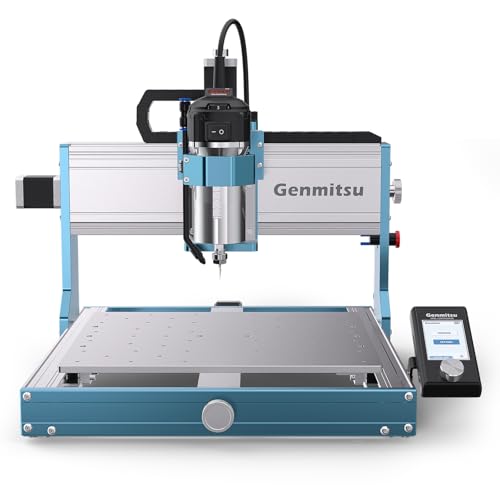
- 710W spindle for stronger cutting performance
- Dual rails and ball screws improve rigidity
- Quick 10-minute setup with app control
Best For: Precision-focused users engraving aluminum and light metals
Best Handheld Engraver for Personalizing

- Lightweight pen-style engraving tool
- Adjustable depth with five-position dial
- Includes carbide point and stencil template
Best For: Simple personalizing and light-duty engraving
Best Mid-Size Workshop CNC

- Sturdy all-metal frame with steel linear tubes
- Control box adds emergency stop and home buttons
- Supports spindle and accessory upgrades
Best For: Workshop users who want a stable, upgrade-friendly CNC
Best Budget Desktop Engraver

- Compact desktop CNC with 0.1mm accuracy
- WiFi and USB support for easier control
- Good for wood, acrylic, plastic, and soft metals
Best For: Beginners and hobbyists starting with light CNC work
Beginner-Friendly All-Metal Pick
FoxAlien Masuter Pro 3-Axis CNC Router

- All-metal frame with linear rail Z-axis
- Quick 10-15 minute setup with pre-wired parts
- Supports 52mm and 65mm spindle clamps
Best For: Beginners wanting a stable, upgradeable desktop CNC
Power-Focused Desktop Option

- 500W spindle with 52mm/65mm clamp support
- Includes Z-probe, tools, cables, and manual
- GRBL/Candle control with 3D preview
Best For: Makers wanting a stronger spindle and easy software control
Feature-Rich Pro Upgrade
Twotrees TTC450 Pro All-Metal CNC Router

- 3.5-inch capacitive touch screen control
- Large 460 x 460 x 80 mm working area
- Open-source GRBL compatibility across major OSes
Best For: Users wanting a large, upgrade-ready desktop CNC
Precision 4040 Workhorse
Genmitsu 4040-PRO MAX CNC Router
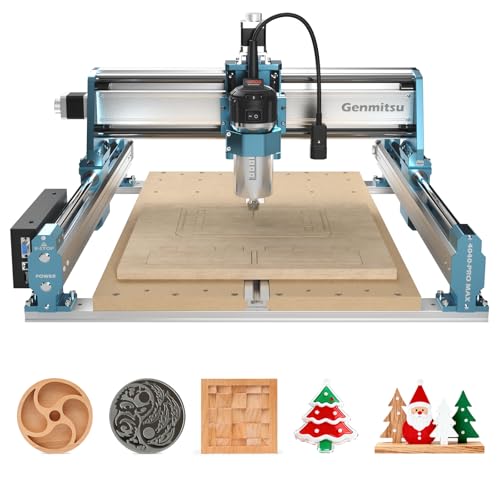
- SBR16 linear rail X-axis for better stability
- 710W router for wood, metal, and acrylic work
- Upgradeable with rotary, extension, and dust shoe options
Best For: Compact mixed-material engraving with upgrade potential
Desktop Metal Upgrade
Lunyee 3018 Pro Ultra CNC Router

- HGH15 linear guide and reinforced profiles
- 500W spindle with 80mm Z-axis height
- Includes limit switches and emergency stop
Best For: Small metal engraving with improved rigidity and control
Top Pick for Precision Metal Work – Genmitsu 3030-PROVer Ultra CNC Router
If you want a CNC metal engraving machine that leans more toward serious machining than hobby tinkering, the Genmitsu 3030-PROVer Ultra is built for precision and rigidity. Its 710W digital spindle, all-metal chassis, dual linear rails, and ball screws are aimed at cleaner cuts, better stability, and more consistent results on aluminum and other suitable materials.
Best For: Makers and small-shop users who want high precision, stronger spindle power, and a more rigid CNC setup for aluminum engraving and light metal cutting.
Pros:
- 710W digital spindle is rated as 2.4× stronger than the older 300W version.
- HG15 dual linear rails and 1204 ball screws add rigidity and accuracy.
- All-metal chassis and high-torque steppers help reduce wobble and vibration.
- APP control plus Candle, UGS, and Easel compatibility make it flexible to use.
Cons:
- More advanced than a basic engraver, so it may be overkill for simple marking jobs.
- Best suited to users who have space for a larger desktop CNC machine.
This is the strongest pick here if your priority is precision-first CNC metal engraving rather than lightweight personalization. The quick setup is also a plus, but the real value is the machine’s rigidity and spindle power.
Best Handheld Engraver for Personalizing – Dremel Engraver with Stencils
The Dremel Engraver is a simple, handheld option for anyone who wants a CNC metal engraving machine alternative for personalizing tools, hard steel, and other materials. It uses a lightweight pen-style body, a five-position depth dial, and a 7,200 strokes-per-minute motor for controlled engraving work.
Best For: DIY users who want an easy-to-handle engraver for names, labels, decorative marks, and light-duty metal personalization.
Pros:
- Works on metal, hard steel, wood, leather, glass, ceramics, and more.
- Five-position dial helps regulate engraving depth.
- Lightweight design and soft grip support longer sessions.
- Includes a carbide point and letter/number stencil template.
Cons:
- Handheld tool is not a true CNC machine.
- Heavy-duty hard-surface work may require the optional diamond point, sold separately.
If you mainly need straightforward engraving rather than automated CNC routing, this Dremel is the easiest entry point. It is best for marking and personalization, not for machine-style cutting or larger precision projects.
Best Mid-Size Workshop CNC – Genmitsu 4040-PRO CNC Router
The Genmitsu 4040-PRO is a practical CNC metal engraving machine for users who want a sturdier desktop setup with room to grow. Its all-metal frame, steel HSS linear tubes, lead screw motion drivers, and dual Y-axis rails are built for better stability, while the upgraded control box adds useful safety and workflow features.
Best For: Makers who want a mid-size CNC router for aluminum, acrylic, and light metal work with upgrade options.
Pros:
- All-metal frame and steel HSS linear tubes improve stability.
- Upgraded control box includes emergency stop and home buttons.
- Compatible with multiple spindle mounts and upgrade accessories.
- Pre-assembled main parts make setup relatively quick.
Cons:
- Heavier machine than compact desktop engravers.
- Some upgrades, like spindle mounts and modules, are sold separately.
This model stands out if you want a more expandable machine for workshop use rather than a basic engraver. The combination of stability, safety features, and upgrade paths makes it a strong mid-tier option.
Best Budget Desktop Engraver – TTC3018 CNC Router Machine
The TTC3018 is a compact CNC metal engraving machine option for small desktop projects, especially if you are working with wood, acrylic, plastic, or soft metals like copper and aluminum. It uses GRBL control, a 32-bit STM32 processor, and a 775 spindle motor to deliver light-duty engraving in a small footprint.
Best For: Beginners, students, and hobbyists who want an affordable desktop CNC router for light engraving and soft-metal projects.
Pros:
- Compact desktop size fits small workspaces.
- 0.1mm engraving accuracy is suitable for detailed light work.
- Built-in WiFi and USB operation add convenience.
- Compatible with Artcam and Fusion360, with broad Windows support.
Cons:
- Best suited to soft metals rather than heavy metal cutting.
- Smaller work area limits larger projects.
If you need a starter machine for learning CNC basics, this is the most approachable desktop pick in the group. It is not the most powerful option, but it offers a solid mix of accuracy, connectivity, and ease of setup.
Beginner-Friendly All-Metal Pick – FoxAlien Masuter Pro 3-Axis CNC Router
If you want a CNC metal engraving machine setup that also handles wood, acrylic, MDF, and nylon, the FoxAlien Masuter Pro is built around stability and ease of use. Its all-metal frame and linear rail Z-axis are aimed at more precise engraving and cutting, while the pre-wired components and quick assembly make it approachable for hobbyists.
Best For: Beginners and DIY users who want a stable, easy-to-assemble desktop CNC for detailed engraving and light cutting.
Pros:
- All-aluminum structure with a linear rail Z-axis for improved stability and precision
- Compact dust-resistant controller box with emergency stop and home buttons
- Pre-wired components and manual support fast setup in about 10-15 minutes
- Includes 52mm and 65mm spindle clamps, with upgrade flexibility
Cons:
- Ships with a 300W spindle, so heavier-duty metal work will need an upgrade
- Optional 69mm spindle clamp is not included
- Y-axis extension kit is optional, not standard
Overall, this is a practical starter machine if your priority is a sturdy, upgradeable desktop CNC rather than a fully outfitted industrial system. It offers a solid foundation for engraving and carving projects with room to grow.
Power-Focused Desktop Option – 4040-PRO CNC Router Machine
The 4040-PRO is a desktop CNC metal engraving machine option for users who want a stronger spindle and a more accessory-complete package. It combines belt-and-wheel motion on X/Y with a linear guide and lead screw on Z, and the included GRBL/Candle control support makes it straightforward to get started.
Best For: Hobbyists and makers who want a stronger spindle, easy control software support, and a ready-to-use accessory kit.
Pros:
- 500W spindle and 52mm/65mm clamp compatibility for upgrade flexibility
- Full accessory kit includes Z-probe, test board, tools, cables, and manual
- GRBL and Candle USB control support with 3D preview and origin setting
- Lead screw-driven Z axis adds stability for milling and engraving tasks
Cons:
- X/Y motion uses belt and V-wheel hardware rather than a heavier industrial rail system
- Listed metal capability is for cutting and milling tasks, so expectations should stay realistic
- At 19.12 kg, it is still a desktop machine rather than a portable tool
If you want a desktop machine with a more powerful spindle and a useful starter kit, this model makes a strong case. It is best treated as a versatile maker machine with metal-capable ambitions, not a full production mill.
Feature-Rich Pro Upgrade – Twotrees TTC450 Pro All-Metal CNC Router
The Twotrees TTC450 Pro is a more advanced CNC metal engraving machine choice for users who want a large work area, a responsive touch interface, and built-in expansion options. Its all-metal construction, dual limit switches, and high-precision Z-axis are designed to support stable engraving, milling, and carving across a wide range of materials.
Best For: Makers, small workshops, and education users who want an upgrade-ready desktop CNC with a large work area and touch-screen control.
Pros:
- 3.5-inch IPS capacitive touch screen for intuitive operation
- Large 460 x 460 x 80 mm work area for bigger panels and batch work
- High-precision Z-axis with positioning accuracy up to 0.0025 mm
- Open-source GRBL compatibility with software support across Windows, macOS, and Linux
Cons:
- Uses a 775 brushed spindle motor, so spindle power may limit tougher jobs
- Larger footprint and heavier build make it less compact than smaller desktop units
- Advanced capabilities may be more than a casual beginner needs
For buyers who want a more polished, expandable desktop platform, the TTC450 Pro stands out. It balances ease of control, structure, and upgrade paths in a way that suits serious hobby use and light workshop production.
Precision 4040 Workhorse – Genmitsu 4040-PRO MAX CNC Router
If you want a CNC metal engraving machine that balances size, stability, and upgrade potential, the Genmitsu 4040-PRO MAX is built for serious desktop work. Its linear-rail X-axis, reinforced spoilboard, and 710W router are aimed at improving motion stability and cutting performance for wood, metal, and acrylic projects.
Best For: Makers who want a compact but more rigid CNC platform for mixed-material engraving and milling.
Pros:
- SBR16 linear rails on the X-axis help reduce vibration and improve precision during fast engraving.
- 710W digital display router provides stronger cutting and engraving performance.
- Reinforced spoilboard with integrated T-track adds clamping flexibility and better support.
- Upgradeable with accessories like a rotary module, Y-axis extension, and dust shoe.
Cons:
- Work area is still desktop-sized, so it is not meant for large-format jobs.
- Optional Wi-Fi module is sold separately.
The 4040-PRO MAX stands out if you want a more robust small-format CNC metal engraving machine with a clear path to expand capabilities later. It is a practical step up for users who value stability and modularity over maximum bed size.
Desktop Metal Upgrade – Lunyee 3018 Pro Ultra CNC Router
The Lunyee 3018 Pro Ultra is aimed at buyers who want a CNC metal engraving machine with stronger desktop-level rigidity and easier setup. With a 500W spindle, upgraded HGH15 linear guide on the X-axis, and an 80mm Z-axis height, it is designed to improve precision and make metal engraving more approachable on a compact machine.
Best For: Desktop users who want better stability for drilling and engraving brass, copper, and aluminum.
Pros:
- Upgraded linear guide structure improves engraving accuracy and processing strength.
- 80mm Z-axis height and 500W spindle support more capable metal engraving work.
- Integrated aluminum platform helps maintain flatness and includes measurement scale convenience.
- Comes with limit switches, emergency stop, and an integrated power supply design for easier installation.
Cons:
- Desktop work area limits larger projects.
- Assembly is still required despite pre-assembled main parts.
This model is a sensible choice if you want a compact CNC metal engraving machine with better-than-entry-level guidance and setup conveniences. It looks especially practical for users who value control, accuracy, and support for small metal jobs.
Compact Starter Cutter – TTC3018 Pro Desktop CNC Machine
The TTC3018 Pro is a compact CNC metal engraving machine for users who want a small, affordable-style desktop setup with a focus on precision and ease of use. Its all-metal Z-axis, 0.1mm positioning accuracy, and GRBL control board make it a practical option for light engraving and small fabrication tasks on wood, acrylic, MDF, nylon, and some aluminum or brass sheet work.
Best For: Beginners, hobbyists, and classroom use where a compact all-metal desktop CNC is enough.
Pros:
- All-metal Z-axis with T8 backlash-eliminating lead screws for improved stability.
- 0.1mm positioning accuracy supports fine engraving work.
- Includes 10 cutters, ER11 collet, spindle motor, and tools to start quickly.
- USB wired GRBL control works with common CNC software and Windows systems.
Cons:
- Very small work area limits part size and production volume.
- No wireless features; file transfer is USB-only.
For buyers who want a starter-friendly CNC metal engraving machine in a tiny footprint, the TTC3018 Pro is easy to place and easy to learn on. It is best viewed as a precision desktop machine for small projects rather than heavy-duty production.
How We Picked the Best CNC Metal Engraving Machine
We prioritized build stiffness, drive system quality, spindle output, supported work area, and the control features that matter most for engraving metal cleanly. We also favored machines with solid safety and usability features such as limit switches, emergency stop controls, and clearer setup paths for first-time buyers.
Quick Comparison
For light-duty engraving and personalization, compact desktop models can be enough. For deeper cuts, better surface finish, and more consistent results in aluminum or other softer metals, look for a CNC Metal Engraving Machine with an all-metal frame, lead-screw or linear-rail motion, and a stronger spindle. Larger work envelopes are useful for signs and multiple small parts, while smaller machines suit tight benches and occasional use.
Key Buying Factors for a CNC Metal Engraving Machine
Rigidity and Frame Design
A stiff frame reduces chatter and helps the bit track accurately. All-metal construction is usually preferable when metal engraving is a priority.
Spindle Power and Speed Control
More power is not always better, but it does help when working on tougher materials or using larger cutters. Pair spindle output with controllable speeds so you can avoid tool wear and poor finishes.
Motion System and Accuracy
Lead screws, linear rails, and higher-quality stepper motors generally improve repeatability. If you want cleaner lettering or tighter details, accuracy specs matter as much as raw size.
Software and Workflow
GRBL control is common and beginner-friendly, while built-in displays or Wi-Fi features may make day-to-day use easier. Make sure the machine works with your preferred design and CAM workflow.
Safety and Setup Features
Limit switches, an emergency stop, and simple homing behavior are worth paying for, especially if the machine will run frequently or in a shared workspace.
Who Should Buy Which CNC Metal Engraving Machine?
Beginners who want light engraving or occasional personalization should choose a compact desktop model with straightforward controls. Hobbyists who want more versatility should look for a mid-size CNC Metal Engraving Machine with stronger motion components and a sturdier frame. If your goal is more serious metal cutting, prioritize the most rigid all-metal options with upgraded spindle power, better rails, and a larger working area, even if they cost more.
For most buyers, the best choice is the machine that matches your typical material, part size, and tolerance needs rather than the one with the biggest spec sheet. That approach leads to cleaner results, less setup frustration, and better long-term value.