When it comes to fine art prints, the right desk photo printer can make all the difference. You want something that not only delivers stunning quality but also fits seamlessly into your creative workflow. Whether you’re a professional artist or an enthusiastic hobbyist, choosing the best printer is essential. In the following sections, you’ll discover the top contenders that combine impressive features with reliable performance, ensuring your artwork shines in every print.
Epson Expression Photo HD XP-15000 Wireless Color Wide-Format Printer
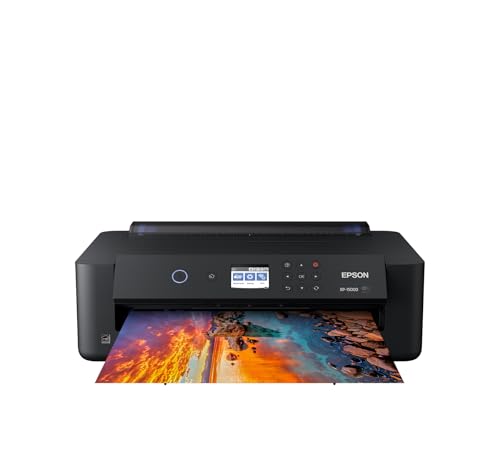
If you’re an artist or photographer looking to create stunning fine art prints, the Epson Expression Photo HD XP-15000 is an excellent choice. This wireless color wide-format printer delivers ultra HD photo quality with borderless prints up to 13 x 19 inches. Its individual 6-color Claria Photo HD ink, featuring red and gray, enhances your color gamut and black-and-white prints. Compact and designed to fit easily on your desktop, it supports auto two-sided printing and holds up to 200 sheets. With a maximum print resolution of 5760 x 1440 dpi, you’ll achieve professional results every time.
Best For: Artists and photographers seeking to produce high-quality fine art prints with vibrant colors and detail.
Pros:
- Ultra HD photo quality with borderless prints up to 13 x 19 inches.
- Compact design that fits easily on desktops, 30% smaller than its predecessor.
- Individual 6-color ink system enhances color gamut and black-and-white print quality.
Cons:
- Limited warranty coverage may not include damage from non-genuine ink usage.
- Some users may find setup and configuration challenging without prior experience.
- Print speed of 20 pages per minute may be slower compared to other printers in its class.
Epson EcoTank Photo ET-8550 Wireless All-in-One Supertank Printer

The Epson EcoTank Photo ET-8550 Wireless All-in-One Supertank Printer is an ideal choice for photographers and artists who demand vibrant colors and exceptional detail in their prints. This inkjet printer boasts a maximum print resolution of 5760 x 1440 DPI and handles media up to 13 x 19 inches. With cartridge-free printing and Claria ET Premium inks, you’ll enjoy significant savings—around 80%—on ink costs. Its intuitive 4.3-inch touchscreen and mobile app compatibility make operation seamless, while auto 2-sided and borderless printing elevate your projects. Plus, you can count on a one-year warranty for peace of mind.
Best For: Photographers and artists seeking high-quality prints with vibrant colors and cost-effective ink solutions.
Pros:
- Cartridge-free printing allows for significant savings on ink costs, reducing waste and expenses.
- High maximum print resolution of 5760 x 1440 DPI ensures exceptional detail and color accuracy in prints.
- Intuitive 4.3-inch touchscreen and mobile app compatibility streamline the printing process from various devices.
Cons:
- Larger size and weight may require more space and make it less portable compared to compact printers.
- Limited one-year warranty may not provide enough coverage for heavy users.
- Requires internet for full functionality of mobile features, which could be a drawback for some users.
Canon imagePROGRAF PRO-1100: 17” Professional Wireless Inkjet Photo Printer

For professional photographers seeking unparalleled print quality, the Canon imagePROGRAF PRO-1100 stands out with its impressive 11 pigment-based ink system. This 17” wireless printer delivers stunning color accuracy and detail, thanks to its maximum resolution of 4800 x 2400 dpi. The Chroma Optimizer enhances glossiness and flattens the print surface, ensuring vibrant results. With a wide color gamut and LUCIA PRO II ink system, your images will truly shine. Plus, its anti-clogging technology and air feeding system guarantee precise ink placement. Whether you’re using USB or Wi-Fi, this printer meets all your professional needs effortlessly.
Best For: Professional photographers seeking exceptional print quality and color accuracy in their photography work.
Pros:
- Wide color gamut and high resolution of 4800 x 2400 dpi for stunning image clarity.
- Advanced ink system with 11 pigment-based inks and Chroma Optimizer for enhanced glossiness.
- Connectivity options including USB and Wi-Fi make it easy to print from various devices.
Cons:
- Heavyweight at 83 pounds, making it less portable.
- Slow print speed at 1 page per minute for both color and black & white.
- Higher upfront cost compared to standard consumer-grade printers.
HP Envy Photo 7975 Wireless Color Inkjet Photo Printer

Families seeking a versatile printer that excels in creating high-quality photos and documents will find the HP Envy Photo 7975 to be an ideal choice. This premium multi-purpose printer offers print speeds of up to 10 pages per minute in color and 15 in black, ensuring efficiency. With features like automatic 2-sided printing, a separate photo tray, and an intuitive color touchscreen, it enhances your printing experience. Plus, the 3-month trial of the Instant Ink subscription delivers ink to your door before you run out. Enjoy borderless, true-to-screen photos and precise document formatting for all your creative projects.
Best For: Families looking for a versatile printer that delivers high-quality photos and documents efficiently.
Pros:
- High print speeds of up to 10 pages per minute in color and 15 pages per minute in black.
- Features automatic 2-sided printing and a separate photo tray for enhanced convenience.
- Intuitive color touchscreen for easy navigation and operation.
Cons:
- Monthly fee applies for the Instant Ink subscription after the 3-month trial unless cancelled.
- Ink cartridge costs may accumulate over time, especially with heavy usage.
- Wireless connectivity issues can occasionally arise, impacting printing efficiency.
KODAK Dock Plus Photo Printer for iPhone & Android

If you’re looking for a convenient and user-friendly option for creating high-quality photo prints, the KODAK Dock Plus Photo Printer is an excellent choice. This compact 4×6” printer uses 4PASS dye sublimation technology, delivering vibrant color prints in about 55 seconds. You can easily connect via Bluetooth or USB Type C and edit your photos through the KODAK app. With a built-in docking station, you can charge your smartphone while printing. Plus, its durable prints resist fingerprints and water. Weighing just 1366 grams, it’s perfect for your desk and can handle up to 20 sheets at a time.
Best For: Those seeking a compact and efficient photo printer that delivers high-quality prints for smartphones.
Pros:
- User-friendly setup with Bluetooth and USB Type C connectivity for easy operation.
- Durable prints that resist fingerprints, water, and fading due to protective lamination.
- Integrated docking station allows smartphone charging while printing, enhancing convenience.
Cons:
- Limited to a maximum media size of 4×6 inches, restricting larger print options.
- Requires specialized glossy photo paper, which may be an additional cost.
- Print speed of approximately 55 seconds may be slower compared to other printers.
Canon Selphy CP1500 Wireless Compact Photo Printer (Black)
The Canon Selphy CP1500 Wireless Compact Photo Printer stands out for those who crave portability without sacrificing quality in their photo prints. Weighing just 1.58 kilograms, its sleek design and compact dimensions make it perfect for on-the-go printing. With a print speed of 1 ppm for color and 1.5 ppm for black and white, you’ll enjoy vibrant, water-resistant photos that last up to 100 years. Its wireless connectivity options, along with a user-friendly 3.5” LCD display, guarantee a seamless experience. Plus, it supports various media sizes, making it versatile for all your printing needs.
Best For: Those seeking a portable photo printer that delivers high-quality, durable prints for travel, events, or personal use.
Pros:
- Compact and lightweight design makes it easy to carry anywhere.
- Prints vibrant, water-resistant photos that can last up to 100 years.
- User-friendly interface with a large 3.5” LCD display for easy viewing and editing.
Cons:
- Print speed may be slower compared to larger, stationary printers.
- Limited sheet capacity with only one tray for 10 sheets.
- Lacks duplex printing capability, which may be a drawback for some users.
Epson Expression Photo XP-980 Wireless Wide-Format Printer

For photographers and artists seeking vibrant, high-quality prints, the Epson Expression Photo XP-980 Wireless Wide-Format Printer stands out with its impressive 6-color Claria Ink System. You’ll appreciate the crisp, colorful prints it produces, boasting a resolution of 5760 x 1440 dpi. It prints borderless photos up to 11″ x 17″, and you can get a 4″ x 6″ print in as fast as 11 seconds. With a user-friendly 4.3-inch touchscreen and wireless capabilities, it’s easy to operate. Plus, the built-in scanner and copier enhance its versatility, making it an excellent choice for your creative projects.
Best For: Photographers and artists looking for a versatile printer that delivers high-quality, vibrant prints in various sizes.
Pros:
- High-quality prints with a resolution of 5760 x 1440 dpi and a 6-color Claria Ink System.
- User-friendly design featuring a 4.3-inch color touchscreen and wireless printing capabilities.
- Built-in scanner and copier for added functionality, making it ideal for creative projects.
Cons:
- Limited print speed of 8 ppm for color and 8.5 ppm for black and white may not meet high-volume printing needs.
- Weight of 19.4 pounds may make it less portable compared to lighter printers.
- Reliance on Epson Genuine Cartridges could be a downside for users seeking third-party ink options.
Canon MegaTank MAXIFY GX2020 All-in-One Wireless Color Printer

Designed with versatility in mind, the Canon MegaTank MAXIFY GX2020 All-in-One Wireless Color Printer is perfect for both home and office environments. You’ll appreciate its multifunctionality—print, copy, scan, and fax effortlessly. With a print yield of up to 3,000 pages for both black and color, you won’t be constantly refilling ink. The duplex printing feature saves time and paper, while the compact design fits neatly on your desk. Enjoy fast print speeds of 15 pages per minute for black and 10 for color. Plus, the 2.7-inch LCD touchscreen makes navigation a breeze, ensuring a smooth printing experience.
Best For: Those seeking a reliable, multifunctional printer for home or office use that offers high-volume printing with minimal ink refills.
Pros:
- High Print Yield: Capable of printing up to 3,000 black and color pages per ink set, reducing the frequency of ink refills.
- Versatile Functionality: Combines printing, copying, scanning, and faxing in one compact device, catering to various needs.
- User-Friendly Interface: The 2.7-inch LCD touchscreen simplifies navigation and operation, making it accessible for all users.
Cons:
- Initial Cost: The upfront investment may be higher compared to standard inkjet printers.
- Size: While compact, it may still take up more desk space than smaller, single-function printers.
- Limited Mobile Features: Although it supports Wi-Fi, some users may find mobile printing features less robust than those of competitors.
Canon PIXMA TS6520 Wireless Inkjet Printer

Looking for a reliable all-in-one printer that delivers vibrant fine art prints? The Canon PIXMA TS6520 is your go-to choice. This compact wireless inkjet printer offers crisp prints using a 2-cartridge hybrid ink system, achieving a maximum resolution of 1200 x 1200 dpi. With speeds of 9 color pages per minute, you won’t be waiting long for your masterpieces. Plus, it features automatic 2-sided printing to save paper. Its dual-band Wi-Fi guarantees stable connections, while mobile printing options make it easy to print from your devices. Ideal for families and students, the TS6520 combines style and functionality effortlessly.
Best For: Families and students seeking a reliable, user-friendly printer for occasional use.
Pros:
- High print quality with vibrant colors and sharp details thanks to the 2-cartridge hybrid ink system.
- Versatile functionality as an all-in-one device for printing, scanning, and copying.
- Wireless connectivity options enable easy printing from mobile devices and computers.
Cons:
- Limited print speed compared to some higher-end models, especially for color pages.
- Compact design may limit the input tray capacity for larger printing tasks.
- Weight of 15.42 pounds may be cumbersome for frequent relocation.
Epson Expression Premium XP-7100 Wireless Color Photo Printer

Elevate your home printing experience with the Epson Expression Premium XP-7100 Wireless Color Photo Printer, perfect for photography enthusiasts and artists seeking superior photo quality. This compact printer features a 5-color Claria Premium ink system, delivering vivid, borderless prints up to 8 x 10 inches. You’ll love the fast print speeds and the auto document feeder that accommodates 30 pages. Plus, its wireless connectivity allows easy printing from your smartphone or tablet. With a user-friendly 4.3-inch touchscreen and direct USB/SD card printing, it’s designed for seamless usability. Enjoy a reliable printer backed by a limited warranty and positive customer reviews.
Best For: Photography enthusiasts and artists seeking high-quality, vibrant photo prints in a compact and user-friendly design.
Pros:
- High-quality printing with a 5-color Claria Premium ink system for vivid and borderless photos.
- Wireless connectivity allows for easy printing from smartphones and tablets, enhancing convenience.
- User-friendly interface with a large 4.3-inch touchscreen and direct USB/SD card printing options.
Cons:
- Limited print speed for color prints, which may be slower compared to other printers.
- Requires genuine Epson cartridges, as non-genuine options could damage the printer and void the warranty.
- Auto duplex printing may take longer than expected for larger documents, affecting overall efficiency.
Factors to Consider When Choosing Deskphoto Printers for Fine Art Prints
When you’re choosing a desk photo printer for fine art prints, several key factors can influence your decision. You’ll want to take into account print quality resolution, the type of ink system, and how much media the printer can handle. Connectivity options and the printer’s size and portability also play vital roles in finding the right fit for your creative needs.
Print Quality Resolution
To achieve stunning fine art prints, you need to pay close attention to print quality resolution, as it plays a crucial role in the overall appearance of your images. Look for printers that offer a maximum resolution of 5760 x 1440 dpi, which guarantees ultra-high-definition prints with rich colors and intricate details. Higher dpi values mean greater detail and clarity, making your artwork stand out. Additionally, consider printers equipped with a 6-color ink system, which can enhance the color gamut and improve black and white print quality. Don’t forget about the ability to print borderless images up to 13 x 19 inches, as this feature elevates the presentation of your fine art prints.
Ink System Type
Choosing the right ink system type is essential for achieving exceptional fine art prints, as it directly impacts color accuracy and longevity. Pigment-based inks generally offer better resistance to fading and a wider color gamut than dye-based inks, guaranteeing your prints remain vibrant over time. Opting for a multi-color ink system, preferably with six or more colors, enhances color reproduction and detail, allowing for smoother tonal shifts in your artwork. Specialized inks, like gray or red, can improve black-and-white prints and expand your color range. Additionally, consider the cost efficiency of traditional cartridges versus refillable ink tank systems; refillable options often lead to significant savings. Finally, higher dpi (dots per inch) resolutions guarantee greater detail and clarity in your final prints.
Media Handling Capacity
While selecting a desk photo printer for fine art prints, it’s important to evaluate its media handling capacity. First, check the maximum media size it can accommodate, as options can range from standard 4″x6″ to larger formats like 13″x19″ or even 17″x22″. Look for printers that support borderless printing; this feature allows for full bleed images, which is vital for fine art presentation. Assess how many sheets the printer can hold in its trays—higher capacities mean less frequent reloading. Additionally, verify compatibility with various media types, including fine art paper, canvas, and specialty photographic papers. Finally, consider the printer’s ability to handle different thicknesses of media, as fine art prints often require thicker substrates for the best quality and durability.
Connectivity Options Available
When considering a desk photo printer for fine art prints, connectivity options can greatly impact your printing experience. Look for printers that offer USB, Ethernet, and Wi-Fi connections, giving you flexibility to print from various devices. Mobile printing capabilities through compatible apps for iOS and Android enhance convenience, allowing you to print on the go from your smartphone or tablet. Wi-Fi Direct functionality simplifies setup by enabling direct wireless printing without a router. Additionally, many modern printers feature dual-band Wi-Fi (2.4GHz and 5GHz), providing faster and more stable connections. Finally, verify compatibility with different operating systems and mobile printing standards like AirPrint and Mopria, so you can easily support a wider range of devices and applications.
Size and Portability
Size and portability are essential factors to take into account for anyone looking to invest in a desk photo printer for fine art prints. First, consider the maximum print size; options range from 4 x 6 inches to 17 x 22 inches, allowing you to explore various artistic formats. If you plan to transport your printer, weight matters—lighter models can weigh as little as 1.58 kilograms, while larger ones might reach 83 pounds. Compact designs can save valuable workspace, with some printers being up to 30% smaller than their predecessors. Additionally, look for borderless printing capabilities for full-bleed prints up to sizes like 13 x 19 inches, and evaluate the printer’s dimensions to ascertain it fits your available space.
Cost of Operation
Understanding the cost of operation is essential as you choose a desk photo printer for fine art prints. Ink usage plays a significant role—some models can save you up to 80% on replacement ink bottles compared to traditional cartridges, potentially saving you around $2,000 over time. Cartridge-free systems can drastically reduce your cost per print, with prices as low as 4 cents for a 4×6 photo versus 40 cents with conventional systems. Long-lasting ink solutions let you print thousands of pages on one set, lowering operational costs. Remember, pigment-based inks offer better longevity but might have higher initial costs, while dye-based inks are cheaper but can fade faster. Regular maintenance with genuine inks is vital for ideal performance and cost efficiency.
Warranty and Support
A solid warranty and reliable support can make a significant difference in your experience with desk photo printers for fine art prints. Most printers come with a limited one-year warranty, covering defects in materials and workmanship. You might also find a 30-day satisfaction guarantee that lets you return the printer if it doesn’t meet your needs. Customer support is generally accessible via phone, email, or online chat, ensuring you can get help when you need it. Keep in mind that using genuine ink cartridges is often required to maintain your warranty. Some manufacturers offer extended warranty options for an extra fee, which can be valuable for professional artists who need consistent performance from their printers.