If you’re an artist looking to digitize your work, you know how essential it is to capture every detail. The right document camera can make all the difference in showcasing your masterpieces with precision. With so many options available, how do you choose the best one for your needs? In this guide, we’ll explore ten top document cameras designed for artists, helping you find the perfect tool to elevate your art.
IPEVO V4K Ultra HD USB Document Camera

The IPEVO V4K Ultra HD USB Document Camera is an excellent choice for artists and educators looking to digitize their work with precision and ease. With its 8MP camera, you’ll capture stunning images up to 3264 x 2448 pixels. You’ll appreciate the high frame rate of 30 fps at full HD, ensuring smooth presentations. The fast focusing speed minimizes interruptions during your demos. Additionally, the multi-jointed stand offers versatility, making it easy to position for various angles. Compatible with Mac, Windows, and Chromebook, it’s perfect for web conferencing and remote teaching. Enjoy capturing your masterpieces effortlessly!
Best For: Artists and educators looking for a high-quality document camera to digitize their work with precision and ease.
Pros:
- High-resolution 8MP camera captures stunning images up to 3264 x 2448 pixels.
- Fast focusing speed and high frame rate (30 fps) ensure smooth presentations and minimal interruptions.
- Compatible with Mac, Windows, and Chromebook, making it versatile for various users.
Cons:
- No audio recording feature, which may limit its use for some presentations.
- Requires specific system requirements that may exclude some older devices.
- The built-in USB cable may limit mobility if the distance to the computer is greater than 4.90ft.
INSWAN INS-2 4K USB Document Camera

For professional educators and art instructors, the INSWAN INS-2 4K USB Document Camera stands out with its 13MP SONY sensor, delivering stunning 4K Ultra HD images. You’ll appreciate the built-in LED light and anti-glare sheet, ensuring your documents and artwork look their best. Its dual-mode autofocus and macro capability let you capture fine details from just 3.9 inches away. Plus, with Documate software, you can zoom, annotate, and record videos seamlessly. The camera’s flexible multi-joint arm and plug-and-play compatibility with various platforms make it perfect for classroom settings or exhibitions. Enhance your presentations effortlessly with this powerful tool!
Best For: Professional educators and art instructors looking for a high-quality document camera to enhance their teaching and presentation experience.
Pros:
- High-resolution imaging with a 13MP SONY sensor, providing clear 4K Ultra HD visuals.
- Versatile features including dual-mode autofocus, macro capability, and built-in LED light for optimal document display.
- Seamless compatibility with multiple platforms and software, enhancing usability in various settings.
Cons:
- Limited macro distance of 3.9 inches may not suit all detailed capturing needs.
- Dependent on software updates for optimal functionality, which may require periodic downloads.
- Multi-joint arm design could be less stable if not positioned correctly, potentially affecting image capture.
4K USB Document Camera for Teachers

Teachers seeking a reliable tool for digitizing art will find the Kitchbai 4K USB Document Camera an excellent choice, thanks to its impressive 8MP resolution and user-friendly features. This versatile device captures stunning 4K video at 30 FPS, ensuring your artwork looks vibrant and detailed. With its foldable design and lightweight build, it’s easy to transport between classrooms. The dual microphones enhance audio quality during presentations, while the adjustable brightness and autofocus make it simple to achieve the perfect shot. Compatible with major operating systems, you’ll enjoy seamless plug-and-play functionality for all your distance education needs.
Best For: Teachers looking for a versatile and high-quality document camera to enhance their digital presentations and art digitization.
Pros:
- 4K video quality at 30 FPS for vibrant and detailed visuals.
- Lightweight and foldable design for easy transport between classrooms.
- Plug-and-play functionality compatible with Windows, macOS, and Chrome OS.
Cons:
- Limited macro focus range may not suit all types of detailed work.
- The weight of 880 grams might be considered heavy for some users.
- Manual adjustments for image reversal may be inconvenient during quick presentations.
Epson DC-21 High-Definition Document Camera

With its impressive HD 1080p resolution and versatile zoom capabilities, the Epson DC-21 High-Definition Document Camera stands out as an ideal choice for artists and educators alike. You’ll appreciate the 10x digital and 12x optical zoom, which lets you capture intricate details of your artwork. Plus, with HDMI connectivity and a built-in microphone, sharing your creations has never been easier. The camera records at 30 fps and supports various file formats, including PDF and MOV. Whether you’re displaying 3D objects or saving lessons to an SD card, the Epson DC-21 delivers clarity and convenience for all your digitizing needs.
Best For: The Epson DC-21 High-Definition Document Camera is best for artists and educators who need a versatile tool for capturing and sharing intricate details of artwork and lessons.
Pros:
- High-definition 1080p resolution for clear and detailed visuals.
- Versatile zoom options with 10x digital and 12x optical zoom capabilities.
- Built-in microphone and HDMI connectivity for easy sharing and presentations.
Cons:
- Limited maximum shutter speed of 1/30 seconds may affect fast-moving subjects.
- Requires software installation for full functionality, which may not be user-friendly for everyone.
- Relatively heavy, making it less portable compared to some other document cameras.
Epson ELPDC21 Document Camera fÃ1/4r Projectors 2

The Epson ELPDC21 Document Camera stands out as an exceptional choice for artists and educators looking to digitize their artwork with precision. With Full HD 1080p resolution and a 1/2.7 CMOS sensor, you’ll capture every detail beautifully. Its 10x digital zoom and auto focus make it easy to highlight intricate designs. The automatic lighting function and adjustable settings guarantee ideal image quality, while the large A3 recording area accommodates various projects. Additional features like the built-in LED light and Kensington lock enhance usability and security, making this document camera a reliable tool for all your digitizing needs.
Best For: Artists and educators seeking a high-quality document camera to digitize artwork and projects with precision.
Pros:
- High-quality imaging with Full HD 1080p resolution and a 1/2.7 CMOS sensor for clear detail capture.
- Versatile functionality including 10x digital zoom, auto focus, and a large A3 recording area suitable for various projects.
- User-friendly features such as automatic lighting adjustments, built-in LED light, and a safety latch for added protection.
Cons:
- Limited frame rate of 30 fps may not meet the needs of users requiring higher-speed video capture.
- Digital zoom may compromise image quality compared to optical zoom options available in other models.
- Price point may be higher than basic document cameras, which could be a consideration for budget-conscious buyers.
IPEVO VZ-X Wireless 8MP Document Camera
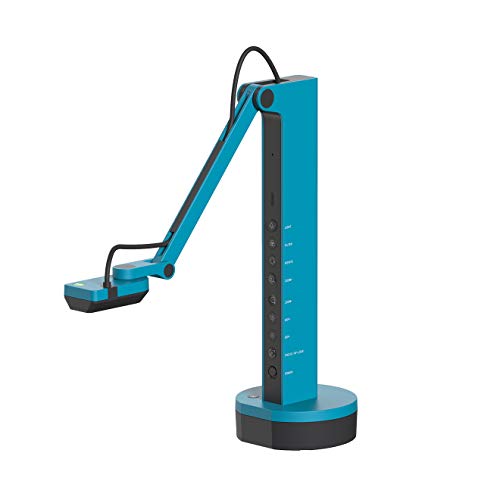
For artists and educators looking to capture high-quality images of their work, the IPEVO VZ-X Wireless 8MP Document Camera stands out with its impressive 8 MP Sony sensor and versatile connectivity options. You’ll appreciate its HD image quality in both Wi-Fi and HDMI modes, as well as near 4K resolution via USB. Weighing just 2.6 pounds, it’s portable with a battery life of up to 12 hours and a wireless range of 33 feet. The built-in LED illuminates your subjects, while the swiveling head and multi-jointed stand allow for easy adjustments. Capture your creations effortlessly with this reliable device.
Best For: Artists and educators seeking a portable and high-quality document camera for capturing detailed images of their work.
Pros:
- High-resolution 8 MP sensor with HD and near 4K image quality.
- Portable design with a battery life of up to 12 hours and a wireless range of 33 feet.
- Versatile connectivity options including Wi-Fi, HDMI, and USB.
Cons:
- No audio recording capability.
- Limited optical zoom at 3x.
- May require additional setup for optimal use with web conferencing software.
Epson DC-12 High-Definition Document Camera

If you’re an educator looking to enhance your lessons, the Epson DC-12 High-Definition Document Camera stands out with its impressive Full HD 1080p resolution and built-in microphone for recording. With a 16x digital zoom, you can capture fine details, making it perfect for displaying books or experiments. The large imaging sensor guarantees clarity, while PC-free annotations add versatility. You can easily save your lessons to various media, including USB drives or SD cards. Plus, the Picture-in-Picture feature lets you show both original and zoomed-in images simultaneously, making sure your students never miss a detail in your presentations.
Best For: Educators and presenters seeking a high-quality document camera to enhance classroom engagement and lesson delivery.
Pros:
- High-definition imaging with Full HD 1080p resolution for clear visuals.
- Versatile connectivity options including HDMI and USB for easy integration with other devices.
- Built-in microphone allows for seamless recording of lessons for later review.
Cons:
- Limited internal memory of only 1GB may restrict extensive lesson storage.
- Weight of 9 pounds might make it less portable for frequent movement between classrooms.
- Customer reviews show a moderate rating of 3.7 out of 5 stars, suggesting potential quality concerns.
ViewSonic 8MP USB Document Camera (VB-VIS-002)

Artists and educators seeking high-quality digitization will find the ViewSonic 8MP USB Document Camera (VB-VIS-002) an exceptional tool. With its 8-megapixel camera, you can capture stunning images up to 3264 x 2448 pixels. The smooth streaming at 30 fps and instantaneous autofocus guarantees your presentations flow seamlessly. Plus, it’s a plug-and-play device with a USB 2.0 connection, making setup a breeze. Its integrated lamp and movable joints allow for easy adjustments. You can scan, record, or livestream materials up to A3 size and enjoy real-time annotation, enhancing your digital learning experience effortlessly across Windows, Mac, and Chromebook.
Best For: Artists and educators looking for a high-quality, user-friendly document camera to enhance their presentations and digital learning experiences.
Pros:
- High-resolution imaging with 8MP and up to 3264 x 2448 pixels for detailed captures.
- Real-time annotation capabilities allow for interactive presentations and effective teaching.
- Plug-and-play setup with USB 2.0 connection ensures quick and easy installation on various devices.
Cons:
- Limited to USB 2.0 connection, which may not support faster data transfer rates compared to newer standards.
- Digital zoom only provides magnification without optical quality, potentially affecting image clarity at high zoom levels.
- Integrated lamp may not provide sufficient lighting in all environments, requiring additional lighting sources for optimal performance.
THUSTAR 8MP Document Camera & Webcam
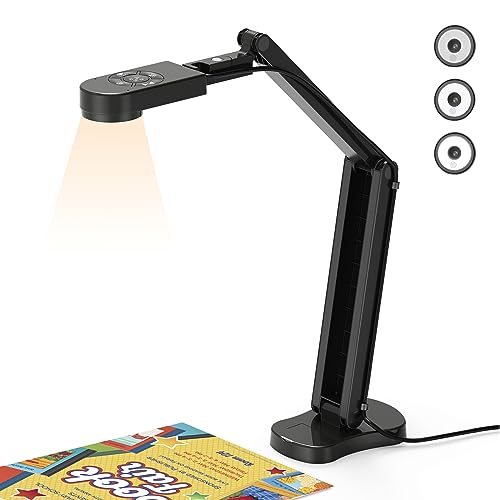
The THUSTAR 8MP Document Camera & Webcam stands out as an ideal choice for educators and content creators looking to digitize art. With an impressive 8MP resolution and 30fps video capture, you’ll enjoy clear and vibrant images. Its foldable design makes it portable, while multi-angle rotation allows for versatile capturing. You can easily adjust brightness across ten levels to enhance clarity in various lighting conditions. Plus, the built-in dual microphones improve sound quality during presentations. Compatible with popular software and offering a 2-year warranty, it’s a reliable tool for bringing your artwork to life.
Best For: Educators and content creators seeking a portable and high-quality document camera for digitizing artwork and presentations.
Pros:
- High Resolution: Offers 8MP resolution and 30fps video capture for clear and vibrant images.
- Adjustable Brightness: Features 10 levels of brightness adjustment to enhance image clarity in different lighting conditions.
- Versatile Design: Foldable and multi-angle support make it easy to transport and capture from various perspectives.
Cons:
- Weight: At 0.84 kg, it may be slightly heavier compared to other document cameras.
- Limited Macro Focus: Can only capture objects as close as 3.94 inches, which may be restrictive for some users.
- USB Connectivity: Relies on USB 2.0, which may not provide the fastest data transfer speeds available with newer USB standards.
Epson ELPDC21 Projector Calligraphy Camera

For those seeking a versatile tool to digitize their artwork, the Epson ELPDC21 Projector Calligraphy Camera stands out with its impressive 12x optical zoom and Full HD support. This camera captures images up to A3 size and offers 1080p video recording, making it perfect for detailed art projects. With its foldable arm mechanism, it’s easy to store and transport. You can record audio, too, thanks to its built-in microphone. Plus, it connects effortlessly to various devices, from computers to TVs. With a 30-day return policy, you can try it risk-free and see how it enhances your creative process.
Best For: Artists and educators looking for a high-quality tool to digitize and project their artwork or presentations.
Pros:
- High 12x optical zoom and Full HD support for detailed image capture.
- Compact and portable design with a foldable arm for easy storage and transport.
- Built-in audio recording feature and compatibility with various devices enhance usability.
Cons:
- Some users may find the image quality under certain lighting conditions less than ideal.
- Customer reviews indicate mixed feedback, with an average rating of only 3.6 out of 5 stars.
- The reliance on specific media formats (JPEG, MP4) may limit compatibility with certain older devices.
Factors to Consider When Choosing Document Cameras for Digitizing Art
When you’re choosing a document camera for digitizing art, it’s essential to take into account several key factors. Think about the resolution quality, lighting features, and autofocus capabilities that will best suit your needs. You should also assess compatibility with software and the camera’s portability and design to guarantee it fits seamlessly into your workflow.
Resolution Quality
Choosing a document camera with the right resolution quality is essential, especially if you want to capture the intricate details of your artwork. Cameras that offer 4K resolution provide greater clarity, making them perfect for digitizing fine details. Look for models with at least 8 megapixels, which can deliver images up to 3264 x 2448 pixels, ensuring even the smallest elements are preserved in high definition. A minimum frame rate of 30 frames per second is also vital for smooth video playback, ideal for demonstrating art techniques. Continuous shooting capabilities enable you to capture multiple images quickly, documenting your artwork’s progression. Additionally, the ability to adjust resolution settings allows you to tailor detail levels based on your specific needs.
Lighting Features
Effective lighting features play an essential role in ensuring your artwork is digitized with clarity and color accuracy. When choosing a document camera, look for built-in LED lights that illuminate hard-to-see details, reducing shadows and enhancing overall image quality. Adjustable brightness settings let you customize the lighting to meet the specific needs of your artwork, ensuring ideal visibility. If you’re working with glossy or reflective surfaces, consider models that include anti-glare sheets to minimize unwanted reflections. Additionally, some document cameras offer dual-mode brightness control, allowing you to make precise adjustments based on different art pieces and environments. With the right lighting, capturing your masterpieces becomes a seamless and effective process.
Autofocus Capabilities
Autofocus capabilities in document cameras can make a notable difference in how clearly you capture your artwork. With automatic adjustments based on the distance of your subject, these cameras guarantee sharp, well-defined details. High-quality models offer fast focusing speeds, minimizing interruptions during presentations and allowing seamless shifts between different pieces. Some even feature dual-mode autofocus, letting you switch between macro and standard focus settings—perfect for those intricate details in your art. Advanced systems reduce noise and enhance color reproduction, making them effective in dimly lit environments. The speed and accuracy of autofocus greatly impact your efficiency when digitizing art, allowing for quick adjustments without manual intervention, which saves you time during live demos or recordings.
Compatibility With Software
When selecting a document camera for digitizing art, it’s crucial to reflect on its compatibility with various software platforms. Make certain the camera integrates seamlessly with popular tools like Zoom, Microsoft Teams, and Google Meet to enhance your virtual presentations. Look for UVC (USB Video Class) support for plug-and-play functionality across multiple operating systems such as Windows, macOS, and Chrome OS. Additionally, consider whether the camera includes dedicated software that offers features like annotation, OCR, and video recording. Confirm that the camera’s resolution and frame rate align with the software used, as higher quality can greatly enhance your digitized art. Finally, check for updates and support to guarantee long-term compatibility and access to new features.
Portability and Design
Portability and design play an essential role in choosing the right document camera for digitizing art, especially if you often find yourself moving between locations. A foldable design makes transportation and storage a breeze, perfect for artists on the go. Opt for a lightweight camera that you can handle comfortably during presentations or teaching sessions. Look for models with multi-joint support, allowing you to adjust angles easily and capture your artwork from various perspectives. A compact footprint helps save valuable space in studios or classrooms, especially with larger A3-size documents. Finally, consider the durability of the materials; a robust design guarantees your camera can withstand frequent use and travel across different environments without compromising performance.
Maximum Capture Area
Choosing the right document camera for digitizing art involves more than just portability and design; the maximum capture area is equally important. A larger capture area allows you to digitize bigger artworks—like A3 size—without multiple scans, preserving the piece’s integrity. Ideally, look for a camera with a minimum shooting area of 13 inches by 10 inches, ensuring all details fit in one frame. Don’t overlook the aspect ratio, as it affects how well your art is represented without cropping significant elements. Additionally, a camera with adjustable settings can enhance usability, accommodating both small, intricate pieces and larger canvases. This flexibility is key to meeting diverse artistic needs effectively.
Connectivity Options
While considering a document camera for digitizing art, connectivity options play an essential role in ensuring compatibility with your devices. Look for features like USB, HDMI, and wireless capabilities to suit various setups. USB-C connectivity offers a plug-and-play experience, so you can start using it instantly without extra drivers. If you prefer flexibility, wireless options let you present without physical connections, allowing remote access via Wi-Fi. Make sure the camera supports major operating systems like Windows, macOS, and Chrome OS for seamless integration. Additionally, some models are compatible with popular web conferencing platforms, making them ideal for remote teaching or presentations. Choosing the right connectivity can enhance your digitizing experience greatly.