Long drawing, drafting, and design sessions demand more than a large work surface. The right motorized drafting table can help you alternate between sitting and standing, set a comfortable working angle, and keep essential tools within reach.
This roundup compares 10 electric drafting tables across different sizes, layouts, tilt ranges, storage options, and specialty features so you can choose a workstation that fits your workflow and available space.
Best 10 Motorized Drafting Tables for Long Sessions Picks for 2026
Best Overall
FLEXISPOT Electric Drafting Table

- Electric height range from 28.7 to 48.4 inches
- 0–40° tilting tabletop with four height presets
- Drawer, collapsible side table, and cable tray included
Best For: Artists and students wanting a versatile motorized drafting workstation
Best Storage Setup
Adjustable Drafting Table with Shelves

- 0–80° board with 12 lockable angles
- Four drawers plus removable tilted shelves
- Built-in AC, USB, and USB-C charging
Best For: Organized craft and art workspaces with abundant supplies
Best Compact Option
JOY worker Electric Glass Standing Desk

- Electric range from 28.3 to 46.5 inches
- Three programmable memory height settings
- Compact glass top with wheels or foot pads
Best For: Small spaces needing a mobile motorized sit-stand desk
Best for Tracing
Studio Designs Fusion Light Table
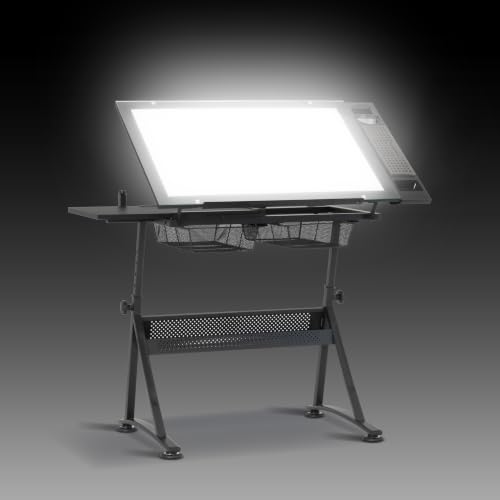
- Integrated adjustable Artograph LED light pad
- 0–40° glass drafting surface
- Drawers, shelves, art tray, and pencil ledge included
Best For: Illuminated tracing, illustration, drafting, and pattern work
Best Large Workspace
MOUMON 55-Inch Electric Drafting Table

- 55.1-inch-wide workspace with an adjustable tilt section
- Three height presets plus integrated three-color LED lighting
- Hutch, side shelves, and drawer for extensive supply storage
Best For: Dedicated studios and large, organized creative workstations
Best Dual-Zone Design
TIQLAB Electric Drafting Table

- Stepless 0–60° tilting work surface
- Electric height range from 28.3 to 45.6 inches
- Dual work zones with reversible shelves and side storage bag
Best For: Compact, adaptable drafting and creative workstations
Best with Extra Features
JOY worker Electric Drafting Table

- 0–90° tilting work panel
- Three electric height memory settings
- Cable manager and cup holder included
Best For: Artists and students needing a flexible drafting workstation
Best Mobile Option
35-Inch Glass Standing Drafting Table

- 0–90° tilting tempered-glass top
- Four lockable rolling casters
- 132-pound support rating
Best For: Compact, mobile creative and laptop workspaces
Best Smart Features
VERSADESK Smart Drafting Table
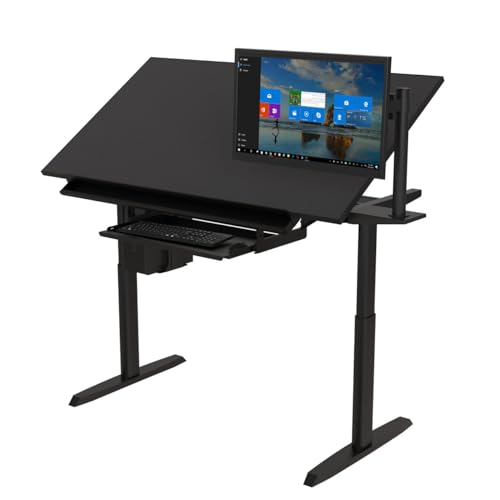
- Electric Powerlift height adjustment
- App, remote, and voice control
- Large professional-oriented workstation
Best For: Connected creative workspaces for artists and designers
Best Overall – FLEXISPOT Electric Drafting Table
For motorized drafting tables for long sessions, the FLEXISPOT combines powered height adjustment with a broad 47.2-inch workspace and a tilting surface. Its four height presets and 0–40° tabletop range make it practical for switching between sitting, standing, reading, and detailed art work.
Best For: Artists, students, and home studios needing an adaptable electric drafting workstation.
Pros:
- Electric height adjustment from 28.7 to 48.4 inches with four presets
- Tabletop tilts continuously from 0° to 40°
- Includes a storage drawer, collapsible side table, and cable-management tray
- Supports up to 110 pounds and includes a five-year limited warranty
Cons:
- Its 92.6-pound weight and two-person assembly recommendation may make setup challenging
- The included storage is limited to one drawer and the collapsible side table
This is the most complete choice for users who want true motorized height adjustment alongside drafting-specific tilt control. The maple-and-black design is versatile, though its larger footprint and heavy frame suit a dedicated workspace better than a very small room.
Best Storage Setup – Adjustable Drafting Table with Shelves
Although it is not motorized, this adjustable drafting table is worth considering when organized storage matters more than powered height changes. The drawing board locks at 12 angles between 0° and 80°, while four drawers, removable shelves, and built-in charging ports support extended creative sessions.
Best For: Crafters, artists, and students who need plentiful, accessible supply storage.
Pros:
- Drawing board adjusts from 0° to 80° and locks at 12 preset angles
- Four drawers include a divider for customized organization
- Four side shelves tilt and can be removed for bulky or rolled materials
- Built-in charging station provides two AC outlets, USB, and USB-C
Cons:
- It does not provide motorized height adjustment
- At 51.2 inches wide, it may require substantial floor space
This model is a strong organization-focused alternative for long sessions, especially if your supplies tend to crowd the desktop. Its generous storage and charging station are useful, but shoppers specifically seeking motorized drafting tables for long sessions should note that height adjustment is manual rather than electric.
Best Compact Option – JOY worker Electric Glass Standing Desk
The JOY worker is a compact motorized standing desk for users who want movement during long sessions without a full-size drafting-table footprint. Its 39.4-by-19.7-inch glass top travels from 28.3 to 46.5 inches, and three programmable memory settings simplify repeated sit-stand changes.
Best For: Small home offices, narrow work areas, and users who value rolling mobility.
Pros:
- Electric height adjustment operates at 25 mm/s from 28.3 to 46.5 inches
- Three programmable memory modes support repeatable working heights
- Wheels or foot pads can be installed, depending on stability or mobility needs
- Tempered glass top is smooth, wipe-clean, and supports up to 176 pounds
Cons:
- The 40-by-19.7-inch surface is narrower than a conventional drafting table
- The supplied details do not indicate a tilting tabletop
- Glass may feel less suited to users who prefer a traditional wood drafting surface
This is a practical pick for long computer-based work where changing height is the priority. It offers strong support and a small footprint, but its flat, compact top is better for general workstation use, doodling, or drawing than for large-format drafting.
Best for Tracing – Studio Designs Fusion Light Table
The Studio Designs Fusion is designed for detail-heavy creative work, pairing a tempered-glass drafting surface with an integrated Artograph LED light pad. It offers 0–40° angle adjustment and a 27.5–35.5-inch height range, making it useful for tracing, illustration, architectural drafting, and other long sessions where visibility matters.
Best For: Illustrators, animators, pattern makers, and artists who need integrated illumination.
Pros:
- Integrated 31.75-by-20-inch LED light pad with adjustable 0–2,600-lux brightness
- Tempered-glass tabletop adjusts from 0° to 40°
- Includes two mesh drawers, a side shelf, bottom shelf, pencil ledge, and art tray
- Daylight-balanced 6,000K–7,000K LEDs are rated for 50,000 hours
Cons:
- Height adjustment tops out at 35.5 inches, below many standing desks
- Tabletop capacity is 25 pounds, with separate lower limits for drawers and shelves
- The supplied details do not specify motorized height adjustment
This is the most specialized option for illuminated creative work, reducing the need for a separate light box and keeping tools close at hand. It is highly functional for seated or moderately raised work, but shoppers requiring a fully motorized sit-stand range should consider the height-adjustment specification carefully.
Best Rolling Option – Gibbon Mounts 40-Inch Electric Drafting Table
For shoppers comparing motorized drafting tables for long sessions, the Gibbon Mounts model combines sit-stand adjustment with a partially tilting work surface. Its 40-by-24-inch desktop, storage features, and optional locking casters suit flexible home, study, or studio setups.
Best For: Artists, students, and remote workers who want a compact rolling drafting table with storage.
Pros:
- Electric height adjustment from 28.3 to 46.5 inches with three memory buttons.
- Desktop tilts from 0 to 60 degrees while a fixed section helps keep supplies stable.
- Includes a shelf, drawer, monitor stand, and hooks; optional lockable casters add mobility.
- Steel frame supports up to 154 pounds.
Cons:
- The 40-inch width offers less workspace than larger drafting tables.
- Casters require replacing the base pads, and the rolling height range differs from the standard range.
This is a practical choice when mobility and organization matter as much as drafting flexibility. The smaller top may be limiting for large plans, but its quiet motor, tilt range, and storage make it well suited to extended mixed-position work.
Best Large Workspace – MOUMON 55-Inch Electric Drafting Table
Among motorized drafting tables for long sessions, the MOUMON stands out with a broad 55.1-inch workspace, electric height adjustment, and a tilting desktop section. Its integrated lighting and substantial storage are useful for artists or students who keep many supplies nearby.
Best For: Users who need a large, storage-rich drafting station for drawing, reading, or office work.
Pros:
- Three memory presets and a digital display support repeatable sit-stand adjustments.
- Built-in LED lighting offers warm, neutral, and cool modes with an automatic timer.
- Multi-tier hutch, side shelves, and a metal-glide drawer provide extensive storage.
- Heavy-duty metal framing and MDF construction support up to 170 pounds.
Cons:
- At 154 pounds, it is substantially heavier and less convenient to reposition.
- Assembly arrives in two boxes, which may not be delivered at the same time.
- The supplied specifications describe a 63-to-79-inch height range but do not state the tilt-angle range.
The MOUMON is a strong fit for a dedicated creative workstation rather than a portable desk. Its lighting, hutch, and wide top can reduce interruptions during long projects, provided you have room for its larger footprint and extended assembly.
Best Dual-Zone Design – TIQLAB Electric Drafting Table
The TIQLAB is a flexible option for motorized drafting tables for long sessions, pairing electric sit-stand adjustment with a stepless 0-to-60-degree tilt. Its dual working zones let you draft on one side while keeping tools, notes, or a drink accessible on the other.
Best For: Artists, architects, engineers, and students who want an adaptable drafting surface with a compact footprint.
Pros:
- Electric height adjustment ranges from 28.3 to 45.6 inches.
- Stepless 0-to-60-degree tilt supports reading, sketching, and detailed drafting.
- Dual work zones and an edge stop help separate active work from accessories.
- Reversible shelves and a side storage bag keep smaller supplies close.
Cons:
- The 43-by-23.6-inch surface is smaller than the MOUMON’s workspace.
- The supplied notes do not list memory presets or a maximum supported weight.
- Storage is more limited than a desk with a built-in drawer or hutch.
Choose the TIQLAB when angle control and an efficient layout are priorities. Its lighter 42.9-pound design and reversible storage support adaptable rooms, while the dual-zone top is especially useful for long projects that require frequent reference materials.
Best with Extra Features – JOY worker Electric Drafting Table
The JOY worker Electric Drafting Table is a practical choice among motorized drafting tables for long sessions, combining electric height adjustment with a broad tilt range. Its split tabletop provides a dedicated drafting surface alongside space for accessories, making it useful for switching between drawing and computer-based tasks.
Best For: Artists, students, and home-office users who want an adjustable drafting and computer workstation.
Pros:
- Electric height adjustment from 28.3 to 46.5 inches with three memory settings.
- Left work panel tilts from 0 to 90 degrees and sits closer to the user at lower angles.
- Fixed side includes cable management and a cup holder for supplies.
- Steel frame, MDF top, leveling structure, and included installation tools.
Cons:
- The split tabletop offers less continuous drawing space than a single-piece surface.
- The supplied dimensions describe a 40-by-20-inch desk, which may feel compact for larger layouts.
Its ergonomic downward tilt, memory controls, and thoughtful accessories make this a well-rounded option for extended creative work, especially when you need both drafting and workstation functionality.
Best Mobile Option – 35-Inch Glass Standing Drafting Table
This 35-inch glass standing desk is one of the more mobile motorized drafting tables for long sessions, with a one-piece tempered-glass top, electric height adjustment, and four lockable casters. Its 0-to-90-degree tilt and foldable design support both creative work and easy storage.
Best For: Users who want a compact, rolling drafting table for drawing, laptop work, classrooms, or multipurpose rooms.
Pros:
- One-piece tempered-glass surface is designed for easy writing, doodling, and cleaning.
- Electric height adjustment includes three memory buttons and operates below 55dB.
- Four lockable wheels allow the desk to move between work areas or pair with a walking pad.
- Steel frame supports up to 132 pounds and is tested for 50,000 lift cycles.
Cons:
- The 34.6-by-19.6-inch surface is smaller than many full-size drafting tables.
- With casters installed, the minimum height rises to 30.8 inches.
- Glass may be less suitable for users who prefer a traditional wood drawing surface.
This model stands out for portability and easy-care construction. It is a strong fit when storage, mobility, and a clean modern surface matter as much as drafting functionality.
Best Smart Features – VERSADESK Smart Drafting Table
The VERSADESK Smart Drafting Table targets professionals who want connected controls in a larger workstation. Its electric Powerlift system, tilting work surface, app integration, remote control, and voice activation make it a technology-focused choice among motorized drafting tables for long sessions.
Best For: Artists, architects, designers, engineers, and other professionals who value smart controls and a substantial creative workspace.
Pros:
- Electric height adjustment supports changing between seated and standing work.
- Tilting surface is intended to help with sketching, design work, and ergonomic alignment.
- App, remote, and voice controls provide multiple ways to adjust the workstation.
- Commercial-grade construction includes a keyboard tray and lifetime warranty description.
Cons:
- The supplied details do not specify the desk’s tilt-angle range or height range.
- At 106 pounds, it is substantially heavier than the other listed options.
- The notes describe a 60-inch model but list a 48-inch width, so buyers should verify the final dimensions.
This is the most feature-rich option for users who want hands-free or app-based adjustments. Verify the exact dimensions and adjustment ranges before purchase, particularly if your room has limited space.
How We Picked the Best Motorized Drafting Tables for Long Sessions
We focused on the features that matter most during extended creative work: electric height adjustment, tabletop tilt, usable surface area, stability, control convenience, and organization. We also considered practical extras such as memory presets, shelves, drawers, wheels, glass surfaces, integrated lighting, app control, and voice compatibility.
Because drafting setups vary widely, this list includes compact 35- and 40-inch desks as well as larger 47- and 55-inch workstations. A smaller table may suit an apartment or mobile setup, while a wider model can better accommodate paper, tools, a monitor, and reference materials at the same time.
Quick Comparison
- Best for a broad work area: Look at the 47- to 55-inch electric models, especially if you use large sheets, multiple tools, or a monitor.
- Best for compact spaces: The 35- and 40-inch tables are easier to place in bedrooms, studios, and shared offices.
- Best for light-based work: A glass light table or model with integrated LEDs can support tracing, illustration, and detailed layout work.
- Best for organization: Prioritize drawers, removable shelves, or built-in storage if your desktop tends to become crowded.
- Best for smart controls: App, voice, and memory-preset functions make frequent position changes faster and more repeatable.
Key Buying Factors for Long Sessions
Height Range and Movement
Check whether the table reaches a comfortable seated height and a genuinely useful standing height. Smooth electric adjustment is especially valuable when you change posture often. Memory buttons can save preferred sitting, standing, and sketching positions.
Tilt Angle and Surface Stability
A broad tilt range helps reduce neck and wrist strain when drawing or drafting at an angle. Look for a secure locking mechanism or stable motorized tilt system, plus a raised edge or lip to help prevent paper and tools from sliding.
Size, Weight Capacity, and Clearance
Measure the available floor and wall space before buying. Account for the tabletop’s full tilt position and the height of nearby shelves or monitors. Confirm the weight capacity if you plan to use a computer, lamp, cutting tools, or heavy equipment.
Surface and Accessories
Glass surfaces can work well with light pads and are easy to clean, while solid tops may feel more familiar for general drafting and crafting. Storage, cable management, wheels, drawers, and lighting can improve daily convenience, but they may also increase the footprint.
Who Should Buy Which Motorized Drafting Tables for Long Sessions?
Choose a compact motorized table if you have limited space, primarily draw or write, or need a workstation that can move between rooms. Choose a larger table if you work with oversized paper, multiple devices, or several materials at once.
Choose a light-table design for tracing, illustration, and illuminated layouts. Choose built-in storage if keeping tools organized is a priority. For frequent posture changes, prioritize a wide height range, quiet adjustment, and memory presets. If smart-home integration matters, a connected model may be worth the premium; otherwise, a straightforward electric control panel can deliver the essential ergonomic benefits at a lower cost.