Finding the right portable embroidery machine for monogramming comes down to hoop size, font selection, ease of design transfer, and how much flexibility you want for future projects.
Below, we focus on options that make initials, names, and custom text easier to stitch at home without overcomplicating setup or operation.
Best 10 Portable Embroidery Machine for Monogramming Picks for 2026
Wireless Home Embroidery Pick
Brother PE545 Wireless Embroidery Machine 4x4

- 4" x 4" field for monograms and small designs
- Wireless LAN and USB file transfer
- 135 built-in designs and 10 fonts
Best For: Home embroidery and monogramming with easy wireless design transfer
Commercial Powerhouse
Smartstitch S-1501 15-Needle Embroidery Machine

- 15 needles with automatic color change
- Large 14" x 20" embroidery area
- Built for caps, shirts, bags, and business use
Best For: Commercial embroidery shops and high-volume monogramming
Large-Field Monogramming Upgrade
Brother PE900 Wireless Embroidery Machine

- 5" x 7" field for larger monograms
- Wireless transfer with Artspira support
- Color Sort and jump stitch trimming
Best For: Home users who want more space for monograms and custom designs
Beginner-Friendly Home Pick
Poolin EOC05 Embroidery Machine for Beginners

- 4" x 9.25" area for shirts, bags, and gifts
- 7" touchscreen with simple Institch OS2 control
- WiFi/USB transfer plus starter kit included
Best For: Beginners making personal monograms and home embroidery projects
Starter Pick
Brother Skitch Single-Needle Embroidery Machine

- Artspira app required for design use
- Embroidery area up to 4" x 4"
- Compact, embroidery-only machine
Best For: Beginners who want easy monogramming and small custom projects
Editing Pick
Janome Memory Craft 100e Embroidery Machine
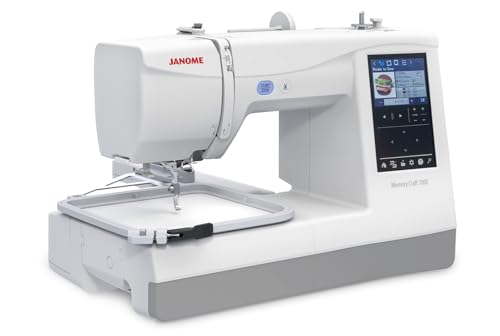
- 274 built-in designs and 11+ fonts
- USB transfer and on-screen editing tools
- Optional free arm hoops for finished garments
Best For: Users who want built-in monogram fonts and flexible editing
Beginner-Friendly Pick
PooLin EOC03 Embroidery Machine

- Two hoop sizes: 4" x 4" and 4" x 9.25"
- 130 built-in designs and 8 fonts
- WiFi transfer with starter kit and support
Best For: New embroiderers who want guided setup and flexible home projects
Compact Monogramming Starter
Brother PE535 Embroidery Machine

- Embroidery-only machine with a 4" x 4" hoop
- 80 built-in designs and 9 font styles
- USB port for importing custom designs
Best For: beginners who want simple monogramming and small embroidery projects
Beginner-Friendly Hybrid Choice

- 4.5" x 7" embroidery area for bigger layouts
- 180 built-in designs with USB import
- Automatic threader and cutter simplify setup
Best For: beginners who want embroidery plus basic sewing in one machine
Connected All-in-One Pick
Brother SE700 Sewing and Embroidery Machine

- Wireless LAN and USB support for design transfer
- 4" x 4" embroidery field with 135 designs
- Includes 103 stitches and 8 sewing feet
Best For: sewists who want monogramming and sewing in one connected machine
Wireless Home Embroidery Pick – Brother PE545 Wireless Embroidery Machine 4×4
If you want a portable embroidery machine for monogramming, the Brother PE545 is a practical home-friendly pick with wireless file transfer, built-in designs, and a simple touchscreen workflow. Its 4″ x 4″ embroidery field keeps it compact, while the embroidery-only design makes it easy to focus on personalized stitching projects.
Best For: Home users who want an embroidery-only machine for monograms, names, and small personalized projects.
Pros:
- 4″ x 4″ embroidery field is well suited to monograms and smaller designs.
- Wireless LAN and USB support make it easy to transfer embroidery files.
- 3.7″ touchscreen supports drag-and-drop positioning and design preview.
- 135 built-in designs and 10 fonts add useful personalization options.
Cons:
- Embroidery-only machine, so it does not sew.
- Smaller field limits larger design work.
- Intended for US 120V use only.
For monogramming, this model is strongest when you want straightforward personalization without a big learning curve. The built-in fonts, wireless transfer, and compact format make it a solid fit for home embroidery projects.
Commercial Powerhouse – Smartstitch S-1501 15-Needle Embroidery Machine
The Smartstitch S-1501 is a commercial-scale option if you need a portable embroidery machine for monogramming work that goes beyond hobby use. With 15 needles, a large embroidery area, and 1200 SPM max speed, it is built for bigger-volume embroidery on caps, shirts, bags, and other materials.
Best For: Small business owners and serious users who want commercial capacity for monograms and custom embroidery.
Pros:
- 15 needles and automatic color change help streamline complex jobs.
- 14″ x 20″ embroidery area supports larger commercial projects.
- 1200 SPM max speed is built for faster production.
- WiFi, USB, and included training/support make setup more manageable.
Cons:
- Very large and heavy compared with home embroidery machines.
- Not a casual starter machine for simple personal use.
- Commercial pricing and size may be more than most monogramming hobbyists need.
This machine makes sense when monogramming is part of a business workflow and you need scale, speed, and flexibility. It is less about portability in the everyday sense and more about handling serious embroidery output with support tools included.
Large-Field Monogramming Upgrade – Brother PE900 Wireless Embroidery Machine
If you want a portable embroidery machine for monogramming with more room to work, the Brother PE900 offers a 5″ x 7″ embroidery field plus wireless transfer and on-screen editing. It is an embroidery-only machine, but it adds helpful efficiency features like color sorting and jump stitch trimming for cleaner results.
Best For: Users who want a larger home embroidery area for monograms, names, and medium-size custom designs.
Pros:
- 5″ x 7″ embroidery field gives more room than compact entry models.
- Wireless LAN and Artspira support easy design transfer and custom creation.
- Color Sort and Jump Stitch Trimming help reduce manual cleanup.
- 193 built-in designs and 13 fonts support personalization.
Cons:
- Embroidery-only machine, so it does not sew.
- Larger than compact 4″ x 4″ models.
- Some Artspira-related features depend on separate products or services.
For monogramming, this is a strong step up if you want more stitching space without moving to a commercial setup. The combination of a larger field, wireless tools, and editing options makes it especially practical for personalized gifts and custom home projects.
Beginner-Friendly Home Pick – Poolin EOC05 Embroidery Machine for Beginners
The Poolin EOC05 is a practical portable embroidery machine for monogramming if you want a beginner-focused setup with a larger-than-basic work area. Its 4″ x 9.25″ embroidery area, 7″ touchscreen, and WiFi/USB design transfer are aimed at home users making personal projects and gifts.
Best For: Beginners and home DIY users who want an easy-to-learn machine for monograms and personal embroidery projects.
Pros:
- 4″ x 9.25″ embroidery area gives more room for home projects.
- 7″ touchscreen and Institch OS2 are designed for simple operation.
- WiFi and USB transfer add flexibility for importing designs.
- Starter kit includes hoops, thread, stabilizer, bobbins, and tools.
Cons:
- Embroidery-only machine, so it does not sew.
- Not intended for commercial mass production.
- Best suited to personal use rather than advanced production work.
This model stands out for buyers who want to learn embroidery without feeling overwhelmed. The included starter items and training support make it a sensible choice for monograms, clothing, accessories, and handmade gifts.
Starter Pick – Brother Skitch Single-Needle Embroidery Machine
If you want a portable embroidery machine for monogramming that keeps things approachable, the Brother Skitch is built for easy starts and small-space crafting. It uses the Artspira app for design creation, lets unpaid users import PES, PHC, PHX, or DST files, and handles embroidery up to 4″ x 4″ at speeds up to 400 spm.
Best For: Beginners who want a compact embroidery-only machine for personalizing clothes, towels, and small projects.
Pros:
- Compact footprint fits well in a small craft space.
- Artspira app support makes design creation and importing straightforward.
- Embroider designs up to 4″ x 4″ at up to 400 spm.
- Includes a 4″ x 4″ magnetic frame and starter accessories.
Cons:
- Requires the Artspira app to use the system.
- Embroidery-only machine, so it does not sew.
- Limited to a 4″ x 4″ embroidery area.
Overall, this is a practical entry-level choice if your priority is simple monogramming and custom embellishment on everyday items. It is especially appealing when you want a smaller machine that is ready for personal projects without a complicated setup.
Editing Pick – Janome Memory Craft 100e Embroidery Machine
The Janome Memory Craft 100e is a strong portable embroidery machine for monogramming if you want built-in lettering options and more on-screen control. It offers 274 built-in designs, 11+ fonts for 2- and 3-letter monograms, USB design transfer, and a 5.5″ x 5.5″ hoop for larger personalization work.
Best For: Makers who want more editing tools and built-in monogram fonts for shirts, garments, and crafts.
Pros:
- 274 built-in designs plus 11+ fonts for monogramming.
- On-screen editing includes resize, rotate, flip, combine, and more.
- USB transfer supports custom embroidery files.
- Optional free arm hoops help embroider finished garments.
Cons:
- More advanced feature set may be more than a casual beginner needs.
- No mention of wireless transfer in the supplied notes.
- Embroidery area is smaller than some multi-size machines.
This model stands out when monogramming is only part of the goal and you also want flexible editing and garment-friendly stitching. It balances portability, built-in lettering, and smart automation in a way that suits regular home use.
Beginner-Friendly Pick – PooLin EOC03 Embroidery Machine
The PooLin EOC03 is a portable embroidery machine for monogramming that aims to make first-time use less intimidating. It includes 4″ x 4″ and 4″ x 9.25″ embroidery areas, 130 built-in designs, 8 fonts, WiFi design transfer, and a beginner-focused Institch system.
Best For: New users who want flexible hoop sizes, built-in fonts, and guided support for home embroidery.
Pros:
- Two embroidery sizes add flexibility for shirts, totes, towels, and gifts.
- 130 built-in designs and 8 fonts let you start personalizing right away.
- WiFi transfer and free software support custom design creation.
- Includes a starter kit plus tutorials and one-on-one online support.
Cons:
- System is geared toward beginners, so advanced users may want more control.
- Input voltage is 110V, which may matter for some setups.
- Largest area is still limited compared with bigger embroidery machines.
For shoppers who want a guided path into monogramming, this model offers a lot of support right out of the box. The combination of dual hoop sizes, built-in content, and learning resources makes it a practical home starter.
Compact Monogramming Starter – Brother PE535 Embroidery Machine
If you want a portable embroidery machine for monogramming with a simple learning curve, the Brother PE535 keeps the focus on embroidery only. Its 4″ x 4″ hoop area, 80 built-in designs, 9 font styles, and USB port make it straightforward to personalize towels, gifts, and small fabric projects without extra sewing features to learn.
Best For: Beginners and hobbyists who want a dedicated embroidery-only machine for names, initials, and small custom projects.
Pros:
- 4″ x 4″ embroidery field is a practical size for monograms and small personalization work.
- 80 built-in designs plus 9 fonts give you ready-to-use options right away.
- USB port lets you upload and store your own embroidery designs.
- Large 3.2″ LCD touchscreen helps preview designs before stitching.
Cons:
- Embroidery only, so it does not function as a traditional sewing machine.
- 4″ x 4″ hoop limits larger lettering or wide design layouts.
- Designed for US 120V use only.
For buyers who mainly want monogramming and simple custom embroidery, the PE535 offers a focused feature set without unnecessary complexity. It is a compact choice, but the small hoop size means it is best suited to initials, names, and other modest embroidery projects.
Beginner-Friendly Hybrid Choice – D492 Embroidery Machine
The D492 is a practical portable embroidery machine for monogramming if you want more room to work and a less intimidating setup. It combines embroidery and basic sewing, adds a 4.5″ x 7″ embroidery area, includes 180 built-in designs, and uses a 7″ touchscreen to help you preview and adjust projects before stitching.
Best For: New users who want a larger embroidery area and the convenience of both embroidery and basic sewing in one machine.
Pros:
- 4.5″ x 7″ embroidery area gives more flexibility than standard small hoops.
- 180 built-in designs plus USB import expand creative options.
- 7″ color touchscreen helps preview and place designs with less guesswork.
- Automatic needle threading and thread cutting reduce setup and finishing effort.
Cons:
- Feature-rich layout may be more than casual users need for basic monograms only.
- Hybrid sewing-and-embroidery design is less specialized than an embroidery-only machine.
- Support and app/community features may not matter if you just want a simple out-of-box tool.
This model stands out if you want one machine that can handle personalization and everyday sewing tasks. The larger hoop and automation features make it appealing for beginners, but it is most useful when you plan to do more than occasional initials.
Connected All-in-One Pick – Brother SE700 Sewing and Embroidery Machine
If you want a portable embroidery machine for monogramming that also handles sewing, the Brother SE700 adds a lot of flexibility in a compact 4″ x 4″ field. It includes wireless LAN transfer, an Artspira mobile app, 135 built-in designs, 10 embroidery lettering fonts, and a 3.7″ touchscreen for previewing and editing before stitching.
Best For: Sewists who want monogramming capability plus wireless design transfer and everyday sewing functions.
Pros:
- 4″ x 4″ embroidery area is suitable for names, initials, and other small personalization.
- Wireless LAN and USB transfer make it easy to send designs to the machine.
- Artspira app support adds a convenient way to create or download patterns.
- Includes 103 sewing stitches, 8 feet, and an automatic needle threader for broader use.
Cons:
- Embroidery field is still limited to 4″ x 4″ for larger monograms or motifs.
- More features can mean a steeper learning curve than a basic embroidery-only model.
- US 120V only, so it is not intended for other power setups.
The SE700 is the most versatile option here if you want embroidery and sewing in one machine, plus wireless convenience. It is a strong pick for users who plan to monogram often but also want a machine that can handle regular sewing projects.
How We Picked the Best Portable Embroidery Machine for Monogramming
We prioritized machines that are practical for monogramming, with clear on-screen editing, built-in fonts, wireless or USB design transfer, and a hoop size that suits common personalization work. We also weighed ease of use, stitch consistency, and whether the machine is better for occasional home projects or heavier production.
Quick Comparison
Most buyers will choose between compact 4″ x 4″ machines for simple initials and smaller garments, mid-size hoops for larger names or repeated orders, and higher-capacity models if speed and volume matter more than portability. Touchscreen navigation and wireless file transfer are especially helpful if you plan to switch designs often.
Key Buying Factors for a Portable Embroidery Machine for Monogramming
Hoop Size and Embroidery Field
A 4″ x 4″ hoop works well for basic monograms and baby items, while larger fields make it easier to stitch oversized initials, multi-line text, or designs on tote bags and jackets. If you want more versatility, look for at least a mid-size embroidery area.
Built-In Fonts and Design Tools
For monogramming, built-in lettering matters as much as design count. Look for multiple font styles, text editing, and simple alignment tools so you can place initials cleanly without relying on external software for every project.
Design Transfer and Connectivity
Wireless LAN, Bluetooth, and USB support can save time when you are testing layouts or adding custom names. If you work from mobile devices or download frequent designs, smoother transfer options are a major convenience.
Ease of Use
Beginners should favor clear touchscreens, guided menus, and easy threading. A Portable Embroidery Machine for Monogramming should make setup fast enough that you can move from idea to stitched result without a steep learning curve.
Speed and Output
If you only personalize gifts occasionally, moderate speed is fine. If you expect to monogram in batches, look for faster stitch rates, better stability, and a machine built to handle longer sessions without constant interruption.
Who Should Buy Which Portable Embroidery Machine for Monogramming?
Choose a compact beginner model if you mainly want initials on towels, gifts, and children’s items. Pick a mid-size wireless embroidery machine if you want more room for names and decorative lettering. Consider a higher-end multi-needle or larger-area option if you plan to monogram frequently, take custom orders, or want faster turnaround.
For most buyers, the best choice is the machine that balances hoop size, font options, and simplicity with the kind of monogramming you will actually do most often.