Professional makers need labeling tools that keep pace with production, packaging, inventory, and shipping without adding ink costs or unnecessary setup.
We selected 10 thermal label printers across desktop, portable, Bluetooth, and commercial-style formats so you can match print quality, label size, connectivity, and workflow demands to your workspace.
Best 10 Thermal Label Printers for Professional Makers Picks for 2026
Best Commercial Workhorse
Rollo USB Shipping Label Printer

- Prints 4x6 labels at up to one per second
- Supports Windows, Mac, and major marketplaces
- Handles shipping and custom labels up to 4.1 inches wide
Best For: High-volume makers shipping orders and printing varied monochrome labels
Best for Durable Labels
NIIMBOT M2 Thermal Transfer Label Maker

- Uses 300 DPI thermal-transfer printing
- Labels are designed for long-term, harsh-condition use
- Connects to phones and PCs with feature-rich app support
Best For: Makers labeling equipment, inventory, cables, or items exposed to moisture and temperature changes
Best for High-Speed Office Labels
Brother QL-800 Professional Printer

- Prints up to 93 labels per minute at 300 DPI
- Supports black-and-red printing with DK-2251 media
- Includes auto-cutting and Plug & Label computer integration
Best For: Busy maker workspaces producing compact organization, product, and office labels
Best Wireless Shipping Value
JADENS Bluetooth Thermal Label Printer

- Offers Bluetooth and USB connectivity
- Supports 4x6, roll, and fanfold labels
- Works with major marketplaces and shipping platforms
Best For: Small maker businesses shipping from computers or mobile devices
Compact Professional Workhorse

- 44-labels-per-minute monochrome printing
- Supports paper, film, and continuous labels up to 2.4 inches
- USB, P-touch Editor, and Microsoft application integration
Best For: Desktop product, storage, and organization labels
Flexible Wireless Shipping Station
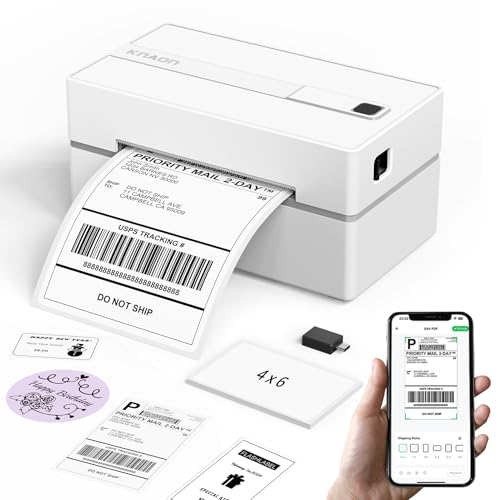
- Bluetooth app printing and USB connectivity
- Supports major marketplaces and 1.5- to 4.2-inch media
- Includes extensive templates, icons, and fonts
Best For: Mobile-friendly shipping and custom label workflows
Multi-Platform Shipping Specialist

- Bluetooth and USB printing across major operating systems
- Supports 1- to 4.6-inch labels and major marketplaces
- Up to 72 4x6 labels per minute
Best For: Home businesses and makers handling recurring shipments
Wireless Shipping Workhorse
Rongta 4x6 Bluetooth Label Printer

- Bluetooth printing through the RONGTA app
- USB support for Windows and macOS computers
- Inkless 203 DPI printing for 4x6 labels
Best For: Makers and small businesses shipping packages from home
Creative Label Studio
NIIMBOT B21 Bluetooth Label Maker

- Handles 0.8- to 2-inch label widths
- App offers templates, fonts, images, and batch printing
- Rechargeable battery provides up to four hours of work
Best For: Crafters and small retailers making compact product labels
Platform-Friendly Fulfillment Pick

- Bluetooth and USB connectivity across major platforms
- Supports Windows, macOS, and Linux
- Fast 203 DPI 4x6 printing with automatic calibration
Best For: Multi-platform sellers managing regular shipping volume
Best Commercial Workhorse – Rollo USB Shipping Label Printer
For professional makers who need dependable output for orders, the Rollo USB is one of the more versatile thermal label printers for professional makers. It connects to Windows or Mac computers by USB, prints one 4×6 label per second, and supports label widths from 1.57 to 4.1 inches.
Best For: Makers shipping products from online marketplaces while also creating barcodes, product labels, QR stickers, and other custom labels.
Pros:
- Fast 150 mm/s printing with a 203 DPI print head.
- Works with Windows and Mac, plus major shipping platforms and marketplaces.
- Supports both standard shipping labels and narrower custom labels.
- Inkless operation eliminates ink and toner purchases.
Cons:
- USB connectivity is wired rather than wireless.
- It prints monochrome labels only.
The Rollo is a strong all-around choice when shipping volume and platform compatibility matter most. Its included Rollo Ship app adds shipping-focused workflow tools, while the adjustable label width makes it useful beyond package labels.
Best for Durable Labels – NIIMBOT M2 Thermal Transfer Label Maker
The NIIMBOT M2 stands apart from conventional thermal label printers for professional makers by using thermal-transfer technology. Its 300 DPI output and specialized labels are designed for longer-lasting identification in workshops, labs, storage areas, and other demanding environments.
Best For: Professional makers creating durable labels for inventory, cables, jewelry, laboratory items, freezer storage, or outdoor use.
Pros:
- Thermal-transfer labels are described as waterproof, oil-proof, scratch-resistant, chemical-resistant, and suitable for temperatures from -4°F to 248°F.
- 300 DPI resolution produces clear text and images.
- Supports iOS, Android, and PC connectivity, with Bluetooth connections for multiple phones.
- The app supports templates, logos, barcodes, QR codes, images, and spreadsheets.
Cons:
- Only M2 thermal-transfer labels are compatible; standard NIIMBOT thermal labels will not work.
- Its 20–50 mm label-width range is narrower than a typical 4×6 shipping printer.
The M2 is best viewed as a durable identification system rather than a general shipping-label machine. The required label media is an important ongoing consideration, but the transfer-printing approach is valuable when labels must remain legible for years or withstand harsh conditions.
Best for High-Speed Office Labels – Brother QL-800 Professional Printer
The Brother QL-800 is a practical pick among thermal label printers for professional makers who need fast desktop labeling and occasional visual emphasis. It prints up to 93 labels per minute at 300 DPI and can produce black-and-red labels when used with the specified DK-2251 media.
Best For: Makers organizing products, files, shipping materials, name badges, food labels, or warehouse stock at a busy workstation.
Pros:
- High-speed output of up to 93 labels per minute.
- 300 DPI printing supports crisp professional labels.
- Black-and-red printing is available with Brother DK-2251 labels.
- Built-in auto-cutter and Plug & Label support simplify finishing and computer-based printing.
Cons:
- It uses Brother Genuine DK pre-sized labels and continuous tape rather than arbitrary label rolls.
- USB connectivity limits it to a wired computer setup.
- The maximum media width is about 2.44 inches, so it is not a standard 4×6 shipping-label printer.
The QL-800 is a strong fit for rapid organization and branding tasks where compact labels are enough. Its black-and-red capability gives professional makers more visual flexibility than a typical monochrome thermal printer, provided they are comfortable using compatible Brother media.
Best Wireless Shipping Value – JADENS Bluetooth Thermal Label Printer
The JADENS JD268BT offers a flexible entry point for professional makers who want thermal label printers for professional makers with both wireless and USB options. It supports roll and fanfold media, prints labels from 1.57 to 4.1 inches wide, and is designed for common shipping platforms and marketplaces.
Best For: Small online businesses and makers who ship from Windows, Mac, or mobile devices and want a flexible 4×6-capable printer.
Pros:
- Supports Bluetooth printing as well as USB connections.
- Works with roll and fanfold labels in several sizes, including 4×6.
- Compatible with major shipping services, marketplaces, and shipping software.
- Inkless 203 DPI printing avoids toner and ink mess.
Cons:
- iOS and Android printing requires the JADENS app rather than direct Bluetooth printing.
- The printer requires label identification and calibration when changing labels.
- At 203 DPI, it offers less resolution than the 300 DPI options in this roundup.
The JADENS is appealing when wireless flexibility and broad label compatibility are more important than maximum resolution. Its platform support and 4×6 capability make it well suited to growing maker shops, while the setup and calibration steps are worth planning for.
Compact Professional Workhorse – Brother QL-600
For professional makers who need dependable thermal label printers for professional makers, the Brother QL-600 is a practical desktop option for organized, high-resolution monochrome labeling. It prints paper and film labels up to 2.4 inches wide, uses no ink or toner, and connects to a computer by USB.
Best For: Desktop makers creating product labels, storage labels, banners, and Microsoft-based workflows.
Pros:
- Prints up to 44 labels per minute with 300 x 600 dpi resolution.
- Supports continuous tape, film labels, and pre-sized paper labels up to 2.4 inches wide.
- Automatic cutter handles banners up to 3 feet long.
- Works with P-touch Editor, Microsoft Word, Excel, and Outlook on Windows, Mac, and Linux.
Cons:
- USB connectivity limits convenient mobile printing.
- Monochrome output is not suitable for color product labels.
- Uses Brother Genuine DK rolls, which may limit media choices.
The QL-600 is a strong fit when print quality, speed, and compact desktop operation matter more than wireless access or wide-format labels. Its included sample roll and software make it easy to start labeling quickly.
Flexible Wireless Shipping Station – KNAON Bluetooth 4×6 Printer
The KNAON Bluetooth printer is a versatile choice among thermal label printers for professional makers, especially those selling through online marketplaces. It supports wireless printing through the FlashLabel Pro app, USB connections, and label widths from 1.5 to 4.2 inches.
Best For: Makers who need shipping, barcode, price, thank-you, and small custom labels from phones, tablets, or computers.
Pros:
- Supports Bluetooth through the FlashLabel Pro app plus USB connectivity for Windows, macOS, ChromeOS, and Linux.
- Works with Etsy, Shopify, USPS, UPS, Amazon, eBay, and other major platforms.
- Offers more than 3,000 templates, 5,000 icons, and 100 fonts in the app.
- Compact design supports paper widths from 1.5 to 4.2 inches and prints up to 180 mm/s.
Cons:
- Bluetooth printing requires the FlashLabel Pro app rather than a direct device connection.
- Shipping-platform labels must be saved as PDFs and imported into the app.
- Monochrome thermal printing cannot produce conventional color labels.
Choose the KNAON when wireless flexibility and broad template support are priorities. Its app-based workflow is particularly useful for makers who move between mobile devices and desktop systems.
Multi-Platform Shipping Specialist – Phomemo 241BT
The Phomemo 241BT combines Bluetooth and USB printing in a compact thermal printer aimed at home businesses and professional makers. It handles label widths from 1 to 4.6 inches and works with common selling and shipping platforms, making it a flexible option for thermal label printers for professional makers.
Best For: Small businesses and makers printing shipping labels, barcodes, QR codes, forms, and marketplace orders.
Pros:
- Prints wirelessly through the Labelife app and connects by USB to Windows, Mac, ChromeOS, and Linux.
- Supports label widths from 1 to 4.6 inches and works with Amazon, Etsy, Shopify, eBay, UPS, USPS, and FedEx.
- Prints at up to 150 mm/s, producing up to 72 sheets of 4×6 labels per minute.
- Handles text, barcodes, QR codes, forms, and pre-made templates without ink or toner.
Cons:
- Printing is black and white only unless compatible thermal color paper is purchased.
- Phone and tablet printing requires the Labelife app.
- Computer setup requires downloading the appropriate driver.
The 241BT is well suited to makers who want one printer for shipping and general business labels across several operating systems. Its broad media range and high stated throughput make it especially practical for recurring order fulfillment.
Wireless Shipping Workhorse – Rongta 4×6 Bluetooth Label Printer
For professional makers who need to send products regularly, the Rongta RP425-PK is a practical option among thermal label printers for professional makers. It supports 4×6 shipping labels, Bluetooth printing from mobile devices, and USB printing from Windows or macOS computers, with inkless 203 DPI output.
Best For: Home-based makers and small businesses printing shipping labels from phones, tablets, or computers.
Pros:
- Supports wireless Bluetooth printing through the RONGTA app.
- USB connectivity supports PC and laptop printing.
- Prints inkless monochrome labels at 203 x 203 DPI.
- Supports multiple label sizes, with a maximum media size of 4.1 x 9.5 inches.
Cons:
- Prints monochrome only.
- Printing from a computer requires downloading the driver.
- Its listed connectivity is limited to Bluetooth and USB.
The Rongta is a sensible shipping-focused pick if you want a compact, pink printer with both mobile and computer workflows. Its 4×6 support and included USB cable make it especially useful for makers handling routine package fulfillment.
Creative Label Studio – NIIMBOT B21 Bluetooth Label Maker
The NIIMBOT B21 suits professional makers who need more than shipping labels. As one of the more design-oriented thermal label printers for professional makers, it handles label widths from 0.8 to 2 inches and pairs with an app offering templates, fonts, image materials, image recognition, and batch printing.
Best For: Crafters, jewelry sellers, clothing businesses, retailers, and makers creating small product, barcode, price, ingredient, or gift labels.
Pros:
- Supports labels from 0.8 to 2 inches wide.
- App includes 20+ fonts, 1,000+ image materials, templates, and batch printing.
- Image recognition can convert photographed text into editable text.
- Rechargeable battery supports up to four hours of work per charge.
Cons:
- Maximum media width is 2 inches, so it is not intended for standard 4×6 shipping labels.
- Bluetooth connectivity is listed for smartphones rather than computer platforms.
- Printing is monochrome at 203 DPI.
The B21 is a strong fit when presentation and label variety matter more than large shipping formats. Its portable, app-driven workflow gives makers useful creative controls for organizing products, packaging, and retail displays.
Platform-Friendly Fulfillment Pick – HKHKPI N40 4×6 Label Printer
The HKHKPI N40 is aimed at makers who need faster, platform-compatible shipping workflows. It combines Bluetooth for iOS and Android devices with USB support for Windows, macOS, and Linux, making it a flexible choice among thermal label printers for professional makers.
Best For: Small businesses and home sellers printing 4×6 shipping labels across major marketplaces and shipping services.
Pros:
- Prints 4×6 labels at speeds up to 150 mm/s, with the listing stating up to 55 sheets per minute.
- Supports Bluetooth mobile printing and USB desktop printing.
- Compatible with Windows, macOS, and Linux through downloadable drivers.
- Works with platforms including Amazon, eBay, Etsy, Shopify, USPS, UPS, FedEx, and others.
Cons:
- Label size should be recalibrated whenever the label stock changes.
- Prints monochrome at 203 DPI.
- Bluetooth printing requires the Nada Print app.
The N40 is a practical fulfillment choice for makers selling through multiple marketplaces. Automatic calibration, smart paper ejection, included sample labels, and broad platform compatibility help support a streamlined shipping station.
How We Picked the Best Thermal Label Printers for Professional Makers
We focused on the features that matter most in real maker workflows: supported label formats, connection options, printing speed, software compatibility, portability, and the ongoing cost of labels. The lineup includes dedicated 4×6 shipping printers, compact label makers for products and storage, and versatile desktop units for office or studio use.
Because professional makers often switch between packaging, inventory, organization, and direct-to-customer fulfillment, we also considered setup simplicity and how easily each printer can fit into a small workspace. Thermal printing eliminates ink or toner replacement, but the right label ecosystem and device compatibility still affect long-term value.
Quick Comparison
| Best For | Look For | Recommended Type |
|---|---|---|
| Frequent shipping | 4×6 support, reliable connectivity, fast output | Commercial or desktop shipping printer |
| Product and storage labels | Compact design, varied label widths, easy software | Bluetooth label maker |
| Office and studio organization | Pre-sized rolls, USB setup, clean monochrome printing | Desktop label printer |
| Mobile or shared workspaces | Battery-friendly operation and wireless control | Portable Bluetooth model |
Key Buying Factors for Thermal Label Printers for Professional Makers
Label Size and Purpose
Choose a 4×6 printer if you regularly ship parcels and need standard carrier labels. For bins, barcodes, product names, price tags, or craft packaging, a narrower label maker may offer better flexibility and less waste.
Connectivity and Compatibility
USB models are dependable for a dedicated computer station. Bluetooth models are more convenient for phones, tablets, and shared maker spaces, but confirm operating-system support and whether your preferred shipping or design software works with the printer.
Speed, Resolution, and Daily Volume
Higher speed matters when processing batches of orders, while consistent resolution is important for small text, barcodes, and detailed product information. Occasional users can prioritize ease of setup over maximum throughput.
Consumables and Operating Cost
Direct thermal printers do not require ink, but they do require compatible rolls or sheets. Check label availability, proprietary-roll requirements, adhesive quality, and storage conditions. Direct thermal labels can fade with heat, sunlight, or extended exposure.
Who Should Buy Which Thermal Label Printers for Professional Makers?
Choose a dedicated 4×6 shipping printer if fulfillment is central to your business. It is the most efficient choice for online sellers and makers shipping several packages per week. Pick a compact Bluetooth label maker for product labels, inventory, bins, and craft-room organization, especially when you want to print from a mobile device.
A USB desktop model is a strong fit for a permanent studio or office station where predictable, computer-based printing matters most. If your work moves between markets, workshops, and production spaces, prioritize a portable wireless printer. Finally, makers with mixed needs should favor a model supporting multiple label sizes and straightforward software, even if its peak speed is lower than a shipping-focused unit.