UV DTF printing can help a small shop add full-color graphics to items that are difficult to print directly. But a listing that says “UV DTF” does not always describe the same workflow: some machines produce adhesive transfers, while others print straight onto objects.
These seven options span A3 and A4 formats, integrated laminating setups, and compact flatbed-style machines. Use the buying guide below to narrow the field by what you sell, the space you have, and the work you are prepared to do each day.
Best 7 Uv Dtf Printers for Small Business Picks for 2026
Best Integrated Workflow
PLK A3 Dual XP600 UV DTF Printer

- Printing and laminating in one machine
- 11.8-inch print area; dual XP600 heads
- White-ink circulation and automatic cleaning
Best For: Shops seeking an integrated transfer workflow
Best 13-Inch Starter Kit

- 13-inch maximum print width
- Automatic laminating; DX7 printhead
- Film, six 500 ml inks, and software included
Best For: Windows-based shops starting 13-inch transfer production
Best Flatbed Features

- Vacuum platform and auto-height adjustment
- White-ink mixing and self-cleaning
- Verify laminator and printhead configuration
Best For: Buyers who want flatbed features and can verify specifications
Best Windows-Friendly Bundle

- 13-inch maximum print width
- A/B film, inks, and RIIN software included
- Automatic cleaning; Windows 7/10/11 support
Best For: Windows-based teams making transfer stickers and labels
Compact Flatbed Option

- A4 flatbed model
- Specified 2880 x 1440 dpi
- Bottle holder included
Best For: Small shops customizing listed items such as phone cases and cups
Integrated Sticker Workflow
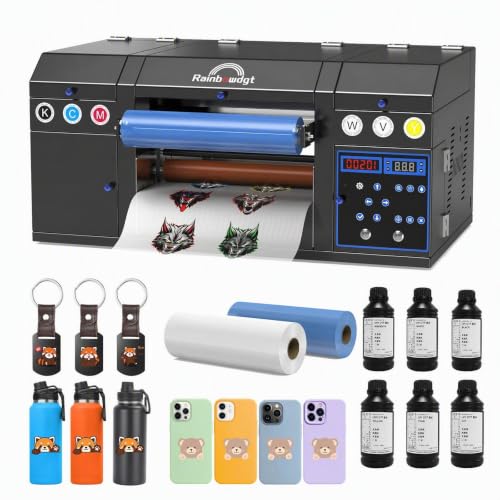
- Prints and laminates in one unit
- Dual XP600 printheads
- Windows-only included software
Best For: Shops producing UV DTF decals and labels across multiple materials
Vacuum-Platform Pick

- Vacuum platform listed
- Bottle holder listed
- Weighs 110 pounds
Best For: Buyers seeking an A4 UV printer with object-holding fixtures
Best Integrated Workflow – PLK A3 Dual XP600 UV DTF Printer
Among uv dtf printers for small business, this PLK model suits shops that want printing and laminating in one machine. Its 11.8-inch print area, dual XP600 printheads, and included A/B film and inks provide a starting point for making transfers for hard surfaces.
Best For: Small shops prioritizing an integrated print-and-laminate workflow and fine-detail transfers.
Pros:
- Integrated laminating eliminates the need for a separate laminator.
- Dual XP600 printheads support a stated resolution up to 2880 × 1440 dpi.
- White-ink stirring and circulation plus automatic cleaning help with routine upkeep.
Cons:
- At 151 pounds, it requires a substantial, stable workspace.
- USB connectivity and PC compatibility may limit placement options.
The included films, inks, software, and printer holder make the package relatively complete. Check that its 11.8-inch print width and footprint suit your production plans.
Best 13-Inch Starter Kit – SYLCYS A3+ DX7 UV DTF Printer
If you are comparing uv dtf printers for small business and need a wider transfer format, this SYLCYS model offers a stated 13-inch maximum print width. It combines a DX7 printhead with automatic laminating and includes A/B film rolls, six 500 ml ink bottles, and RIIN software.
Best For: Windows-based shops wanting a bundled 13-inch transfer-printing setup.
Pros:
- Automatic laminating is built into the printer.
- Included film rolls, inks, and software cover key startup supplies.
- Software supports Windows 7, 10, and 11, with setup videos offered.
Cons:
- The stated printhead warranty is three months, shorter than the one-year parts warranty.
- At 38 kg, it is not especially easy to move.
The listed output of 1.5–2 square meters per hour may appeal to shops planning repeat transfer runs. Confirm that your workstation can accommodate its weight and USB-connected, Windows-based setup.
Best Flatbed Features – MZK H300-X A3 UV DTF Pro
This MZK listing stands out among uv dtf printers for small business for its advertised flatbed features: a vacuum platform, infrared auto-height adjustment, white-ink mixing, and self-cleaning. The supplied notes also describe a dual-XP600 UV DTF printer with a laminator, though the package list calls it an A3 UV printer.
Best For: Buyers interested in flatbed handling features who can verify the exact transfer workflow before purchase.
Pros:
- Vacuum platform helps hold material in place during printing.
- Infrared height adjustment and self-cleaning can reduce manual setup and upkeep.
- Package lists six 500 ml UV inks, a bottle holder, software, and instructional videos.
Cons:
- The supplied listing mixes flatbed UV printing and UV DTF descriptions; confirm whether laminating and transfer-film supplies are included.
- Listed printhead specifications differ between the title and bullet points.
Its handling and maintenance features are promising, but the inconsistent product details matter. Ask the seller to confirm the printhead configuration, included laminator, and film requirements before treating it as a complete UV DTF setup.
Best Windows-Friendly Bundle – YXSM A3+ UV DTF Printer
For buyers reviewing uv dtf printers for small business, the YXSM A3+ offers a stated 13-inch maximum print width, a DX7 printhead, and English-language software supporting Windows 7, 10, and 11. The bundle includes A/B film rolls, six 500 ml ink bottles, RIIN software, and backup parts.
Best For: Small Windows-based teams seeking a bundled printer for UV transfer stickers and labels.
Pros:
- Integrated printing and laminating streamline the transfer process.
- Automatic software-controlled cleaning reduces routine manual cleaning.
- Included film, inks, and setup support videos help with initial setup.
Cons:
- The 38 kg machine needs a sturdy work surface.
- Windows-focused software may not suit Mac-based workflows.
This is a practical option if 13-inch transfers and a Windows workflow fit your shop. Plan for the stated operating conditions of 20–45°C and 20%–80% humidity, and follow the seller’s maintenance instructions during downtime.
Compact Flatbed Option – L805 A4 UV Flatbed Printer
For buyers comparing uv dtf printers for small business, this A4 L805 model is worth a look if a flatbed printer with a bottle holder fits your planned projects. The listing specifies 2880 x 1440 dpi resolution and names phone cases, glass cups, and stickers as intended uses.
Best For: Small shops seeking an A4 flatbed setup for the listed custom-item projects.
Pros:
- Specified 2880 x 1440 dpi resolution.
- Includes a bottle holder.
- USB contains instructions and software, with installation help offered by the seller.
Cons:
- Instructions and software are supplied on USB, so setup depends on accessing those files.
- The supplied details do not describe an integrated laminator.
Check whether its A4 format and flatbed workflow suit your products before treating it as an alternative to a dedicated transfer-sticker setup.
Integrated Sticker Workflow – RAINBOWDGT A3 UV DTF Printer
Among uv dtf printers for small business, this RAINBOWDGT model stands out for combining A3 printing and laminating in one unit. Its dual XP600 printheads, white-ink agitation, and automatic cleaning are geared toward repeat decal and label production.
Best For: Businesses making UV DTF decals for a range of materials and wanting printing and laminating in one workflow.
Pros:
- Integrated printing and laminating avoids a manual film-transfer step between those processes.
- Dual XP600 printheads support 12-channel CMYKWV printing.
- Includes A and B films, UV ink, software tutorials, and accessories.
- White-ink agitation and automatic cleaning are designed to reduce nozzle-clogging issues.
Cons:
- Included software is specified as Windows-only.
- At 34.2 inches wide, the unit needs more room than a compact desktop printer.
This is the clearest dedicated sticker-production choice of the three, provided your workspace and Windows setup fit its requirements.
Vacuum-Platform Pick – A4 UV XP600 Printer
If you are researching uv dtf printers for small business but also considering an A4 UV printer for custom objects, this XP600 model lists a vacuum platform and bottle holder. Its title identifies projects including phone cases, glass cups, stickers, wood, acrylic, leather, ABS, and PVC.
Best For: Buyers who specifically want an A4 UV setup with both a vacuum platform and bottle holder.
Pros:
- Lists a vacuum platform and bottle holder.
- Names a variety of intended project materials and items.
- Seller offers help if the USB installation instructions cannot be opened or used.
Cons:
- Listed weight is 110 pounds, making placement an important consideration.
- The supplied details do not specify a built-in laminator or a numerical resolution.
Its fixtures may appeal to object-customization shops, but confirm the exact sticker-transfer workflow before buying it specifically for UV DTF decals.
How We Picked the Best Uv Dtf Printers for Small Business
We compared the seven selected listings around decisions that matter to a small shop: transfer printing versus direct-to-object printing, stated print format, laminating requirements, included supplies, and maintenance features such as automatic cleaning and white-ink mixing. Product titles alone cannot establish print speed, durability, software compatibility, or total operating cost. Confirm those details with the seller before ordering, especially when a listing uses both “flatbed” and “UV DTF” terminology.
Quick Comparison: Match the Machine to the Job
The PLK A3 and RAINBOWDGT A3 listings describe dual-XP600 transfer-oriented setups with laminating capability; check whether laminating is built in and what additional supplies each package needs. The A3 Pro dual-XP600 listing also advertises an all-in-one setup with a laminator. The A3+ DX7 and A3+ UV DTF listings emphasize transfer printing and bundled materials, but verify the full laminating workflow before treating either bundle as ready to produce finished stickers.
The L805 flatbed and A4 vacuum-platform options emphasize printing on objects such as phone cases and drinkware. They may suit direct printing better than a business whose main product is peel-and-apply UV DTF transfers. Ask for a demonstration of your intended job, not just a sample made on a different material.
Key Buying Factors for Uv Dtf Printers for Small Business
Workflow and Printable Area
For transfers, clarify how the printer uses A film and B film, whether a laminator is included, and the maximum usable print width—not merely the A3, A3+, or A4 label. For direct printing, check object height clearance, fixtures, and whether curved items need a separate attachment. Neither workflow is automatically a substitute for the other.
Ink, Maintenance, and Running Costs
White ink can settle, so ask what cleaning and agitation are automatic and what daily manual steps remain. Price replacement printheads, ink, films, and waste-ink components. Estimate cost per sellable item using realistic spoilage and setup waste rather than ink price alone. Plan for appropriate ventilation and follow the ink and equipment safety instructions.
Software and Seller Support
Confirm your computer’s operating system, RIP software license, color-management options, installation help, warranty terms, and parts availability. Request recent samples on the surfaces you sell and clear instructions for cleaning and shutdown. If your orders depend on consistent color or deadlines, dependable support may matter more than an advertised resolution figure.
Who Should Buy Which Uv Dtf Printers for Small Business?
Choose an A3 or A3+ transfer setup if you make decals for varied finished products and want to apply graphics after printing. Prioritize a clearly documented laminating workflow if you want fewer separate pieces of equipment. Consider an A4 direct-printing machine when your work centers on smaller, compatible objects and you can accommodate fixtures and surface preparation. Before committing to any of these Uv Dtf Printers for Small Business, ask the seller to confirm the exact package contents and produce a sample using your artwork and target material.