When it comes to your creative projects, having the right 11×17 printer can make all the difference. You want something that offers quality, versatility, and efficiency. From detailed craft prints to vibrant designs, the right printer can enhance your work. But with so many options available, which ones truly stand out? Let’s explore the top printers that cater specifically to crafters like you.
Epson Workforce Pro WF-7310 Wireless Wide-Format Printer

If you’re a crafter looking for a reliable printer that can handle larger projects, the Epson Workforce Pro WF-7310 is an excellent choice. This wireless wide-format printer supports print sizes up to 13″ x 19″ and features auto double-sided printing for max 11″ x 17″ sheets. With a 500-sheet capacity and fast printing speeds of 25 black and 12 color ISO ppm, you’ll breeze through high-volume tasks. Its PrecisionCore technology guarantees sharp text and vivid colors, while the Epson Smart Panel App simplifies setup and control. Designed for durability, this printer meets your crafting needs effortlessly.
Best For: Crafters and small business owners needing a reliable printer for large-format projects and high-volume printing tasks.
Pros:
- Fast Printing: Delivers 25 black and 12 color ISO pages per minute, perfect for quick turnaround on projects.
- Versatile Print Sizes: Capable of printing up to 13″ x 19″ and automatic double-sided printing for 11″ x 17″ sheets.
- User-Friendly: The Epson Smart Panel App allows for easy setup and control directly from smart devices.
Cons:
- Ink Exclusivity: Designed to work only with Epson Genuine Cartridges, limiting options for ink replacements.
- Initial Cost: The upfront investment may be higher compared to standard printers.
- Size and Weight: Being a wide-format printer, it may require more space compared to smaller models.
Brother INKvestment 6560 Wireless Color Inkjet All-in-One Printer (MFC-J6560DW)

The Brother INKvestment 6560 Wireless Color Inkjet All-in-One Printer (MFC-J6560DW) stands out as an ideal choice for crafters who need versatility and efficiency in their projects. With capabilities to print, copy, scan, and fax up to 11”x17”, it handles various tasks effortlessly. The 2.7” color touchscreen simplifies operation, while the 250-sheet tray and 50-page automatic document feeder boost productivity. Enjoy speedy prints at up to 31 pages per minute in black and 30 in color. Plus, with wireless and cloud connectivity, you can print directly from your mobile devices, making crafting even more convenient.
Best For: Crafters and small businesses seeking a versatile, efficient all-in-one printer for various printing tasks.
Pros:
- High productivity: Fast print speeds of up to 31 ppm in black and 30 ppm in color, along with a 250-sheet paper tray and 50-page ADF.
- Versatile functionality: Capable of printing, copying, scanning, and faxing up to 11”x17” media.
- Convenient connectivity: Wireless printing and scanning from mobile devices as well as direct cloud printing capabilities.
Cons:
- Size and weight: At 44.1 pounds, it may be cumbersome for some users to move or reposition.
- Ink costs: While the printer includes high-yield cartridges, ongoing ink expenses may add up without a subscription service.
- Limited touch screen size: The 2.7” touchscreen may not provide the most user-friendly experience for all tasks compared to larger screens.
Epson EcoTank ET-15000 Wireless Color All-in-One Printer

Crafters looking for a reliable and versatile printing solution will appreciate the Epson EcoTank ET-15000 Wireless Color All-in-One Printer. This supertank printer offers cartridge-free printing with supersized ink tanks, allowing you to print up to 6,000 pages per bottle set—saving you money and time. It handles media sizes up to 13 x 19 inches, perfect for your creative projects. With wireless connectivity and voice activation, printing from your mobile device is a breeze. Plus, its energy-efficient design and recycling options make it an eco-friendly choice. Enjoy high-quality prints with a resolution of 4800 x 1200 dpi!
Best For: Crafters and small businesses seeking a cost-effective and versatile all-in-one printing solution for high-quality prints and creative projects.
Pros:
- Cartridge-free printing significantly reduces printing costs and increases convenience with supersized ink tanks.
- Versatile media handling allows for printing on various sizes up to 13 x 19 inches, making it ideal for creative projects.
- Wireless and voice-activated printing provides easy connectivity and hands-free operation from mobile devices.
Cons:
- Initial investment may be higher compared to traditional cartridge printers.
- Size and weight could be a drawback for those with limited space.
- Limited warranty of only one year or 50,000 sheets may not be sufficient for heavy users.
Brother INKvestment 6960 Wireless Color Inkjet All-in-One Printer
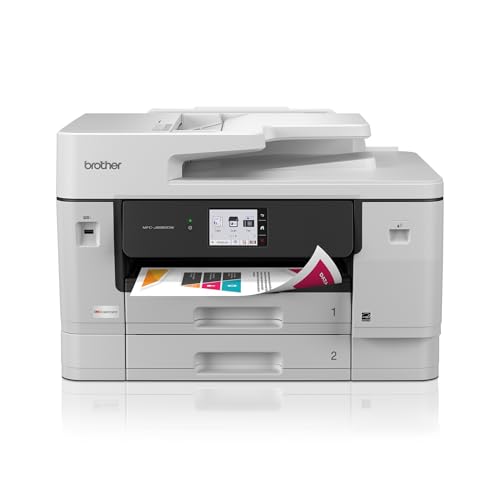
For those who need versatility in their printing projects, the Brother INKvestment 6960 Wireless Color Inkjet All-in-One Printer stands out with its ability to handle media up to 11” x 17”. With impressive print speeds of up to 31 ppm in black and 30 ppm in color, you won’t be waiting long for your creations. The 500-sheet capacity and automatic duplex printing make it a breeze to produce professional-quality documents. Plus, with wireless connectivity and the Brother Mobile Connect app, managing your print tasks from your devices is simple. Enjoy a 2-year warranty and a 30-day return policy for peace of mind.
Best For: The Brother INKvestment 6960 Wireless Color Inkjet All-in-One Printer is best for small to medium-sized businesses or home offices that require versatile printing capabilities and high-volume output.
Pros:
- High print speeds of up to 31 ppm black and 30 ppm color, allowing for quick document production.
- Large paper capacity with a 500-sheet main tray and automatic duplex printing for efficient workflow.
- Wireless connectivity and mobile app support enable easy printing and management from various devices.
Cons:
- Relatively heavy at 51.4 lbs, making it less portable compared to lighter models.
- Initial ink cartridge yield may be lower than expected, requiring more frequent replacements for color cartridges.
- Best Sellers Rank indicates it may not be as popular as other models, potentially affecting availability and support.
HP OfficeJet Pro 9720 All-in-One Color Inkjet Printer
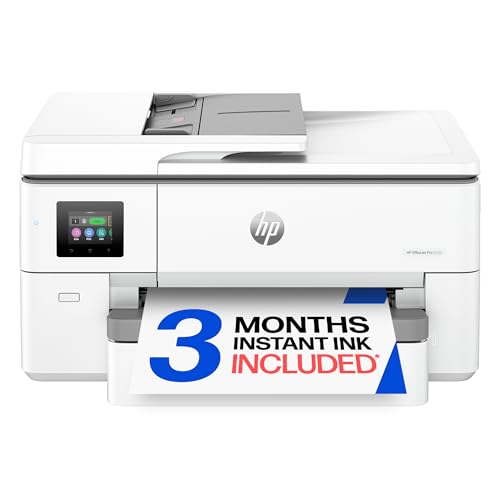
Designed with versatility in mind, the HP OfficeJet Pro 9720 All-in-One Color Inkjet Printer is perfect for anyone who needs to produce vibrant, high-quality prints up to 11×17 inches. With print speeds of 22 ppm for black and 18 ppm for color, you won’t waste time waiting for your projects. The automatic duplex printing and 250-sheet input tray enhance efficiency, while the 2.7-inch touchscreen simplifies navigation. Plus, with wireless connectivity and an HP app, you can print directly from your smartphone. Enjoy peace of mind with HP Wolf Pro Security and a sustainable design made from over 30% recycled plastic.
Best For: Professionals and small businesses that require versatile, high-quality printing solutions for documents up to 11×17 inches.
Pros:
- Fast print speeds of up to 22 ppm for black and 18 ppm for color.
- Wireless connectivity and mobile printing capabilities through the HP app.
- Automatic duplex printing and a 250-sheet input tray for increased efficiency.
Cons:
- Initial setup may require technical knowledge for optimal wireless connectivity.
- Limited print media options may not suit all specialized printing needs.
- The printer’s size may be too large for compact office spaces.
Epson EcoTank Photo ET-8550 Wireless Wide-Format All-in-One Printer

When you need a versatile printer for your crafting projects, the Epson EcoTank Photo ET-8550 stands out with its ability to handle a maximum media size of 13 x 19 inches, making it perfect for larger prints and creative designs. This all-in-one inkjet printer offers vibrant 5760 x 1440 DPI resolution and prints color pages at 12 ppm. With cartridge-free printing and Claria ET Premium inks, you’ll save up to 80% on ink costs—allowing for thousands of pages printed over two years. Plus, its user-friendly touchscreen and mobile connectivity make it a breeze to operate from anywhere!
Best For: The Epson EcoTank Photo ET-8550 is best for photographers, crafters, and small businesses looking for a cost-effective, high-quality printing solution for large-format projects.
Pros:
- Cartridge-free printing significantly reduces ink costs, saving users up to 80%.
- High print resolution of 5760 x 1440 DPI ensures vibrant colors and sharp text for professional-quality prints.
- Versatile media handling supports a variety of paper types and sizes, including cardstock and borderless prints up to 13 x 19 inches.
Cons:
- Initial investment may be higher compared to traditional printers due to the EcoTank system.
- Weight and size may not be suitable for those with limited space or for portability.
- Requires internet connection for full functionality of mobile features, limiting usability in offline environments.
Epson Expression Photo XP-980 Wireless Wide-Format Printer

The Epson Expression Photo XP-980 Wireless Wide-Format Printer is an ideal choice for crafters who demand exceptional print quality and versatility. With its 6-color Claria ink system, you’ll enjoy stunning 11″ x 17″ borderless prints, perfect for scrapbooking or family albums. It prints 4″ x 6″ photos in as fast as 11 seconds, helping you save time on your projects. The user-friendly 4.3″ touchscreen and separate trays for different paper types make it easy to navigate. Plus, wireless connectivity lets you print directly from your smartphone or tablet, making it a great companion for your creative endeavors.
Best For: Crafters and photography enthusiasts who seek high-quality, versatile printing for projects and albums.
Pros:
- High-quality prints with 6-color Claria ink system for vibrant colors and sharp details.
- Fast photo printing, producing 4″ x 6″ borderless photos in as little as 11 seconds.
- User-friendly features including a 4.3″ touchscreen and separate trays for different paper types.
Cons:
- Weighty design at 19.4 pounds, making it less portable.
- Limited maximum copies per run (99), which may not be sufficient for larger printing jobs.
- Customer ratings average at 4.0 stars, indicating potential inconsistencies in user satisfaction.
Canon PIXMA TS9521Ca – Wireless Home All-in-One Inkjet Printer

For crafters seeking versatility and convenience, the Canon PIXMA TS9521Ca stands out as an ideal choice. This all-in-one printer lets you print, copy, and scan with ease. Enjoy fast print speeds of 15 ipm for black and 10 ipm for color, plus auto duplex printing for efficiency. Its user-friendly 4.3” touchscreen simplifies setup, while mobile device compatibility guarantees you can print from anywhere. With a 200-sheet capacity and support for various media, including 11×17 documents, this printer meets all your crafting needs. Plus, its five individual ink system saves you money by allowing you to replace only the colors you use.
Best For: Crafters and home users looking for a versatile, efficient, and user-friendly all-in-one printer.
Pros:
- Fast print speeds of 15 ipm for black and 10 ipm for color enhance productivity.
- Auto duplex printing saves paper and time with effortless double-sided printing.
- Supports a variety of media sizes up to 12” x 12” and 11” x 17”, catering to diverse crafting needs.
Cons:
- Limited to a 200-sheet capacity, which may require more frequent paper refills for heavy users.
- The individual ink system may lead to higher costs if multiple colors are frequently needed.
- Mobile device printing may require additional setup or app installation for some users.
HP OfficeJet Pro 9730 Wide-Format Wireless All-in-One Color Inkjet Printer

If you’re looking for a versatile printer that can handle a variety of crafting tasks, the HP OfficeJet Pro 9730 is an excellent choice. With its ability to print, scan, copy, and fax, it meets all your creative needs. You’ll enjoy vibrant prints up to 11×17 inches at speeds reaching 22 ppm for black and 18 ppm for color. The 500-sheet capacity and auto document feeder streamline your workflow. Plus, the 4.3-inch touchscreen makes navigation easy. Enjoy wireless connectivity, sustainability features, and a three-month trial of the Instant Ink service for cost-effective ink management. Your crafting projects will shine with this printer!
Best For: Those seeking a multifunctional printer that excels in high-quality color printing and supports a variety of creative tasks.
Pros:
- Fast print speeds of up to 22 ppm for black and 18 ppm for color, enhancing productivity.
- Large maximum print size of 11×17 inches, perfect for crafting and professional presentations.
- Includes a 3-month trial of the Instant Ink service, offering savings on ink costs.
Cons:
- The printer may have a higher upfront cost compared to basic models.
- Some users may find the wireless setup process complex.
- Limited to inkjet technology, which may not be suitable for high-volume printing needs.
HP OfficeJet Pro 9730e Wireless All-in-One Color Inkjet Printer

Crafting professional-quality color documents is a breeze with the HP OfficeJet Pro 9730e Wireless All-in-One Color Inkjet Printer, making it a top pick for crafters. With print speeds up to 18 ppm in color and 22 ppm in black, you’ll efficiently create stunning floorplans, mood boards, and spreadsheets. This printer handles up to 11×17 inches and features dual 250-sheet input trays for a total capacity of 500 sheets. Its AI capabilities guarantee precision printing while the HP app lets you manage tasks from your smartphone. Plus, built-in security protects your projects from cyber threats, guaranteeing peace of mind.
Best For: The HP OfficeJet Pro 9730e is best for professionals and crafters who need to produce high-quality color documents efficiently.
Pros:
- High print speeds of up to 18 ppm in color and 22 ppm in black enhance productivity.
- Wide-format printing capability supports documents up to 11×17 inches.
- Integrated security features provide protection against cyber threats, ensuring safe printing.
Cons:
- Relatively heavy at 47.9 pounds, making it less portable.
- Requires HP cartridges, which may limit options and increase long-term costs.
- 3-month Instant Ink trial requires subscription activation, which could be a commitment for some users.
Factors to Consider When Choosing 11X17 Printers for Crafters
When you’re choosing an 11×17 printer for your crafting projects, several key factors come into play. You’ll want to reflect on print quality and resolution, as well as how efficient the ink usage is to keep costs down. Don’t forget to take into account media handling capacity, connectivity options, and whether the printer has a user-friendly interface that suits your needs.
Print Quality and Resolution
Quality matters greatly in your choice of 11×17 printers, especially for crafting projects. The printer’s maximum print resolution is key; look for models offering 4800 x 1200 dpi or higher for sharp, detailed images. Advanced ink technologies, like 6-color ink systems, enhance color accuracy and provide a broader color gamut, making your prints vibrant and realistic. Fast print speeds also matter; aim for at least 12 ppm for color and 16 ppm for black and white to keep your workflow efficient during high-volume projects. Features like borderless printing allow for full bleed on your prints, essential for professional presentations. Finally, guarantee consistent print quality across various media types to maintain color and detail.
Ink Efficiency and Cost
Ink efficiency is an essential factor to assess for crafters looking to invest in an 11×17 printer. You’ll want to contemplate printers with cartridge-free systems, as they can drastically cut printing costs. Some models let you print for as little as 1 cent per color page, compared to the standard 20 cents with traditional cartridges. Look for printers that offer substantial ink yields, with some capable of printing up to 6,000 pages from a single set of ink bottles. If you do a lot of printing, you might also benefit from ink subscription services, which can save you up to 50%. Just remember to use genuine ink cartridges to avoid warranty issues and guarantee peak performance.
Media Handling Capacity
Finding the right media handling capacity is essential for crafters who want to maximize their printing efficiency. First, consider the maximum media size supported by the printer; you’ll want one that can handle larger formats up to 11″ x 17″. Next, check the paper capacity; larger trays, like those with 500-sheet capacities, let you tackle extensive print jobs without constant reloading. Automatic document feeders (ADFs) can simplify scanning or copying multiple pages, saving you time during your crafting sessions. Also, make sure the printer supports various media types, such as specialty papers, cardstock, and photo paper. Finally, evaluate the duplex printing feature for automatic double-sided printing, which helps save paper and reduces costs for your creative projects.
Connectivity Options Available
When choosing an 11×17 printer, connectivity options can greatly enhance your crafting experience. Many models offer wireless connectivity like Wi-Fi Direct, letting you print directly from your mobile devices without needing an external network. If you prefer stability, look for printers with Ethernet ports for a reliable wired connection, especially useful in office settings. USB connectivity is also common, providing a straightforward plug-and-play option for direct connections to your computer. Advanced printers might even support cloud printing, allowing you to access and print documents from various cloud storage services. Plus, mobile printing apps make it easy to print, copy, and scan right from your smartphone or tablet, streamlining your creative process.
User-Friendly Interface
Choosing the right connectivity options sets the stage for a seamless crafting experience, but a user-friendly interface truly elevates it. Look for printers with a touchscreen display that makes navigation effortless, allowing you to access settings quickly. Intuitive design features, like simple menus and clear icons, reduce the learning curve, making it easy for anyone to use. Mobile app compatibility is a game-changer, enabling direct printing from your smartphone or tablet, adding convenience to your workflow. Voice activation can enhance your experience, offering hands-free operation while you craft. Finally, customizable settings and presets let you switch between media types and print formats swiftly, improving your efficiency and keeping your creative process flowing smoothly.
Durability and Reliability
Durability and reliability are essential factors to take into account for crafters who need an 11×17 printer that can keep up with their creative demands. Look for printers built with robust construction to handle high-volume printing tasks without faltering. Advanced technologies like PrecisionCore or MAXIDRIVE guarantee consistent print quality, even during heavy use. A high paper capacity, such as a 500-sheet input tray, allows for longer, uninterrupted printing sessions, perfect for completing your projects efficiently. Additionally, consider energy-efficient models that have low energy consumption and zero warm-up time, enhancing reliability during extended use. Finally, check the warranty coverage—it reflects the manufacturer’s confidence in the printer’s durability and offers protection against potential damages.
Versatility in Functions
While selecting an 11×17 printer, you’ll want to prioritize versatility in its functions to enhance your crafting experience. Look for printers that combine printing, scanning, copying, and faxing, reducing the need for multiple devices. This streamlining can greatly simplify your creative process. The ability to print on various media types, like cardstock and photo paper, opens up diverse project options, allowing your creativity to flourish. Automatic duplex printing saves time by enabling two-sided designs effortlessly. A user-friendly touchscreen interface makes it easy to navigate settings quickly during busy crafting sessions. Finally, confirm your printer has connectivity options like wireless printing and mobile app integration, which offer added convenience and flexibility in your workflow.