Choosing a desktop laser cutter with camera alignment can save time, reduce setup errors, and make repeatable projects much easier.
Below, we break down the key factors that matter most so you can compare the best options for your workspace, materials, and budget.
Best 10 Desktop Laser Cutter with Camera Alignment Picks for 2026
Flagship Automation CO2
xTool P3 80W Flagship CO2 Laser Cutter

- 80W CO2 laser cuts thick wood and acrylic.
- Dual HD cameras and LiDAR autofocus improve alignment.
- Large enclosed workspace supports bigger production jobs.
Best For: Advanced users needing large-format CO2 cutting with automated camera alignment.
Compact Maker Diode
Twotrees TTS-55 Pro 5.5W Engraver

- 5.5W diode with fine spot size for detailed work.
- Wi-Fi and TF card support flexible control options.
- Lightweight, compact option for hobby projects.
Best For: Hobbyists wanting a small, precise diode engraver for light cutting and engraving.
Camera-Ready CO2 Workhorse
Monport 70W Desktop CO2 Engraver

- 70W CO2 cuts thick acrylic and basswood.
- 8MP camera and auto-focus support setup.
- Built-in water cooling and batch engraving improve workflow.
Best For: Small businesses needing a mid-size CO2 cutter with camera guidance and autofocus.
Smart Enclosed Desktop
Creality Falcon A1 10W Laser Cutter

- Pre-calibrated HD camera helps with object placement.
- Ready-to-use presets simplify first-time setup.
- Enclosed Class 1 design adds safety features.
Best For: Beginners wanting a safe, camera-guided enclosed engraver for simple projects.
Dual-Laser Precision for Small Business
xTool F2 5W IR & 15W Diode Dual Laser Engraver

- 50MP camera with up to 0.1 mm alignment accuracy
- 5W IR and 15W diode lasers for 300+ materials
- Up to 6000 mm/s speed in a portable enclosed design
Best For: Small businesses needing precise camera alignment and versatile dual-laser output
Large-Format CO2 Cutting with Auto Focus
VEVOR 55W CO2 Laser Engraver with 16MP Camera
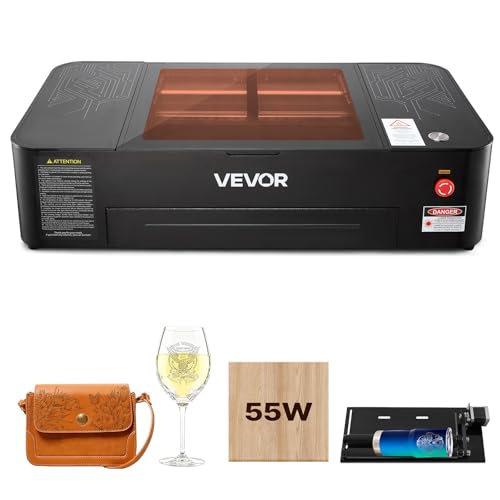
- 16MP camera and auto focus simplify positioning
- 20 x 12 in bed handles larger signs and batches
- Rotary axis and air assist add versatility
Best For: Wood and acrylic users who want a roomy CO2 cutter with camera alignment
Smart Camera Enclosed Pick
Ortur R2 10W Enclosed Laser Engraver

- HD camera for accurate positioning and batch engraving
- Fully enclosed Class 1 design with touch screen control
- WiFi, app, USB, and TF card offline operation
Best For: Beginners wanting a safe enclosed desktop laser cutter with camera alignment
Large Workspace Alignment Pick
LaserPecker LX2 20W Desktop Engraver Cutter

- 12MP overhead camera with point-to-shape positioning
- Large 19.7" x 12" enclosed work area
- Up to 1000mm/s speed for faster output
Best For: Users who want a larger desktop laser cutter with camera alignment and high speed
Portable Camera Alignment Pick
A1 Pro 10W Mini Laser Engraver with Camera

- Built-in HD camera with real-time preview
- Fully enclosed Class 1 portable desktop design
- WiFi, Type-C, and offline engraving support
Best For: Crafters and small businesses needing a portable desktop laser cutter with camera alignment
Flagship Automation CO2 – xTool P3 80W Flagship CO2 Laser Cutter
If you want a desktop laser cutter with camera alignment that feels closer to a production tool than a hobby machine, the xTool P3 is built for that job. Its dual HD cameras, LiDAR-based autofocus, and large enclosed workspace are aimed at fast setup, precise placement, and cleaner results on materials that smaller diode machines struggle with.
Best For: Advanced makers and small businesses that need large-format CO2 cutting, camera-guided alignment, and automation-heavy workflows.
Pros:
- 80W CO2 power cuts up to 20mm wood and 25mm acrylic.
- Dual HD cameras plus LiDAR autofocus support precise placement and setup.
- Large 36″ × 18″ workspace suits bigger projects and batch production.
- Smart Nesting and Variable Batch Fill help improve material use and workflow.
Cons:
- High-end machine with a very large physical footprint.
- Accessories like conveyor feeder, rotary, and purifier are sold separately unless bundled.
The P3 is the most automation-focused option here, and it stands out if accuracy, speed, and throughput matter more than entry-level simplicity. It is a serious desktop laser cutter with camera alignment for users who want professional CO2 capability in a fully enclosed system.
Compact Maker Diode – Twotrees TTS-55 Pro 5.5W Engraver
The Twotrees TTS-55 Pro is a compact desktop laser cutter with camera alignment alternatives that leans more toward hands-on maker use than automated workflow. It does not include a camera, but its fine spot size, offline support, and Wi-Fi control make it a practical choice for smaller projects in wood, leather, acrylic, and even stainless steel engraving.
Best For: Hobbyists and small-project makers who want a lightweight, budget-friendly laser engraver with precise output.
Pros:
- 5.5W laser with 0.08 x 0.46 mm spot for fine detail.
- Supports engraving and light cutting on multiple materials.
- Wi-Fi, online, and TF card offline control add flexibility.
- Compatible with LaserGRBL and LightBurn.
Cons:
- No built-in camera alignment or enclosure.
- Much smaller cutting power and work area than CO2 desktop models.
This is a straightforward maker machine rather than an automated production cutter, so expectations should match the power class. It is best when you want compact size, simple control, and precision engraving more than camera-guided setup.
Camera-Ready CO2 Workhorse – Monport 70W Desktop CO2 Engraver
The Monport 70W is a strong fit if you want a desktop laser cutter with camera alignment tools and practical shop features in a mid-size CO2 machine. Its 8MP HD camera, auto-focus, and built-in water cooling are designed to make setup easier while supporting serious cutting on acrylic and basswood.
Best For: Small businesses and serious hobbyists who want a camera-equipped CO2 cutter with autofocus and solid cutting performance.
Pros:
- 70W CO2 power cuts up to 20mm acrylic and 18mm basswood.
- 8MP HD camera and auto-focus simplify positioning and setup.
- Built-in water cooling adds convenience for longer sessions.
- Batch engraving support helps with higher-volume work.
Cons:
- Heavier desktop machine at 235 pounds.
- Material flatness matters because warped stock can affect autofocus accuracy.
For users who want more capacity than an entry-level diode machine, this Monport balances power, alignment tools, and workflow features well. It is a practical choice when camera-assisted setup and repeatable cutting are key priorities.
Smart Enclosed Desktop – Creality Falcon A1 10W Laser Cutter
The Creality Falcon A1 is a compact enclosed machine for buyers who want a desktop laser cutter with camera alignment features but do not need CO2-level cutting power. Its pre-calibrated HD camera, preset parameters, and smart material recognition are geared toward quick setup and easier day-to-day use.
Best For: Beginners and casual makers who want a ready-to-use enclosed laser engraver with smart camera positioning.
Pros:
- Pre-calibrated HD camera gives a full-frame view for object placement.
- Ready-to-use presets reduce trial-and-error setup.
- 600mm/s speed and CoreXY motion support fast operation.
- Class 1 enclosed design includes auto-lock, emergency stop, and smoke control.
Cons:
- 10W diode power is limited compared with CO2 cutters.
- Not suitable for mirror-finished metals, mirrored acrylic, or uncoated acrylic cutting.
The Falcon A1 is appealing if you value convenience, safety, and camera-guided placement over raw cutting strength. It works best as an approachable enclosed engraver for wood and select metal projects within its material limits.
Dual-Laser Precision for Small Business – xTool F2 5W IR & 15W Diode Dual Laser Engraver
If you want a desktop laser cutter with camera alignment that can handle both metal marking and material cutting, the xTool F2 is built for fast, accurate work. Its built-in 50MP camera helps you place designs with up to 0.1 mm alignment accuracy, which is especially useful for small items, batch runs, and on-site personalization.
Best For: Makers and small businesses that need precise camera-guided alignment, fast turnaround, and dual-laser flexibility on a wide range of materials.
Pros:
- 50MP camera supports precise workspace visualization and small-piece alignment
- Dual 5W IR and 15W diode lasers expand use across 300+ materials
- Up to 6000 mm/s speed is strong for quick engraving and batch work
- Fully enclosed, portable design suits workshops, stores, and pop-ups
Cons:
- Smaller 6.89 x 9.33 in footprint may limit larger-format projects
- Best batch scaling depends on add-ons like the Slide Extension
- Some advanced accessories are optional rather than included
The F2 stands out for buyers who value camera-guided accuracy and material versatility more than a large work area. It is especially compelling if you need a compact machine that can travel easily while still supporting polished, repeatable results.
Large-Format CO2 Cutting with Auto Focus – VEVOR 55W CO2 Laser Engraver with 16MP Camera
For buyers comparing a desktop laser cutter with camera alignment for larger non-metal projects, the VEVOR 55W CO2 machine brings a spacious bed and practical positioning tools. The 16MP camera and auto focus help simplify setup, while the 20 x 12 in work area makes it easier to handle signs, panels, and batch jobs.
Best For: Wood, acrylic, and craft users who want a larger desktop CO2 cutter with camera-assisted positioning and rotary support.
Pros:
- 16MP camera and auto focus support more accurate placement
- 20 x 12 in workspace is roomy for signs and batch engraving
- Rotary axis adds support for cylindrical objects
- Air assist, water pump cooling, and waste tray improve day-to-day use
Cons:
- Not suitable for metal engraving, except coated metals
- Best cutting performance is recommended for thinner acrylic and wood
- At 120.6 pounds, it is not especially portable
This model makes sense if your work is centered on wood, acrylic, and other non-metal materials. The combination of camera guidance, auto focus, and a large work area gives it a practical edge for users who need dependable setup without a steep learning curve.
All-in-One Safe Desktop Cutter – Genmitsu L8 20W Laser Engraver with Camera
If safety and setup speed matter most, this desktop laser cutter with camera alignment is designed to be ready right out of the box. The Genmitsu L8 includes a LightBurn-compatible camera, full enclosure, air assist, honeycomb bed, and plug-and-play assembly to reduce trial-and-error for everyday engraving and cutting.
Best For: Users who want a fully assembled, Class 1 enclosed laser machine with camera-guided positioning and built-in safety features.
Pros:
- LightBurn-compatible camera makes project placement easier
- Fully assembled, enclosed design is ready to use quickly
- Air assist pump and honeycomb help with cleaner cuts
- Class 1 safety features include door sensor, flame monitor, and emergency stop
Cons:
- Camera-focused workflow is framed around LightBurn compatibility
- Best-known strengths are safety and convenience, not sheer size
- Advanced accessories like purifier and rotaries are optional
The L8 is a strong fit for buyers who want a protected, integrated machine rather than a bare-bones frame. Its camera, enclosure, and safety system make it appealing for home workshops or shared spaces where controlled operation matters.
Smart Camera Enclosed Pick – Ortur R2 10W Enclosed Laser Engraver
If you want a desktop laser cutter with camera alignment that stays simple to use at home, the Ortur R2 is built around that workflow. Its built-in HD camera, touch screen, and fully enclosed Class 1 design make positioning, safety, and offline control straightforward for everyday wood, metal, and craft projects.
Best For: Beginners and home users who want a safe, enclosed machine with camera-based positioning and easy standalone operation.
Pros:
- Built-in HD camera supports accurate positioning and batch engraving.
- Fully enclosed Class 1 structure is compact and ready to use out of the box.
- Supports WiFi, app, USB, and TF card offline operation.
- 10W LU3-10A module offers a fine spot for detailed engraving.
Cons:
- 300 × 210 mm work area is smaller than larger-format desktop units.
- Best suited to DIY and small-scale projects rather than large production runs.
The R2 focuses on convenience first, with camera positioning and enclosure safety doing most of the heavy lifting. If you value quick setup and controlled desktop use over maximum size, it is a practical pick for small workshops and home craft spaces.
Large Workspace Alignment Pick – LaserPecker LX2 20W Desktop Engraver Cutter
The LaserPecker LX2 is aimed at buyers who want a desktop laser cutter with camera alignment for larger jobs and faster throughput. Its 12MP overhead camera, precision point-to-shape positioning, and spacious 19.7″ x 12″ work area make it easier to place designs accurately on wood, metal, acrylic, and irregular materials.
Best For: Small shops and serious hobbyists who need a large enclosed work area with camera-guided alignment and high-speed output.
Pros:
- 12MP 6K overhead camera supports precise placement on irregular materials.
- Large 19.7″ x 12″ work area handles batch runs and bigger projects.
- Up to 1000mm/s speed is geared toward higher output.
- Fully enclosed Class 1 safety structure with front-and-side dual doors.
Cons:
- Physical footprint is substantial compared with mini desktop machines.
- Some cutting performance depends on the optional module chosen.
This model stands out when alignment accuracy and productivity matter more than compact size. If you need a camera-assisted machine that can handle larger layouts while staying enclosed and workshop-friendly, the LX2 is well matched to that job.
Portable Camera Alignment Pick – A1 Pro 10W Mini Laser Engraver with Camera
The A1 Pro is a compact desktop laser cutter with camera alignment designed for fast setup and flexible use. Its built-in HD camera, real-time preview, and drag-and-drop positioning are useful for small items and batch engraving, while the enclosed Class 1 build keeps home and small-shop use more manageable.
Best For: Crafters and small businesses that want a portable, camera-guided engraver for small parts and easy alignment.
Pros:
- Built-in HD camera supports real-time preview and drag-and-drop positioning.
- Fully enclosed Class 1 design adds safer everyday use.
- Supports WiFi, Type-C, and offline engraving options.
- True 10W output is rated for cutting plywood and acrylic, with broad material support.
Cons:
- Best setup guidance may require watching the video tutorial first.
- Small form factor is better for compact projects than very large workpieces.
This is a strong choice if you want camera-assisted alignment without giving up portability. It mixes easy positioning, broad software compatibility, and enclosed safety in a package that makes sense for custom work and smaller production tasks.
How We Picked the Best Desktop Laser Cutter with Camera Alignment
For this roundup, we prioritized camera quality, ease of alignment, enclosure and safety features, working area, power, software workflow, and real-world usefulness for hobbyists, small shops, and creators. A good camera system should help with placement, previewing the work area, and reducing wasted material—not just add another spec on the box.
Quick Comparison
When comparing a Desktop Laser Cutter with Camera Alignment, start with three basics: what materials you want to cut or engrave, how large your projects are, and how often you need accurate placement. Higher-power CO2 machines are better for thicker wood, acrylic, and faster throughput, while diode and dual-laser models are often more compact and flexible for mixed-use engraving.
Key Buying Factors for a Desktop Laser Cutter with Camera Alignment
Camera Quality and Positioning Accuracy
Look for clear camera resolution, low-lag preview, and software that makes alignment intuitive. A camera is most useful when it helps you place designs precisely on irregular stock, nested layouts, or partially used material.
Work Area and Material Size
Bigger beds handle signs, panels, and batch jobs, while smaller machines fit better in apartments, home studios, or mobile setups. Make sure the usable cutting area matches the projects you actually plan to make.
Laser Type and Power
CO2 lasers generally cut thicker non-metals more efficiently, while diode and IR systems are often better for engraving, marking, and lighter cutting. Power ratings matter, but real-world performance also depends on optics, airflow, and firmware.
Safety, Enclosure, and Air Management
An enclosed design, proper ventilation, air assist, and fume control should be high on your list. These features improve cut quality and make the machine safer and more pleasant to use indoors.
Workflow Features
Useful extras include autofocus, offline operation, touch controls, WiFi, rotary support, and smart preview tools. If you work with production runs, these can save more time than raw speed alone.
Who Should Buy Which Desktop Laser Cutter with Camera Alignment?
If you want the fastest path to larger-format cutting and automation, choose a high-power CO2 model with advanced camera tools. If your priority is a compact, lower-cost entry into engraving and light cutting, a smaller diode machine may be the better fit. For makers who value clean setup, frequent repositioning, and mixed-material work, a Desktop Laser Cutter with Camera Alignment is especially worthwhile because it reduces mistakes and speeds up every job.
For small businesses, prioritize repeatability, enclosure quality, and bed size. For hobbyists, focus on ease of use, safety, and the types of materials you enjoy working with most.