If you want to engrave tumblers, bottles, mugs, and other curved surfaces, a diode laser engraver with rotary attachment makes the job far easier and far more consistent. It keeps cylindrical items turning smoothly so your designs stay aligned from start to finish.
In this roundup, we focus on models and bundles that offer a strong mix of power, usability, rotary support, and beginner-friendly features for makers, small shops, and hobbyists.
Best 10 Diode Laser Engraver with Rotary Attachment Picks for 2026
Creality Power Cutter
CREALITY FALCON 10W with Rotary Roller

- 10W diode laser with air assist for cleaner cuts
- Included 4-in-1 rotary roller for curved objects
- Works with LaserGRBL, LightBurn, and offline TF card use
Best For: Users who want a powerful diode engraver with an included rotary kit
Ultra-Detail Pick
LaserPecker LP4 Dual Laser Engraver

- 8K hyper engraving with very high speed
- Rotary kit supports curved items up to Ø0-145 mm
- Dual IR and diode lasers handle 10+ materials
Best For: Users who prioritize precision, speed, and curved-object engraving
Universal Roller Upgrade
Longer Rotary Roller Series with Bracket
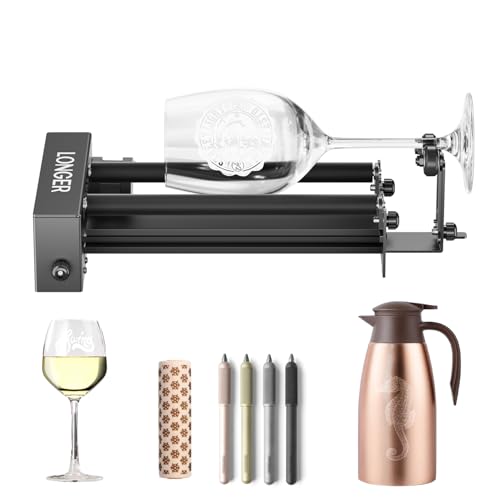
- 360° auto-rotating roller for round items
- Two wiring options for broad compatibility
- Adjustable height for different object sizes
Best For: Existing laser owners needing a cylindrical-object rotary add-on
AI Camera Rotary Pro
TOOCAA NOVA 10W Smart Laser Engraver

- 5MP AI camera with real-time preview
- Auto focus and AI material recognition
- 360° rotary kit for tumblers and bottles
Best For: Beginners and small businesses making personalized drinkware
Touchscreen Rotary Bundle
Algolaser 10W Laser Engraver and Cutter

- 3.5-inch touchscreen with AlgoOS
- Rotary roller and riser kit included
- LightBurn and LaserGRBL compatible
Best For: Beginners who want on-machine control and rotary projects
Compact Rotary Starter
AlgoLaser Pixi 10W Laser Engraver Machine

- No-PC operation with built-in AlgoOS
- Rotary roller for tumblers, mugs, and bottles
- Compact 3kg design for easy portability
Best For: Portable personalization and small workspaces
Creality Power Cutter – CREALITY FALCON 10W with Rotary Roller
If you want a diode laser engraver with rotary attachment that can handle both flat projects and cylindrical items, the Creality Falcon 10W is built for that mix. Its 10W output, air assist, and included 4-in-1 rotary roller make it a practical choice for users who want faster cutting, cleaner edges, and flexible setup options for tumblers, spheres, and ring-shaped items.
Best For: Makers who want a stronger diode engraver with an included rotary kit for tumblers, bottles, and other curved objects.
Pros:
- 10W output can cut up to 12 mm wood board or 3 mm black acrylic in one pass.
- Includes a 4-in-1 rotary roller for cylindrical objects, spheres, and ring-shaped items.
- Air assist helps clear smoke and dust for cleaner, smoother cuts.
- Compatible with LaserGRBL and LightBurn, plus offline use via TF card.
Cons:
- Laser class 4 machine requires careful safety practices during use.
- Rotary setup may take attention to install correctly, especially for first-time users.
This is a well-rounded option if you want one machine that can do both general engraving and rotary work without buying the accessories separately. The combination of power, air assist, and broad material support makes it especially useful for hobbyists with growing project needs.
Ultra-Detail Pick – LaserPecker LP4 Dual Laser Engraver
The LaserPecker LP4 is a premium diode laser engraver with rotary attachment support if your priority is speed and fine detail. With 8K hyper engraving, a dual IR and 10W diode setup, and a rotary extension for curved surfaces, it is aimed at users who need accurate marking across a wide range of materials and project styles.
Best For: Detail-focused users who want high-speed engraving, curved-object support, and a compact expanded workspace.
Pros:
- 8K hyper engraving and galvanometer tech deliver very fine detail and high speed.
- Dual infrared plus diode lasers support 10+ materials, including wood, acrylic, steel, and ceramic coatings.
- Rotary kit supports Ø0-145 mm items with 3° accuracy.
- Slide extension expands the workspace to 160 x 300 mm for larger or batch projects.
Cons:
- Premium feature set may be more machine than casual users need.
- Best suited to users comfortable with a more advanced workflow and accessory ecosystem.
This model stands out when precision and speed matter more than entry-level simplicity. If you need a diode laser engraver with rotary attachment for jewelry, industrial parts, or curved items, the LP4 offers a very capable all-in-one system.
Balanced Workshop Choice – LONGER Ray5 5W with Rotary Kit
The LONGER Ray5 is a versatile diode laser engraver with rotary attachment support for users who want a larger work area and a practical accessory bundle. Its 5W output, air assist kit, touchscreen, and included 4-in-1 rotary roller make it a solid fit for everyday engraving and moderate cutting tasks.
Best For: Makers who want a flexible desktop engraver with strong connectivity, air assist, and a rotary accessory included.
Pros:
- 400 x 400 mm work area gives plenty of room for flat projects.
- 5W laser with 0.08 x 0.08 mm spot size and 0.01 mm engraving accuracy.
- Air assist helps reduce smoke, dust, and overburning for cleaner results.
- 4-in-1 rotary accessory supports many cylindrical items, including mugs, glasses, and rings.
Cons:
- 5W output is less powerful than higher-wattage models for thicker cutting jobs.
- Some users may prefer a more powerful setup if heavy cutting is the main goal.
This package makes sense if you want broad compatibility and a large working area without stepping up to a heavier-duty machine. It is especially appealing for hobbyists who plan to use both flat material engraving and rotary projects from the same setup.
Rotary Accessory Pick – ORTUR Laser Rotary Roller Module
If you already own a compatible machine and only need a diode laser engraver with rotary attachment capability, the ORTUR Laser Rotary Roller is a simple add-on focused on cylindrical work. It is designed for cups, bottles, pipes, bowls, and similar round objects, with adjustable diameters to help you match the setup to the item.
Best For: Existing laser engraver owners who need an affordable rotary roller for cylindrical projects.
Pros:
- Supports cylindrical objects like cups, bottles, pipes, bowls, and tubes.
- 7 adjustable diameter steps, from as small as 8 mm up to 110 mm.
- Compatible with LaserGRBL and LightBurn on Windows, Mac OS, and Linux.
- Compact 2.4-pound module is easy to integrate into an existing setup.
Cons:
- It is an accessory, not a complete laser engraver machine.
- Some compatibility setups may require swapping blue and green wires at one end of the cable.
This is the most focused option in the group, built specifically to add rotary capability rather than replace your main machine. It makes sense if you already have a working laser engraver and just want to expand into curved-object engraving.
Compact Class 1 Desktop Pick – WECREAT Vista 10W with 9-in-1 Rotary
If you want a diode laser engraver with rotary attachment that feels beginner-friendly but still covers a lot of ground, the WECREAT Vista stands out for its compact desktop design, smart camera positioning, and easy rotary workflow. It’s built for clean alignment on flat material, and its FlipLaser rotary setup is designed to handle tumblers and cups without the usual manual calibration hassles.
Best For: Beginners, hobbyists, and gift makers who want a compact Class 1 engraver with an easy rotary setup for tumblers and cups.
Pros:
- Class 1 enclosed design with fire-retardant metal housing for safer home or school use
- Smart HD TopView camera helps with flat scanning and alignment to reduce waste
- FlipLaser rotary system is designed for 40oz Stanley-style tumblers on a desktop without bulky risers
- 600mm/s engraving speed with a fine 0.06 x 0.04mm laser spot for detailed work
Cons:
- The rotary feature is described through the patented FlipLaser system, which may be more specialized than a simple roller accessory
- Optional infrared module is separate if you want more detailed metal and plastic engraving
Overall, this is a strong pick if you value a safer, compact setup and want rotary engraving to feel straightforward rather than fiddly. The camera guidance and enclosed design make it especially appealing for first-time users who still want room to grow.
Universal Roller Upgrade – Longer Rotary Roller Series with Bracket
If you already own a compatible machine and need a diode laser engraver with rotary attachment support for cylindrical projects, this Longer rotary roller is a practical add-on. It’s designed to expand engraving options for tumblers, bottles, mugs, and other round objects with 360° auto rotation and adjustable height for different sizes.
Best For: Owners of compatible laser engravers who want an affordable rotary roller upgrade for cylindrical objects.
Pros:
- Works with a wide range of engravers and offers two wiring options for broader compatibility
- 360° auto-rotating roller supports mugs, bottles, wine glasses, and similar cylindrical items
- Adjustable height range helps fit objects of different sizes
- Stable support and accurate positioning are aimed at improving engraving consistency
Cons:
- Compatibility still depends on your machine and which wiring option works for it
- It is an accessory, so it won’t help if you don’t already have a laser engraver to pair it with
As a rotary accessory, this Longer roller is best seen as a versatility upgrade rather than a standalone solution. If your current engraver supports it, the adjustable fit and broad cylindrical-object focus make it a useful way to expand what you can personalize.
Enclosed Beginner Dual-Laser Choice – ATOMSTACK P1 5W with Rotary Support
The ATOMSTACK P1 is a diode laser engraver with rotary attachment support that focuses on safety, portability, and beginner-friendly operation. Its fully enclosed Class 1 design, compact footprint, and plug-and-play setup make it a practical option if you want a small machine that can still handle round-object projects like mugs and bottles with the right accessory.
Best For: Beginners who want a safe enclosed engraver with dual-laser flexibility and support for rotary projects.
Pros:
- Fully enclosed Class 1 safety design with auto-shutdown, enclosure detection, and USB safety lock
- Dual-laser setup includes a 5W diode and 1.2W infrared laser for more material flexibility
- Compact, lightweight, and plug-and-play for easy setup and portability
- Supports rotary tools for mugs, bottles, and baseballs, plus optional air purifier support
Cons:
- Work area is limited to 110 x 110mm, so it suits smaller projects better than large pieces
- The rotary tool is an accessory, not included as part of the main machine description
For shoppers who want an enclosed machine with a short learning curve and room for round-object engraving, the P1 is a sensible pick. Its safety features and dual-laser design make it a flexible entry-level choice, especially if your projects are mostly small and precise.
AI Camera Rotary Pro – TOOCAA NOVA 10W Smart Laser Engraver
If you want a diode laser engraver with rotary attachment that leans heavily into automation, the TOOCAA NOVA is built to make setup and alignment easier. The 5MP AI camera offers real-time workspace preview, while auto focus and AI material recognition help reduce trial-and-error before engraving tumblers, wood, acrylic, leather, glass, and more.
Best For: Beginners, classrooms, and small businesses that want a fully enclosed, beginner-friendly machine for tumblers and personalized projects.
Pros:
- 5MP AI camera with one-click calibration for visual positioning
- 3-second auto focus plus AI material recognition for faster setup
- Includes a 360° rotary kit for tumblers, bottles, rings, and other cylindrical projects
- Fully enclosed Class 1 design with flame detection, emergency stop, lid-open stop, tilt protection, and child lock
Cons:
- Heavier and larger than compact desktop machines
- Advanced features may be more than casual users need
The NOVA stands out if you value a guided workflow and safety in a home or shared workspace. Its rotary kit and AI-assisted features make it especially appealing for customized drinkware and gift production.
Touchscreen Rotary Bundle – Algolaser 10W Laser Engraver and Cutter
This diode laser engraver with rotary attachment is designed for users who want a more self-contained desktop workflow. The built-in 3.5-inch touchscreen and AlgoOS let you create, preview, and engrave without constant computer use, while the included rotary roller and riser kit expand the machine to tumblers, mugs, bottles, and thicker materials.
Best For: Beginners and DIY makers who want touchscreen control, rotary engraving, and broad software compatibility in one setup.
Pros:
- 3.5-inch smart touchscreen with AlgoOS for on-machine control
- Includes rotary roller and riser base for cylindrical and thicker projects
- Supports WiFi, USB, TF card, and app control
- Compatible with LightBurn and LaserGRBL on Windows and Mac
Cons:
- Fully enclosed safety design may take up more desk space than compact open-frame units
- Setup options are broad, which may feel busy for absolute first-time users
For buyers who want a practical balance of ease and flexibility, this model covers a lot of ground. The rotary bundle and software compatibility make it a strong fit for personalization work without pushing into a more complicated machine class.
Compact Rotary Starter – AlgoLaser Pixi 10W Laser Engraver Machine
If you want a diode laser engraver with rotary attachment in a smaller, more portable format, the AlgoLaser Pixi is built around convenience. It runs on AlgoOS with a 3.5-inch touchscreen, so you can create and start projects directly on the machine, and the included rotary roller opens the door to tumblers, mugs, insulated bottles, wine glasses, pens, and more.
Best For: Makers, classrooms, and small businesses that want a compact, portable engraver for both flat and cylindrical items.
Pros:
- Built-in AlgoOS and touchscreen for no-PC operation
- Rotary roller included for cylindrical objects like tumblers and bottles
- Compact 3kg design that is easy to move and store
- Compatible with LightBurn and LaserGRBL for advanced workflows
Cons:
- Compact footprint may limit project size compared with larger desktop machines
- Best suited to users who value portability over maximum workspace
The Pixi is a smart pick if your priority is a lighter, simpler machine that still handles rotary personalization. It trades size for portability, making it a practical option for craft spaces, teaching environments, and on-site customization.
How We Picked the Best Diode Laser Engraver with Rotary Attachment
We looked for a Diode Laser Engraver with Rotary Attachment that balances engraving power, software ease, build quality, and real-world cylindrical engraving support. Priority went to machines with reliable rotary compatibility, clear setup, and useful extras such as air assist, camera positioning, autofocus, or riser kits.
We also favored options that suit different experience levels, from first-time users to buyers who want faster workflows or more advanced automation.
Quick Comparison
For simple tumbler and cup projects, compact desktop models can be the easiest way to start. If you want more flexibility, a kit with a rotary roller and riser gives better clearance for larger drinkware and taller objects. More advanced systems may add camera guidance, touch controls, or dual-laser capability for broader material support.
Key Buying Factors for a Diode Laser Engraver with Rotary Attachment
Rotary Type and Object Fit
Check whether the included rotary is a roller-style module or a chuck-style option. Roller units are common and easy to use for tumblers and cans, while better adjustability can help with different diameters and surface textures.
Laser Power and Material Needs
Higher diode power generally helps with faster engraving and better results on wood, leather, dark acrylic, and coated metals. If you want lighter-duty personalization, a lower-watt model may still be enough, especially for detailed work.
Working Area and Z Clearance
Rotary projects often need extra height clearance. Look for a riser kit or a frame that can accommodate bottles, mugs, and taller cylinders without forcing awkward positioning.
Ease of Setup
Beginners should consider smart features such as autofocus, camera alignment, touchscreen controls, and guided software. These features can reduce test runs and make rotary jobs less frustrating.
Air Assist and Speed
Air assist helps with cleaner edges and less scorching on many materials. Faster motion systems can improve productivity, but only if the machine stays stable and precise at speed.
Who Should Buy Which Diode Laser Engraver with Rotary Attachment?
If you want a straightforward starter setup, choose a bundle that includes the rotary attachment and simple controls. If you plan to engrave lots of tumblers or run frequent jobs, prioritize reliability, quick alignment, and adjustable rotary support. Makers who want broader material flexibility should look for stronger power, better software features, and room to expand with add-ons.
For the best long-term value, match the machine to the objects you engrave most often, not just the headline power rating. The right Diode Laser Engraver with Rotary Attachment should feel easy to set up, stable while running, and flexible enough for your most common cylindrical projects.