Finding the right desktop milling machine under $2000 means balancing power, precision, workspace, and ease of use. For hobbyists and small workshops, the best choice is usually the one that matches your materials and your experience level.
Below, we focus on compact CNC and mini milling options that are practical for wood, plastic, acrylic, PCB work, and light-duty metal tasks, so you can narrow down the best fit faster.
Best 5 Desktop Milling Machines Under 2000 Picks for 2026
Best for Upgrade-Ready Hobbyists
Twotrees TTC450 Pro CNC Router

- 3.5-inch capacitive touch screen
- 4th-axis and laser expansion ports
- Large 460 x 460 x 80 mm work area
Best For: Makers who want a desktop CNC router with strong upgrade potential and a larger cutting area.
Best for Metalwork Beginners
Full Metal Mini Milling Machine 36W
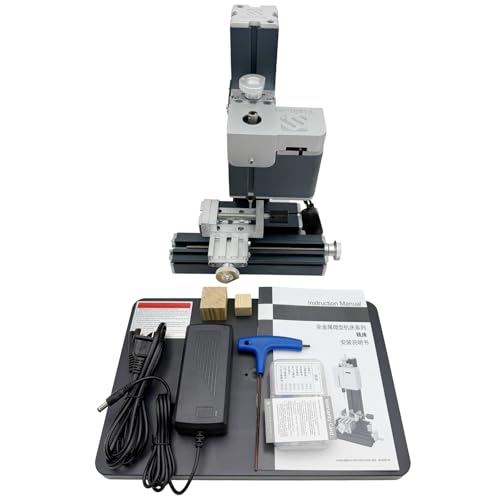
- All-metal construction for added rigidity
- 20,000 RPM motor for light precision work
- Mills and drills soft materials with ease
Best For: Hobbyists and small-shop users who want an entry-level desktop mill for light-duty projects.
Best for Precision Small-Project Milling

- 500W spindle with up to 12,000 RPM
- ±0.025 mm repeat positioning accuracy
- Rigid aluminum frame with USB software support
Best For: Makers who want a compact CNC router for accurate engraving and light milling.
Best for Beginners
RATTMMOTOR 3-Axis Mini CNC Router Kit
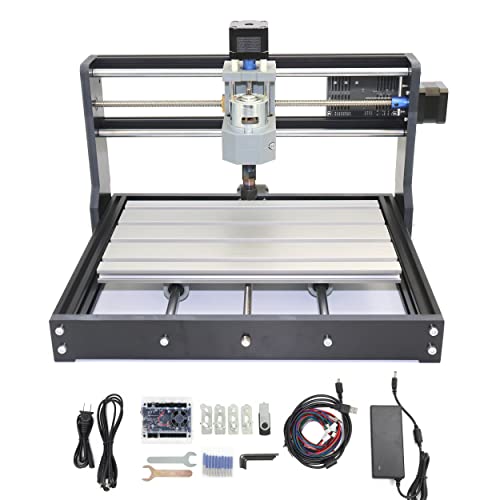
- Compact 300 x 180 x 45 mm working area
- GRBL control with emergency stop and limit support
- Works with wood, acrylic, PVC, PCB, and soft metals
Best For: DIY beginners and hobbyists learning small-format CNC engraving.
Best for Upgrade-Ready Hobbyists – Twotrees TTC450 Pro CNC Router
If you want one of the more expandable desktop milling machines under 2000, the Twotrees TTC450 Pro stands out for its 3.5-inch touch screen, 4th-axis and laser-ready ports, and a roomy 460 x 460 x 80 mm work area. It’s a practical pick for makers who want a desktop CNC that can grow with their projects instead of staying locked into one setup.
Best For: Hobbyists, small workshops, and makers who want a capable CNC router with upgrade paths for 4-axis work and laser add-ons.
Pros:
- Capacitive 3.5-inch touch screen makes operation more straightforward than many basic GRBL machines.
- Expansion ports support 4th-axis, laser, and spindle control upgrades.
- Large 460 x 460 x 80 mm workspace is useful for bigger signs, panels, and batch jobs.
- All-metal frame and NEMA 57-driven Z-axis help with stability and cut precision.
Cons:
- Accessory-heavy setup may be more complex than a true beginner machine.
- Included 775 spindle is fine for entry use, but serious milling may call for upgrades.
As a flexible choice among desktop milling machines under 2000, the TTC450 Pro is less about being the cheapest option and more about offering a solid base you can expand over time. That makes it especially appealing if you want room to experiment with carving, cutting, and future add-ons.
Best for Metalwork Beginners – Full Metal Mini Milling Machine 36W
If you’re comparing desktop milling machines under 2000, this compact all-metal mini mill stands out for hobby-scale machining, drilling, and light-duty precision work. It’s a practical pick for DIY users who want a ready-to-run machine with real metal construction, adjustable travel, and enough versatility for small workshop projects.
Best For: Hobbyists, makers, and small-shop users who want an affordable desktop mill for wood, plastic, acrylic, and soft metals.
Pros:
- Full-metal build with no plastic structural parts for better rigidity
- 20,000 RPM motor and 36W power are well-suited to small precision tasks
- Works for both milling and drilling, adding flexibility for DIY projects
- Comes fully assembled with manual, tools, and one-year warranty
Cons:
- Small working envelope limits larger workpieces
- 36W power is best for light-duty materials, not heavy cuts
- Requires careful setup and bit matching for best results
As a compact entry-level machine, it makes sense for buyers who want hands-on control and a durable frame rather than maximum cutting power. For shoppers sorting through desktop milling machines under 2000, this is a solid fit when size, simplicity, and light precision work matter most.
Best for Precision Small-Project Milling – ACMER Ascarva 3 S 500W CNC
If you want one of the more capable desktop milling machines under 2000 for detailed work, the ACMER Ascarva 3 S stands out with its 500W spindle, rigid aluminum frame, and compact footprint. It’s a practical pick for engraving, cutting, and light milling on wood, acrylic, plastic, MDF, nylon, and softer metals.
Best For: Makers and hobbyists who want a compact CNC router with enough power and accuracy for small, repeatable projects.
Pros:
- 500W spindle with up to 12,000 RPM for solid cutting performance
- ±0.025 mm repeat positioning accuracy for fine detail work
- Rigid aluminum construction helps improve stability on small jobs
- USB control with Windows, macOS, and Linux compatibility
Cons:
- Working area is small compared with larger desktop CNCs
- Best suited to light-duty milling rather than heavy production use
- Assembly and setup may take time for first-time users
For buyers comparing desktop milling machines under 2000, this model makes sense if accuracy, rigidity, and software compatibility matter more than raw table size. It’s especially appealing for hobby shops that need a versatile machine for detailed parts and occasional soft-metal work.
Best X-Y Adjustment Pick – 12.2-Inch X-Y Milling Worktable
If you want a compact accessory that adds controlled X-Y movement to a bench drill setup, this milling worktable is a practical choice among desktop milling machines under 2000. The aluminum alloy build, smooth slide action, and adjustable screws make it useful for light-duty drilling and positioning jobs in a small shop or garage.
Best For: Hobbyists, DIY users, and small workshops that need a compact cross-slide table for drilling and light milling tasks.
Pros:
- Aluminum alloy construction feels sturdy, rust-resistant, and built for shop use.
- X-Y axis movement helps with more precise left-right and front-back positioning.
- Six adjustable screws and lock nuts let you fine-tune table play.
- Compact size works well with mini drills and bench drill brackets.
Cons:
- It is a worktable accessory, not a full milling machine.
- Best suited to light-duty tasks rather than heavy metal removal.
- Travel and working area are limited by its compact footprint.
For buyers comparing desktop milling machines under 2000, this model makes the most sense as an affordable precision add-on rather than a standalone machine. It is a smart pick if you value simple manual control and a small footprint over maximum power.
Best for Beginners – RATTMMOTOR 3-Axis Mini CNC Router Kit
If you want an affordable way to get started with CNC carving, this compact RATTMMOTOR kit is a practical option to consider among desktop milling machines under 2000. It offers a small footprint, GRBL control, and enough versatility for wood, acrylic, PVC, PCB, and other light-duty projects.
Best For: DIY beginners and hobbyists who want a compact, entry-level desktop CNC for learning engraving and small project work.
Pros:
- Compact 300 x 180 x 45 mm working area fits smaller benches and hobby spaces
- GRBL control with updated board features like emergency stop and limit support
- Can handle common materials such as wood, acrylic, PVC, PCB, and soft metals
- DIY-friendly kit format is approachable for hands-on users
Cons:
- Limited work envelope makes it unsuitable for larger parts
- Not meant for hard metals, glass, or other demanding materials
- Requires assembly and basic setup before use
This is a sensible entry-level pick if you care more about learning CNC basics than pushing heavy cutting performance. For shoppers comparing desktop milling machines under 2000, it stands out as a small, affordable training machine for light engraving and carving tasks.
How We Picked These Desktop Milling Machines Under 2000
We prioritized machines that offer a useful mix of build quality, usable work area, control features, and material compatibility without pushing past the budget. For Desktop Milling Machines Under 2000, that usually means solid frame construction, stable motion components, and controls that are friendly for beginners but still capable enough for repeatable work.
We also looked at whether each machine makes sense for real-world desktop use: setup complexity, supported materials, upgrade potential, and whether the footprint matches a home shop, garage, or small maker space.
Quick Comparison
Choose based on what you plan to make most often. A compact CNC router is generally better for automated carving, engraving, and light milling. A mini manual milling table is better if you want more hands-on control with a drill press or small mill. DIY kits can offer the best value if you do not mind assembly and tuning.
- Best for automated CNC work: CNC router and GRBL-based machines
- Best for hobby engraving and light materials: compact desktop engravers
- Best for flexible workshop use: milling tables and cross-slide setups
- Best for tinkerers: DIY kits with upgrade potential
Key Buying Factors for Desktop Milling Machines Under 2000
Work Area and Travel
Make sure the cutting area matches your common project sizes. Bigger is not always better, but too little travel can limit you quickly.
Motor Power and Material Limits
More power helps with harder materials and deeper passes, but spindle strength only matters if the frame and motion system can keep up.
Frame Rigidity and Accuracy
A stiffer machine usually gives cleaner results, especially on repeated cuts and fine engraving. Look for all-metal construction where possible.
Control System and Learning Curve
Touch screens, GRBL control, and straightforward software support can make a big difference for first-time buyers. If you prefer hands-on work, a manual table may be a better fit.
Materials and Project Type
Some machines are ideal for wood, acrylic, and PCB projects, while others are better suited to light aluminum work or general-purpose milling tasks. Match the machine to your material list first.
Who Should Buy Which Desktop Milling Machines Under 2000?
If you want a ready-to-run CNC setup for engraving and light routing, choose one of the more complete router-style machines. If your projects are mostly small DIY crafts, electronics, or soft materials, a compact mini mill or hobby CNC may be enough. If you already own a drill press or small mill and want more flexibility, a milling table can be a smart budget-friendly upgrade.
For most buyers, the best Desktop Milling Machines Under 2000 are the ones that fit your workspace, your materials, and how much setup you are willing to handle. Picking the right format is more important than chasing the biggest number on a spec sheet.