The right DTF printer depends on what you plan to decorate, how many transfers you need, and how much setup you can manage. A compact A4 bundle may suit occasional T-shirt orders; an A3 machine with a roll feeder may fit a growing apparel workflow.
These 10 picks span basic printer setups, oven bundles, and an all-in-one UV DTF model. The guide below helps you compare what is included and spot the differences that matter before you buy.
Best 10 Direct to Film Printers Picks for 2026
Best for Higher-Volume A3+ Printing

- 33 cm print width
- Timed cleaning and white-ink circulation
- Touchscreen maintenance controls
Best For: Windows-based A3 transfer production
Best Complete A4 Starter Bundle
VELOZONE L8058 with Curing Oven

- Printer and curing oven included
- CMYK plus white printing
- One-sheet A4 workflow
Best For: Small-batch A4 transfers on Windows
Best A3 Bundle with Ink-Care Features

- 11.8-inch stated print width
- Oven and starter supplies included
- White-ink mixing and circulation
Best For: Larger transfers with bundled curing
Best for Conversion-Minded Buyers
Generic A4 DTF Conversion Printer

- A4 conversion-style printer
- CMYK supplies included
- White-ink workflow not specified
Best For: Buyers willing to verify setup details
Best for Fabric Variety
Senortian A3 L1800 DTF Printer and Oven Bundle

- A3 printer with curing oven
- White ink circulation and agitation
- Windows-only computer support
Best For: Transfers across varied fabrics and accessories
Best Starter Bundle
ZIMTOKO A3 R1390 G6 DTF Printer

- Oven, RIP software, and starter supplies
- Air suction helps flatten PET film
- Remote support and print-head coverage
Best For: An A3 setup with supplies and setup guidance
Best for Automated Upkeep
KOMHOW A3 L1800 DTF Printer Bundle

- Automatic ink circulation and cleaning
- Air suction helps keep film flat
- Oven and software included
Best For: A3 transfers with less hands-on maintenance
Best A3 Apparel Workflow
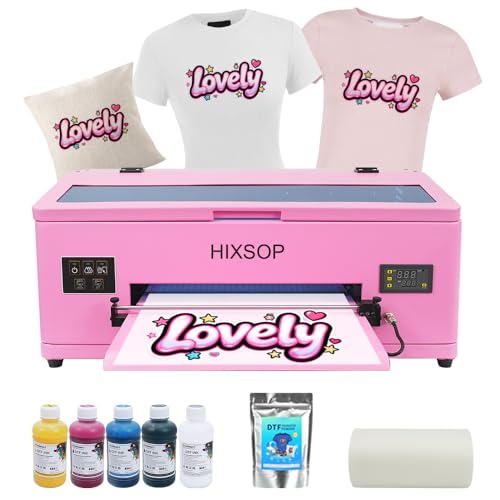
- A3 format with roll feeder and cutter
- White-ink circulation and scheduled cleaning
- Includes film and software
Best For: T-shirt makers seeking streamlined A3 film handling
Best A4 Starter Bundle

- Includes ink, film, powder, and RIP software
- Roll feeder and one-touch cleaning
- Heat press, oven, and laptop not included
Best For: Beginners printing smaller apparel transfers
Best for Hard-Surface Decals

- UV DTF for glass, metal, wood, and tumblers
- Prints and laminates in one machine
- Dual XP600 heads; 151-pound listed weight
Best For: Shops making hard-surface transfer stickers
Best for Higher-Volume A3+ Printing – MZK F1080 DTF Printer
Among direct to film printers for a busy apparel workspace, the MZK F1080 stands out for its 33 cm print width and stated output of one A3-size film in about four minutes. Its touchscreen and automated ink-care features are aimed at reducing routine hands-on work.
Best For: Windows-based shops producing A3-size transfers in regular batches.
Pros:
- White-ink circulation, mixing, filtering, and timed cleaning help manage clogging risk.
- Touchscreen provides nozzle checks, cleaning, ink filling, and layout controls.
- Includes film, ink, powder, and maintenance supplies.
Cons:
- DTF software supports Windows 7, 10, and 11, but not macOS.
- The advertised two-year ink-and-powder offer is US-only and requires paying shipping.
This is a strong fit if print width and maintenance automation matter more than a compact footprint; confirm the supply-offer terms before factoring them into operating costs.
Best Complete A4 Starter Bundle – VELOZONE L8058 with Curing Oven
If you are comparing direct to film printers for a home studio, this VELOZONE bundle packages the A4 L8058 printer with a curing oven, ink, powder, and 100 film sheets. Its sheet-fed design suits small batches rather than continuous film production.
Best For: Windows users starting small-batch A4 apparel transfers who already have, or plan to buy, a heat press.
Pros:
- Includes an adjustable digital curing oven and supplies for initial printing practice.
- Prints CMYK plus a white underbase at 720 × 1440 dpi.
- Compact printer handles one A4 sheet at a time.
Cons:
- A heat press is required but not included.
- AcroRip workflow is specified for Windows, not macOS.
The included oven makes this a practical A4 starting point, provided you account for the separate heat press and the one-sheet-at-a-time workflow.
Best A3 Bundle with Ink-Care Features – FAFAIR R1390 with Oven
The FAFAIR R1390 is one of the direct to film printers here that pairs an A3-class printer with an oven. Its stated 11.8-inch print width and included roll of transfer film make it worth considering for larger designs than an A4 sheet allows.
Best For: Buyers wanting an 11.8-inch print width, an included curing oven, and automated ink-care features.
Pros:
- White-ink mixing and circulation plus automatic cleaning address routine ink upkeep.
- Includes an oven, film, ink, powder, and a nozzle-cleaning kit.
- Automatic vacuum adsorption helps hold film during printing.
Cons:
- Maximum stated print width is 11.8 inches, despite the A3 designation.
- The listed warranty is six months.
This bundle covers printing and curing in one purchase. Check that its actual print width accommodates your artwork before choosing it over a wider machine.
Best for Conversion-Minded Buyers – Generic A4 DTF Conversion Printer
This A4 option is described as a DTF conversion printer and includes CMYK ink, transfer media, powder, and thermal tape. Compared with other direct to film printers in this roundup, its listing supplies fewer workflow details, so it calls for extra verification before purchase.
Best For: Buyers comfortable confirming a conversion printer’s setup and supply requirements with the seller.
Pros:
- Includes four CMYK ink bottles, transfer media, powder, and thermal tape.
- Lists both USB and Wi-Fi connectivity.
- Supports A4-size media.
Cons:
- No white ink is listed among the included inks.
- No curing oven or heat press is listed as included.
- Listed warranty is 30 days.
Confirm how this conversion handles white underbases, curing, and software before relying on it for apparel transfers; those details are not established by the supplied listing.
Best for Fabric Variety – Senortian A3 L1800 DTF Printer and Oven Bundle
Among direct to film printers, this A3 L1800 bundle is worth considering if you want to transfer designs onto a wide range of fabrics without pretreating them. It includes a curing oven and uses white ink circulation and agitation to help keep the ink mixed.
Best For: Windows users making transfers for varied garments and accessories.
Pros:
- Works with materials including cotton, polyester, denim, leather, and blends.
- White ink circulation and agitation help limit pigment settling.
- A3-format printer and oven come together in the bundle.
Cons:
- Supports Windows computers only; Bluetooth is not supported.
- At 102 pounds, it needs a dedicated setup space.
This is a practical pick when material flexibility matters more than a compact footprint. Check that your computer and workspace suit it before ordering.
Best Starter Bundle – ZIMTOKO A3 R1390 G6 DTF Printer
If you’re comparing direct to film printers for a new garment-printing setup, this A3 R1390 G6 bundle brings together a roll feeder, oven, RIP software, and starter consumables. Adjustable air suction holds PET film flat while white ink circulation helps reduce settling.
Best For: Buyers who want a bundled A3 setup with setup guidance and starter supplies.
Pros:
- Includes an oven, software, starter film, inks, and other consumables.
- Air suction helps prevent film wrinkles and contact with the print head.
- Includes setup guides, remote support, and six-month print-head coverage.
Cons:
- The 97-pound machine requires substantial workspace and handling.
- A3 media size limits the width of individual prints.
The included supplies make this bundle appealing for getting started, while its film-control features address a common printing hassle. Plan for its size and confirm that A3 output fits your designs.
Best for Automated Upkeep – KOMHOW A3 L1800 DTF Printer Bundle
This A3 L1800 bundle stands out among direct to film printers for its maintenance features: automatic white ink circulation, agitation, and a stated 10-hour cleaning cycle. The supplied notes also list a curing oven, software, and adjustable air suction for keeping film flat.
Best For: Buyers who prioritize automated upkeep and film handling in an A3 bundle.
Pros:
- Automatic ink circulation, agitation, and cleaning are designed to help prevent clogs.
- Adjustable air suction helps hold film flat during printing.
- Includes an oven and software, with six-month print-head and one-year accessory warranty coverage.
Cons:
- A3 maximum media size may be restrictive for larger designs.
- Automated cleaning still uses ink, according to the supplied notes.
Choose this bundle if reducing hands-on maintenance is a priority, but allow for the ink consumed by its cleaning cycle and check that A3 output meets your needs.
Best A3 Apparel Workflow – HIXSOP R1390 DTF Printer
Among direct to film printers for custom apparel, this HIXSOP A3 model stands out for its roll feeder, integrated cutter, and automated maintenance. It comes with film and software, but the supplied package details do not list a heat press.
Best For: T-shirt makers who want A3 transfers and less hands-on film handling.
Pros:
- Roll feeder and integrated cutter streamline film handling.
- White-ink stirring, circulation, and filtration help reduce settling and clogs.
- Automatic cleaning runs on a 10-hour cycle; adjustable preheating and vacuum film hold-down support consistent printing.
Cons:
- USB connectivity only is listed.
- At 31 by 22 inches of desk footprint, it needs dedicated space.
This is the A3 choice if feeding and maintenance features matter more to you than a compact setup. Check the full package contents before budgeting for the rest of your transfer workflow.
Best A4 Starter Bundle – Qilpho A4 DTF Printer
If you’re comparing direct to film printers for a first apparel setup, this Qilpho A4 bundle includes a roll feeder, ink, transfer film, hot-melt powder, and Windows-compatible RIP software. A heat press, oven, and laptop are not included.
Best For: Beginners making smaller custom-apparel transfers who want core printing supplies in one bundle.
Pros:
- Includes five 250 ml ink bottles, a 164-foot film roll, powder, and RIP software.
- Roll feeder supports continuous printing; press-and-hold automatic cleaning simplifies routine upkeep.
- White-ink stirring, circulation, and filtration help limit pigment settling.
Cons:
- A4 media size limits larger designs.
- Requires separately purchased equipment to complete the transfer workflow.
The included supplies make it a practical starting point, provided A4 sizing suits your designs and you account for the missing finishing equipment.
Best for Hard-Surface Decals – PLK A3 UV DTF Printer
This PLK model is the specialist pick among direct to film printers here: it uses UV DTF to make transfer stickers for hard surfaces such as glass, metal, wood, and tumblers, rather than the powder-based apparel workflow of the other two machines. Printing and laminating are integrated, so a separate laminator is not needed.
Best For: Shops producing hard-surface decals and UV DTF transfers.
Pros:
- Integrated printing and laminating simplify sticker production.
- Dual XP600 printheads offer a stated resolution up to 2880 × 1440 dpi across an 11.8-inch print area.
- White-ink stirring and circulation, automatic cleaning, and included A/B films support the supplied workflow.
Cons:
- Not the right workflow if your priority is traditional powder-based T-shirt transfers.
- At a listed 151 pounds, it requires a sturdy, dedicated location.
Choose this machine for ready-to-apply hard-surface graphics, not as a substitute for the apparel-focused DTF printers above. Its integrated laminating may be especially useful where workspace is limited.
How We Picked the Best Direct to Film Printers
We organized the selections around the buying decisions most likely to affect daily use: A4 versus A3 format, included curing equipment, white-ink maintenance features, software requirements, and sheet versus roll feeding. We also kept the UV DTF option distinct from the garment-transfer printers because it serves a different application. Listed features are a starting point, not a substitute for checking the current package contents, seller support, and consumable requirements before ordering.
Quick Comparison
A4 apparel printers take less workspace and suit smaller artwork or lower-volume jobs. A3 apparel printers give you more layout room for larger graphics and multiple small designs per sheet. A roll-feeder model may reduce sheet handling when printing repeated designs, but it adds setup considerations. An oven bundle covers a key curing step, though you should still check whether a heat press is needed for your workflow. The UV DTF printer belongs in a separate category: it is intended for transferring designs to suitable hard surfaces, not for making standard fabric DTF transfers.
Key Buying Factors for Direct-To-Film Printers
Print Area and Workflow
Choose your format based on the transfer sizes you actually sell, not just the printer’s footprint. Check the usable print area, supported film sizes, and whether a roll feeder is included or merely compatible. If you plan to print batches, ask the seller about realistic throughput for your artwork and settings rather than relying on an unspecified speed claim.
White Ink and Maintenance
White ink needs consistent care. Circulation, stirring, mixing, and automatic cleaning can help manage routine upkeep, but none makes a printer maintenance-free. Confirm the recommended operating schedule, cleaning procedure, replacement-part availability, and what happens if the machine sits unused.
Complete Setup and Running Costs
Verify exactly what comes in the box: inks, film, powder, curing oven, RIP software, and instructions may vary by bundle. Check software compatibility with your computer, including any Windows-only requirements. Budget for ongoing film, ink, powder, cleaning supplies, electricity, test prints, and ventilation appropriate to the materials and curing process. Seller training, warranty terms, and access to technical support can matter as much as a long feature list.
Who Should Buy Which Direct to Film Printers?
Choose an A4 bundle if you are testing apparel transfers or working with limited space. Consider an A3 printer with an oven if larger shirt graphics are a regular part of your orders and you want a bundled curing solution. Look at an A3 roll-feeder setup for repeat designs or batch work, provided you are comfortable managing film alignment and maintenance. Choose the UV DTF option only if your goal is decorating compatible hard goods rather than printing fabric transfers. Whatever the format, favor a clearly specified bundle with dependable support over features you may never use.