The right plotter depends on more than print quality. A 24-inch model may cover everyday plans and posters, while a 36-inch printer gives growing teams more room for larger drawings.
These 10 options span compact desktop printers, stand-mounted models, and a multifunction unit. Use the guide below to narrow the field by output size, workflow, and support needs.
Best 10 Large Format Plotter Printers Picks for 2026
Best for CAD Workflow
HP DesignJet T210 24-Inch Plotter

- Prints on rolls up to 24 inches wide
- HP Click supports PDF checks and auto-nesting
- Ethernet, USB, and Wi-Fi connectivity
Best For: CAD drawings and routine 24-inch print jobs
Best Desktop Setup
Epson SureColor T2170 24-Inch Plotter
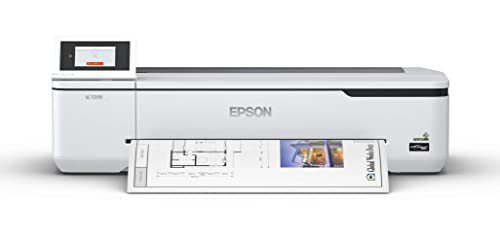
- A1/D-size prints in as little as 43 seconds
- 4.3-inch color touchscreen
- Wireless and Wi-Fi Direct printing
Best For: Desktop blueprint and poster printing
Best for Copying and Scanning

- Built-in letter-size flatbed scanner
- Prints on rolls up to 24 inches wide
- Feeder holds up to 100 letter-size sheets
Best For: Offices that enlarge, copy, and print documents
Best with Onsite Support
HP DesignJet T210 24-Inch Plotter
- Two-year HP Care Pack with onsite support
- Prints on rolls up to 24 inches wide
- HP Click includes PDF checks and auto-nesting
Best For: CAD teams that prioritize onsite support
Best for Mixed-Size CAD Work

- Prints on rolls up to 36 inches wide
- Feeds sheets up to 13 by 19 inches
- Includes stand, media bin, and HP Click
Best For: Teams switching between technical drawings and smaller sheets
Best for Supported 36-Inch Printing

- Includes two-year onsite support
- Handles 36-inch rolls and 13-by-19-inch sheets
- Rated up to 25 seconds per A1/D page
Best For: Busy drawing offices seeking longer included support
Best Desktop 24-Inch Option

- Prints on rolls up to 24 inches wide
- Includes automatic cut-sheet feeding
- Ships with 280 ml of four-color ink
Best For: Small workspaces printing posters up to 24 inches wide
Best for Supported CAD Workflows
- 24-inch rolls; 13-by-19-inch sheets
- Automatic media switching and HP Click
- Two years of onsite and phone support
Best For: CAD teams seeking a supported 24-inch plotter
Best for 36-Inch Posters

- Prints on media up to 36 inches wide
- Automatic media detection and color calibration
- Includes stand, catch basket, and starter ink
Best For: Wider posters and technical graphics
Best for Mixed-Size Printing

- 24-inch rolls and 13-by-19-inch sheets
- Includes sheet feeder, stand, and media bin
- HP Click plus Ethernet, USB, and Wi-Fi
Best For: Teams switching between CAD rolls and smaller sheets
Best for CAD Workflow – HP DesignJet T210 24-Inch Plotter
HP DesignJet T210 Large Format 24-inch Plotter Printer, for Easy CAD & Poster Prints (8AG32D)
Check Price On AmazonAmong large format plotter printers, the HP DesignJet T210 is a practical choice for producing technical drawings, maps, posters, and sewing patterns on rolls up to 24 inches wide. HP Click software supports drag-and-drop job submission, PDF error checking, and auto-nesting.
Best For: CAD users who want straightforward 24-inch printing with flexible job submission.
Pros:
- Prints an A1/D-size page in as little as 45 seconds.
- Supports roll and sheet feed, with an automatic horizontal cutter.
- Offers Ethernet, USB, Wi-Fi, and remote management through the HP Smart app.
Cons:
- Printing on sheets up to 13 by 19 inches requires an optional automatic sheet feeder.
- Print-only device; it does not provide built-in scanning or copying.
Choose this model if print-job tools and CAD compatibility matter more than all-in-one functions. It includes a one-year limited hardware warranty.
Best Desktop Setup – Epson SureColor T2170 24-Inch Plotter
The Epson SureColor T2170 suits buyers comparing large format plotter printers for a desktop workspace. It handles rolls up to 24 inches wide, prints an A1/D-size page in as little as 43 seconds, and has a 4.3-inch color touchscreen.
Best For: Small offices printing blueprints, line drawings, and posters without dedicating floor space to a printer.
Pros:
- Compact desktop design; an optional stand is available.
- Built-in wireless and Wi-Fi Direct support printing from mobile devices.
- UltraChrome XD2 pigment ink produces durable, instant-dry prints.
Cons:
- The automatic sheet feeder accepts sheets only up to 11 by 17 inches.
- Designed for use exclusively with Epson cartridges.
This is a strong fit when desk placement and wireless access are priorities. If your work requires larger cut sheets, check its sheet-size limit before buying.
Best for Copying and Scanning – Canon imagePROGRAF TC-21M
The Canon imagePROGRAF TC-21M stands out among large format plotter printers for its built-in flatbed scanner. You can enlarge smaller originals from the letter-size scanner, print on rolls up to 24 inches wide, and use its automatic feeder for everyday sheets.
Best For: Offices that need large-format printing alongside scanning, copying, and document enlargement.
Pros:
- Flatbed scanner enables enlargement copying and cloud scanning.
- Automatic sheet feeder holds up to 100 letter-size or 50 11-by-17-inch sheets.
- Supports USB flash-drive printing and has a tiltable 2.7-inch touchscreen.
Cons:
- The built-in flatbed scans letter-size originals, not full-size plans.
- 11-by-17-inch sheets have a lower feeder capacity than letter-size sheets.
Pick the TC-21M when its multifunction features will replace separate office steps; for scanning oversized originals directly, its letter-size flatbed is a limitation.
Best with Onsite Support – HP DesignJet T210 24-Inch Plotter
This HP DesignJet T210 is an option among large format plotter printers for buyers who want the familiar 24-inch CAD and poster workflow plus a two-year HP Care Pack with onsite support. It prints on rolls up to 24 inches wide and includes HP Click tools for submitting and checking jobs.
Best For: Architects, engineers, and construction teams that value onsite support for routine large-format printing.
Pros:
- Includes a two-year HP Care Pack with onsite support.
- HP Click offers PDF error checking, auto-nesting, and drag-and-drop printing.
- Roll and sheet feed plus an automatic horizontal cutter support varied jobs.
Cons:
- The optional automatic sheet feeder is needed for sheets up to 13 by 19 inches.
- Print-only model with no built-in scanner or copier.
The defining reason to choose this T210 listing over the standard T210 is its included onsite support plan; its core printing capabilities serve the same kinds of CAD and poster projects.
Best for Mixed-Size CAD Work – HP DesignJet T630 36-Inch
Among large format plotter printers, the HP DesignJet T630 is a practical choice when your projects alternate between 36-inch rolls and smaller sheets. Its included automatic sheet feeder accepts sheets up to 13 by 19 inches, while the stand and media bin support everyday office use.
Best For: Architects, engineers, and construction teams printing technical drawings, maps, and posters in multiple sizes.
Pros:
- Automatically switches between roll and sheet feeds and includes a horizontal cutter.
- HP Click supports drag-and-drop printing, PDF error checks, and auto-nesting.
- Offers Gigabit Ethernet, USB 2.0, and Wi-Fi connectivity.
Cons:
- Sheet printing through the included feeder is limited to 13 by 19 inches.
- Print-only model; it does not add scanning or copying functions.
The T630 makes the most sense if you want flexible media handling and straightforward CAD printing without moving up to the T650 for its longer included support coverage.
Best for Supported 36-Inch Printing – HP DesignJet T650 36-Inch
The HP DesignJet T650 stands out among large format plotter printers for its included two-year HP Care Pack with onsite support. It handles rolls up to 36 inches wide and sheets up to 13 by 19 inches, making it well suited to offices producing drawings and posters in different sizes.
Best For: Architecture, engineering, and construction offices that want 36-inch printing with longer included support coverage.
Pros:
- Includes a two-year HP Care Pack with onsite support.
- Automatically switches between sheet and roll media and includes a media bin and cutter.
- Rated for up to 25 seconds per A1/D-size page, with HP Click and HP Smart app printing options.
Cons:
- The automatic sheet feeder tops out at 13 by 19 inches; larger jobs need roll media.
- Print-only model, so scanning and copying require separate equipment.
Choose the T650 if the included onsite support and stated A1/D print speed matter to your workflow; its media flexibility is especially useful when jobs vary in size.
Best Desktop 24-Inch Option – Canon imagePROGRAF TC-21
For buyers comparing large format plotter printers but needing a 24-inch desktop model, the Canon imagePROGRAF TC-21 offers roll printing alongside an automatic cut-sheet feeder. Its four-color ink system is designed for crisp text and colorful posters, and it ships with 280 ml of ink.
Best For: Small workspaces producing posters and other prints up to 24 inches wide.
Pros:
- Accepts roll media up to 24 inches wide and includes an automatic sheet feeder.
- Ships with 70 ml of each of its four ink colors.
- Provides USB, Ethernet, and Wi-Fi connectivity, plus a tiltable touchscreen.
Cons:
- Its 24-inch roll width will not accommodate jobs that require a 36-inch printer.
- Print-only model; scanning and copying are not included.
The TC-21 is a sensible fit when 24-inch output is enough and you value desktop placement, accessible ink refills, and both wired and wireless connections.
Best for Supported CAD Workflows – HP DesignJet T650 24-Inch
Among large format plotter printers, the HP DesignJet T650 is a practical 24-inch choice for technical drawings, maps, and posters. It combines roll printing with an included sheet feeder, so mixed-size projects need less hands-on media switching.
Best For: Architects, engineers, and construction teams that want a 24-inch plotter with two years of onsite and phone support for covered issues.
Pros:
- Handles rolls up to 24 inches wide and sheets up to 13 by 19 inches, with automatic sheet/roll switching and a horizontal cutter.
- HP Click supports drag-and-drop printing, PDF error checking, and auto-nesting.
- Offers Ethernet, USB, and Wi-Fi connectivity, plus the stated two-year onsite support.
Cons:
- Maximum roll width is 24 inches, so it will not suit jobs that require 36-inch media.
- This is a print-only device, not an all-in-one scanner or copier.
The T650 makes the most sense when reliable support and streamlined CAD-to-print handling matter more than extra width.
Best for 36-Inch Posters – Canon imagePROGRAF TM-340
If your shortlist of large format plotter printers needs room for wider posters, the 36-inch Canon imagePROGRAF TM-340 is worth a look. Its five-color pigment ink system is intended to produce crisp text, sharp lines, and vibrant images across a variety of media.
Best For: Teams producing 36-inch posters and technical graphics that benefit from automatic media detection and color calibration.
Pros:
- Supports media up to 36 inches wide and includes a stand with catch basket.
- Detects loaded media type, width, and remaining roll length automatically.
- Automatic color calibration helps keep output consistent; 300 ml of starter ink is included.
Cons:
- At a listed 130.5 pounds and 57.6 inches wide, it needs more room than the 24-inch models here.
- The supplied details conflict on warranty length: the title and bullets say two years, while other warranty fields say one year; confirm coverage before buying.
Choose the TM-340 when 36-inch output and simpler roll setup justify its larger footprint, and verify the exact warranty terms with the seller.
Best for Mixed-Size Printing – HP DesignJet T630 24-Inch
The HP DesignJet T630 is a 24-inch option among large format plotter printers for offices alternating between roll-fed drawings and smaller sheets. Its included automatic sheet feeder, stand, and media bin make it ready for a range of CAD, map, and poster jobs.
Best For: Small architecture, engineering, or construction teams that regularly switch between 24-inch rolls and sheets up to 13 by 19 inches.
Pros:
- Automatically switches between sheet and roll feeds and includes a horizontal cutter.
- HP Click provides drag-and-drop submission, PDF error checking, and auto-nesting.
- Connects by Gigabit Ethernet, USB 2.0, or Wi-Fi.
Cons:
- Limited to 24-inch-wide rolls rather than 36-inch media.
- Listed with a one-year limited warranty, versus the T650’s stated two-year onsite support.
The T630 is a sensible fit when flexible media handling is the priority; compare its warranty and support terms with the T650 before deciding.
How We Picked These Large Format Plotter Printers
We focused on the practical differences in the selected models: 24-inch versus 36-inch output, desktop versus stand-mounted setups, roll and cut-sheet handling, multifunction capability, and included support. Several entries are closely related HP models with different widths or warranty packages, so compare the exact model number and listing contents before buying. We have not treated a longer warranty or a larger chassis as proof of better print quality.
Quick Comparison
For a small workspace, start with the 24-inch HP DesignJet T210 or Epson SureColor T2170. The Canon imagePROGRAF TC-21 is another 24-inch option with roll and cut-sheet feeding; choose the TC-21M if you also need multifunction features. For 36-inch output, compare the HP DesignJet T630 and T650 with the Canon imagePROGRAF TM-340. If you want a 24-inch printer with a stand, media bin, and automatic sheet feeder, look at the DesignJet T630. Check the T650 listings for the stated two-year onsite support, and distinguish those from the T210 listing that includes a two-year HP Care Pack.
Key Buying Factors for Large Format Plotter Printers
Print Width and Workspace
Choose the narrowest width that reliably fits your work. A 24-inch printer can save space when most jobs are smaller plans or posters; a 36-inch model accommodates wider output but needs more floor space and room to load media and collect prints. Check your actual sheet and roll sizes rather than relying on a printer’s width alone.
Media Handling and Daily Workflow
If you alternate between rolls and cut sheets, confirm how each printer handles switching and feeding. An automatic sheet feeder can reduce manual steps, while a stand and catch bin can keep larger jobs organized. A desktop model may suit occasional printing if you already have a stable surface and a workable way to collect output.
Functions, Ink, and Support
Buy a multifunction model only if copying or scanning large originals is part of your workflow; otherwise, a print-only device may be simpler. Compare replacement ink costs and cartridge availability before committing, especially if you produce frequent color posters. Also verify what the listed warranty covers, how onsite service is arranged, and whether the advertised bundle applies to the exact model number in your cart.
Who Should Buy Which Large Format Plotter Printers?
Solo designers and small offices printing mostly 24-inch documents should begin with the T210, T2170, or TC-21. Teams that need large-format scanning or copying should consider the TC-21M. If a stand and easier cut-sheet handling matter, compare the 24-inch T630 against those compact choices. Buyers regularly producing wider plans or posters should focus on the 36-inch T630, T650, and TM-340, then decide based on required media handling, available space, and support terms. If downtime is costly, give the included service package as much attention as the printer price.