Fiber lasers are a strong choice for marking metal tools, personalizing jewelry, and adding durable identification to parts. But the right machine depends on more than wattage: work area, software, safety features, and the depth of engraving you need all matter.
These 10 options span compact dual-laser machines, portable markers, and higher-power fiber systems. Use the product breakdowns and buying guide to narrow your shortlist to the work you actually plan to do.
Best 10 Fiber Laser Engraving Machines Picks for 2026
Best Equipped Portable Kit
WeCreat Lumos Flex Dual Laser Bundle
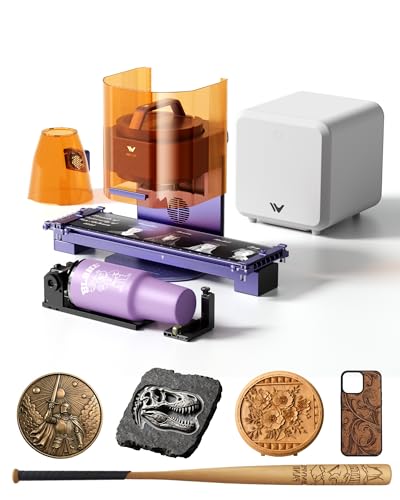
- 15W fiber plus 15W diode lasers
- Rotary, extension, cone, and extractor included
- 50MP camera for visual positioning
Best For: Portable, mixed-material personalization with included accessories
Best Compact Dual-Laser Base
WeCreat Lumos Flex 15W Fiber + Diode

- 15W fiber and 15W diode in one unit
- Built-in 50MP positioning camera
- Rotary and extension sold separately
Best For: Portable dual-laser engraving without a bundled accessory kit
Best for Jewelry Marking

- Dedicated 20W metal-marking laser
- 110 × 110 mm and 200 × 200 mm lenses
- Desktop or handheld operation
Best For: Jewelry and other metal-personalization projects
Best High-Power Dual Laser
xTool F2 Ultra 60W MOPA + 40W Diode

- 60W MOPA fiber plus 40W diode
- Metal color marking and up to 2 mm metal cutting
- Dual 48MP cameras; conveyor expansion optional
Best For: Higher-output metal and mixed-material production
Portable Deep Engraving Pick

- 30W laser supports deep metal engraving and 3D embossing.
- Detachable design; 110 × 110 mm work area.
- Wi-Fi, USB, and LightBurn compatibility.
Best For: Portable metal engraving and small-piece 3D work
High-Output Metal Pick
xTool F2 Ultra Single 60W MOPA

- 60W MOPA laser handles several metal-working processes.
- 8.7 × 8.7-inch area; optional conveyor expands it.
- Dual 48MP cameras and AI-assisted setup.
Best For: Metal-focused shops and repeat production jobs
Easy-Focus Work Area Pick

- 150 × 150 mm engraving area with electric lift.
- Up to 15,000 mm/s and selectable 2K/4K/8K resolution.
- Detachable design with Wi-Fi, USB, and LightBurn.
Best For: Easy focusing and varied small-item engraving
Best for Mobile Customization
LaserPecker LP5 Dual-Laser Engraver

- 20W fiber and diode lasers
- Engraves metals, wood, and leather
- Supports 3D grayscale designs
Best For: Mobile sellers working across metal and nonmetal items
Best for Fast Metal Marking

- Up to 15,000mm/s listed speed
- 150 × 150mm work area
- Electric lift and red-light preview
Best For: Detailed metal marking and embossed designs
Best for Rotary Metal Projects
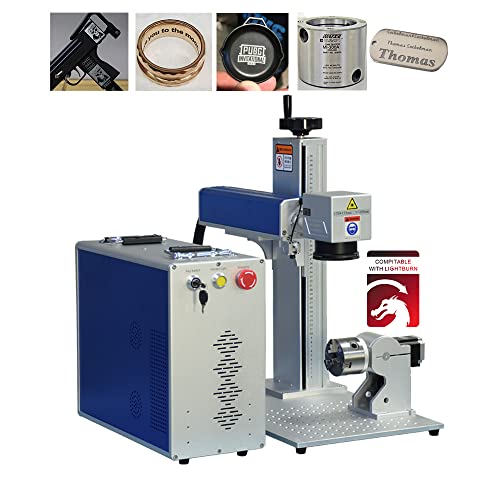
- 50W JPT laser source
- 175 × 175mm marking area
- Includes 80mm rotary head
Best For: Windows-based shops marking metal and cylindrical parts
Best Equipped Portable Kit – WeCreat Lumos Flex Dual Laser Bundle
Among fiber laser engraving machines, this Lumos Flex bundle stands out for pairing a 15W fiber laser for metal with a 15W diode laser for wood, leather, and acrylic. It includes the protective cone, Rotary Pro, slide extension, and fume extractor, making it a more complete setup for varied projects.
Best For: Sellers who want portable metal marking and mixed-material personalization with rotary and batch accessories included.
Pros:
- Dual lasers handle metal engraving and diode-friendly materials in one machine.
- Includes a rotary, extension, protective cone, and fume extractor.
- 50MP camera supports visual positioning; the extension helps with batch layouts.
Cons:
- Its 15W fiber laser is less powerful than the higher-wattage fiber options here.
- Class 4 operation calls for appropriate laser-safety precautions.
Choose this configuration if the included accessories matter as much as the laser itself. Its 2.8 kg portable unit is particularly appealing for on-site customization, while metal-cutting claims are limited to thin, 0.3 mm stainless steel.
Best Compact Dual-Laser Base – WeCreat Lumos Flex 15W Fiber + Diode
This Lumos Flex is a compact entry into fiber laser engraving machines for buyers who also work with wood, leather, or acrylic. Its 15W fiber and 15W diode lasers share one machine, while the built-in 50MP camera helps position designs before engraving.
Best For: Buyers seeking a portable dual-laser base machine who are comfortable adding specialty accessories later.
Pros:
- Fiber laser supports metal marking, 3D embossing, and cutting up to 0.3 mm stainless steel.
- Diode laser adds wood, leather, and acrylic capability.
- 50MP camera provides a visual preview for positioning.
Cons:
- Protective cone, rotary, and slide extension are not included.
- Air purifier is optional, and Class 4 use requires appropriate safety precautions.
This is the simpler Lumos Flex choice if you do not need a rotary or extended workspace immediately. Check accessory costs if cylindrical objects or batch production are central to your plans.
Best for Jewelry Marking – ComMarker B4 20W Fiber Laser
For buyers comparing fiber laser engraving machines primarily for metal work, the ComMarker B4 offers a 20W fiber source and desktop or handheld operation. Its two included field lenses provide 110 × 110 mm and 200 × 200 mm marking areas for different job sizes.
Best For: Jewelry makers and metal-personalization shops that want a dedicated marker with two lens options.
Pros:
- Marks listed metals including gold, silver, stainless steel, aluminum, and copper.
- Includes two field lenses, a foot switch, positioning accessories, and 1064 nm goggles.
- Supports LightBurn and the supplied EzCad2 software.
Cons:
- Metal-focused fiber source is not presented as a solution for engraving bare wood or clear acrylic.
- At 37.9 pounds, the package is less convenient to move than a lightweight portable unit.
The B4 makes sense when metal marking is the main job and lens flexibility matters more than a second laser type. Confirm your preferred computer and software workflow before purchasing.
Best High-Power Dual Laser – xTool F2 Ultra 60W MOPA + 40W Diode
The xTool F2 Ultra is the high-power pick among these fiber laser engraving machines: a 60W MOPA fiber laser handles metal projects, while a 40W diode laser expands its use to materials such as wood, acrylic, and leather. Dual 48MP cameras assist with setup and positioning.
Best For: Busy shops needing stronger metal capabilities and a second laser for nonmetal projects.
Pros:
- MOPA fiber laser supports metal color marking, deep engraving, and cutting up to 2 mm metal.
- 40W diode laser adds substantial wood and acrylic cutting capability.
- 8.7 × 8.7-inch work area can expand to 8.7 × 19.7 inches with an auto conveyor.
Cons:
- Auto conveyor is needed for the stated expanded work area and is not listed in the included items.
- At 67.9 pounds, it is the heaviest option here; it is also a Class 4 laser.
Choose the F2 Ultra if metal cutting, MOPA color control, and mixed-material output justify a larger desktop machine. The listed package contains the dual-laser machine and a base material kit, so plan separately for optional production accessories.
Portable Deep Engraving Pick – GWEIKE G2 Pro 30W
Among fiber laser engraving machines, the GWEIKE G2 Pro 30W is a practical choice when you need deep metal engraving without keeping the laser fixed to one workbench. Its detachable design and 110 × 110 mm working area suit smaller pieces and on-site marking.
Best For: Makers who want portable metal engraving, 3D embossing, and color-marking options.
Pros:
- 30W, 1064 nm fiber laser supports deep engraving and 3D embossing on metal.
- Rated engraving speed up to 15,000 mm/s, with 8K resolution and dual red-light positioning.
- Supports Wi-Fi, USB, and LightBurn; the manufacturer claims over 90 colors on stainless steel and titanium.
Cons:
- 110 × 110 mm working area limits the size of pieces you can engrave in one setup.
- Class 4 laser requires careful use of appropriate protective measures.
The G2 Pro makes the most sense if portability and deeper metal work matter more to you than a larger engraving field. Its included protective glasses and cover do not remove the need to follow Class 4 laser safety practices.
The xTool F2 Ultra Single stands out among fiber laser engraving machines for its 60W MOPA laser and 8.7 × 8.7-inch working area. It is aimed at metal-focused users who need more than surface marking, including deep engraving, 3D embossing, and cutting metal up to 2 mm thick.
Best For: Metal-focused shops handling varied jobs or repeat batches.
Pros:
- Supports deep engraving, 3D embossing, color marking, and cutting up to 2 mm metal.
- Dual 48MP cameras assist positioning, while AI features suggest settings and provide one-click focus and preview.
- Work area can expand to 8.7 × 19.7 inches with a separately available auto conveyor.
Cons:
- At 66.9 pounds, it is substantially heavier than the other models listed here.
- Expanded conveyor-based working area requires an additional accessory.
- Class 4 laser operation calls for appropriate safety controls.
Choose this model if its metal-processing range and larger desktop workspace justify the weight. The manufacturer also claims over 100 repeatable colors on metal, aided by preset color files, but results will depend on the material and settings used.
The GWEIKE G2 Plus 20W gives buyers comparing fiber laser engraving machines a 150 × 150 mm engraving area and a button-operated electric lifting column. That combination is useful when you want more room for layouts and less manual adjustment during focusing.
Best For: Users engraving varied small metal items who value easy focusing and a roomier marking area.
Pros:
- 150 × 150 mm work area with electric lift for focus adjustment.
- Rated speed up to 15,000 mm/s, selectable 2K/4K/8K resolution, and dual red-light preview.
- Supports deep metal engraving, plus Wi-Fi, USB, and LightBurn connectivity.
Cons:
- 20W output is lower than the 30W and 60W models in this roundup.
- Class 4 laser requires suitable protective practices.
The G2 Plus is the practical middle ground for buyers prioritizing setup convenience and engraving area. Its detachable structure adds flexibility, while the manufacturer lists over 30 color options for stainless steel and titanium.
Best for Mobile Customization – LaserPecker LP5 Dual-Laser Engraver
Among fiber laser engraving machines, the LaserPecker LP5 stands out for combining a 20W fiber laser for metals with a 20W diode laser for materials such as wood and leather. Its portable design makes it a practical choice for on-the-spot customization.
Best For: Craft-fair sellers and mobile shops engraving both metal and nonmetal items.
Pros:
- Dual lasers cover jewelry metals as well as wood and leather.
- Supports 3D grayscale engraving for relief-style designs.
- Portable setup is suited to kiosks and events.
Cons:
- The stated 0.5mm metal-cutting capacity limits thicker metal projects.
- Listed weight varies between the portability claim and product details.
Choose the LP5 if material flexibility and taking your engraver to customers matter more than thick-metal cutting capacity.
Best for Fast Metal Marking – GWEIKE G2 Pro 30W
The GWEIKE G2 Pro is one of the fiber laser engraving machines to consider when speed and detailed metal work are priorities. Its 30W, 1064nm fiber laser supports deep engraving, while the 150 × 150mm work area gives you room for larger designs.
Best For: Users producing detailed metal marks, embossed designs, or color effects on compatible metals.
Pros:
- Listed engraving speed reaches 15,000mm/s.
- Electric lift and dual red-light positioning simplify focusing and placement.
- Supports LightBurn, Wi-Fi, and USB workflows.
Cons:
- Its 150 × 150mm marking area may be restrictive for larger pieces.
- As a Class 4 laser, it requires appropriate protective measures.
The G2 Pro makes sense if you value quick positioning and metal-engraving versatility, provided its work area fits your projects.
Best for Rotary Metal Projects – SFX 50W JPT Fiber Laser
For buyers comparing fiber laser engraving machines for metal marking, this SFX model pairs a 50W JPT laser source with a 175 × 175mm marking area. The included 80mm rotary head adds an option for cylindrical items.
Best For: Windows-based workshops marking metals and cylindrical parts.
Pros:
- Includes an 80mm rotary head.
- Marks metals including aluminum, stainless steel, brass, and copper.
- Compatible with LightBurn and EZCAD2.
Cons:
- Listed operating-system support is limited to Windows versions through Windows 10.
- Warranty information conflicts between the bullets and product details; confirm coverage before buying.
This is a practical pick if the included rotary and larger marking area suit your work; verify software and warranty details with the seller first.
How We Picked These Fiber Laser Engraving Machines
We focused on the specifications and configurations that affect a buyer’s day-to-day use: laser type and rated power, stated marking area, included accessories, software compatibility, portability, and provisions for fumes and eye protection. The list includes both dedicated fiber machines and dual-laser models for buyers who also want to work with materials better suited to a diode laser. Manufacturer speed and precision claims are useful for comparison, but they are not substitutes for results on your own materials; this roundup does not treat them as independently tested performance.
Quick Comparison: Which Type Fits Your Work?
Compact Dual-Laser Machines
Consider the WeCreat Lumos Flex, LaserPecker LP5, or dual-laser xTool F2 Ultra if your projects mix metal marking with wood or other diode-suitable materials. Check which head handles each material: a fiber source does not make a machine equally capable on every surface.
Dedicated Fiber and MOPA Options
The ComMarker B4 and GWEIKE G2 models target buyers primarily marking metal, with different power and handling options. The 50W JPT listing and 60W xTool F2 Ultra MOPA warrant a closer look for more demanding metal workflows. MOPA offers additional pulse controls that can be valuable for certain finishes and color-marking techniques, though results depend on material and settings.
Key Buying Factors for Fiber Laser Engraving Machines
Power, Depth, and Throughput
A higher wattage can help with deeper engraving or production pace, but it does not guarantee a better mark. Thin jewelry, serial numbers, and surface logos may not require the same power as repeated deep passes on metal. Compare realistic examples of the exact material, finish, and depth you need.
Work Area and Part Handling
Check the supplied lens and its usable marking field, not just a machine’s maximum advertised area. A larger field can be convenient for batches, while a smaller field may suit fine detail. If you engrave rings, tumblers, or irregular parts, confirm rotary compatibility, clearance, and whether the needed accessory is included. Products with similar names may be sold in different bundles.
Software, Safety, and Total Cost
Verify support for your operating system, file formats, and preferred workflow; do not assume every configuration supports LightBurn. Budget for fixtures, a suitable enclosure or shielding, fume extraction, and material testing. Fiber lasers present serious eye and reflected-beam hazards. Follow the maker’s enclosure and eyewear requirements, and never rely on a protective accessory without checking its rating for the installed laser.
Who Should Buy Which Fiber Laser Engraving Machines?
Choose a dual-laser model if versatility across metal and diode-suitable materials matters more than a metal-only setup. Choose a compact 20W fiber unit if your priority is small metal goods, personalization, or a portable workflow. Look at 30W options when you expect frequent metal marking or want more headroom for engraving. Consider the higher-power JPT or MOPA configurations for deeper work or specialized finishes, provided you can accommodate their setup, safety, and cost requirements. Before ordering, confirm the exact lens, accessories, warranty, and software included in the listing you select.