If you need clean, reliable cuts through thick acrylic, a CO2 laser cutter is the right tool for the job. The challenge is finding a machine with enough power, proper airflow, and a work area that fits your projects.
This roundup focuses on 10 options that balance cutting strength, usability, and value so you can choose with confidence for signage, fabrication, prototyping, or small business production.
Best 10 CO2 Laser Cutter for Thick Acrylic Picks for 2026
Industrial 130W 55×35 Model

- 130W CO2 power with burr-free cutting
- 55 × 35 in workspace with pass-through design
- Autofocus, air assist, and water chiller included
Best For: Large-format users who want strong acrylic cutting support and shop-ready features
Flagship Automated Desktop Pro

- Cuts up to 25 mm acrylic with 80W power
- Dual HD cameras and LiDAR autofocus
- 36" × 18" workspace with 1200 mm/s speed
Best For: Pro users needing thick-acrylic cutting and automated setup
Large-Format 35×55 Cutter

- Cuts up to 0.24 in material in one pass
- 35 × 55 in workspace with pass-through doors
- LightBurn, CorelDRAW, and AutoCAD compatible
Best For: Users who need a large bed for acrylic sheets and mixed-material jobs
Compact 45W Desktop Cutter

- Cuts up to 10 mm acrylic with 45W power
- Compact 12" × 8" desktop workspace
- Built-in air assist and LightBurn support
Best For: Small shops and desktop users cutting smaller acrylic parts
Heavy-Duty Shop Pick
VEVOR 100W CO2 Laser Engraver for Large Acrylic Jobs

- 100W power cuts up to 0.59 in thick material in one pass
- 24 x 35 in work area suits large acrylic panels and signs
- Works with LightBurn, CorelDRAW, AutoCAD, and major OSes
Best For: Large-shop buyers cutting thicker acrylic and oversized parts
Compact Precision Pick
VEVOR 55W Desktop CO2 Laser Engraver
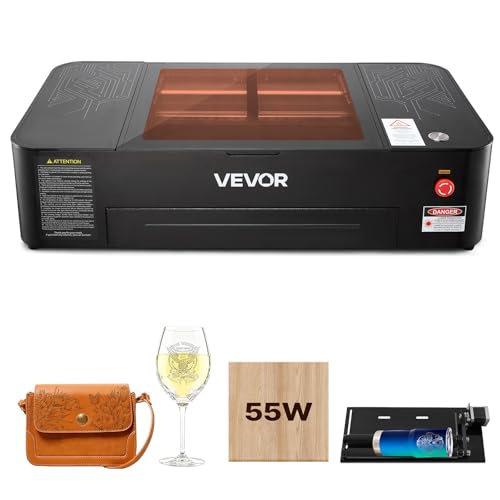
- Recommended for acrylic up to 7 mm thick
- 16 MP camera and auto focus improve positioning
- Includes rotary axis and LightBurn/RDWorks support
Best For: Desktop users cutting moderate-thickness acrylic with precision
Balanced Power Pick
80W CO2 Laser Cutter for Acrylic

- Cuts up to 0.59 in/15 mm material in one pass
- 28 x 20 in bed fits mid-sized acrylic projects
- Supports LightBurn, AutoCAD, and major operating systems
Best For: Users wanting strong acrylic cutting power in a mid-size machine
High-Output Workhorse
60W CO2 Laser for Larger Acrylic Jobs

- Rated for acrylic up to 10 mm
- 24 x 16 in bed with four-way pass-through
- Works with LightBurn, RDWorks, and CorelDRAW
Best For: Makers needing a larger-format CO2 laser cutter for acrylic up to 10 mm
Budget-Friendly Midrange
50W CO2 Laser for Everyday Acrylic Cutting
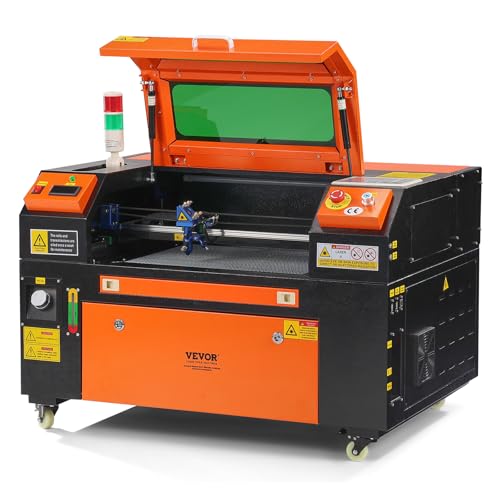
- Cuts material up to 0.24 in thick in one pass
- 12 x 20 in workspace with pass-through doors
- Compatible with LightBurn, CorelDRAW, and AutoCAD
Best For: Hobbyists and small shops needing a compact CO2 laser cutter for acrylic up to 0.24 in
Heavy-Duty Pick
80W CO2 Laser for Thicker Acrylic

- Cuts material up to 0.59 in thick in one pass
- Largest 20 x 28 in work area here
- Supports LightBurn, CorelDRAW, and AutoCAD
Best For: Users who need the highest stated cutting capacity for thicker acrylic
Industrial 130W 55×35 Model – VEVOR 130W CO2 Laser
If you need a CO2 laser cutter for thick acrylic and large-format jobs, this VEVOR 130W machine is built for serious throughput. It’s rated to cut acrylic and other non-metal materials with burr-free edges, and its autofocus, air assist, and water chiller support consistent results on longer runs.
Best For: Shops and makers who want a large work area, pass-through capability, and strong acrylic-cutting performance.
Pros:
- 130W CO2 power with burr-free cutting on wood, acrylic, and other non-metal materials
- Autofocus and two-way pass-through help handle thicker stock and longer pieces
- 55 × 35 in work area with both honeycomb and aluminum blade beds
- Built-in air-assist and water chiller support cleaner, steadier operation
Cons:
- Recommended for materials under 10 mm, so it’s not aimed at very thick acrylic
- Not suitable for metal engraving except coated metals
- Large footprint and 736 lb weight make it a shop-focused machine
Overall, this is a capable high-power option if you want a spacious CO2 laser cutter for thick acrylic workflows, but the published guidance still points to moderate material thickness rather than extreme depth. It’s best suited to users who value size, autofocus convenience, and production-ready support features.
Flagship Automated Desktop Pro – xTool P3 80W CO2 Laser
The xTool P3 is a premium CO2 laser cutter for thick acrylic if you want high power plus heavy automation. Its notes specifically call out cutting up to 25 mm acrylic, along with dual HD cameras, LiDAR-based autofocus, and a large 36″ × 18″ workspace for precise, repeatable jobs.
Best For: Professional users who want fast acrylic cutting with automation and camera-assisted positioning.
Pros:
- 80W CO2 power cuts up to 25 mm acrylic and 20 mm wood
- ACS automation with LiDAR ranging, dual cameras, and AutoLift Base
- Large 36″ × 18″ work area with high-speed operation up to 1200 mm/s
- Smart nesting and batch tools support efficient production workflows
Cons:
- Accessories such as conveyor feeder, rotary, and purifier are sold separately unless bundled
- Premium feature set is more advanced than most hobby users need
- Large, heavy machine may require dedicated workspace
For thick acrylic cutting, this model stands out for combining documented material depth with a highly automated workflow. If you want cleaner setup, precise alignment, and production efficiency, it’s one of the strongest choices in this group.
Large-Format 35×55 Cutter – VEVOR 130W 35×55 Laser
This VEVOR 130W CO2 laser cutter for thick acrylic is built around a big 35 × 55 in work area and one-pass cutting up to 0.24 in material. It’s designed for users who want a spacious, software-compatible machine with pass-through access, air assist, and clear job monitoring.
Best For: Makers and small shops that need a large bed and straightforward control for acrylic and mixed materials.
Pros:
- 130W CO2 laser cuts up to 0.24 in thick material in one pass
- 35 × 55 in work area with front and back pass-through doors
- Compatible with LightBurn, CorelDRAW, AutoCAD, Windows, macOS, and Linux
- Air assist, red-dot pointer, and emergency stop support safer operation
Cons:
- Spec sheet focuses on 0.24 in thickness, so it is not a deep-cut specialty machine
- Very large and heavy at 794 lb, which limits portability
- Best suited to dedicated workspace setups rather than desktop use
As a large-format option, this machine is a practical fit for users who need to process bigger acrylic sheets and want broad software support. It offers the kind of workspace and cutting capacity that matter most when selecting a CO2 laser cutter for thick acrylic projects.
Compact 45W Desktop Cutter – OMTech K40+ 45W CO2 Laser
If you want a compact CO2 laser cutter for thick acrylic in a smaller workspace, the OMTech K40+ gives you a desktop-friendly footprint with upgraded 45W power. It is rated to slice through 10 mm acrylic, adds built-in air assist, and keeps setup flexible with LightBurn and LaserGRBL support.
Best For: Desktop users and small businesses that need an affordable, compact acrylic cutter with solid support features.
Pros:
- 45W laser cuts up to 0.4 in (10 mm) acrylic and 0.31 in wood
- Compact 12″ × 8″ workspace fits desktop or smaller shop setups
- Built-in air assist helps reduce charring and fire risk during cutting
- Compatible with LightBurn and LaserGRBL for flexible workflow control
Cons:
- Small work area limits the size of acrylic parts you can cut
- Not intended for large-format production work
- Lower power than 80W and 130W machines in this roundup
This is the most compact option here, so it makes sense if your acrylic projects are smaller and you value space-saving design. For thick acrylic within its 10 mm limit, it offers a practical balance of power, safety, and software compatibility.
Heavy-Duty Shop Pick – VEVOR 100W CO2 Laser Engraver for Large Acrylic Jobs
If you need a CO2 laser cutter for thick acrylic with enough size and power for larger shop projects, this 100W VEVOR is the most capable option in this lineup. It is rated to cut materials up to 0.59 in thick in one pass, and the 24 x 35 in work area gives you room for full-size signs, panels, and other oversized work.
Best For: Users who want a high-power, full-size CO2 laser cutter for larger acrylic cutting jobs and mixed-material work.
Pros:
- 100W output with one-pass cutting up to 0.59 in thick material.
- Large 24 x 35 in work area with front and back pass-through doors.
- Compatible with LightBurn, CorelDRAW, AutoCAD, Windows, macOS, and Linux.
- Air assist, red-dot pointer, and intelligent laser head support cleaner, more precise cuts.
Cons:
- Very large and heavy at 551 pounds, so it needs dedicated space.
- More machine than most desktop users need for smaller acrylic projects.
For buyers prioritizing capacity over compact size, this model stands out as a practical production-oriented choice. Its higher power and generous bed size make it the strongest fit when thick acrylic is only part of a broader cutting workload.
Compact Precision Pick – VEVOR 55W Desktop CO2 Laser Engraver
If you want a CO2 laser cutter for thick acrylic but are mainly working at a desktop scale, this 55W VEVOR is the more compact choice. The supplier recommends it for acrylic up to 7 mm, and the included 16 MP camera and auto focus make it easier to position smaller projects accurately.
Best For: Makers who want a smaller CO2 laser cutter for moderate acrylic thickness and precise desktop work.
Pros:
- Recommended for acrylic up to 7 mm with burr-free edges.
- Auto focus and 16 MP camera help with accurate placement.
- Rotary axis adds flexibility for cylindrical objects.
- Supports LightBurn, RDWorks, USB, Wi-Fi, and multiple operating systems.
Cons:
- Less capable for thicker acrylic than the higher-power 80W and 100W units.
- Smaller 20 x 12 in work area limits larger sheet projects.
This model is a better fit for precision-focused users than for heavy-duty acrylic production. It balances useful automation features with a manageable footprint, but its recommended acrylic thickness is lower than the larger machines here.
Balanced Power Pick – 80W CO2 Laser Cutter for Acrylic
For shoppers comparing a CO2 laser cutter for thick acrylic, this 80W VEVOR sits in the middle ground between desktop convenience and larger-shop power. It is rated to cut materials up to 0.59 in/15 mm in one pass, while the 28 x 20 in bed gives you a useful workspace for signs, panels, and other mid-sized acrylic projects.
Best For: Buyers who want strong acrylic cutting performance without stepping up to the largest machine in the group.
Pros:
- 80W output cuts up to 0.59 in/15 mm thick material in one pass.
- 28 x 20 in work area is a practical size for many acrylic jobs.
- Compatible with LightBurn, AutoCAD, Windows, macOS, and Linux.
- Air assist, red-dot pointer, and intelligent laser head support smoother cuts.
Cons:
- Heavier and less compact than a desktop CO2 laser engraver.
- Not as spacious as the 100W model for very large sheets.
This is the most balanced pick if you want real cutting capability for thicker acrylic but do not need the biggest footprint. It offers strong one-pass performance and broad software compatibility in a more manageable size than the top-end unit.
High-Output Workhorse – 60W CO2 Laser for Larger Acrylic Jobs
If you want a CO2 laser cutter for thick acrylic with more room to work, this 60W VEVOR model is built for bigger projects and cleaner edge quality. It is rated for cutting acrylic up to 10 mm, and the 24 x 16 in bed plus four-way pass-through setup makes it easier to handle longer stock.
Best For: Makers who need a larger-format CO2 laser cutter for acrylic up to 10 mm, along with wood, glass, and other non-metal materials.
Pros:
- Recommended for acrylic up to 10 mm with burr-free cutting.
- Large 24 x 16 in work area with four-way pass-through feeding.
- Compatible with LightBurn, RDWorks, CorelDRAW, and multiple operating systems.
- Built-in air assist, water pump cooling, and a pull-out waste tray help support cleaner operation.
Cons:
- Not intended for metal engraving, except coated metals.
- Heavier and bulkier than the smaller VEVOR options.
- For acrylic, the stated recommendation tops out at 10 mm, so it is not the strongest pick for very thick sheet.
Overall, this is the most balanced choice here if you need a CO2 laser cutter for thick acrylic without jumping to the highest-wattage machine. It gives you useful workspace, broad software support, and enough cutting capacity for many acrylic jobs.
Budget-Friendly Midrange – 50W CO2 Laser for Everyday Acrylic Cutting
This 50W VEVOR is a practical CO2 laser cutter for thick acrylic if your needs stay on the lighter side. The machine is rated to cut material up to 0.24 in thick in one pass, and its 12 x 20 in work area is a solid fit for hobby and small-shop projects.
Best For: Hobbyists and small shops that want a compact CO2 laser cutter for acrylic up to 0.24 in, plus mixed non-metal material work.
Pros:
- Cuts material up to 0.24 in thick in one pass.
- Compatible with LightBurn, CorelDRAW, and AutoCAD.
- Pass-through doors expand project flexibility.
- Air assist, emergency stop, and automatic power cutoff add convenience.
Cons:
- Smaller working area than the 60W and 80W models.
- Not as much cutting capacity as the 80W unit for thicker acrylic.
- Laser power and output are lower than the larger model in this roundup.
If you want a more compact machine and do not need the deepest acrylic-cutting capacity, this model is the best middle-ground option. It keeps the software compatibility and safety features while staying easier to fit into a smaller workspace.
Heavy-Duty Pick – 80W CO2 Laser for Thicker Acrylic
For anyone shopping for a CO2 laser cutter for thick acrylic, this 80W VEVOR is the strongest option in the group. It is rated to cut material up to 0.59 in thick in one pass, giving it the highest acrylic-cutting capacity among these three machines.
Best For: Users who need the highest stated cutting capacity here for thicker acrylic and larger-format non-metal projects.
Pros:
- Rated to cut material up to 0.59 in thick in one pass.
- Largest 20 x 28 in work area in the lineup.
- Compatible with LightBurn, CorelDRAW, and AutoCAD.
- Pass-through doors, air assist, and red-dot positioning support bigger jobs.
Cons:
- Largest and heaviest machine in this group.
- More space and setup commitment than the lower-watt models.
- Like the others, it is designed for non-metal materials rather than metal engraving.
When acrylic thickness is the priority, this is the clear standout. It combines the highest stated one-pass cutting capacity with the biggest work area, making it the best fit for users who want more headroom on demanding acrylic projects.
How We Picked the Best CO2 Laser Cutter for Thick Acrylic
We prioritized machines that are realistically suited to acrylic cutting, not just general engraving. That means looking at tube wattage, usable bed size, air assist, cooling support, software compatibility, and motion speed. For a CO2 Laser Cutter for Thick Acrylic, these factors matter more than flashy extras because they directly affect cut quality, edge clarity, and production consistency.
Quick Comparison
The lineup spans desktop units for smaller shops and larger-format systems for batch work. Lower-wattage models can handle thinner acrylic and detailed work, while 80W to 130W options are better positioned for thicker sheets and faster throughput. Bigger beds are useful when you need to nest parts efficiently or work with oversized signage panels.
Key Buying Factors for a CO2 Laser Cutter for Thick Acrylic
Laser Power and Tube Strength
Power is the first thing to check. Thicker acrylic generally benefits from higher wattage because the beam can maintain cleaner cutting performance with fewer passes. If your workflow centers on heavy acrylic, prioritize 80W and above when budget and space allow.
Bed Size and Material Handling
A larger work area gives you more flexibility for signage, templates, and production runs. Make sure the bed can fit the largest sheet sizes you expect to use, and leave room for clamps, fixtures, and airflow clearance.
Air Assist and Cooling
Strong air assist helps reduce flare-ups, improves edge finish, and clears debris from the cut path. For thicker acrylic, water cooling is also important because it helps maintain stable output during longer jobs and reduces stress on the tube.
Software Compatibility
Most buyers should confirm support for the design workflow they already use. LightBurn is a major advantage for many shops, while compatibility with CorelDRAW or AutoCAD can matter if you already have established production habits.
Who Should Buy Which CO2 Laser Cutter for Thick Acrylic?
If you are a hobbyist or occasional user, a compact desktop machine may be enough for signs, small parts, and lighter acrylic jobs. If you run a shop or maker space and expect thicker material, choose a higher-wattage, larger-bed model with strong air assist and dependable cooling. For production-focused buyers, a fast, large-format machine is often worth the extra investment because it saves time on nesting, setup, and repeat runs.
In short, match power to material thickness, bed size to your projects, and airflow to cut quality. That approach will help you choose the right machine without paying for capacity you will not use.