Choosing a 3D scanner for clay models comes down to more than just resolution. You want a device that can capture soft surface details, handle matte and textured clay, and fit your workflow from sculpting to printing.
In this roundup, we focus on scanners that balance accuracy, tracking stability, portability, and ease of use so you can turn hand-built clay forms into reliable digital models.
Best 10 3D Scanner for Clay Models Picks for 2026
Ultra-Fine Wireless Pick
Creality Raptor Pro with Scan Bridge

- 0.02mm lab-condition accuracy
- Wireless scanning with Scan Bridge
- Blue laser lines and color mapping
Best For: Precision scanning of detailed clay models
Beginner-Friendly Detail Scanner
- Up to 0.03mm accuracy
- AI tracking and post-processing
- Marker-free scanning support
Best For: Handheld clay model scanning with easier workflow
Industrial Versatility Pick

- 2-in-1 blue light and NIR
- Up to 0.02mm accuracy
- Handles small to very large objects
Best For: Clay models plus broader studio scanning
Portable All-in-One Pick

- All-in-one scanning and editing
- Up to 0.02mm precision
- Near and Far modes for scale flexibility
Best For: Portable clay model scanning without a computer
Beginner-Friendly Wireless Pick

- 0.1mm accuracy for detailed scans
- WiFi6 wireless scanning
- Full-color output with OBJ, STL, PLY
Best For: Beginners scanning medium to large clay models
Precision Portable Option

- 0.05mm resolution for finer detail
- Dual-mode scanning for near and far work
- Portable kit with turntable and case
Best For: Detailed clay-model scanning with portability
Portable Wireless All-Rounder

- 105g portable handheld design
- 0.1mm accuracy with 24-bit color
- WiFi6 support for cross-platform scanning
Best For: Portable scanning of medium to large clay models
Precision Starter Pick
3DMakerpro Seal Lite Small-Format Scanner
- 0.02mm claimed accuracy
- Blue LED helps capture fine surface texture
- Best for 10–300mm indoor scans
Best For: Small indoor clay models where fine detail matters
Pro Detail Option
Revopoint MetroX Pro Blue Laser Scanner

- Up to 0.01mm single-frame precision
- Four scan modes for different surfaces
- Auto turntable and color capture support
Best For: Advanced clay model scanning with professional precision needs
Portable Value Choice
3DMakerpro Moose Lite Handheld Scanner
- 0.05mm claimed accuracy
- Lightweight 250g handheld design
- AI tracking with dark-scene support
Best For: Portable scanning of detailed clay models
Ultra-Fine Wireless Pick – Creality Raptor Pro with Scan Bridge
If you need a 3D scanner for clay models with top-tier detail capture, the Creality Raptor Pro is built for small sculpted forms and complex surfaces. Its 0.02mm lab-condition accuracy, blue laser lines, and marker-based alignment make it a strong fit when fine edges, grooves, and texture matter most.
Best For: Detail-focused users scanning small-to-medium clay models where precision and wireless convenience matter.
Pros:
- Up to 0.02mm accuracy for capturing intricate surface detail.
- Wireless scanning support with Scan Bridge for more flexible movement.
- Fast scanning up to 60 FPS and 660,000 points per second.
- Supports color mapping for more realistic texture reproduction.
Cons:
- Best precision is stated in laboratory conditions.
- Larger and heavier than some handheld alternatives.
Overall, this is the most precision-driven option in the group, especially if your clay models include fine sculpting work that benefits from blue laser capture and clean scan stitching.
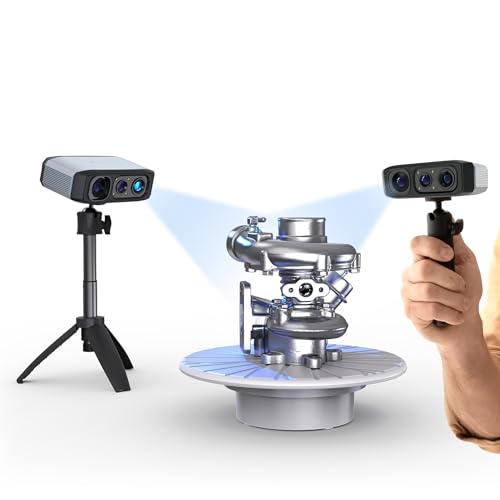
Beginner-Friendly Detail Scanner – 3DMakerpro Moose Lite
The 3DMakerpro Moose Lite is a practical 3D scanner for clay models if you want detailed capture without a steep learning curve. Its blue light system, AI tracking, and intelligent pre/post processing are aimed at making handheld scanning smoother, while the marker-free workflow is useful for organic shapes.
Best For: Users who want a more approachable scanner for clay models, especially for handheld workflows and post-processing support.
Pros:
- Up to 0.03mm accuracy with blue light technology.
- AI tracking and point cloud algorithms help stabilize scanning.
- Marker-free scanning support is helpful for sculpted clay forms.
- JMStudio combines scanning, editing, and optimization in one workflow.
Cons:
- Some accessories, like the Smart Grip, are optional and sold separately.
- Color capture is a strength, but the listed precision is lower than the top Creality options.
For clay model work, this scanner stands out as the easiest all-around pick when you want solid detail, better software assistance, and fewer setup headaches.
Industrial Versatility Pick – Creality Raptor
If your clay models are part of a broader workflow that also includes larger objects, the Creality Raptor gives you more flexibility than a single-purpose scanner. Its blue light and NIR combination, plus strong texture capture, make it useful when you need to handle feature-rich clay pieces and scan a wider range of object sizes.
Best For: Makers and pros who want a versatile 3D scanner for clay models and other objects in the same studio.
Pros:
- 2-in-1 blue light and NIR scanning covers small to very large objects.
- Up to 0.02mm accuracy with industrial-grade blue light.
- NIR mode helps with larger capture areas and featureless surfaces.
- RGB camera and LEDs support detailed texture and color capture.
Cons:
- Windows and Mac system requirements are fairly demanding.
- More industrial-focused than a simple hobby scanner.
This is a strong pick if you want one scanner that can handle clay models now and scale into larger engineering or product scans later.
Portable All-in-One Pick – Revopoint MIRACO Pro
The Revopoint MIRACO Pro is a strong 3D scanner for clay models when you want an all-in-one workflow without being tethered to a computer. With onboard scanning and editing, 0.02mm single-frame precision, and flexible near/far modes, it is well suited to capturing both small sculptural details and larger clay forms.
Best For: Creators who want a portable, wireless scanner for clay models and on-device scanning.
Pros:
- All-in-one design scans and edits without a computer.
- Up to 0.02mm precision for detailed captures.
- Near-mode and Far-mode support both small and large objects.
- 48MP RGB camera helps create photorealistic color models.
Cons:
- Revo Design scan-to-CAD software is sold separately.
- Battery life is limited to about 2 hours of scanning time.
For clay model scanning on the move, this is the most self-contained option here, especially if you value portability, onboard editing, and wireless transfer.
Beginner-Friendly Wireless Pick – Creality Ferret Pro
If you want a 3D scanner for clay models that’s easy to start with, the Creality Ferret Pro focuses on simple operation, wireless scanning, and solid detail capture. Its 0.1mm accuracy, WiFi6 connection, and full-color camera make it a practical option for scanning medium and large clay pieces without a steep learning curve.
Best For: Beginners and hobbyists who want a wireless, full-color scanner for medium to large clay models.
Pros:
- One-click scanning workflow is designed for beginners.
- Up to 0.1mm accuracy helps capture finer surface detail.
- Built-in 2MP color camera supports full-color model capture.
- WiFi6 wireless connection supports smoother data transfer.
Cons:
- Notes emphasize medium and large objects more than very small clay parts.
- Best results still depend on learning the scanning workflow.
Overall, this is a user-friendly choice if you want a straightforward clay-model scanner with wireless convenience and export flexibility for common CAD and printing workflows.
Precision Portable Option – Creality Otter Lite Basic
The Creality Otter Lite Basic is a strong 3D scanner for clay models if you care about accuracy and portability. It offers 0.05mm resolution, dual scanning modes, and color texture support, making it well suited to capturing detailed clay surfaces in a compact, travel-friendly kit.
Best For: Makers who want higher precision and a portable scanner for detailed clay models.
Pros:
- 0.05mm resolution supports fine surface detail.
- Dual-range scanning handles both close and longer distances.
- RGB and infrared cameras enable full-color texture mapping.
- Lightweight design and included case make it easy to carry.
Cons:
- Requires a compatible Windows or macOS computer setup.
- Best performance depends on meeting the listed hardware requirements.
For clay artists who want a more precise scanner and don’t mind a computer-based workflow, this model balances detail, portability, and a complete accessory kit well.
Portable Wireless All-Rounder – Creality CR-Scan Ferret Pro
If you need a 3D scanner for clay models that’s light, wireless, and simple to use, the CR-Scan Ferret Pro is built around convenience. It offers up to 0.1mm accuracy, full-color scanning, and WiFi6 support, which makes it a practical pick for scanning larger clay pieces at home, in the studio, or on the go.
Best For: Users who want a lightweight wireless scanner for larger clay models and general 3D printing workflows.
Pros:
- Very light 105g design for easy handheld use.
- Wireless WiFi6 scanning works across PC, Android, and iOS.
- Up to 0.1mm accuracy with full-color 24-bit scanning.
- Includes useful accessories like a tripod, phone holder, and case.
Cons:
- Not suitable for very small or highly detailed items like jewelry.
- Reflective, transparent, or very dark surfaces may be harder to scan well.
This is a flexible choice if your clay models are medium to large and you value portability plus wireless scanning more than ultra-fine small-object performance.
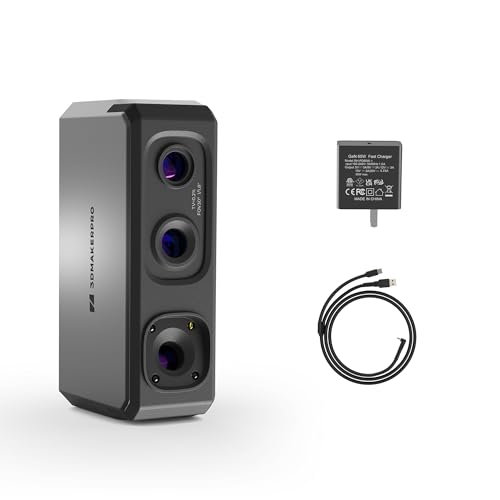
Precision Starter Pick – 3DMakerpro Seal Lite Small-Format Scanner
If you need a 3D scanner for clay models and your pieces are small to medium in size, the Seal Lite is built for detailed indoor capture. Its blue LED light source, fine structured-light output, and 0.02mm claimed accuracy make it a strong fit for preserving tiny dents, edge textures, and surface detail before printing or digital editing.
Best For: Makers who scan small clay models indoors and want fine surface detail for 3D printing workflows.
Pros:
- Blue LED structured light is designed to capture tiny dents and edge textures.
- Supports small-format objects from 10 to 300mm.
- Includes scan-back and anti-shake features for steadier handheld use.
- JMStudio offers auto-alignment, error correction, and OBJ/STL/PLY/ASC export.
Cons:
- Mono texture only, so it does not capture full color.
- Indoor use is suggested for best results.
- Has a learning curve and may need a relatively powerful PC.
Overall, the Seal Lite is a practical entry point if your priority is detail on smaller clay sculptures rather than maximum workflow automation. It gives you the core tools needed to turn hand-shaped models into printable digital files.
Pro Detail Option – Revopoint MetroX Pro Blue Laser Scanner
For a more advanced 3D scanner for clay models, the MetroX Pro is aimed at high-precision work and complex surfaces. Its blue laser system, multiple scan modes, and claimed industrial-grade accuracy make it suitable when you want reliable geometry capture for detailed clay forms, reverse engineering tasks, or color scans for presentation.
Best For: Users who want a high-precision scanner for detailed clay models, prototyping, or professional modeling workflows.
Pros:
- Up to 0.01mm single-frame precision and 0.02mm accuracy claimed.
- Four scan modes cover flat, shiny, dark, and feature-rich surfaces.
- Auto turntable scanning can automate complex object capture.
- HD RGB camera supports color-accurate scans in turntable mode.
Cons:
- Heavier and more workstation-like than a simple handheld scanner.
- Revo Design and Revo Measure are paid and Windows-only.
- Best value appears focused on advanced users rather than casual scanning.
If your clay models demand maximum detail and you want multiple capture modes in one system, the MetroX Pro stands out. It is the most capable pick here for users building a serious scanning workflow around precision and automation.
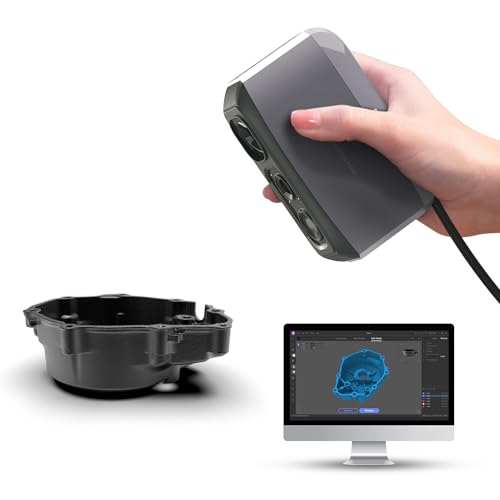
Portable Value Choice – 3DMakerpro Moose Lite Handheld Scanner
The Moose Lite is a handy 3D scanner for clay models if you want a lightweight option with strong detail capture. It uses blue light technology, supports up to 0.05mm claimed accuracy, and adds AI tracking plus point-cloud processing to help smooth out the scan workflow for printing or display projects.
Best For: Hobbyists and creators scanning smaller clay models who want portability and detailed output.
Pros:
- Claims 0.05mm accuracy and 0.1mm resolution for detailed models.
- Lightweight 250g design makes it easy to move and handle.
- AI tracking and point cloud algorithms help simplify scanning.
- Supports dark-scene scanning with 9 levels of light adjustment.
Cons:
- Like many handheld scanners, it still benefits from practice.
- Smart Grip for mobile scanning is sold separately.
- Plastic construction may feel less premium than the metal Moose version.
Moose Lite is a balanced choice when you want a lighter scanner that still aims for strong detail on clay forms. It is especially appealing if you value portability and software-assisted scanning over a more elaborate setup.
How We Picked the Best 3D Scanner for Clay Models
For clay work, the best scanners are the ones that preserve subtle fingerprints, tool marks, and curved surfaces without forcing you into a complicated setup. We prioritized stated accuracy, scanning speed, tracking stability, portability, and support for small-to-medium objects that are common in sculpting studios. We also favored models with useful color or texture capture, wireless options, and software features that reduce cleanup time.
Quick Comparison
Among the options in this roundup, some scanners lean toward metrology-level precision for highly detailed casts, while others are better all-rounders for artists who want easier operation and faster capture. Handheld wireless models are often the most flexible for tabletop sculptures, while higher-end blue-laser systems tend to be better when fine surface detail and repeatable measurements matter most.
Key Buying Factors for 3D Scanner for Clay Models
Accuracy and Surface Detail
Clay models often have soft transitions and shallow textures, so accuracy matters. If your goal is to preserve sculpting marks or create print-ready replicas, look for tighter accuracy claims and systems designed for fine detail capture.
Tracking and Anti-Shake Performance
Clay pieces can be scanned from multiple angles, and smooth surfaces may be harder to track. Anti-shake tracking, robust alignment, and consistent frame rates help prevent drift and missing data.
Object Size and Workspace
Match the scanner to your typical projects. Small-format scanners are ideal for figurines and maquettes, while all-in-one and handheld units can better handle larger busts, masks, and assembled sculptures.
Color, Texture, and Workflow
If your clay models include paint, surface coloration, or reference textures, color capture can be helpful. Also consider whether the software includes pre- and post-processing tools, since cleaner alignment and easier mesh cleanup can save a lot of time.
Who Should Buy Which 3D Scanner for Clay Models?
If you want the highest possible detail for studio-quality digitizing, choose a high-precision laser-based scanner. If you need flexibility for mixed-size sculptures and occasional outdoor or on-location work, an all-in-one wireless handheld model is a better fit. If you are mostly scanning smaller clay maquettes or prototype figures, a compact, detailed scanner can offer the best balance of cost, simplicity, and accuracy. For beginners, look for simpler setup, stable tracking, and software that minimizes manual cleanup.