Choosing the right scanner for rings, settings, and small decorative parts comes down to detail, stability, and ease of use. The best options for jewelry capture fine geometry without forcing constant rescans.
Below, we focus on scanners that can help jewelers, makers, and CAD users move from physical pieces to usable digital models faster and with fewer headaches.
Best 10 Desktop 3D Scanner for Jewelry Picks for 2026
Precision Desktop Scan
EinScan SE V2 Desktop 3D Scanner with Dual Scan Modes

- Up to 0.1 mm accuracy in Fixed Scan mode
- Auto Scan captures models in seconds
- ExScan software supports one-click scanning
Best For: Small-object scanning, print-ready meshes, and easy desktop workflows
Handheld Detail Pick
Shining 3D Einstar Handheld 3D Scanner

- Point distance up to 0.1 mm
- RGB camera captures high color fidelity
- Detail enhancement tools improve completeness
Best For: Portable scanning with fine detail and color capture
Ultra-Fine Laser Scan
Creality CR-Scan Raptor 3D Scanner

- Up to 0.02 mm accuracy with blue laser
- 7 laser lines for sharp edge capture
- Scans small to very large objects
Best For: High-precision scanning of small parts and demanding detail work
Metrology Desktop Choice
Revopoint MetroY Ultra 3D Scanner

- 0.01 mm single-frame precision
- Five scan modes for versatile workflows
- PTB-certified software supports reporting
Best For: Verified measurements, inspection workflows, and precision capture
Entry-Level Detail Scanner
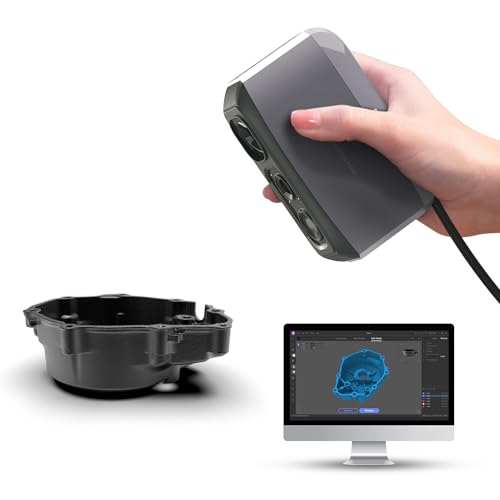
- 0.05mm accuracy and 0.1mm resolution
- AI tracking plus point-cloud processing
- Quiet 250g handheld design
Best For: Detail-focused beginners and hobbyists
All-in-One Pro Capture

- Up to 0.02mm single-frame precision
- On-board scanning and editing, no PC needed
- 48MP color capture with Near/Far modes
Best For: Advanced users who want portable pro-grade scanning
Easy Color Scanner
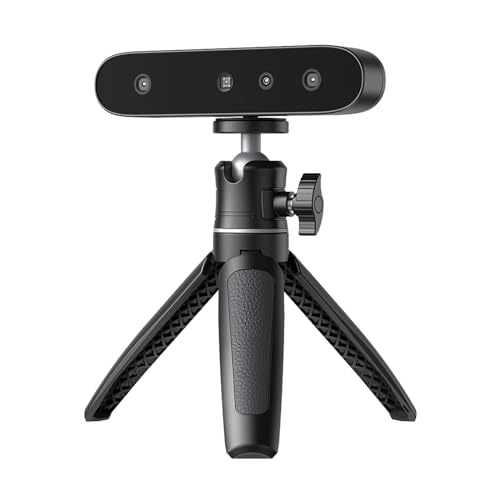
- Anti-shake tracking for steadier scans
- Scans black or metallic objects without spray
- 24-bit color capture in a 105g body
Best For: Beginners who want simple color scanning
Industrial Precision Pick
Revopoint MetroX Pro 3D Scanner

- 0.01 mm single-frame precision
- Handles shiny or dark surfaces without spray
- Auto turntable and 4 scan modes
Best For: Precision jewelry capture, inspection, and fine-detail modeling
Portable Beginner Pick

- Wireless WiFi 6 scanning with phone and PC support
- Lightweight 105g handheld design
- Not suitable for jewelry or precision parts
Best For: Beginners scanning larger objects who value portability and ease of use
Flexible Detail Pick
Revopoint INSPIRE 2 3D Scanner

- 0.03 mm precision and 0.05 mm accuracy
- Handles reflective or dark surfaces without spray
- Wireless, lightweight, full-color scanning
Best For: Small to medium object scanning with color capture and flexible workflows
Precision Desktop Scan – EinScan SE V2 Desktop 3D Scanner with Dual Scan Modes
If you need a desktop 3D scanner for jewelry-style small parts, the EinScan SE V2 is built around fine-detail capture and easy turntable workflows. Its Auto Scan and Fixed Scan modes let you choose between speed and higher-detail capture, while the stated sub-0.1 mm accuracy and small-object support make it a practical fit for compact items that need clean geometry.
Best For: Users who want a desktop scanner for small objects, print-ready meshes, and straightforward scanning software.
Pros:
- Fixed Scan mode offers up to 0.1 mm accuracy for detailed object capture.
- Auto Scan can capture models in seconds for faster workflow.
- ExScan software includes automatic calibration and one-click scanning.
- Auto meshing helps produce watertight, print-ready 3D data.
Cons:
- Best suited to small-object workflows rather than large-item scanning.
- Focuses on structured desktop use, so it is not a handheld option.
For jewelry-adjacent digitizing and other small parts, this model leans into accuracy, convenience, and direct 3D-printing output. It is a strong pick if you want a simple desktop setup rather than a more mobile scanner.
Handheld Detail Pick – Shining 3D Einstar Handheld 3D Scanner
Although it is handheld rather than a desktop 3D scanner for jewelry, the Einstar is worth considering if you need flexible capture of small and irregular surfaces. It offers point distance up to 0.1 mm, RGB color capture, and detail enhancement tools that help improve data completeness during scanning and post-processing.
Best For: Buyers who want a portable scanner with fine-detail capture and color data for varied objects.
Pros:
- Point distance up to 0.1 mm for high-density data capture.
- Built-in RGB color camera captures high color fidelity 3D data.
- Hair Mode and detail enhancement tech help improve completeness.
- Single USB cable keeps setup simple and flexible.
Cons:
- Handheld design may be less convenient than a true desktop turntable workflow.
- Not specifically a dedicated jewelry scanning system.
If portability matters more than a fixed desktop rig, the Einstar brings strong capture quality and easy handling. It fits buyers who value versatile scanning over a strictly stationary setup.
Ultra-Fine Laser Scan – Creality CR-Scan Raptor 3D Scanner
If your priority is high precision for small, detailed parts, the Creality CR-Scan Raptor stands out with blue laser scanning and a stated 0.02 mm accuracy. While not a desktop-only machine, its fine line projection and fast capture make it a serious option for users comparing a desktop 3D scanner for jewelry with more industrial-grade detail.
Best For: Users who need very high accuracy, fast scanning, and support for tiny-to-large object ranges.
Pros:
- Blue laser mode reaches up to 0.02 mm accuracy.
- 7 parallel blue laser lines create thin, sharp edge capture.
- Scans up to 60 fps in blue light mode for faster acquisition.
- Handles objects from 5 mm up to 2000 mm across scanning modes.
Cons:
- Requires a strong PC setup, especially for Windows or macOS use.
- More advanced than many entry-level desktop scanners.
This is a strong choice when precision matters more than simplicity. For buyers focused on tiny detail capture, it offers more technical headroom than many general-purpose scanners.
Metrology Desktop Choice – Revopoint MetroY Ultra 3D Scanner
For buyers who want a desktop 3D scanner for jewelry-like small parts plus measurement-focused output, the Revopoint MetroY Ultra is the most metrology-oriented option here. It combines multiple scanning modes, certified measurement software, and on-site verification tools designed for accuracy checking and industrial reporting.
Best For: Measurement-heavy users who need verified scan data, reporting, and multi-mode precision capture.
Pros:
- 0.01 mm single-frame precision and 0.015 mm + 0.04 mm/m volumetric accuracy.
- Five scanning modes cover fine detail, holes, marker-free scans, and turntable work.
- PTB-certified Revo Measure supports measurement and PDF report generation.
- Wi-Fi 6 and battery grip add flexibility for mobile or outdoor scanning.
Cons:
- Revo Measure support is Windows 10/11 only.
- Geared more toward inspection and metrology than simple hobby scanning.
This scanner is best when you care about verification as much as capture quality. It is a strong fit for users who need precise scans and documented results rather than only visual models.
Entry-Level Detail Scanner – 3DMakerpro Moose Lite
If you want a desktop 3D scanner for jewelry-style detail work without jumping to a full pro setup, the 3DMakerpro Moose Lite is built around fine accuracy and easy software handling. Its 0.05mm accuracy and 0.1mm resolution are aimed at preserving small surface details, while the AI tracking and point-cloud processing help keep scans manageable for printing or display workflows.
Best For: Hobbyists and makers who want a lightweight scanner for detailed small-object capture and 3D printing prep.
Pros:
- 0.05mm accuracy and 0.1mm resolution for detailed captures
- AI tracking and point-cloud algorithms help simplify scanning
- Quiet, lightweight 250g design for easy handling
- Supports scanning in darker conditions with 9-level light adjustment
Cons:
- Handheld format may be less convenient than a true fixed desktop rig
- Optional smartphone grip is sold separately
- Best suited to Windows 10/11 and MacOS 12/13 systems only
The Moose Lite is a practical choice if you care more about fine detail and approachable software than all-in-one convenience. For jewelry-adjacent scanning tasks, its strength is capturing small features accurately while keeping the workflow relatively simple.
All-in-One Pro Capture – Revopoint MIRACO Pro
If you need a desktop 3D scanner for jewelry workflows that can also handle broader studio tasks, the Revopoint MIRACO Pro stands out for its all-in-one design and high-precision capture. It scans and edits on board, offers up to 0.02mm single-frame precision, and adds 48MP color capture for detailed, realistic models.
Best For: Users who want a portable, self-contained scanner for detailed scanning, measurement, and scan-to-CAD work.
Pros:
- Up to 0.02mm precision for high-detail capture
- All-in-one operation with no computer or cables required during scanning
- 48MP RGB camera and Flash LED system for color-rich models
- Near-mode and Far-mode support both small and large objects
Cons:
- More expensive, feature-heavy option than basic handheld scanners
- Revo Design software is paid separately and Windows-only
- Battery life is limited to up to 2 hours of scanning time
The MIRACO Pro is the strongest fit here if you want premium detail and the convenience of scanning without being tethered to a PC. It is especially compelling when you need fine capture, editing, and export options in one portable package.
Easy Color Scanner – Creality CR-Ferret SE
The Creality CR-Ferret SE is a desktop 3D scanner option for buyers who want simple operation, decent accuracy, and color capture without a complicated setup. Its anti-shake tracking is designed to improve scan stability, and the scanner can handle black or metallic objects without spray, which is useful for mixed-material jewelry-adjacent parts and accessories.
Best For: Beginners who want a lightweight scanner with straightforward operation and full-color results.
Pros:
- Anti-shake tracking helps reduce errors from unsteady hands
- Can scan dark or metallic objects without scanning spray
- 24-bit full-color scanning with a built-in 2MP color camera
- Very compact at just 105g
Cons:
- PC scanning only on the SE model
- No battery handle included
- Requires compatible Windows PC hardware and software version
For shoppers who value ease of use and color capture over a fully wireless workflow, the CR-Ferret SE is an accessible pick. It is a practical scanner for getting started with detailed object digitizing, especially when dark or reflective surfaces are part of the job.
Industrial Precision Pick – Revopoint MetroX Pro 3D Scanner
If you need a desktop 3D scanner for jewelry or other small precision work, the Revopoint MetroX Pro is built around high-detail capture and multiple scan modes. Its blue laser and structured-light options are designed to handle shiny or dark surfaces, while the dual-axis auto turntable helps automate detailed scans with minimal hands-on adjustment.
Best For: Users who want industrial-grade precision for jewelry modeling, inspection, reverse engineering, and fine-detail 3D capture.
Pros:
- Single-frame precision up to 0.01 mm and accuracy up to 0.02 mm
- Can scan shiny or dark surfaces without spray in cross-line or parallel-line modes
- Auto turntable mode supports one-click automated scanning
- Real-time PC-to-mobile streaming helps you monitor scan progress
Cons:
- Revo Design and Revo Measure are paid software sold separately
- Windows-only support applies to some advanced software tools
- Bulky package and heavier setup than portable handheld-only options
The MetroX Pro is the strongest fit here if your priority is capture quality over simplicity. For jewelry-scale work, its precision-focused hardware and flexible tracking modes make it the most capable option in this roundup.
Portable Beginner Pick – Creality CR-Scan Ferret Pro
The Creality CR-Scan Ferret Pro is a practical desktop 3D scanner for jewelry only if you are working on larger objects, not tiny pieces. It is positioned as an easy-to-use, wireless handheld scanner with full-color capture, but its own notes say it is not suitable for very small or highly detailed items like jewelry or precision parts.
Best For: Beginners and mobile creators scanning medium to large objects who want wireless full-color scanning across phone and PC platforms.
Pros:
- Easy to use for entry-level users and 3D printing enthusiasts
- Wireless scanning with WiFi 6 and cross-platform support
- Lightweight 105g design for portability
- Full-color 24-bit scanning with anti-shake tracking
Cons:
- Not suitable for very small or highly detailed items like jewelry
- Best performance depends on avoiding reflective, transparent, or very dark surfaces
- 0.1 mm accuracy is less suited to fine jewelry work than precision-focused scanners
For jewelry-focused buyers, this is the least suitable option in the group, but it can still make sense if you also scan larger everyday objects. Its real value is convenience: wireless operation, broad device support, and simple setup for general-purpose scanning.
Flexible Detail Pick – Revopoint INSPIRE 2 3D Scanner
The Revopoint INSPIRE 2 is a compact 3D scanner for buyers who want detailed capture in a lighter, more flexible package. For a desktop 3D scanner for jewelry, its multi-line laser and structured-light system, plus support for reflective or dark surfaces without spray, make it a more relevant choice than general-purpose handheld scanners.
Best For: Creators who need a portable but detail-oriented scanner for small to medium objects, full-color capture, and mixed-surface scanning.
Pros:
- Up to 0.05 mm accuracy and 0.03 mm precision
- Scans reflective or dark surfaces without scanning spray
- Lightweight 190g body with wireless scanning support
- Built-in RGB camera captures full-color textures
Cons:
- Designed for small-medium objects rather than ultra-fine jewelry workflows
- Advanced software and full scan-to-CAD features may require paid tools
- Best system requirements are relatively demanding on Windows and Mac
INSPIRE 2 sits between beginner convenience and precision-focused scanning. If you want a more adaptable scanner for small objects, texture capture, and challenging materials, it offers a strong balance of detail and portability.
How We Picked the Best Desktop 3D Scanner for Jewelry
For a Desktop 3D Scanner for Jewelry, we prioritized fine-detail capture, repeatability, small-object performance, and software that supports clean post-processing. We also considered scan speed, tracking stability, and whether a scanner is practical for studio or bench workflows.
Because jewelry often includes reflective surfaces, tight curves, prongs, and engraved details, we favored models that offer higher stated accuracy, structured light or laser capture, and reliable alignment for compact objects.
Quick Comparison
Use the comparison list to separate scanners by the kind of work you do. Some models are better suited to stationary tabletop scanning, while others are more flexible if you also need to scan prototypes, tools, or larger pieces beyond jewelry.
In general, the most important tradeoff is precision versus convenience: ultra-fine scanners usually demand better setup and more careful preparation, while easier all-in-one systems can speed up everyday work but may sacrifice some surface detail.
Key Buying Factors for a Desktop 3D Scanner for Jewelry
Accuracy and Detail
Look for sub-0.1 mm performance if you need reliable geometry for rings, pendants, clasps, and stone settings. If your work includes CAD editing, wax modeling, or custom reproduction, tighter accuracy helps reduce cleanup time.
Small-Object Handling
Jewelry scanning depends on the scanner’s ability to lock onto tiny features. Check minimum scan size, focus depth, and whether the software handles narrow bands, filigree, and thin edges without losing track.
Surface Challenges
Shiny metal, transparent stones, and dark finishes can make scanning harder. A scanner with strong tracking and good lighting or laser support is usually easier to work with on real-world jewelry.
Software and Workflow
Good hardware matters, but software determines how much time you spend cleaning meshes. Look for tools that support alignment, hole filling, texture capture when needed, and export formats compatible with CAD and 3D printing.
Speed Vs. Control
Fast scan rates are useful, but not if they reduce fine detail. For jewelry, controlled scanning often beats raw speed, especially when you need crisp edges and accurate dimensions.
Who Should Buy Which Desktop 3D Scanner for Jewelry?
If your main goal is bench-top jewelry digitizing, choose a scanner that emphasizes accuracy, small-object stability, and simple repositioning. If you also scan larger objects or need portability, a more versatile handheld or hybrid model may be the better investment.
Studios focused on reproduction and CAD workflows should lean toward precision-first models. Makers and small businesses that want a smoother day-to-day experience may prefer scanners with easier setup, faster tracking, and less post-processing, even if they give up a little fine detail.
Ultimately, the best Desktop 3D Scanner for Jewelry is the one that matches your part size, finish type, and workflow speed requirements. Prioritize consistent results over headline specs alone.