Choosing a handheld 3D scanner for sculpture is really about balancing detail, surface handling, and workflow speed. The right model should capture fine textures and subtle contours without forcing you into a slow, frustrating scan process.
Below, we focus on options that fit sculptors, model makers, and digital artists who want practical performance for real studio use.
Best 10 Handheld 3D Scanner for Sculpture Picks for 2026
Wireless Dual-Light Scanner for Outdoor Sculpture
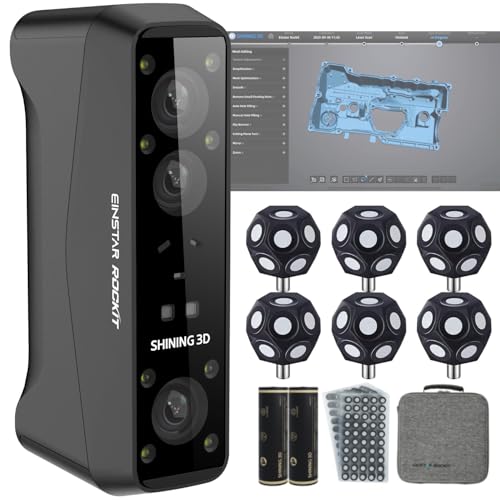
- Dual blue laser and IR VCSEL scanning
- Works in daylight and bright environments
- Wireless with color texture capture
Best For: Outdoor statues, sculptures, and mixed-size art scanning
Multi-Mode Handheld Scanner for Detailed Sculpture Capture

- Four scan modes for varied sculpture work
- Up to 0.04 mm accuracy in supported modes
- Built-in mesh editing and CAD-oriented workflow
Best For: Versatile users who need flexible scanning and cleanup tools
Portable High-Precision Scanner for Sculpture and 3D Printing

- 0.05 mm resolution with dual scanning ranges
- Full-color texture capture at up to 30 fps
- Lightweight 235 g body with included kit
Best For: Portable DIY sculpture scanning and 3D printing prep
Wireless Full-Color Scanner for Sculpture Archiving

- Wireless WiFi 6.0 with mobile streaming
- Dual laser and structured-light scan modes
- Captures texture and handles dark or reflective surfaces
Best For: Lightweight sculpture archiving and full-color capture
Detailed color scanning
3DMakerpro Moose Lite with color capture
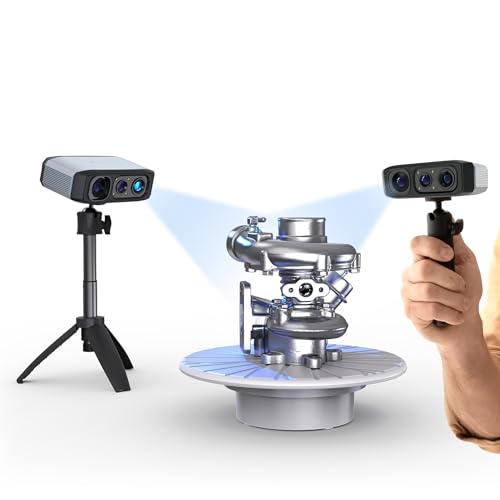
- Up to 0.03mm accuracy
- 24-bit color restoration
- Anti-shake and rescan support
Best For: Sculptors wanting detailed, color-aware scans with easier handling
Wireless pro scanning
EinScan Rigil all-in-one handheld

- 0.04mm accuracy with 50 laser lines
- Works on dark or reflective objects
- Standalone, wireless PC, and wired PC modes
Best For: Professional sculpture scanning with difficult surfaces and flexible setups
Quiet entry-level precision
3DMakerpro Moose Lite standard
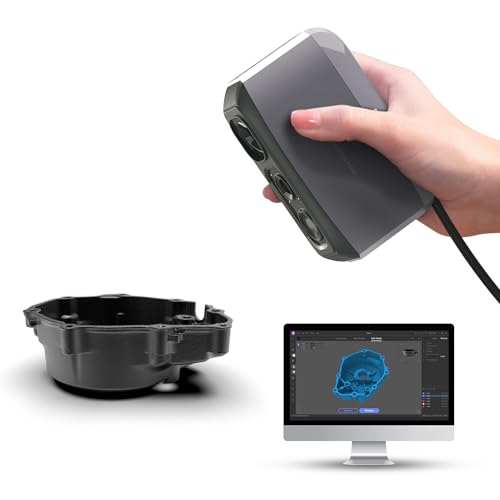
- Up to 0.05mm accuracy
- 250g lightweight, no fan noise
- 9-level lighting for dark scans
Best For: Makers seeking a lightweight sculpture scanner with simple handling
Hybrid Texture Capture
EinScan H2 Handheld 3D Scanner

- Hybrid LED and infrared scanning
- Portable for larger or irregular sculptures
- Works with Solid Edge CAD software
Best For: Sculpture and artwork scans with strong texture detail
Wireless Precision Pick
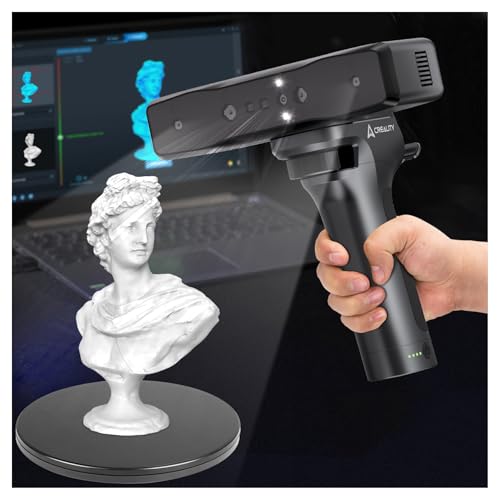
- 0.05 mm accuracy with infrared structured light
- Wi-Fi and mobile app control
- Scans from tiny objects to larger parts
Best For: Flexible, cable-free scanning across a wide size range
Stand-Alone Powerhouse
Toucan Premium Handheld 3D Scanner
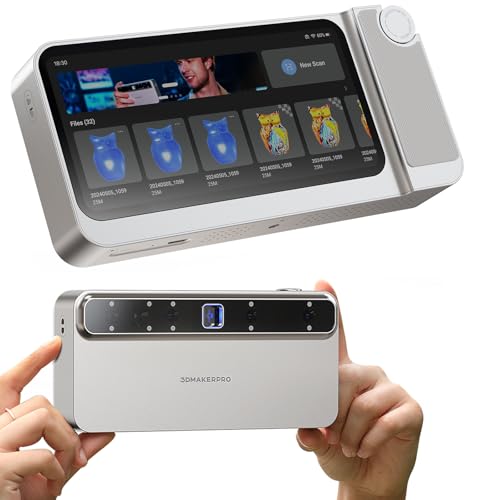
- No PC required for full scan-to-export workflow
- Up to 0.03 mm accuracy with blue laser structured light
- Deep scan mode helps capture cavities and hidden areas
Best For: All-in-one scanning when you want complete on-device processing
Wireless Dual-Light Scanner for Outdoor Sculpture – EINSTAR Rockit
If you need a handheld 3D scanner for sculpture work that can handle both fine surface detail and larger outdoor pieces, the EINSTAR Rockit is built for exactly that. Its dual light system combines blue laser for fast capture and fine detail with IR VCSEL for safer, quicker scanning of medium to large objects, including statues and other outdoor subjects.
Best For: Sculptors, digitization teams, and creators scanning statues or mixed-material artwork outdoors or in changing light.
Pros:
- Blue laser mode supports detailed scanning and deep-hole capture.
- IR VCSEL mode is designed for medium to large objects and can work in bright environments.
- Wireless Wi-Fi scanning with real-time sync to PC adds mobility.
- Built-in 5 MP color camera captures vivid textures for art-focused models.
Cons:
- Battery runtime is up to 3 hours, so long sessions may need planning.
- Wi-Fi interference can require switching to cable connection.
For sculpture scanning, the Rockit stands out when you need flexibility across lighting conditions and object sizes. The combination of wireless operation, texture capture, and outdoor-capable scanning makes it a strong pick for practical field workflows.
Multi-Mode Handheld Scanner for Detailed Sculpture Capture – EinScan Pro 2X Plus
For buyers comparing a handheld 3D scanner for sculpture, the EinScan Pro 2X Plus offers a versatile, multi-mode workflow that can adapt to different object sizes and scanning needs. Its accuracy range, rapid scanning speed, and optional color capture make it a solid option when you want a flexible scanner for art and modeling tasks.
Best For: Users who want a versatile handheld scanner with multiple scan modes for sculpture digitization and related CAD workflows.
Pros:
- Supports 4 scanning modes with optional accessories for different setups.
- Accuracy ranges from 0.04 mm to 0.1 mm depending on mode.
- Scans at up to 30 fps with 1.5M points per second.
- Mesh editing tools include hole filling, smoothing, and sharpening.
Cons:
- Color capture requires the Color Pack option.
- Included accessories and marker workflow may add setup steps.
This is a strong choice when your sculpture work overlaps with reverse engineering or CAD cleanup. The broad mode support and post-processing tools give it more flexibility than a basic single-purpose scanner.
Portable High-Precision Scanner for Sculpture and 3D Printing – Creality Otter Lite Basic
The Creality Otter Lite Basic is a practical handheld 3D scanner for sculpture projects when portability and straightforward operation matter. It combines close-range and long-range scanning modes with full-color texture capture, making it useful for capturing small sculpted details as well as larger forms.
Best For: DIY users and creators who want a lightweight scanner for portable sculpture capture and 3D printing prep.
Pros:
- 0.05 mm resolution supports fine-detail capture.
- Close-range and long-range modes handle small and larger objects.
- RGB and infrared cameras capture full-color texture at up to 30 fps.
- Weighs just 235 g and includes a turntable, markers, and carrying case.
Cons:
- More suited to small-to-medium projects than very large sculpture workflows.
- USB-based operation may be less flexible than wireless models.
If you want an easy-to-carry scanner for sculpture digitizing, this model focuses on convenience without giving up useful texture capture. The included accessories and plug-and-play design make it appealing for home studios and mobile setups.
Wireless Full-Color Scanner for Sculpture Archiving – Revopoint INSPIRE 2
If your priority is a handheld 3D scanner for sculpture with strong portability and detailed color capture, the Revopoint INSPIRE 2 is a compelling option. It combines wireless scanning, dual scanning modules, and outdoor-capable performance to help capture artwork, heritage pieces, and other textured objects with useful flexibility.
Best For: Creators and archiving workflows that need a lightweight scanner for detailed sculpture capture in studio or outdoor settings.
Pros:
- Wireless WiFi 6.0 supports mobile scanning and live streaming workflows.
- Dual modes include infrared structured light and multi-line laser scanning.
- Can scan reflective or dark surfaces without scanning spray.
- Built-in RGB camera captures true-to-life full-color textures.
Cons:
- Outdoor performance is rated for shaded or semi-bright conditions up to 20,000 lux.
- Best results may depend on compatible hardware and software requirements.
For sculpture digitization, the INSPIRE 2 stands out when you want mobility, texture fidelity, and better handling of difficult surfaces. Its lightweight design and scan-to-CAD workflow support make it especially useful for detailed archiving and modeling projects.
Detailed color scanning – 3DMakerpro Moose Lite with color capture
If you want a handheld 3D scanner for sculpture that prioritizes fine detail and easier scanning, the 3DMakerpro Moose line is built around precision capture and guided workflow. It combines blue light scanning, AI tracking, and JMStudio processing to help preserve intricate surfaces and streamline the path from scan to export.
Best For: Sculptors and makers who want detailed, color-capable scans with beginner-friendly handling.
Pros:
- Claims up to 0.03mm accuracy and 0.07mm resolution for fine surface detail.
- 24-bit color camera supports true-color restoration for lifelike models.
- Anti-shake modules and rescan support make it easier to handle interruptions.
- JMStudio combines scanning, editing, and optimization in one workflow.
Cons:
- Smart Grip for phone scanning is optional and sold separately.
- Best-supported workflow depends on Windows or MacOS compatibility.
For sculpture work where detail preservation and color capture matter, this model offers a strong mix of accuracy and software support. It looks especially practical if you want a guided scanner that helps reduce the learning curve while still aiming for refined results.
Wireless pro scanning – EinScan Rigil all-in-one handheld
If your priority is a handheld 3D scanner for sculpture that can handle demanding materials and more flexible scanning setups, the EinScan Rigil is positioned as a pro-level option. Its wireless all-in-one design, hybrid laser and infrared scanning, and marker-free performance make it suited to larger workflows where speed and mobility matter.
Best For: Professionals scanning sculptures, prototypes, or reflective and dark objects without spray.
Pros:
- Triple-mode operation includes standalone, wireless PC, and wired PC scanning.
- 50 laser lines and hybrid scan tech support 0.04mm accuracy.
- Can scan dark or reflective objects without spray, including sculptures.
- Built-in storage, touchscreen, batteries, and Wi-Fi 6 improve mobility.
Cons:
- More complex feature set may be more than casual users need.
- Accessory-heavy kit may be best suited to advanced workflows.
For users who need portability without giving up precision, the Rigil stands out as a capable professional scanner. Its ability to work on difficult surfaces and in multiple scan modes makes it a strong fit for serious sculpture digitizing.
Quiet entry-level precision – 3DMakerpro Moose Lite standard
The Moose Lite standard is a practical handheld 3D scanner for sculpture if you want fine detail, simple handling, and a lighter desktop-friendly setup. It focuses on blue light accuracy, AI tracking, and low-noise operation, making it a straightforward choice for scanning models for printing or display.
Best For: Makers who want a lightweight scanner for detailed sculpture scans in varied lighting.
Pros:
- Offers up to 0.05mm accuracy and 0.1mm resolution for detailed models.
- Weighs only 250g and is designed to be quiet with no fan noise.
- Supports scanning in the dark with 9-level light adjustment.
- JMStudio provides integrated scanning, editing, and optimization.
Cons:
- Smart Grip phone scanning requires a separate purchase.
- Plastic build may feel less premium than the aluminum-alloy Moose model.
This version is appealing if you want an accessible scanner that still emphasizes detail capture and low noise. For sculpture scanning, its combination of depth handling, dark-scene support, and streamlined software makes it a flexible everyday option.
Hybrid Texture Capture – EinScan H2 Handheld 3D Scanner
If you want a handheld 3D scanner for sculpture work, the EinScan H2 is built to capture textured surfaces with a hybrid LED and infrared setup. It’s designed for portable use, so you can move around larger or irregular pieces in the studio or on location while keeping detail and texture accuracy in focus.
Best For: Capturing sculpture surfaces, artwork, and mixed-material objects where texture detail matters.
Pros:
- Hybrid LED and infrared scanning supports realistic texture capture.
- Handheld, portable design makes it easier to scan large or awkward sculptures.
- Compatible with Solid Edge software for mesh editing and exporting.
- Can handle shiny, dark, and organic surfaces with reduced noise.
Cons:
- Requires a fairly demanding Windows 10 system with a strong GPU and 32GB RAM.
- Uses a USB connection rather than wireless operation.
The EinScan H2 is a practical option if your priority is texture-rich scanning rather than ultra-simple setup. For sculpture documentation and 3D printing workflows, its mixed-light approach and CAD compatibility make it a solid studio tool.
Wireless Precision Pick – Creality Otter Lite Scanner
The Creality Otter Lite is a handheld 3D scanner for sculpture projects that need flexibility and precision. With wireless operation, mobile control, and 0.05 mm accuracy, it’s a good fit when you want to move around an object freely and capture models from small parts to larger pieces.
Best For: Users who want a wireless scanner for flexible scanning of objects at different sizes.
Pros:
- 0.05 mm accuracy supports detailed scanning work.
- Wi-Fi and smartphone control remove cable restrictions.
- Designed for both tiny objects and large parts up to 2000mm³.
- Real-time 30fps scanning helps keep tracking smooth.
Cons:
- Wireless convenience still depends on compatible Windows or macOS systems.
- Its feature set may be more than needed for simple, occasional scans.
If you value mobility during sculpture scanning, the Otter Lite stands out for its cable-free workflow and broad object-size range. It’s especially appealing for creators who want high precision without being tied to a workstation.
Stand-Alone Powerhouse – Toucan Premium Handheld 3D Scanner
The Toucan Premium is a handheld 3D scanner for sculpture workflows that need more than basic capture. Because it scans, processes, edits, fuses, and exports directly on the device, it’s well suited to creators who want a self-contained tool for detailed models of small objects, figurines, and even life-size sculptures.
Best For: Users who want an all-in-one scanner for complete on-device workflows.
Pros:
- No computer required for scanning, processing, editing, and exporting.
- Up to 0.03 mm accuracy and 0.05 mm resolution for detailed capture.
- Handles a very wide range of object sizes, including life-size sculptures.
- Deep scan capability helps capture interiors and complex geometry.
Cons:
- At 735 g, it is still a handheld device you’ll be supporting during longer scans.
- Its onboard workflow may be more than needed if you only want simple capture to a PC.
For sculpture scanning, Toucan stands out when independence and workflow speed matter. Its onboard processing and deep-scan features make it especially useful for users who want complete results without relying on a laptop.
How We Picked the Best Handheld 3D Scanner for Sculpture
For this roundup, we prioritized scanners that make sense for sculptural work: fine stated accuracy, reliable tracking, flexible light sources, and enough portability for tabletop and studio scanning. We also looked at whether each Handheld 3D Scanner for Sculpture supports color capture, wireless use, and software features that help clean up scans faster.
Quick Comparison
If you want the shortest path to a decision, start with your subject size and finish quality goals. High-detail figurines and small maquettes benefit from higher accuracy and strong close-range performance, while larger sculptures need stable tracking, wider capture, and easier repositioning. If your workflow includes presentation renders or archival work, color capture becomes more important.
Key Buying Factors for a Handheld 3D Scanner for Sculpture
Accuracy and Surface Detail
Look for sub-0.1 mm accuracy if you need crisp edges, tool marks, or fine ornamentation. For many sculpture workflows, a scanner in the 0.03 mm to 0.05 mm range offers a strong balance of detail and usability.
Light Technology and Texture Handling
Structured light, laser lines, and hybrid systems each have tradeoffs. Laser can help with geometry and tricky surfaces, while structured light is often easier for dense, smooth scans. If the sculpture has mixed materials or complex finishes, a hybrid system can be the safest choice.
Color Capture
Color scanning is worth considering if you document painted pieces, mixed-media sculptures, or presentation-ready models. It is less critical for pure geometric reproduction, but it can save time if you need visual records alongside mesh data.
Tracking, Speed, and Portability
A good Handheld 3D Scanner for Sculpture should stay locked on surfaces without constant re-alignment. Faster frame rates and anti-shake tools help reduce rescans, while wireless operation is useful when moving around larger pieces or working in tight studio spaces.
Who Should Buy Which Handheld 3D Scanner for Sculpture?
If you scan small, highly detailed sculpture pieces, prioritize accuracy and close-range capture. If you work with larger objects or need mobility, choose a wireless model with strong tracking and faster scan speed. If your final output is for archiving, client presentation, or digital cataloging, favor models with reliable color capture and cleaner post-processing tools.
For most buyers, the best choice is the scanner that matches your real workflow, not just the highest spec sheet number. Think about your typical sculpture size, how often you need color, and how much cleanup you are willing to do after scanning.