The best label printing systems make it easier to organize supplies, prepare shipments, identify products, and create professional-looking labels on demand.
This roundup compares 10 options across desktop, handheld, Bluetooth, and industrial formats so you can choose a system that matches your label size, workflow, and budget.
Best 10 Label Printing Systems Picks for 2026
Fast Professional Pick

- Up to 93 labels per minute at 300 dpi
- Black-and-red printing with compatible media
- Windows and Mac USB workflow
Best For: High-volume business and shipping labels
Creative Bluetooth Pick

- Bluetooth app control across mobile and computer devices
- 30+ fonts, 50+ frames, and 660+ icons
- Includes three starter tapes
Best For: Custom home and small-business labels
Shipping Workflow Pick

- Supports 4-inch shipping labels
- Works with major selling and shipping platforms
- Bluetooth and USB connectivity
Best For: Online sellers and shipping workflows
Simple Home Organization Pick

- Physical QWERTY keyboard for app-free use
- Stores up to 30 frequently used labels
- Supports laminated TZe tapes up to about 1/2 inch
Best For: Home, desk, and small-office organization
Wireless Shipping Workhorse
JADENS Bluetooth 4x6 Label Printer

- Inkless 203 DPI thermal printing
- Bluetooth and USB connectivity
- Compatible with major shipping platforms
Best For: Online sellers and small businesses printing shipping labels
Portable Organization Specialist

- Handheld QWERTY keyboard
- Includes three D1 tape cassettes
- 300 DPI inkless thermal printing
Best For: Home and office organization labels
High-Volume Business Engine
iDPRT iD880 Industrial Label Printer
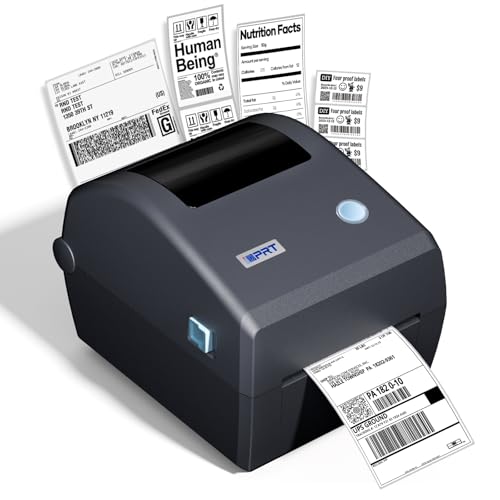
- Prints up to 6 inches per second
- USB and Ethernet connectivity
- Supports major shipping and commerce platforms
Best For: Warehouses and commercial high-volume label printing
Industrial Choice

- 300 DPI thermal-transfer printing
- Automatic cutter for batch labeling
- Mobile and PC editing support
Best For: Durable 2-inch industrial identification labels
Portable Organizer

- Compact 222.8 g Bluetooth design
- 20–50 mm label-width range
- App supports templates and Excel batches
Best For: Home, school, office, and small retail labels
Shipping Workhorse

- Supports labels up to 4.2 inches wide
- Up to 180 mm/s printing speed
- Works with major selling platforms
Best For: Small-business shipping and mailing labels
Fast Professional Pick – Brother QL-800
For businesses that need dependable label printing systems for shipping, filing, and office workflows, the Brother QL-800 stands out for its high output speed and practical USB connectivity. It prints up to 93 labels per minute at 300 dpi and supports both standard DK labels and continuous-length tape.
Best For: High-volume office, warehouse, shipping, and business labeling.
Pros:
- Prints up to 93 labels per minute at 300 dpi.
- Supports black-and-red printing with DK-2251 media.
- Works with Windows and Mac, including Word, Excel, and Outlook integration.
- Built-in auto-cutter and included USB cable simplify regular workflows.
Cons:
- USB connectivity may be less convenient than a wireless system.
- Black-and-red output requires compatible Brother media.
- Designed for Brother Genuine DK labels and tapes.
The QL-800 is a strong choice when speed and polished office output matter more than portability. Its dual-color capability and auto-cutter add useful flexibility for professional labels, signage, and shipping tasks.
Creative Bluetooth Pick – SUPVAN T50M Pro
The SUPVAN T50M Pro is a flexible label printing system for home organization, school, office, and small-business projects. Its Bluetooth app supports custom designs with more than 30 fonts, 50 frames, and 660 icons, while the package includes three tapes.
Best For: Custom organization labels, product labels, QR codes, and household projects.
Pros:
- Bluetooth support works with Android, iOS, tablets, PCs, and laptops.
- Free app offers fonts, frames, icons, and image importing.
- Supports label widths from approximately 3/4 to 2 inches.
- Includes three starter tapes in different formats and colors.
Cons:
- Print resolution is 203 dpi, below higher-resolution office models.
- Requires SUPVAN-compatible label tape.
- App-based operation may be less convenient for users who prefer a physical keyboard.
Choose the T50M Pro if design flexibility and wireless convenience are priorities. It is especially useful for varied personal projects and small-business labels rather than high-volume shipping runs.
Shipping Workflow Pick – KNAON Y41BT Shipping Printer
The KNAON Y41BT is a practical shipping-focused option among label printing systems, combining 4-inch thermal label support with Bluetooth and USB connectivity. Its app works with major marketplaces and includes templates for shipping, barcode, mailing, and small business labels.
Best For: Online sellers printing shipping labels from marketplaces and multiple devices.
Pros:
- Supports paper widths from 1.38 to 4.41 inches, including 4-inch shipping labels.
- Works with Windows, macOS, ChromeOS, Linux, Android, and iOS through supported software.
- Compatible with platforms including Amazon, eBay, Shopify, USPS, UPS, Etsy, and DHL.
- Offers printing speeds up to 180 mm/s and includes 20 test papers.
Cons:
- Mobile Bluetooth printing requires the FlashLabel Pro app.
- Marketplace labels must be saved as PDFs and imported into the app.
- Prints monochrome at 203 dpi.
The Y41BT makes the most sense for sellers who need a compact thermal printer with broad platform support. Its app-based workflow takes an extra step for marketplace PDFs, but the connectivity and shipping-oriented design are useful.
Simple Home Organization Pick – Brother PTD220 Label Maker
The Brother PTD220 is a straightforward label printing system for home and small-office organization. Its QWERTY keyboard, preset templates, built-in memory, and support for laminated Brother TZe tapes make everyday labeling simple without relying on a mobile app.
Best For: Home organization, desk labeling, files, storage bins, and small-office use.
Pros:
- Physical QWERTY keyboard enables direct, app-free label creation.
- Offers 14 fonts, 11 styles, 99 frames, and more than 600 symbols.
- Stores up to 30 frequently used labels.
- Includes 25 preset templates and a laminated TZe sample tape.
Cons:
- Supports labels up to approximately 1/2 inch wide.
- Runs on six AAA batteries or an optional AC adapter sold separately.
- Print resolution is 180 dpi and output is monochrome.
The PTD220 is a good fit for users who value simplicity and a familiar keyboard over wireless features. It is best suited to everyday organization tasks rather than wide shipping labels or high-volume production.
Wireless Shipping Workhorse – JADENS Bluetooth 4×6 Label Printer
For small businesses building practical label printing systems, the JADENS Bluetooth Thermal Shipping Label Printer offers a flexible way to produce 4×6 shipping labels without ink or toner. It supports both wireless and USB connections, works with roll or fanfold labels, and integrates with common shipping and marketplace platforms.
Best For: Online sellers and small offices printing shipping, warehouse, and marketplace labels.
Pros:
- Prints inkless 203 DPI labels in widths from 1.57 to 4.1 inches.
- Supports Bluetooth on compatible Windows and Mac computers, plus USB connectivity.
- Works with platforms including ShipStation, Shopify, eBay, Amazon, and Shippo.
- Includes setup resources and a one-year limited warranty.
Cons:
- Android and iOS phones require the Jadens printer app rather than direct Bluetooth printing.
- Label calibration is required when changing label types.
- Its 203 DPI output is designed for everyday shipping labels rather than higher-detail printing.
The JADENS is a practical pick when wireless convenience and broad shipping-platform compatibility matter most. Its compact thermal design keeps ongoing printing simple, though mobile users should be comfortable working through the dedicated app.
Portable Organization Specialist – DYMO LabelManager 160 Bundle
For portable label printing systems focused on home and office organization, the DYMO LabelManager 160 combines a handheld QWERTY keyboard with one-touch editing controls. This bundle includes three D1 tape cassettes, making it ready for creating compact text labels without ink or toner.
Best For: Home users, offices, and anyone labeling folders, supplies, storage areas, or equipment.
Pros:
- Compact handheld design with a built-in QWERTY keyboard.
- Offers more than 20 text formats and over 200 symbols for customization.
- Includes three 1/2-inch by 23-foot D1 label cassettes.
- 300 DPI thermal printing and automatic power-off support everyday organization tasks.
Cons:
- Designed for narrow tape labels rather than 4×6 shipping labels.
- Its maximum media size is approximately 2.63 inches.
- Best performance requires authentic DYMO D1 tapes.
The LabelManager 160 is a straightforward choice for users who want a self-contained label maker instead of a computer-dependent printer. The included tapes add value, while the narrow format limits it to organization and identification jobs rather than parcel shipping.
High-Volume Business Engine – iDPRT iD880 Industrial Label Printer
For commercial label printing systems handling continuous batches, the iDPRT iD880 is built around direct thermal 4×6 printing, dual USB and Ethernet connectivity, and support for multiple operating systems. Its fast 6-inch-per-second output and broad media compatibility suit warehouses, logistics operations, retailers, and other busy workgroups.
Best For: Warehouses, logistics centers, retail operations, and businesses printing high volumes of shipping or barcode labels.
Pros:
- Prints at speeds up to 6 inches per second with 203 DPI resolution.
- Offers both USB and Ethernet connections for flexible deployment.
- Supports Windows, macOS, Linux, Android, and iOS systems.
- Works with major platforms including Amazon, Shopify, USPS, UPS, FedEx, eBay, and Etsy.
Cons:
- Its industrial-oriented feature set may be more than occasional users need.
- Media is limited to rolls with a 1-inch core, up to 5 inches in diameter and 4.64 inches wide.
- The power plug must be firmly connected for the printer to be recognized and operate correctly.
The iDPRT iD880 is the strongest fit of these options for demanding business workflows. Ethernet, automatic paper alignment, memory, and high-speed output support shared or continuous operations, while its 203 DPI resolution remains appropriate for clear barcodes and shipping information.
Industrial Choice – Makeid D50 Label Printer
For demanding label printing systems, the Makeid D50 combines a 2-inch print head with thermal-transfer output, making it suited to identification work where durable, sharp labels matter. Its 300 DPI resolution, automatic cutter, and mobile or PC connectivity support both occasional jobs and larger batches.
Best For: Electrical, data and telecommunications, cable, safety, laboratory, warehouse, and equipment labeling.
Pros:
- Thermal-transfer printing is designed to resist fading for up to 10 years and withstand water exposure.
- 300 DPI output produces sharp monochrome labels with minimal margins.
- Automatic cutting and a combined label-and-ribbon cartridge simplify batch work and consumable changes.
- Supports mobile app and PC editing, with a 2600mAh battery and USB-C connectivity.
Cons:
- Maximum media size is limited to 2 inches.
- Uses compatible Z series label cartridges.
- At 1.5 kg, it is less lightweight than compact consumer label makers.
The D50 is a strong fit when durability and workflow efficiency matter more than ultra-portability. Its specialized consumables and 2-inch format are worth considering before purchase.
Portable Organizer – Phomemo M110 Label Maker
The Phomemo M110 is a compact option for everyday label printing systems, connecting to a phone over Bluetooth and using the Print Master app for templates and custom designs. Its 20–50 mm label-width range covers many small organization and retail tasks, while Excel batch printing can help with repetitive work.
Best For: Home organization, office sorting, school projects, clothing, price, cable, jewelry, address, and folder labels.
Pros:
- Small, lightweight design weighs about 222.8 g and connects wirelessly to mobile devices.
- Print Master provides templates and supports custom layouts, Excel batch printing, and OCR text recognition.
- Supports label widths from 20 mm to 50 mm, or approximately 0.78 to 2 inches.
- Includes a pre-installed test roll and USB-C cable.
Cons:
- Monochrome thermal printing does not support color output.
- It is not intended for shipping labels.
- Some templates, icons, and fonts in the app require paid membership.
The M110 makes sense for users who want a highly portable label maker for small-format tasks. Its app features are useful for organization and batch lists, but shipping-label needs call for a larger dedicated printer.
Shipping Workhorse – KNAON 4×6 Thermal Printer
The KNAON is built for shipping-focused label printing systems, supporting media from 1.5 to 4.2 inches and printing at speeds up to 180 mm/s. It works with the FlashLabel Pro app on mobile and desktop, while USB connectivity extends compatibility to Windows, macOS, ChromeOS, and Linux.
Best For: Small businesses and sellers printing shipping, mailing, barcode, thank-you, name, and price labels.
Pros:
- Supports major selling and delivery platforms including Amazon, eBay, Shopify, USPS, UPS, Etsy, PayPal, Poshmark, and DHL.
- Prints at up to 180 mm/s and supports paper widths from 1.5 to 4.2 inches.
- Offers Bluetooth through the FlashLabel Pro app plus USB connectivity across multiple operating systems.
- App includes more than 3,000 templates, 5,000 icons, and 100 fonts.
Cons:
- Bluetooth printing requires the FlashLabel Pro app rather than a direct device connection.
- Shipping-platform labels must be saved as PDFs and imported into the app.
- ChromeOS setup requires the FlashLabel browser extension.
The KNAON is the most practical choice here for sellers who need wider labels and broad platform support. Its app-based workflow adds a step, but the speed, size range, and included test papers make setup approachable.
How We Picked the Best Label Printing Systems
We focused on practical differences that affect daily use: supported label formats, print speed, connectivity, portability, setup, cutting features, software compatibility, and the intended workload. The selection includes compact handheld label makers for home and office organization, Bluetooth thermal printers for mobile workflows, and larger shipping or industrial models designed for frequent 4-by-6-inch labels.
Because label needs vary widely, we did not treat one format as universally best. A printer for address labels has different strengths from a tape-based organizer or product-labeling system. We also considered whether each model is suited to occasional personal use, small-business operations, or more demanding production environments.
Quick Comparison
| Best For | Recommended Type | What to Look For |
|---|---|---|
| Home organization | Handheld tape label maker | Simple keyboard, compact design, durable tape |
| Office filing and supplies | Desktop or handheld system | Fast formatting, easy tape replacement, multiple styles |
| Online shipping | 4-by-6 thermal printer | Wireless or USB connectivity, reliable feeding, broad platform compatibility |
| Retail and inventory | Industrial or desktop thermal printer | Higher duty cycle, consistent output, cutter, software support |
| Mobile labeling | Bluetooth thermal printer | Phone app quality, battery life, portability, template options |
Key Buying Factors for Label Printing Systems
Label Format and Materials
Start with the labels you actually need. Tape-based models are convenient for bins, cables, folders, and shelves, while thermal printers are better for shipping labels, barcodes, receipts, and larger batches. Confirm the supported width, roll or cassette style, adhesive type, and whether color printing is required.
Connectivity and Software
USB is dependable for a fixed workstation, while Bluetooth is more convenient for phones and tablets. Check operating-system support and review the companion app or desktop software before buying. Template quality, barcode tools, saved designs, and cloud or marketplace compatibility can matter as much as print resolution.
Speed, Duty Cycle, and Cutting
Occasional users can prioritize simplicity, but businesses should consider how many labels they produce in a session. Automatic cutters, dependable media alignment, quick first-label output, and a robust feed mechanism reduce interruptions during busy shipping or inventory work.
Running Costs and Maintenance
Compare replacement tape or roll prices, not just the printer’s purchase price. Thermal systems generally avoid ink, but they still require compatible media. Look for easy-loading supplies, clear status indicators, and accessible support if the printer will be part of a daily workflow.
Who Should Buy Which Label Printing Systems?
Choose a handheld tape label maker if you mainly label household storage, office folders, cables, or equipment. Pick a Bluetooth thermal model if you want to design labels from a phone and move between work areas. For online sellers and small businesses printing standard shipping labels, a 4-by-6 thermal printer is usually the most efficient choice. If you print continuously, manage inventory, or need more durable production equipment, prioritize an industrial or higher-duty desktop system with reliable software and media handling.