The best beginner-friendly label printing systems make everyday organization faster without requiring design expertise, complicated software, or a steep learning curve.
This roundup compares compact handheld makers, Bluetooth thermal printers, and wireless 4×6 shipping printers so you can choose a system that fits your labels, devices, and workflow.
Best 10 Beginner-Friendly Label Printing Systems Picks for 2026
Pocket-Sized Smart Pick
Nelko P21 Bluetooth Label Printer

- Pocket-sized rechargeable design
- App offers 750+ templates and 29 languages
- Prints text, QR codes, and barcodes
Best For: Portable smartphone-based labeling
Simple Screen-Controlled Choice
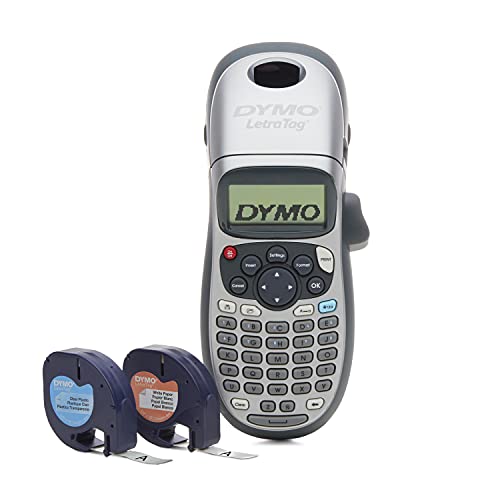
- Handheld design for home or office use
- Preview effects on the graphical display
- Includes two label cassettes and a holder
Best For: Straightforward non-smartphone labeling
Flexible App Labeling Pick
Phomemo M110 Portable Bluetooth Printer

- Handles 20–50 mm label widths
- Supports OCR and Excel batch printing
- Includes USB-C cable and test roll
Best For: App-based home, office, and small-business labels
Classic Keyboard Organizer
Brother P-Touch PTD220 Label Maker

- Familiar QWERTY keyboard controls
- Includes 25 templates and 30-label memory
- Prints durable laminated TZe tape
Best For: Home and small-office organization
Best Portable Organizer

- Built-in QWERTY keyboard
- 20+ formats and 200+ symbols
- Includes three D1 tape cassettes
Best For: Home and office organization labels
Best Bluetooth Shipping Option
Bluetooth 4x6 Thermal Label Printer

- Bluetooth and USB connectivity
- Up to 72 labels per minute
- Automatic return for 4x6 labels
Best For: Low-to-medium-volume ecommerce shipping
Colorful Desktop Simplicity

- Full keyboard with preview display
- 250 symbols and colorful Btag tapes
- Built-in cutter and label memory
Best For: Home, dorm, studio, and workshop organization
App-Powered Versatility

- Bluetooth app with templates and symbols
- Prints labels up to 50mm wide
- Rechargeable and highly portable
Best For: Mobile-designed home and small-business labels
Ready-to-Use Home Labeling
Brother P-Touch PT-D210 Bundle

- Simple one-touch controls and preview
- Includes four label tapes
- Supports four tape widths and many templates
Best For: First-time home and office organizers
Pocket-Sized Smart Pick – Nelko P21 Bluetooth Label Printer
The Nelko P21 is a compact, app-connected option for anyone seeking beginner-friendly label printing systems. Its Bluetooth setup works with iOS and Android phones, while templates and quick-print tools help new users create labels without ink or toner.
Best For: Portable home, school, and office labeling from a smartphone.
Pros:
- Lightweight, pocket-friendly design with a rechargeable battery.
- App includes hundreds of templates, icons, borders, materials, and 29 languages.
- Supports text, QR codes, barcodes, images, and borders at 203 dpi.
- Prints without ink or toner using direct thermal technology.
Cons:
- Does not work with computers or support continuous label tape.
- Labels are monochrome unless color-pattern tape is used.
- Not compatible with Google Pixel phones running Android 14; charging adapter is not included.
The P21 is a strong beginner choice when portability and phone-based design matter most. Fixed label sizes and app compatibility limits are worth checking before purchase.
Simple Screen-Controlled Choice – DYMO LetraTag 100H Plus
DYMO LetraTag 100H Plus Handheld Label Maker - for Office or Home Organization
Check Price On AmazonThe DYMO LetraTag 100H Plus keeps beginner-friendly label printing systems straightforward with a handheld design, graphical display, and physical controls. Users can preview effects before printing and choose from multiple fonts, styles, and box designs.
Best For: Basic home and office organization without a smartphone.
Pros:
- Compact, lightweight handheld format.
- Graphical display previews font effects before printing.
- Offers five font sizes, seven print styles, and eight box styles.
- Includes one black-on-white paper cassette, one black-on-clear plastic cassette, and a magnetic holder.
Cons:
- Monochrome printing only.
- Designed for 1/2-inch LetraTag LT labels.
- Print speed is listed at one black-and-white page per minute.
This is a practical pick for users who prefer a dedicated label maker and on-device previews over app features. Its limited tape format and basic monochrome output suit everyday organization rather than advanced labeling.
Flexible App Labeling Pick – Phomemo M110 Portable Bluetooth Printer
The Phomemo M110 combines Bluetooth printing with a feature-rich mobile app, making it one of the more flexible beginner-friendly label printing systems for home, school, office, and small-business tasks. Its Print Master app supports templates, custom layouts, and Excel batch printing.
Best For: Users who want varied label sizes and app-based batch printing.
Pros:
- Supports label widths from 20 mm to 50 mm.
- App offers templates, custom designs, OCR, and Excel batch printing.
- Bluetooth 4.0 connection reaches up to 33 feet and connects with one click.
- Includes a pre-installed test roll and USB-C cable.
Cons:
- Does not print shipping labels or color labels.
- Some templates, icons, and fonts require paid membership.
- Requires a fully charged device for initial testing and Bluetooth setup.
The M110 is a capable choice for beginners who expect to create different kinds of labels and occasionally print batches. The app’s paid content and lack of color or shipping-label support should be considered.
Classic Keyboard Organizer – Brother P-Touch PTD220 Label Maker
The Brother P-Touch PTD220 offers a familiar keyboard and built-in templates, making it a dependable option among beginner-friendly label printing systems. It prints durable laminated TZe labels and stores frequently used designs for quick reprinting.
Best For: Home and small-office organization with durable tape labels.
Pros:
- QWERTY-style keyboard is familiar and easy to use.
- Provides 14 fonts, 11 styles, 99 frames, and more than 600 symbols.
- Includes 25 preset templates and memory for up to 30 labels.
- Prints easy-to-peel laminated TZe tapes up to approximately 12 mm wide.
Cons:
- Requires six AAA batteries or an optional AC adapter, sold separately.
- Monochrome printing with a listed resolution of 180 dpi.
- Designed for Brother Genuine TZe tapes and does not offer wireless control.
The PTD220 is a sensible choice for beginners who want hands-on controls, reusable saved labels, and laminated tape. Its battery requirement and reliance on Brother TZe media make operating costs and supplies important considerations.
Best Wireless Pick – KNAON Y486AP Label Printer
For shoppers seeking beginner-friendly label printing systems, the KNAON Y486AP offers a straightforward wireless setup for shipping and general label tasks. AirPrint support makes it especially convenient for Apple users, while Wi-Fi compatibility also extends printing to Android and Windows devices.
Best For: Small businesses and home offices that want wireless 4×6 shipping-label printing from phones, tablets, or computers.
Pros:
- Supports AirPrint and Wi-Fi printing across major device platforms.
- Prints at up to 150 mm/s with 203 dpi resolution.
- Works with label widths from 1.54 to 4 inches.
- Includes a label holder, test papers, and setup materials.
Cons:
- It is a monochrome, simplex printer rather than a general-purpose document printer.
- Wireless printing requires connecting the printer and device to the same Wi-Fi network.
The Y486AP is a practical choice when easy wireless access matters more than advanced finishing features. Its compact design and broad platform support suit routine shipping, barcode, price-tag, and name-tag printing.
Best Portable Organizer – DYMO LabelManager 160 Bundle
The DYMO LabelManager 160 is one of the more beginner-friendly label printing systems for home and office organization. Its built-in QWERTY keyboard, display, and one-touch controls let users create labels directly without relying on a computer or mobile app.
Best For: Home, office, and classroom organization where portable labels are more useful than 4×6 shipping labels.
Pros:
- Portable handheld design with a familiar QWERTY keyboard.
- Offers more than 20 text formats and 200-plus symbols.
- Includes three 1/2-inch D1 label cassettes.
- Inkless thermal printing and automatic power-off help simplify use.
Cons:
- It is designed for narrow organizational labels, not standard 4×6 shipping labels.
- It uses compatible DYMO D1 label tapes and has a maximum media size of 2.625 inches.
This bundle is a good fit for labeling bins, folders, cables, and household supplies. The self-contained keyboard keeps the learning curve low, though its smaller tape format limits its usefulness for shipping workflows.
Best Bluetooth Shipping Option – Bluetooth 4×6 Thermal Label Printer
This Bluetooth thermal printer is among the beginner-friendly label printing systems aimed at small-business shipping. Its app-based setup, Bluetooth phone support, USB desktop connection, and automatic paper-return feature make it practical for low-to-medium-volume fulfillment without Wi-Fi configuration.
Best For: Home offices and small ecommerce operations printing 4×6 shipping labels from phones or desktop computers.
Pros:
- Bluetooth 4.0 works with iPhone and Android, while USB supports Windows, Mac, and Chromebook workflows.
- Prints up to 72 labels per minute at 203 dpi.
- Automatic paper return helps reduce wasted 4×6 labels.
- FlashLabel Pro includes templates, icons, and fonts for customization.
Cons:
- Mac and Chromebook users must connect through USB.
- The intelligent paper-return feature applies only to 4×6 labels.
- It supports labels from 1.57 to 4.3 inches, so some sizes are not compatible.
The printer balances fast output with flexible connectivity and is well suited to routine ecommerce packing. Buyers should confirm their label sizes and preferred device connection before choosing it.
Colorful Desktop Simplicity – Brother P-Touch PT-N20
For shoppers seeking beginner-friendly label printing systems, the Brother P-Touch PT-N20 offers straightforward, hands-on operation. Its full QWERTY keyboard, preview display, built-in cutter, and creative formatting tools make it practical for labeling items around the home, dorm, studio, or workshop.
Best For: Personal organization and colorful labels without relying on a phone or computer.
Pros:
- Full QWERTY keyboard and 16-character display make label creation easy to preview.
- Includes 3 fonts, 7 font styles, 15 frames, and 250 symbols.
- Built-in cutter provides clean edges, while the unit stores up to 10 labels for quick reprinting.
- Uses colorful 12mm Brother P-touch Btag tapes with split, easy-peel backings.
Cons:
- Works exclusively with Brother P-touch Btag tapes.
- Prints labels up to two lines with a combined text height of 9mm.
- The supplied sample tape is limited to a short 2-meter length.
The PT-N20 is a good fit if you want a compact, self-contained label maker with expressive formatting and minimal setup. Its dedicated keyboard is especially approachable for users who prefer not to design labels in an app.
App-Powered Versatility – NIIMBOT B1 Label Maker
The NIIMBOT B1 is one of the more flexible beginner-friendly label printing systems for users comfortable with a smartphone app. Bluetooth pairing, ready-made templates, and support for barcodes, QR codes, images, and symbols make it suitable for both household organization and small-business labeling.
Best For: Mobile-designed labels, product tags, storage labels, and portable monochrome printing.
Pros:
- Direct thermal printing requires no ink or toner.
- The app offers more than 10 fonts or languages, 100+ borders, 1,500+ symbols, and templates.
- Supports label widths from 20 to 50mm, including styles for cables, files, and round labels.
- Compact 293-gram design and rechargeable 1,500mAh battery support portable use.
Cons:
- Prints monochrome labels only.
- Requires the NIIMBOT app for phone use and does not support iPads.
- Only NIIMBOT thermal label paper is supported.
The B1 makes sense for beginners who want more design variety than a basic handheld labeler provides. Its app-based workflow is powerful, but buyers should be comfortable using Bluetooth and purchasing compatible NIIMBOT media.
Ready-to-Use Home Labeling – Brother P-Touch PT-D210 Bundle
Brother P-Touch, PTD210, Easy-to-Use Label Maker Bundle (4 Label Tapes Included), White, Small
Check Price On AmazonFor a conventional, beginner-friendly label printing system, the Brother P-Touch PT-D210 keeps controls simple with one-touch keys and an LCD preview. This bundle also includes four label tapes, making it a practical starting point for organizing files, supplies, clothing storage, and other household items.
Best For: First-time users who want a button-operated label maker with broad tape compatibility.
Pros:
- One-touch access to fonts, symbols, frames, and templates simplifies setup.
- Includes 10 styles, 14 fonts, 98 frames, more than 600 symbols, and 27 templates.
- Supports Brother TZe tapes in 3.5mm, 6mm, 9mm, and 12mm widths.
- Bundle includes one sample tape and three full-length black-on-white tapes.
Cons:
- Six AAA batteries are required and sold separately.
- Optional AC adapter and protective case cost extra.
- As a monochrome label maker, it does not provide color printing.
The PT-D210 is a strong choice for buyers who value predictable, button-based operation and durable Brother tape options. The included tape bundle adds immediate usefulness, although battery costs should be included in the purchase plan.
How We Picked These Beginner-Friendly Label Printing Systems
We focused on ease of setup, straightforward controls, printing flexibility, portability, and the availability of compatible labels. The selection includes handheld models with built-in keyboards, Bluetooth printers controlled by a phone, and wireless thermal systems designed for shipping labels. We also considered whether each format suits occasional home use, office organization, craft projects, or higher-volume business printing.
Quick Comparison
- Handheld label makers: DYMO LetraTag, DYMO LabelManager, and Brother P-Touch models are convenient for storage bins, folders, cables, and household organization.
- Bluetooth thermal printers: Nelko, Phomemo, and NIIMBOT models are compact and app-driven, making them useful for custom labels and portable printing.
- Wireless shipping printers: KNAON and the Bluetooth 4×6 model are better suited to postage labels, online orders, and business fulfillment.
Key Buying Factors for Beginner-Friendly Label Printing Systems
Label Size and Purpose
Start with the labels you expect to print most often. Narrow tape works well for jars, cables, drawers, and folders, while 2-inch thermal rolls can provide more room for product details. For shipping, choose a dedicated 4×6 printer rather than a small tape-based label maker.
Controls and Connectivity
A built-in keyboard is useful when you want a self-contained device with no app or phone pairing. Bluetooth models generally offer more design options, symbols, barcodes, and templates through a mobile app. Check compatibility with your phone, tablet, or computer before buying.
Consumables and Operating Cost
Compare the price and availability of replacement tape or thermal rolls. Thermal printing avoids ink cartridges, but proprietary sizes and specialty colors can affect long-term cost. Also check whether the printer requires specific label dimensions or branded supplies.
Portability and Power
For occasional room-to-room use, a lightweight handheld model is convenient. Rechargeable Bluetooth printers are easier to carry than desktop units, while shipping printers are typically better left connected to a work surface.
Who Should Buy Which Beginner-Friendly Label Printing Systems?
Choose a handheld Brother or DYMO model if you want simple, reliable labeling for home, school, or office organization with minimal setup.
Choose the Nelko, Phomemo, or NIIMBOT option if you prefer phone-based design tools, portable printing, and more customization than a basic keyboard label maker provides.
Choose a wireless 4×6 thermal printer if you sell products, ship frequently, or need standard carrier and marketplace labels. Confirm operating-system support and the printer’s compatibility with your shipping platform before purchase.