Detailed labels demand more than a basic label maker. You need dependable media handling, readable output, simple design tools, and connectivity that fits the way you work.
We compared 10 label printing systems across portable, desktop, office, industrial, and color-focused workflows to help you choose the right balance of detail, speed, durability, and cost.
Best 10 Label Printing Systems for Detailed Designs Picks for 2026
Best for Jobsite Flexibility

- Prints labels up to 2 inches wide
- Stores 1,000+ labels onboard
- Bluetooth, Wi-Fi, and USB connectivity
Best For: Industrial, on-site label printing
Best for Networked Workflows
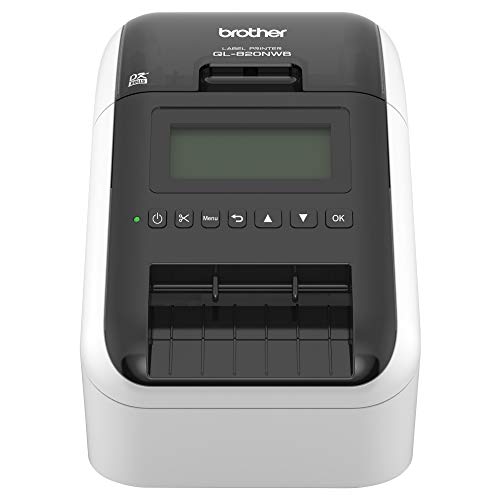
- Prints up to 110 address labels per minute
- Supports Bluetooth, Ethernet, Wi-Fi, and USB
- Prints black-and-red labels with compatible tape
Best For: Fast, shared office labeling
Best for Creative App Editing

- Includes 30+ fonts, 50+ frames, and 660 icons
- Prints labels from 3/4 to 2 inches wide
- Comes with three starter tapes
Best For: Home, school, and small-business designs
Best for Two-Roll Convenience
DYMO LabelWriter 450 Twin Turbo
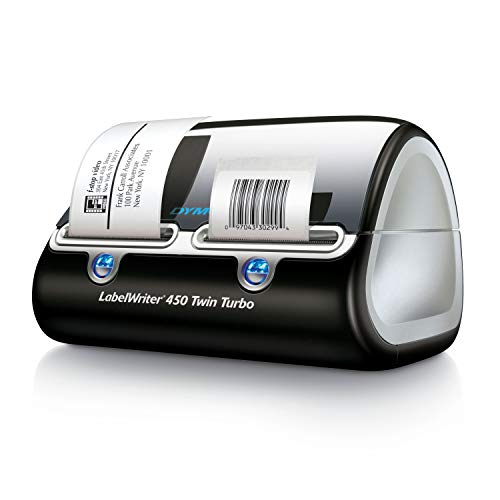
- Keeps two label rolls loaded
- Prints directly from common office contacts and documents
- Uses ink-free 300 dpi thermal printing
Best For: Home and office desktop labeling
Best Connected Design Label Maker

- 17 fonts, 17 styles, 160 frames, and 900 symbols
- Bluetooth and USB connectivity with mobile and desktop software
- Stores up to 90 labels and includes 175 business templates
Best For: Custom business, asset, inventory, and barcode labels
Best Industrial Detailed-Design System

- 300 dpi thermal-transfer printing for industrial identification
- Supports labels and tape up to 4.25 inches wide
- PC-connected or stand-alone operation with automatic setup
Best For: Facility, safety, panel, laboratory, and maintenance labeling
Best High-Speed Two-Color Printer

- Prints up to 93 labels per minute at 300 dpi
- Creates black-and-red labels with DK-2251 media
- Supports Windows, Mac, Microsoft Office, and continuous tape
Best For: Fast office, shipping, badge, file, and food labeling
Industrial Detail Specialist

- 300 dpi thermal-transfer monochrome output
- Automatic cutter and quick cartridge changes
- Mobile and PC editing for industrial labels
Best For: Durable cable, electrical, safety, and equipment labels
Creative Color Cutter

- 300 dpi color dye-sublimation printing
- AI image extraction with precision cutting
- Includes 180 sheets in the Inspire Kit
Best For: Custom stickers, colorful labels, and creative projects
Wide-Format Safety Sign Maker

- Supports 1- to 4-inch vinyl media
- Creates custom die-cut label shapes
- LCD and compact-keyboard operation
Best For: Safety signs and larger custom vinyl labels
Best for Jobsite Flexibility – Brady M611
Brady M611 Bluetooth Label Printer. Flexibility in When, Where, and How You Design and Print Labels.
Check Price On AmazonThe Brady M611 is a strong choice among label printing systems for detailed designs when portability and remote printing matter. It prints labels up to 2 inches wide at 2 inches per second, and you can create, preview, and print from a phone, tablet, or computer.
Best For: Industrial users who need to design and print labels at the jobsite or from multiple devices.
Pros:
- Stores more than 1,000 labels for printing at the jobsite.
- Supports Bluetooth and Wi-Fi connectivity, plus USB.
- Uses 300 dpi monochrome thermal printing and is built for shock resistance.
Cons:
- Requires Brady Authentic Labels.
- Prints monochrome labels only.
- Its maximum label width is 2 inches.
The M611 emphasizes mobility, durable construction, and flexible workflow options. It is particularly practical for industrial labeling tasks where designs need to be prepared away from a desk and printed on demand.
Best for Networked Workflows – Brother QL-820NWB
The Brother QL-820NWB combines fast output with broad connectivity, making it a practical option among label printing systems for detailed designs in busy offices or shared workspaces. It supports Bluetooth, Ethernet, wireless networking, and USB, with an LCD for standalone operation.
Best For: Offices and workgroups that need fast monochrome labels from several connected devices.
Pros:
- Prints up to 110 standard address labels per minute.
- Offers Bluetooth, Ethernet, wireless, and USB connectivity.
- Can print black-and-red labels using DK-2251 tape.
- LCD supports standalone use.
Cons:
- Color printing is limited to black-and-red media.
- Uses Brother DK label media.
- Maximum label length is listed as 3 feet.
With networking options and high stated print speed, the QL-820NWB is suited to shared label stations and recurring office workflows. Its monochrome output and specialized media should be considered when planning more elaborate designs.
Best for Creative App Editing – SUPVAN T50M Pro
The SUPVAN T50M Pro is designed for accessible customization, making it a useful option among label printing systems for detailed designs at home, school, or a small business. Its app includes more than 30 fonts, 50 frames, and 660 icons, while Bluetooth connects the printer to compatible devices.
Best For: Users who want decorative, image-supported labels for organization, products, files, and school or office supplies.
Pros:
- Supports label widths from 3/4 inch to 2 inches.
- App offers fonts, frames, icons, and image importing.
- Includes three tapes and supports several label shapes and formats.
- Inkless thermal printing requires no toner or ink.
Cons:
- Print resolution is 203 dpi.
- Bluetooth is the listed printer connectivity option.
- Uses SUPVAN label tape.
The T50M Pro stands out for its app-based design tools and included media rather than high-volume production. It is a convenient fit for detailed personal or small-business labels where creative formatting is more important than maximum speed.
Best for Two-Roll Convenience – DYMO LabelWriter 450 Twin Turbo
The DYMO LabelWriter 450 Twin Turbo is a practical desktop choice among label printing systems for detailed designs, particularly when you regularly switch between label formats. Its two-roll design lets you keep different media loaded, while direct thermal printing avoids ink and toner.
Best For: Home and office users handling shipping, filing, mailing, barcodes, and other recurring label tasks.
Pros:
- Switches between two loaded label rolls without swapping media.
- Prints precise quantities without sheet-label waste.
- Supports label creation from Microsoft Word, Excel, Outlook, and Google Contacts.
- Uses 300 dpi direct thermal printing with no ink or toner.
Cons:
- Connectivity is USB-based.
- Designed for monochrome output.
- Best performance requires authentic DYMO labels.
The Twin Turbo is most useful when convenience and repeatability matter at a fixed workstation. Its dual-roll setup simplifies switching between common label types, though it offers less connectivity flexibility than the wireless models in this roundup.
Best Connected Design Label Maker – Brother P-Touch PT-D610BT
Brother P-Touch PT-D610BT Business Professional Connected Label Maker with Bluetooth®
Check Price On AmazonFor label printing systems for detailed designs, the Brother P-Touch PT-D610BT combines a built-in QWERTY keyboard with Bluetooth and USB connectivity. Its broad selection of fonts, styles, frames, symbols, templates, and high-resolution output makes it a practical choice for customized business labels.
Best For: Businesses creating merchandise, asset, inventory, security, and barcode labels with repeatable custom designs.
Pros:
- Offers 17 fonts, 17 styles, 160 frames, 900 symbols, and 175 business templates.
- Prints labels up to 1 inch wide with resolution suitable for clear barcodes and logos.
- Supports Bluetooth and USB connections, plus Brother mobile and desktop design software.
- Stores up to 90 labels and includes a preview display and automatic cutter.
Cons:
- Uses monochrome thermal printing rather than full-color output.
- Designed for Brother Genuine TZe label tapes.
- Its extensive features may be more than needed for simple, occasional labels.
The PT-D610BT is a strong all-around option when design flexibility and repeatable workflows matter. The screen preview, template library, and stored-label memory help reduce errors and waste, while Bluetooth makes shared business use more convenient.
Best Industrial Detailed-Design System – Brady S3100
Among label printing systems for detailed designs, the Brady S3100 is built for industrial identification rather than casual home labeling. It supports multi-line signs and labels, 300 dpi thermal-transfer printing, and media up to 4.25 inches wide for facility, safety, panel, and equipment applications.
Best For: Industrial facilities, maintenance teams, laboratories, data centers, and workplaces producing safety and identification labels.
Pros:
- Prints at 300 dpi for detailed industrial signs, barcodes, and identification labels.
- Handles media up to 4.25 inches wide and supports B30 Series continuous tape.
- Automatic label setup reduces calibration and sensor-adjustment work.
- Supports both PC-connected and stand-alone printing with walk-up operation.
Cons:
- Its industrial focus and 8.21 kg weight make it less portable than compact label makers.
- USB is the listed connectivity option, with no wireless connection noted.
- Designed for Brady B30 Series media, which limits material choices.
The S3100 makes the most sense where durable, readable facility identification is more important than portability. Its wider media support, automatic setup, and stand-alone workflow suit demanding environments that may produce up to 600 labels per day.
Best High-Speed Two-Color Printer – Brother QL-800
The Brother QL-800 is a compact option for label printing systems for detailed designs when speed and visual emphasis are priorities. It prints at up to 93 labels per minute at 300 dpi and can produce black-and-red labels with compatible Brother DK-2251 media.
Best For: Offices and small businesses printing shipping labels, name badges, file labels, food labels, and other high-volume applications.
Pros:
- Prints up to 93 labels per minute at 300 dpi.
- Supports black-and-red printing with Brother DK-2251 media.
- Works with Windows and Mac systems and offers Plug & Label integration with Microsoft Word, Excel, and Outlook.
- Includes an automatic cutter and supports pre-sized labels plus continuous tape up to 3 feet.
Cons:
- USB is the listed printer connection, with no wireless connectivity noted.
- Two-color output requires the compatible DK-2251 roll.
- Its 2.4-inch media width is narrower than many industrial sign printers.
The QL-800 is a practical pick for fast office workflows that benefit from occasional red emphasis. It offers detailed 300 dpi output and flexible label formats, though users needing wide industrial signs or wireless printing may prefer another system.
Industrial Detail Specialist – Makeid D50
The Makeid D50 is a practical choice among label printing systems for detailed designs when you need crisp monochrome labels for electrical, cable, asset, laboratory, or facility applications. Its 300 dpi thermal-transfer output, automatic cutter, and mobile or PC editing support make it well suited to repeatable professional labeling.
Best For: Electrical and data-communications labeling, wire and cable identification, safety marking, and other durable industrial labels.
Pros:
- 300 dpi thermal-transfer printing is designed for clear, long-lasting, water-resistant labels.
- Supports media up to 2 inches wide for cable, equipment, and general identification work.
- Automatic cutting and an integrated label-and-ribbon cartridge simplify batch jobs.
- Works with smartphones and PCs, with auto-template matching for compatible consumables.
Cons:
- Prints monochrome output only.
- Media is limited to a maximum width of 2 inches.
- The system uses compatible Z series label cartridges.
The D50 prioritizes dependable, detailed industrial labeling over decorative color work. Choose it if durability, sharp text, and efficient repeat printing matter more than broad-format or full-color designs.
Creative Color Cutter – Liene PixCut S1
The Liene PixCut S1 stands out among label printing systems for detailed designs that require vivid color, custom graphics, and shaped stickers. It combines 300 dpi dye-sublimation printing with AI-assisted image extraction and precision cutting, allowing you to create finished stickers and labels from a mobile device.
Best For: Color stickers, personalized labels, photo-based designs, name tags, journaling projects, and other creative applications.
Pros:
- Prints 16.7 million colors at 300 dpi for vivid, detailed designs.
- Prints and cuts in one workflow, with AI-assisted subject extraction and edge-following cuts.
- Four-layer dye-sublimation printing automatically laminates stickers for waterproof and scratch-resistant results.
- Inspire Kit includes 36 photo sheets and 144 sticker sheets, plus access to templates and design elements without a subscription.
Cons:
- Its focus on stickers and creative projects may be more than needed for basic text labels.
- Supplied details do not specify a maximum label width or broad industrial-media compatibility.
The PixCut S1 is the strongest fit here for visually rich, intricate designs rather than conventional monochrome identification labels. Its integrated cutting and generous starter media bundle make it especially convenient for creative users.
Wide-Format Safety Sign Maker – Cute Things & CC VnM4 PRO
The Cute Things & CC VnM4 PRO is a useful option among label printing systems for detailed designs when you need larger vinyl labels, safety signs, or die-cut shapes. Its LCD interface and compact keyboard support standalone label creation, while the 1- to 4-inch media range provides more width flexibility than compact label makers.
Best For: Safety signage, workplace identification, durable vinyl labels, and custom die-cut designs up to 4 inches wide.
Pros:
- Handles vinyl media from 1 to 4 inches for varied sign and label sizes.
- Die-cut capability supports intricate shapes and customized label designs.
- LCD screen and compact keyboard provide an accessible standalone editing workflow.
- Compact, portable design is suitable for on-site or confined-space labeling.
Cons:
- The supplied specifications identify an inkjet system, which may require ink-based consumables.
- Only one sheet is listed for maximum sheet capacity, so it is geared toward individual jobs rather than large batch loading.
- Product details are inconsistent about the control interface, mentioning both an LCD screen and touch control.
The VnM4 PRO is appealing when label size and shaped vinyl output are priorities. It offers more flexibility for signs and customized media than small desktop labelers, though buyers should confirm the exact interface and consumables before purchasing.
How We Picked the Best Label Printing Systems for Detailed Designs
We evaluated each system for the factors that matter when labels include small text, barcodes, icons, safety information, multiple fonts, or complex layouts. Our comparison considered print resolution and clarity, supported label widths and materials, cutter performance, software and connectivity, operating speed, portability, and long-term media costs.
We also separated true label printers from compact label makers and color sticker systems. Each category serves a different purpose, so the best choice depends on whether you are organizing a home office, producing shipping labels, managing facility identification, or creating polished color stickers.
Quick Comparison
- Portable Bluetooth systems: Best for field work, mobile inventory, and printing from phones or tablets.
- Office desktop printers: Best for shipping, filing, barcodes, and frequent monochrome label production.
- Industrial systems: Best for durable facility labels, safety signs, and demanding environments.
- Keyboard label makers: Best for standalone operation and quick tape-based labeling.
- Color sticker systems: Best for graphics, product presentation, photo-style stickers, and decorative labels.
Key Buying Factors for Detailed Label Designs
Resolution and Print Technology
For tiny characters, fine lines, and dense barcodes, prioritize sharp output and consistent thermal control. Direct thermal systems are convenient and economical for many short-term labels, while color dye-sublimation or ink-based approaches are better when visual detail and color are central to the design.
Media Size, Material, and Durability
Check the maximum width before buying. Narrow tape is suitable for cables and folders, while wider continuous or die-cut media works better for signs and equipment identification. Consider adhesive strength, water resistance, chemical exposure, UV exposure, and whether the label must remain legible in heat or cold.
Design Workflow and Connectivity
Bluetooth is useful for mobile printing, while USB and network connectivity are better for shared workstations and repeatable office workflows. Look for software that supports imported graphics, barcodes, symbols, templates, and precise sizing if your designs go beyond simple text.
Speed, Cutting, and Running Cost
Automatic cutters and fast output reduce wasted media during larger jobs. Compare cartridge or roll pricing, label yield, and whether the system requires proprietary supplies. A low purchase price can become expensive if detailed projects require frequent media changes.
Who Should Buy Which Label Printing Systems for Detailed Designs?
Choose a portable Bluetooth model if you print wherever work takes you. Select a desktop office printer for shipping, filing, and repeated barcode jobs. An industrial sign system is the better fit for facility safety and durable identification. Pick a keyboard-based label maker when you need fast standalone labeling without a computer. For logos, illustrations, photographs, or presentation-ready stickers, choose a color sticker printer and cutter.
Before ordering, confirm operating-system support, compatible media dimensions, required software, and the level of durability your labels need. Matching those details to your workflow will produce better results than choosing solely by advertised print speed.