Large labeling jobs demand more than a compact office printer. The right system should handle sustained output, compatible media, connectivity, and the durability your workflow requires.
We compared 10 strong options across industrial, desktop, handheld, shipping, and general-purpose categories to help you choose a dependable fit for production, inventory, organization, or fulfillment work.
Best 10 Label Printing Systems for Large Projects Picks for 2026
Flexible Network Pick

- Up to 110 address labels per minute
- Bluetooth, Wi-Fi, Ethernet, and USB
- Supports black-and-red DK labels
Best For: Fast, connected office label printing
Industrial Production Pick

- Prints labels up to 4 inches wide
- Supports safety, asset, wire, and pipe labels
- Includes LabelSuite software and lifetime warranty
Best For: Industrial and warehouse labeling workflows
Portable Field Pick
Brady M210 Handheld Label Maker

- Handheld design for on-site labeling
- Resists drops from up to 6 feet
- Prints 203 dpi monochrome labels
Best For: Professional field and maintenance work
Shipping Workflow Pick
Rollo USB Shipping Label Printer

- Prints one 4x6 label per second
- USB support for Windows and Mac
- Works with major shipping platforms
Best For: Fast e-commerce and warehouse shipping labels
Industrial Versatility
Makeid D50 Industrial Label Maker

- 2-inch, 300 dpi thermal-transfer output
- Automatic cutter and quick cartridge changes
- Mobile and PC editing with Bluetooth
Best For: Durable electrical, facility, cable, and equipment labels
Dual-Roll Efficiency
DYMO LabelWriter 450 Twin Turbo
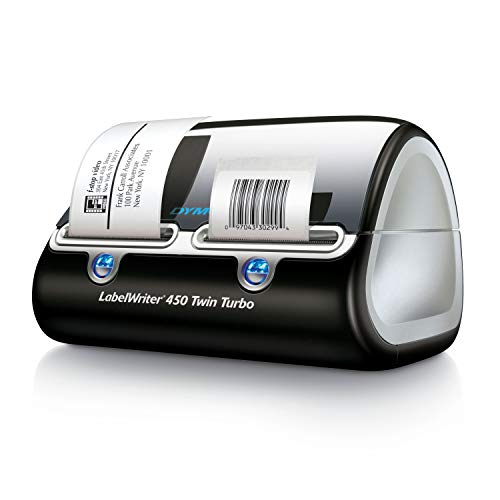
- Switch between two label rolls
- Direct thermal printing needs no ink
- Integrates with common office contacts and documents
Best For: Office, shipping, mailing, and filing workflows
Networked Industrial Output
Brother PT-P900WC Industrial Label Printer

- Seven widths from 3.5mm to 36mm
- Wi-Fi supports apps and database workflows
- Prints barcodes and QR codes
Best For: Industrial inventory, asset, shipping, and tracking labels
Industrial Workstation Pick
LabelTac LT4 Thermal Transfer Label Printer
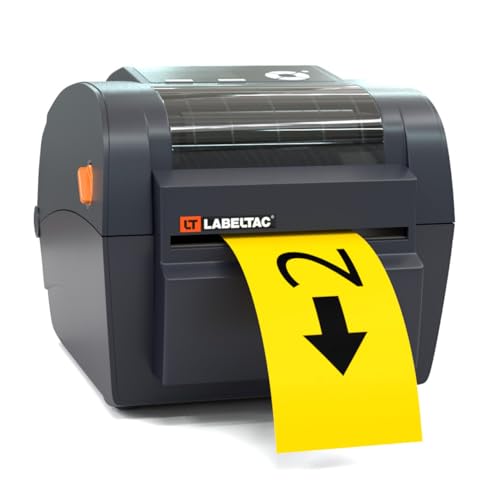
- Supports 1/2- to 4-inch-wide supplies
- Includes LabelSuite design software
- Lifetime transferable printer warranty
Best For: Industrial facility, warehouse, and signage labeling
High-Volume Wireless Pick
Brother QL-810W Professional Label Printer

- Prints up to 110 address labels per minute
- Supports USB, Wi-Fi, AirPrint, and mobile printing
- Can print black-and-red labels
Best For: Fast office, shipping, and package-label batches
Plug-and-Label Speed Pick
Brother QL-800 High-Speed Professional Printer

- Prints up to 93 labels per minute
- Supports black-and-red output
- Works with Word, Excel, and Outlook
Best For: Fast USB-connected office and warehouse labeling
Flexible Network Pick – Brother QL-820NWB
For teams comparing label printing systems for large projects, the Brother QL-820NWB is a flexible monochrome option with wired and wireless connectivity. It can print up to 110 standard address labels per minute and supports black-and-red labels with compatible media.
Best For: Offices, workgroups, and networked workstations that need fast address or general-purpose label printing.
Pros:
- Supports Bluetooth, Ethernet, Wi-Fi, USB, and a USB host connection.
- Prints up to 110 standard address labels per minute.
- Offers a monochrome LCD for standalone operation.
- Can print black-and-red labels with DK-2251 media.
Cons:
- It is a monochrome printer rather than a full-color system.
- Its maximum listed label length is 3 feet.
- It uses Brother-compatible DK media.
The QL-820NWB stands out when connectivity and throughput matter more than color printing. Its compact design, LCD, and fast output make it practical for busy office labeling workflows.
Industrial Production Pick – LabelTac Pro X
The LabelTac Pro X is built for demanding label printing systems for large projects, including warehouse identification, safety signage, asset tagging, and facility marking. Its LabelSuite software and broad supply compatibility support custom labels produced in-house.
Best For: Warehouses, industrial facilities, and offices that need durable custom labels across multiple applications.
Pros:
- Supports supplies from 1/2 inch to 4 inches wide.
- Works with labels for safety signage, pipe marking, wires, assets, QR codes, and warnings.
- Includes LabelSuite design and print software with templates and symbols.
- Has a color LCD and a lifetime transferable warranty.
Cons:
- It is designed for LabelTac LTPX/LT4-compatible supplies.
- The printer is limited to monochrome output.
- Its industrial capabilities may exceed basic office labeling needs.
For large, varied labeling jobs, the Pro X offers a strong combination of media flexibility, dedicated design software, and industrial-oriented construction. It is especially suitable when specialized labels must be created on demand.
Portable Field Pick – Brady M210 Handheld Label Maker
The Brady M210 is a handheld choice for label printing systems for large projects when work happens away from a desk. Its compact professional design and drop resistance make it useful for on-site identification, maintenance, and organization tasks.
Best For: Technicians and field workers who need a portable label maker for professional tasks.
Pros:
- Handheld design supports portable labeling.
- Resists drops from up to 6 feet.
- Uses an LCD display and prints monochrome labels at 203 dpi.
- Supports Brady M21-750-499 cartridges.
Cons:
- Its maximum listed media width is 0.75 inch.
- Output speed is listed at 0.39 pages per minute.
- It is better suited to mobile tasks than high-volume desktop production.
The M210 prioritizes portability and durability over speed and media width. Choose it for field labeling where a compact, drop-resistant device is more valuable than large-format throughput.
Shipping Workflow Pick – Rollo USB Shipping Label Printer
The Rollo USB is a straightforward option for label printing systems for large projects centered on shipping, warehouse, and barcode output. Its direct thermal design prints 4×6 labels at up to one per second without ink or toner.
Best For: E-commerce sellers, shipping stations, and warehouses that need fast USB-connected shipping label production.
Pros:
- Prints one 4×6 label per second at up to 150 mm/s.
- Works with Windows and Mac computers through USB.
- Supports labels from 1.57 to 4.1 inches wide.
- Compatible with major shipping platforms and marketplaces.
Cons:
- Connectivity is wired USB rather than wireless.
- Output is monochrome at 203 dpi.
- It has a one-year limited warranty.
The Rollo USB is a practical high-speed choice when shipping labels are the priority. Its broad platform compatibility and inkless operation can simplify recurring fulfillment work, though it lacks the network and wireless options of some office-focused models.
Industrial Versatility – Makeid D50 Industrial Label Maker
For label printing systems for large projects involving cables, equipment, facilities, or warehouse assets, the Makeid D50 emphasizes durable output and efficient media changes. Its 2-inch print width, 300 dpi resolution, thermal-transfer technology, and automatic cutter make it suited to repeated monochrome labeling.
Best For: Electrical, data and telecommunications, safety, facility, laboratory, warehouse, and equipment labeling.
Pros:
- Thermal-transfer labels are designed to remain clear for up to 10 years and resist water.
- Automatic cutting and an integrated label-and-ribbon cartridge support faster bulk workflows.
- Supports mobile-app and PC editing, with Bluetooth and USB-C connectivity.
- Auto-template matching identifies compatible label sizes and matches templates.
Cons:
- Maximum media size is limited to 2 inches.
- It prints monochrome only.
- The system uses compatible Z-series label cartridges.
The D50 is a strong fit when durability and specialized industrial labeling matter more than wide-format output. Its compact design and 2,600mAh battery also provide useful flexibility for work away from a fixed desk.
Dual-Roll Efficiency – DYMO LabelWriter 450 Twin Turbo
For label printing systems for large projects centered on shipping, filing, mailing, or office organization, the DYMO LabelWriter 450 Twin Turbo focuses on minimizing interruptions. Its two-roll design lets you switch between label types without replacing rolls, while direct thermal printing avoids ink and toner.
Best For: Office organization, shipping, mailing, filing, barcodes, and workflows that use two label formats.
Pros:
- Two label rolls can be installed at once for faster format changes.
- Direct thermal printing eliminates ink and toner costs.
- Prints precise quantities without the waste associated with sheet labels.
- Labels can be customized from Microsoft Word, Excel, Outlook, and Google Contacts.
Cons:
- It connects through USB and is listed as compatible with PCs.
- It is intended for monochrome printing.
- Best performance calls for authentic DYMO LabelWriter labels.
The Twin Turbo makes the most sense for high-volume desktop organization where two frequently used roll types are more valuable than industrial media flexibility. It is a practical choice for offices handling recurring mailing and filing tasks.
Networked Industrial Output – Brother PT-P900WC Industrial Label Printer
For label printing systems for large projects that require varied widths and centralized design, the Brother PT-P900WC combines Wi-Fi connectivity with support for seven label sizes from 3.5mm to 36mm. Its software supports database imports, barcodes, QR codes, and custom label layouts for industrial and organizational work.
Best For: Industrial labeling, inventory and asset tracking, shipping and packaging, and barcode or QR-code projects.
Pros:
- Supports seven label sizes from 3.5mm to 36mm.
- Wi-Fi enables wireless design and database-connected workflows.
- Included software supports custom labels, barcodes, and QR codes.
- Half-cut automatic cutting produces easy-peel labels on strips.
Cons:
- Its maximum print width is 36mm, so it is not intended for wide signage.
- Optional battery and Bluetooth capabilities require additional accessories.
- The listed print speed is slower than some dedicated high-speed printers.
The PT-P900WC is well suited to teams that need flexible label widths and wireless access across industrial or inventory tasks. Its database and barcode capabilities make it particularly useful when projects involve structured, repeatable label data.
Industrial Workstation Pick – LabelTac LT4 Thermal Transfer Label Printer
For large projects that require durable, facility-ready output, the LabelTac LT4 is a practical choice among label printing systems for large projects. It prints monochrome labels from 1/2 to 4 inches wide and includes LabelSuite software for creating barcodes, warning labels, and signage.
Best For: Warehouses, facilities, and workstations that need flexible industrial label sizes and in-house production.
Pros:
- Supports compatible supplies from 1/2 to 4 inches wide.
- Includes LabelSuite design and print software with templates and barcode tools.
- Compact footprint fits on many desks and warehouse workstations.
- Includes a lifetime transferable warranty and in-house technical support.
Cons:
- Prints monochrome output rather than full-color labels.
- Requires compatible LabelTac LT4/LTPX supplies.
- Print speed is listed at 4 pages per minute.
The LT4 stands out when project requirements extend beyond standard address labels. Its wider media support, industrial-oriented software, and lifetime warranty make it especially suitable for recurring facility labeling work.
High-Volume Wireless Pick – Brother QL-810W Professional Label Printer
The Brother QL-810W is built for fast batches of standard labels, making it a strong option among label printing systems for large projects. It can produce up to 110 standard address labels per minute at 300 dpi and supports USB, wireless, AirPrint, and Brother mobile printing.
Best For: Offices, shipping stations, and teams producing large quantities of address, package, folder, badge, or postage labels.
Pros:
- Prints up to 110 standard address labels per minute.
- Supports black-and-red printing with DK-2251 supplies.
- Offers wireless printing and mobile-device compatibility.
- Includes an automatic cutter rated for high label counts.
Cons:
- Maximum paper width is listed at up to 2.4 inches.
- Uses Brother DK label rolls and continuous media.
- Wireless printing requires a compatible network connection.
This model favors throughput and convenient connectivity over industrial-width signage. Choose it when your large project involves many compact paper labels and multiple users need access from computers or mobile devices.
Plug-and-Label Speed Pick – Brother QL-800 High-Speed Professional Printer
The Brother QL-800 offers fast, straightforward desktop production for large runs of standard labels. As one of the more accessible label printing systems for large projects, it prints up to 93 labels per minute at 300 dpi and connects to Windows and Mac computers through USB.
Best For: Businesses that need quick shipping, warehouse, office, name-badge, or file-folder labels from a directly connected computer.
Pros:
- Prints up to 93 labels per minute at 300 dpi.
- Supports black-and-red printing with Brother DK-2251 media.
- Plug & Label technology works with Microsoft Word, Excel, and Outlook.
- Built-in auto-cutter supports clean, consistent finishing.
Cons:
- Uses a USB connection rather than the wireless connectivity listed for the QL-810W.
- Supports labels up to 2.4 inches wide.
- Requires Brother Genuine DK pre-sized labels or compatible continuous tape.
The QL-800 is a good fit for a dedicated labeling station where speed and simple computer integration matter. Its black-and-red capability adds emphasis, while the compact media width keeps it focused on common office and shipping formats.
How We Picked the Best Label Printing Systems for Large Projects
We focused on the features that matter when label volume, consistency, and uptime become priorities. Our comparison considers print speed, media flexibility, connectivity, ease of setup, cutter performance, software compatibility, portability, and whether a printer is designed for ordinary indoor use or harsher industrial conditions.
The selection includes direct-thermal and thermal-transfer models, because each technology suits a different type of project. We also considered common workflows such as shipping, asset tracking, cable identification, warehouse labeling, retail organization, and office-wide document management.
Quick Comparison
| System Type | Best For | Key Advantage |
|---|---|---|
| Industrial thermal transfer | Durable facility and equipment labels | Long-lasting prints and broad material support |
| Desktop professional | High-volume office and inventory work | Fast output with network or wireless options |
| Shipping-label printer | Fulfillment and e-commerce | Efficient 4-by-6-inch label production |
| Handheld label maker | Field service and on-site identification | Portable operation and quick edits |
| General office label printer | Address, file, and organization labels | Simple media loading and everyday usability |
Key Buying Factors for Label Printing Systems for Large Projects
Choose the Right Print Technology
Direct thermal printers are convenient because they use heat-sensitive media and do not require ribbon changes. They are well suited to shipping labels, temporary identification, and indoor organization. Thermal-transfer systems use a ribbon to create more durable labels that better resist abrasion, moisture, chemicals, and heat.
Match Throughput to Your Workflow
Check rated print speed, maximum continuous-print capacity, cutter behavior, and media reload time. For batch work, an automatic cutter and reliable roll handling can save more time than a slightly higher headline speed.
Verify Media and Connectivity
Confirm the supported label widths, roll or cartridge format, material types, and maximum label length before buying. USB is useful for a dedicated workstation, while Wi-Fi, Ethernet, Bluetooth, or multi-user support is preferable for shared work areas and distributed teams.
Consider Software and Total Cost
Printer hardware is only part of the investment. Review design software, operating-system support, templates, replacement rolls, ribbons, accessories, and consumable availability. Proprietary media may simplify setup but can cost more over a long project.
Who Should Buy Which Label Printing Systems for Large Projects?
Choose an industrial thermal-transfer model for warehouse, manufacturing, laboratory, utility, or outdoor-adjacent environments where label durability is essential. A professional desktop wireless printer is a better fit for offices, inventory rooms, and teams that need fast shared access.
For shipping-heavy operations, select a dedicated 4-by-6-inch thermal printer. Choose a handheld unit for technicians, installers, and field workers who need to create labels at the point of use. Finally, an entry-level or general office model makes sense for files, shelves, mail, and moderate-volume organization projects where ruggedness is less important.