Custom merchandise looks more polished when every package, product, and shipment carries a consistent label. The right printer can help you create branding, inventory, barcode, care, and shipping labels without slowing down daily work.
This roundup compares 10 label printing systems for custom merchandise, including portable thermal models, tape-based label makers, custom sticker services, and high-volume desktop printers.
Best 10 Label Printing Systems for Custom Merchandise Picks for 2026
High-Volume Color Labeling

- Up to 93 labels per minute
- Black-and-red thermal printing
- USB, auto-cutter, and 300-dpi output
Best For: Fast business, shipping, and accent-color labels
Full-Color Custom Branding
- Personalized full-color vinyl labels
- Sheet or individually die-cut options
- Waterproof, UV resistant, and dishwasher safe
Best For: Finished branding stickers for products and packaging
Portable Bluetooth Merchandise Labels

- Bluetooth smartphone printing
- Supports labels up to 2 inches wide
- App includes templates and batch printing
Best For: Mobile product, barcode, price, and gift labeling
Simple Portable Tape Labeling
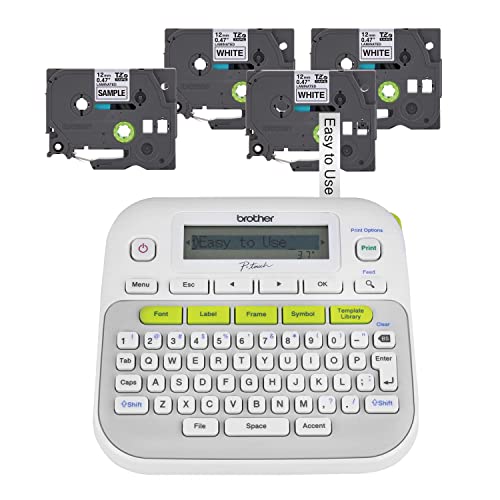
- Includes four label tapes
- Hundreds of symbols and 27 templates
- Portable battery-powered design
Best For: Text labels for crafts, storage, clothing, and office use
Portable Custom Labeling

- 3,000+ app templates and custom designs
- Excel batch printing and OCR support
- 20–50mm black-and-white labels
Best For: Small businesses and craft sellers making narrow product labels
Keyboard-and-App Flexibility

- Keyboard and Bluetooth app operation
- Includes four continuous and die-cut tapes
- 30+ fonts, 50+ frames, and 660+ icons
Best For: Users needing quick entry and highly customizable narrow labels
High-Volume Professional Output

- Up to 110 standard labels per minute
- USB, Wi-Fi, AirPrint, and mobile support
- Black-and-red printing with DK 2251 media
Best For: High-volume merchandise, package, and office labeling
Best Creative Label Maker

- Designs barcodes, QR codes, logos, and custom stickers
- Supports 0.78-1.97-inch thermal labels
- Bluetooth, USB, batch printing, and auto-alignment
Best For: Small businesses and makers creating custom product labels and branded stickers
Best High-Speed Desktop Option
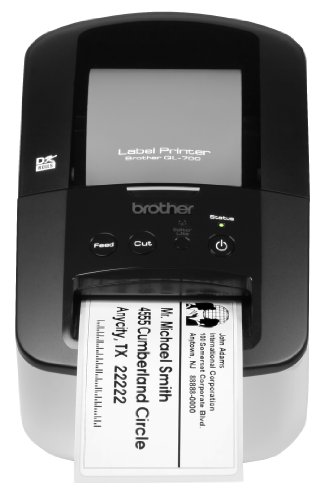
- Prints up to 93 labels per minute
- Handles die-cut and continuous media
- Automatic cutter and inkless thermal operation
Best For: Desktop packaging, postage, signs, and high-volume label jobs
Best for 4x6 Shipping Labels

- Supports 4x6 labels and widths up to 4.1 inches
- Works with roll and fanfold media
- Connects wirelessly or through USB
Best For: Online sellers printing shipping and warehouse labels
High-Volume Color Labeling – Brother QL-800
For businesses seeking label printing systems for custom merchandise, the Brother QL-800 is a fast desktop option for producing professional labels, shipping identifiers, name badges, and signage. Its 300-dpi thermal printing, USB connectivity, and black-and-red capability make it particularly useful when speed and visual emphasis matter.
Best For: Small businesses and workspaces that need fast, high-volume labels with occasional red accents.
Pros:
- Prints up to 93 labels per minute at 300 dpi.
- Supports black-and-red printing with Brother DK-2251 media.
- Works with Windows and Mac computers and can print from Word, Excel, and Outlook.
- Includes an auto-cutter and supports continuous tape up to 3 feet long.
Cons:
- Uses Brother Genuine DK labels and continuous tapes.
- USB connectivity may be less convenient than a wireless system.
- Its primary output is monochrome or black-and-red rather than full color.
The QL-800 is a strong fit when production speed and clean business labeling are more important than full-color merchandise graphics. The included starter rolls and two-year limited warranty add practical value for getting started.
Full-Color Custom Branding – VulgrCo Custom Stickers
Unlike a label printer, the VulgrCo Custom Stickers service delivers ready-to-apply labels for creators considering label printing systems for custom merchandise. You can submit a logo, image, or text and choose sheet or individually die-cut formats in sizes from 1 to 10 inches.
Best For: Brands that want finished, full-color stickers for products, packaging, mailers, and promotional merchandise.
Pros:
- Supports custom logos, photos, and text in vivid full color.
- Offers sheets or individually cut shapes, including circles, rectangles, hearts, stars, and custom die-cuts.
- Waterproof, dishwasher safe, UV resistant, fade resistant, and finished with a glossy laminate.
- Can be ordered in different sizes and reordered as demand grows.
Cons:
- This is a custom sticker product rather than an on-demand label printer.
- Stickers are single-use.
- Production timing and design results depend on the submitted artwork and order process.
VulgrCo is best when you need polished, durable color labels without managing a printer, ink, or media. It is especially suitable for consistent branding across jars, cups, tumblers, mailers, and shipping boxes.
Portable Bluetooth Merchandise Labels – NIIMBOT B21 Label Maker
The NIIMBOT B21 is a compact choice among label printing systems for custom merchandise, especially for sellers labeling clothing, crafts, jewelry, retail goods, and gifts. Its Bluetooth connection and app-based workflow support portable monochrome label creation from a smartphone.
Best For: Mobile sellers and small businesses that need flexible labels, barcodes, prices, dates, or product information.
Pros:
- Supports label widths from 0.8 to 2 inches.
- Bluetooth printing works with smartphones through the NIIMBOT app.
- Offers templates, more than 20 fonts, image materials, batch printing, and image recognition.
- Thermal printing requires no ink, toner, or carbon ribbon, and one charge supports up to four hours of work.
Cons:
- Prints monochrome labels at 203 dpi rather than full-color merchandise graphics.
- Requires the NIIMBOT app and compatible label media.
- Its maximum label width is 2 inches.
The B21 balances portability and feature-rich app control for small-batch product labeling. It is a practical pick for barcode, price, ingredient, and gift labels, provided black-and-white output meets your branding needs.
Simple Portable Tape Labeling – Brother PT-D210 Label Maker
Brother P-Touch, PTD210, Easy-to-Use Label Maker Bundle (4 Label Tapes Included), White, Small
Check Price On AmazonThe Brother PT-D210 is a straightforward handheld option for label printing systems for custom merchandise when durable text labels are more useful than full-color stickers. Its built-in display, one-touch controls, and included tape bundle make it convenient for organizing supplies, storage, clothing, and small business materials.
Best For: Home offices, craft sellers, and users who want portable text labels with durable laminated tape.
Pros:
- Includes four black-on-white tape rolls, including a sample roll and three full-length rolls.
- Provides 10 styles, 14 fonts, 98 frames, more than 600 symbols, and 27 templates.
- Compatible with Brother TZe tape widths from 3.5 mm to 12 mm.
- Portable design can run on six AAA batteries, with an optional AC adapter.
Cons:
- Produces monochrome text labels rather than full-color graphics.
- Batteries and the AC adapter are not included.
- Its small tape format is less suitable for large shipping labels or oversized merchandise graphics.
The PT-D210 is a value-focused solution for clear, durable labeling in a compact format. Its large selection of fonts, symbols, and templates helps personalize merchandise-related organization without requiring a computer or mobile app.
Portable Custom Labeling – Phomemo M110
For makers and small businesses seeking label printing systems for custom merchandise, the Phomemo M110 offers a compact way to create clothing, name, price, jewelry, and inventory labels. Its Bluetooth app supports custom templates, Excel batch printing, and labels from 20mm to 50mm wide.
Best For: Small businesses, craft sellers, and home organizers making narrow black-and-white labels.
Pros:
- More than 3,000 app templates plus custom label design tools.
- Supports Excel batch printing for faster repetitive jobs.
- Portable design with a display and assisted Bluetooth pairing.
- OCR can convert text from images into editable text.
Cons:
- Prints only in black and white.
- Supports label widths only from 20mm to 50mm and is not intended for shipping labels.
- Some templates, icons, and fonts require a paid app membership.
The M110 is a practical choice when custom merchandise labeling means compact product, clothing, or inventory tags rather than large shipping labels or color graphics.
Keyboard-and-App Flexibility – SUPVAN E11
The SUPVAN E11 combines a built-in keyboard with Bluetooth app editing, making it a flexible option among label printing systems for custom merchandise. It supports continuous and die-cut labels, includes four tapes, and lets you create designs with fonts, frames, icons, and multiple languages.
Best For: Sellers and organizers who want quick keyboard entry alongside more customized app-based label designs.
Pros:
- Print directly from the keyboard or design through the Bluetooth app.
- Includes two continuous and two die-cut label tapes.
- Offers 30+ fonts, 50+ frames, 660+ icons, and 17 languages.
- Rechargeable 1,200 mAh battery can provide up to one month of use per charge.
Cons:
- Monochrome printing only.
- Maximum media width is 15mm, limiting label size.
- Bluetooth compatibility is listed for smartphones rather than a broad range of devices.
Choose the E11 if convenience and label variety matter more than wide-format output. Its keyboard is useful for quick tags, while the app provides more room for custom merchandise layouts.
High-Volume Professional Output – Brother QL-810W
For higher-volume work, the Brother QL-810W is a faster desktop option for label printing systems for custom merchandise. It connects through USB or Wi-Fi, prints up to 110 standard address labels per minute, and can produce black-and-red labels when used with compatible DK 2251 media.
Best For: Established sellers and workspaces printing many product, package, envelope, folder, or name-badge labels.
Pros:
- Prints up to 110 standard address labels per minute.
- USB and Wi-Fi connectivity support desktop and mobile workflows.
- Supports black-and-red output with DK 2251 labels.
- Includes starter rolls, software, driver, power adapter, and USB cable.
Cons:
- Less portable than the compact handheld models.
- Uses Brother DK label rolls, limiting media choices.
- Black-and-red output is media-dependent rather than full color.
The QL-810W is the strongest fit when production speed and network access are priorities. It costs more workspace space than a handheld printer, but its throughput is better suited to recurring merchandise and fulfillment tasks.
Best Creative Label Maker – Phomemo M150
The Phomemo M150 is a flexible choice among label printing systems for custom merchandise, especially when you need branded stickers, logos, gift labels, or product tags in different shapes. Its app supports extensive design tools, batch printing, and mobile or computer connectivity.
Best For: Small businesses and makers creating custom product labels, logo stickers, packaging labels, and gift tags.
Pros:
- Supports barcode and QR-code labels, logos, text, tables, borders, and batch printing.
- Print Master app includes templates, fonts, emojis, borders, voice recognition, PDF, and Excel support.
- Works with 0.78- to 1.97-inch thermal labels, including white, colored, and transparent media.
- Inkless 203 DPI printing with automatic label-size detection and alignment.
Cons:
- Produces monochrome output; color effects require compatible thermal labels.
- Its maximum 1.97-inch print width is narrower than standard 4-by-6 shipping labels.
- Computer printing requires a USB connection, official drivers, and Labelife.
Choose this model when design flexibility and portability matter more than large-format labels. Its broad app features make it particularly useful for custom merchandise branding and short-run product labeling.
Best High-Speed Desktop Option – Brother QL-700
The Brother QL-700 is a practical pick for label printing systems for custom merchandise when speed and dependable desktop production are priorities. It handles pre-sized labels as well as continuous paper and film tapes for longer banners and signs.
Best For: Home offices and small businesses producing packaging labels, envelopes, folders, postage, and longer promotional signs.
Pros:
- Prints up to 93 labels per minute according to the supplied specifications.
- Supports pre-sized, easy-peel labels and continuous media for banners up to 3 feet.
- Drop-in rolls and an automatic cutter simplify single- or multiple-label jobs.
- Direct thermal printing requires no ink or toner.
Cons:
- Monochrome output limits full-color merchandise branding.
- USB connectivity is less flexible than wireless systems.
- The supplied details identify the unit as intended for home and office use rather than mobile operation.
This is a strong choice for repeatable desktop workflows where fast output and easy label handling outweigh wireless convenience. It is well suited to packaging and shipping-related merchandise tasks, plus simple banners and signs.
Best for 4×6 Shipping Labels – JADENS JD268BT
The JADENS JD268BT is one of the more practical label printing systems for custom merchandise businesses that ship orders. Its 4-by-6 format works with common shipping workflows, while wireless and USB connections support compatible computers and mobile devices.
Best For: Online sellers and small merchandise businesses printing shipping, warehouse, and marketplace labels.
Pros:
- Supports label widths from 1.57 to 4.1 inches, including 4-by-6 labels.
- Works with both fanfold and roll labels.
- Compatible with numerous shipping platforms, including ShipStation, Shopify, eBay, and Amazon.
- Uses 203 DPI direct thermal printing without ink or toner.
Cons:
- Android and iOS users must print through the Jadens printer app rather than Bluetooth directly.
- Label size must be identified and calibrated after changing labels.
- Its monochrome output is intended for functional labels rather than colorful merchandise graphics.
For a custom-merchandise operation focused on fulfillment, this model offers the right combination of wide media support and shipping-platform compatibility. Consider it when 4-by-6 shipping labels are more important than decorative product stickers.
How We Picked the Best Label Printing Systems for Custom Merchandise
We focused on the needs of makers, small shops, online sellers, event businesses, and growing merchandise brands. Our comparisons consider print method, label sizes, connectivity, portability, software compatibility, printing speed, consumable costs, and the types of labels each system handles best.
The selection includes direct-thermal printers for adhesive labels and shipping media, tape-based machines for durable text labels, and custom sticker options for full-color branding. Because no single device suits every workflow, the best choice depends on your order volume, design requirements, and preferred level of automation.
Quick Comparison
- Best for fast desktop labeling: Brother QL-series printers offer quick output for address, barcode, file, and product labels.
- Best for shipping: The JADENS 4×6 printer is designed around wireless shipping-label workflows.
- Best for portability: Phomemo and NIIMBOT Bluetooth models are convenient for labeling away from a desk.
- Best for durable text labels: Brother P-Touch and SUPVAN tape systems suit bins, packaging, tools, and merchandise components.
- Best for decorative branding: Custom vinyl stickers provide image-based designs, color, and specialty finishes that thermal printers cannot reproduce.
Key Buying Factors for Label Printing Systems for Custom Merchandise
Label Type and Print Quality
Choose a direct-thermal printer for black-and-white shipping, barcode, inventory, and address labels. These systems do not require ink, but their output is generally monochrome. For logos, illustrations, and colorful packaging accents, order custom stickers or use a separate color printer. Tape label makers are better for compact, durable text labels than large-format product graphics.
Size, Speed, and Volume
Check the maximum media width and whether the printer supports the exact label size you use. A portable 2-inch model is useful for small products and organization, while a 4×6 printer is more practical for shipping carriers. If you process frequent orders, prioritize fast print speeds, automatic cutting, reliable software, and easy-to-replace rolls.
Connectivity and Workflow
USB is dependable for a dedicated workstation. Bluetooth is convenient for phone or tablet-based design, and Wi-Fi makes a shared office printer easier to access. Also verify support for your operating system, label-design app, ecommerce platform, and barcode or address-import workflow before buying.
Operating Cost and Durability
Compare roll or tape prices, not just the printer’s purchase price. Consider adhesive strength, water resistance, fading, dishwasher exposure, and storage conditions. For outdoor or frequently handled merchandise, select media rated for those conditions rather than relying on standard paper labels.
Who Should Buy Which Label Printing Systems for Custom Merchandise?
Choose a Brother QL model if you need dependable desktop output for recurring address, barcode, or organization labels. Select a Wi-Fi model when multiple users need access; choose a USB model for a simpler single-computer setup.
Choose a JADENS printer if shipping 4×6 labels is your main task. Choose NIIMBOT or Phomemo when portability and smartphone control matter most. Choose Brother P-Touch or SUPVAN for durable tape labels on containers, tools, packaging, and merchandise supplies.
Choose custom vinyl stickers when your priority is branded artwork, color, or a finished product label that stands out. For a flexible small-business setup, pairing a shipping printer with a portable product-label maker or custom sticker service can cover more use cases than relying on one device alone.