Choosing the right label printer for production work means balancing throughput, media flexibility, connectivity, durability, and operating cost. The best fit depends on whether you print facility signs, asset labels, shipping labels, or high volumes of serialized industrial identification.
Below, we compare ten systems across industrial, desktop, thermal-transfer, and portable categories to help you match printer capabilities with your workflow.
Best 10 Label Printing Systems for Production Work Picks for 2026
Network-Ready Durability
- Laminated labels up to 36mm wide
- Ethernet, Wi-Fi, Bluetooth, and USB
- Up to 3.1 ips at 360 dpi
Best For: Shared industrial identification workflows
Compact App-Based Flexibility

- Bluetooth app-based label creation
- 30+ fonts and 660+ icons
- Includes three label tapes
Best For: Small businesses and light-duty labeling
Industrial Signage Versatility

- Supports labels from 1/2 to 4 inches
- Includes LabelSuite design software
- 300 dpi with lifetime warranty
Best For: Industrial signage and warehouse labeling
High-Capacity Industrial Output

- Up to 1,500 labels per bulk roll
- Prints up to 50mm wide at 300 dpi
- Standalone touchscreen and keyboard
Best For: High-volume industrial identification tasks
Compact Industrial Choice
LabelTac LT4 Thermal Transfer Label Printer
- 300 dpi thermal-transfer printing for industrial labels
- Supports 1/2- to 4-inch compatible supplies
- Compact design with lifetime transferable warranty
Best For: Small workstations producing monochrome industrial labels
Facility Labeling Workstation
Brady S3100 Sign and Label Printer

- 300 dpi thermal-transfer printing up to 4.25 inches wide
- Supports stand-alone and PC-connected operation
- Automatic setup and flexible cutting options
Best For: Facility, safety, and maintenance identification workflows
Mobile Durable-Label Option

- 300 dpi thermal-transfer printing with optional color ribbons
- Bluetooth app and PC editing with batch-print support
- Durable labels resist water, oil, wear, and temperature changes
Best For: Portable labeling for small businesses, labs, and offices
Industrial Production Labeling

- Print Smart Technology supports guided setup and calibration
- Drop-in rolls and ribbons change in about 20 seconds
- Supports 75 lab-specific materials
Best For: Mid-volume industrial and laboratory labeling
Flexible Shipping Production
MUNBYN RW403B Bluetooth Label Printer

- Prints direct thermal labels from 1.57 to 4.25 inches wide
- Bluetooth supports computers and mobile devices
- Auto-calibration helps reduce label misalignment
Best For: Small-business shipping, inventory, and barcode stations
Portable Industrial Identification
Makeid D50 Industrial Label Maker

- Thermal-transfer labels are designed to resist fading
- Automatic cutter and five-second cartridge changes
- Portable 2-inch format with app and PC editing
Best For: Cable, electrical, safety, and facility identification
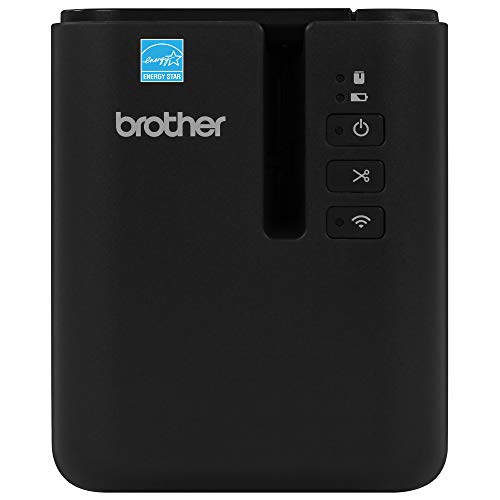
Network-Ready Durability – Brother PT-P950NW
For production work that requires durable identification labels, the Brother PT-P950NW combines laminated media support with fast, high-resolution thermal printing. Its Ethernet and Wi-Fi connectivity also make it practical for shared workstations and multiple users.
Best For: Facilities, warehouses, and offices that need networked printing of chemical-, UV-, abrasion-, and water-resistant labels.
Pros:
- Prints laminated labels up to 36mm wide at up to 3.1 ips and 360 dpi.
- Supports Ethernet, Wi-Fi, Bluetooth, USB, smartphones, tablets, and PCs.
- Includes auto cutter, easy-peel function, drop-in cartridges, and P-touch Editor 5 software.
- Supplied with extra-strength adhesive tape and backed by a two-year limited warranty.
Cons:
- Maximum media width is 36mm, which may not suit larger signage.
- It is a monochrome, print-only system.
The PT-P950NW is a strong choice when shared access and label durability matter more than oversized formats. Its compact thermal design and professional software make it well suited to repeatable identification workflows.
Compact App-Based Flexibility – SUPVAN T50M Pro
The SUPVAN T50M Pro is a portable option for label printing systems for production work on a smaller scale. Its Bluetooth app supports custom layouts, images, QR codes, barcodes, and multiple label shapes without ink or toner.
Best For: Small businesses, offices, schools, and light-duty production tasks involving product, storage, address, cable, or file labels.
Pros:
- Prints labels from 3/4 to 2 inches wide through Bluetooth-connected devices.
- Free app includes 30+ fonts, 50+ frames, 660+ icons, and image editing.
- Supports square, round, address, cable, jewelry, and file label formats.
- Lightweight 303g design includes three tapes and USB-C charging.
Cons:
- Bluetooth is the listed printer connection; there is no Ethernet or Wi-Fi networking.
- Its 203 dpi resolution and one-label capacity are better suited to lighter-duty output.
- It uses SUPVAN label tape cartridges.
This model emphasizes convenience and creative app editing rather than industrial throughput. It is a sensible fit when portability and varied small labels are more important than network integration or large-format printing.
Industrial Signage Versatility – LabelTac Pro X
The LabelTac Pro X is designed for production work that spans safety signage, asset tags, pipe marking, wire labels, and QR codes. With LabelSuite software and support for supplies from 1/2 to 4 inches wide, it brings broad-format thermal transfer printing to a compact workstation.
Best For: Warehouses, industrial facilities, and offices that need varied custom labels and signage printed on demand.
Pros:
- Supports LabelTac supplies from 1/2 to 4 inches wide for diverse applications.
- Includes LabelSuite software with templates and symbols for label design.
- 300 dpi printing, color LCD monitoring, Ethernet and USB connectivity.
- Durable chassis and full lifetime transferable warranty with technical support.
Cons:
- It is a 3.75kg desktop unit rather than a portable printer.
- Uses compatible LabelTac LTPX/LT4 supplies.
- Simplex printing is listed, with no duplex function.
The Pro X stands out when one printer must handle many industrial label types. Its wide media range and included design software can reduce reliance on outsourced signage, while the lifetime warranty adds long-term reassurance.
High-Capacity Industrial Output – Epson LW-Z5010PX
For higher-volume label printing systems for production work, the Epson LABELWORKS LW-Z5010PX combines bulk-roll capacity with standalone controls and industrial features. It can print up to 1,500 labels per 147-foot roll and supports media up to 50mm wide.
Best For: Wire and cable marking, panel labeling, inventory, specimen identification, and other demanding industrial workflows.
Pros:
- Prints up to 1,500 industrial-grade labels per bulk roll.
- Supports labels up to 50mm wide at 300 dpi and 50mm per second.
- Standalone 4.3-inch touchscreen and QWERTY keyboard can create labels without a PC.
- Includes serialization, cable wrap, QR/barcode support, USB, Wi-Fi, Ethernet, and a lifetime warranty.
Cons:
- At 13 pounds, it is less portable than compact label makers.
- It requires Epson LABELWORKS PX cartridges and supplies.
- Print color depends on the selected cartridge rather than liquid ink.
The LW-Z5010PX is built for users who want fewer supply changes and flexible control at the workstation. Its wide media support, bulk-roll capability, and standalone operation make it particularly well suited to repeat production tasks.
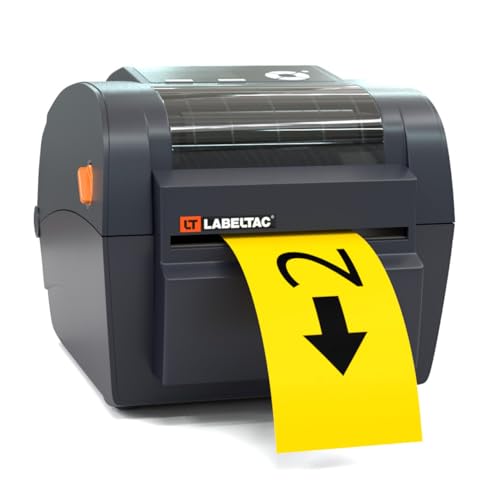
Compact Industrial Choice – LabelTac LT4 Thermal Transfer Label Printer
For label printing systems for production work, the LabelTac LT4 is a compact thermal-transfer option designed for in-house industrial labeling. Its included design software, broad supply-width range, and small footprint make it practical for workstations that need warning labels, barcodes, and facility signage on demand.
Best For: Warehouses, offices, and production workstations needing durable industrial labels in widths from 1/2 to 4 inches.
Pros:
- Includes LabelSuite software with templates and tools for barcodes, warning labels, and signage.
- Accepts compatible supplies from 1/2 inch to 4 inches wide.
- Compact footprint fits on a warehouse workstation or office desk.
- Includes a lifetime transferable warranty and in-house technical support.
Cons:
- Prints monochrome output only.
- Designed for simplex printing rather than duplex workflows.
- Requires compatible LabelTac supplies and ribbons.
The LT4 is a sensible pick when space, supply flexibility, and warranty coverage matter more than high-volume color printing. Its included software also helps reduce the need for separate label-design tools.
Facility Labeling Workstation – Brady S3100 Sign and Label Printer
Among label printing systems for production work, the Brady S3100 is built for facility, safety, and maintenance identification. It combines 300 dpi thermal-transfer printing with automatic label setup, walk-up operation, and support for labels and signs up to 4.25 inches wide.
Best For: Facilities and production environments creating safety signs, panel labels, barcodes, pipe and valve markings, and other identification labels.
Pros:
- Automatic setup reduces calibration and sensor-adjustment work.
- Supports multi-line labels and signs for industrial identification.
- Offers PC-connected and stand-alone printing with walk-up operation.
- Provides cut options at the end of jobs or between labels.
Cons:
- Relatively heavy at about 8.21 kg.
- Uses Brady B30 Series continuous labeling tape, limiting supply compatibility.
- Listed maximum output is 600 labels per day, which may not suit larger production volumes.
The S3100 is a strong fit for teams that regularly create standardized facility and safety identifiers. Its guided setup and stand-alone capability can be especially useful where multiple operators need straightforward access to the printer.
Mobile Durable-Label Option – NIIMBOT M2 Label Maker
For smaller-scale label printing systems for production work, the NIIMBOT M2 offers portable thermal-transfer printing through a mobile app or computer connection. Its 300 dpi output, optional color ribbons, and labels designed to resist water, oil, abrasion, and temperature changes suit varied labeling tasks.
Best For: Small businesses, laboratories, offices, and mobile work areas producing durable labels between 20 and 50 mm wide.
Pros:
- Thermal-transfer labels are described as waterproof, oil-proof, scratch-resistant, and temperature-resistant.
- Supports mobile and PC editing, with Bluetooth multi-device connectivity.
- App templates support barcodes, QR codes, images, tables, and batch printing.
- Color ribbons can be used with compatible label media for more varied designs.
Cons:
- Works only with genuine M2-series thermal-transfer labels.
- Color ribbons and other consumables may need to be purchased separately.
- Its 20–50 mm print width is narrower than the larger industrial printers here.
The M2 is most appealing when portability and durable, compact labels are priorities. Before buying, confirm that the M2-specific media and ribbon system matches your ongoing production-labeling needs.
Industrial Production Labeling – BradyPrinter i3300
BradyPrinter i3300 Industrial Label Printer Brady Workstation Lab Software Ste
Check Price On AmazonFor production work that demands repeatable setup and durable workflow support, the BradyPrinter i3300 is a mid-volume thermal option. Its Print Smart Technology coordinates the printer, label materials, ribbons, and software, while Brady Workstation Lab Suite helps create text labels, graphics, and custom formatting.
Best For: Mid-volume industrial environments using Brady-specific materials and streamlined label changeovers.
Pros:
- Print Smart Technology supports auto calibration, software auto setup, and first-label printing.
- Drop-in label rolls and ribbons can be changed in about 20 seconds.
- Supports 75 lab-specific materials, with custom options available.
- Includes Brady Workstation Lab Suite for basic text and graphic label creation.
Cons:
- USB is the listed connectivity option, with one USB port.
- Its maximum media size is listed as 4 x 6 inches.
- The printer is monochrome and weighs 15.5 pounds, so it is less suited to highly portable use.
The i3300 stands out among label printing systems for production work when fast material changes, guided setup, and compatibility with specialized Brady media matter more than wireless flexibility.
Flexible Shipping Production – MUNBYN RW403B Bluetooth Label Printer
The MUNBYN RW403B is a compact Bluetooth thermal printer for teams that need flexible label printing systems for production work without ink. It handles direct thermal media from 1.57 to 4.25 inches wide, covering shipping labels, inventory tags, barcodes, return labels, and similar monochrome tasks.
Best For: Small businesses, packing stations, and shared workspaces that need wireless printing across computers and mobile devices.
Pros:
- Supports a broad range of direct thermal label widths from 1.57 to 4.25 inches.
- Bluetooth connectivity works with laptops, PCs, smartphones, and tablets.
- DAC Dynamic Algorithm Tech auto-calibrates to help reduce label misalignment.
- Designed for quiet operation at about 60 dB and professional-grade legibility.
Cons:
- It prints monochrome labels only.
- Direct thermal printing requires compatible labels rather than ink cartridges.
- The listed maximum media size is 4 x 6 inches.
With its compact design, wireless control, and broad media-width range, the RW403B is a practical choice for lighter-duty production workflows where shipping and inventory labels share one printer.
Portable Industrial Identification – Makeid D50 Industrial Label Maker
The Makeid D50 is a portable thermal-transfer printer for narrow-format label printing systems for production work. Its 2-inch print head suits cable, electrical, safety, laboratory, asset, and equipment identification, while 300 dpi output and thermal-transfer media are designed for clear labels that can remain readable for up to 10 years without fading.
Best For: Electrical, data-com, facility, cable, pipe-marker, and equipment-labeling tasks that benefit from portable operation.
Pros:
- Thermal-transfer printing is described as water-resistant and suitable for outdoor use.
- Automatic cutting supports bulk label production.
- Integrated label and ribbon cartridges can be changed in about five seconds.
- Works with mobile app and PC software, with up to 90 days of standby time from its 2600mAh battery.
Cons:
- The maximum media width is 2 inches, limiting larger-format labels.
- It uses exclusive Z series label cartridges.
- Bluetooth and USB Type-C are listed, but no network connectivity is specified.
The D50 is a strong fit when production labeling moves around a facility or requires durable narrow labels. Its automatic cutter, fast cartridge changes, and template matching help keep repetitive identification work efficient.
How We Picked the Best Label Printing Systems for Production Work
We evaluated these systems by focusing on practical production requirements: print technology, supported label widths and materials, cutter or dispenser features, connection options, software compatibility, ease of deployment, and suitability for continuous or repeatable workflows. Industrial models receive particular attention for durability, media handling, and facility-identification tasks, while compact printers are considered for lower-volume or space-constrained operations.
Because production environments vary widely, this list includes network-ready printers, thermal-transfer systems, workstation-based solutions, Bluetooth label makers, and a 4-by-6 shipping-label printer. Always verify media compatibility, software support, and duty-cycle specifications before purchase.
Quick Comparison
| Best For | Look For |
|---|---|
| Networked production | Ethernet, centralized software, user access controls |
| Durable industrial labels | Thermal-transfer printing and compatible ribbons |
| Facility signs and safety IDs | Wide media support, design software, color or high-visibility options |
| Shipping operations | 4-by-6 media support, wireless connectivity, fast repeated output |
| Portable or occasional labeling | Bluetooth, rechargeable operation, simple app-based design |
Key Buying Factors for Label Printing Systems for Production Work
Print Technology and Durability
Direct thermal printing is convenient for short-term labels such as shipping stickers, but heat, sunlight, chemicals, or abrasion can shorten label life. Thermal-transfer printers use a ribbon to create more durable output and are usually the better choice for equipment tags, warehouse identification, cable markers, and facility labeling.
Throughput, Width, and Media Compatibility
Check maximum print width, supported continuous or die-cut media, resolution, print speed, and cutter performance. A printer that handles the required stock without adapters or frequent recalibration will save more time than a model with a higher headline speed.
Connectivity and Software
USB is useful for a single workstation, while Ethernet and wireless connectivity support shared production areas. Confirm that the included or compatible software can import databases, generate barcodes and QR codes, manage templates, and integrate with your existing inventory or facility systems.
Operating Cost and Maintenance
Compare the price and availability of labels, tapes, ribbons, printheads, and replacement cutters. Proprietary media may simplify setup but can raise long-term costs. Also consider cleaning requirements, warranty coverage, and access to technical support.
Who Should Buy Which Label Printing Systems for Production Work?
Choose an industrial networked system when multiple users need consistent, centralized label production or when the printer will run throughout a busy facility. Choose a thermal-transfer model for labels exposed to abrasion, chemicals, heat, or outdoor conditions. Choose a sign-and-label workstation when safety signage, facility IDs, and design flexibility matter as much as ordinary labels.
Choose a compact Bluetooth label maker for maintenance teams, mobile technicians, small workstations, or intermittent labeling. Choose a 4-by-6 shipping printer when the main task is producing parcel labels quickly and affordably. Before ordering, measure your available workspace and confirm that the selected printer supports your required label stock, applications, and production volume.