The right label printer can reduce packing time, improve barcode accuracy, and make a growing operation easier to manage. The best setup depends on whether you primarily print 4×6 shipping labels, compact product labels, or both.
We compared these 10 small-business label printing systems by connectivity, label format, ease of use, compatibility, and practical fit for home offices and small workspaces.
Best 10 Small-Business Label Printing Systems Picks for 2026
Compact Wireless Pick
Gloryang 4x6 Bluetooth Label Printer

- Compact 1.11 kg design saves desk space
- Bluetooth works with phones, tablets, and computers
- Prints 4x6 and smaller labels without ink
Best For: Small offices needing flexible wireless shipping-label printing
Portable Organization Pick
NIIMBOT B1 Bluetooth Label Maker
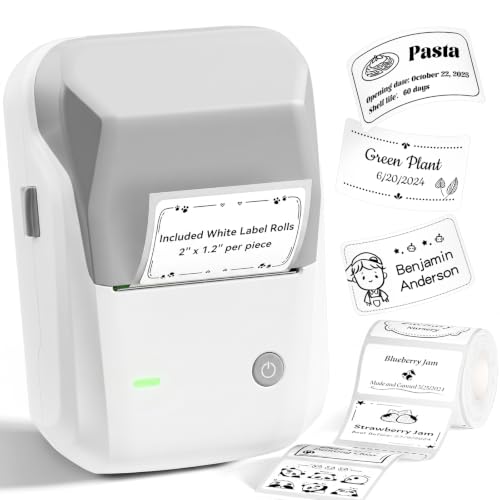
- Lightweight rechargeable design for mobile labeling
- App provides fonts, borders, languages, and symbols
- Supports labels up to 2 inches wide
Best For: Retail and office labeling with compact product or storage labels
Commercial Shipping Pick
Westinghouse 4x6 Thermal Printer

- Prints up to 6 inches per second at 203 dpi
- Supports USB and Ethernet connectivity
- Handles rolls and fanfold labels up to 4.6 inches
Best For: Ecommerce and warehouse workstations with recurring shipping volume
Versatile App Labeling Pick
PM240 Bluetooth Label Maker with 3 Tapes

- Includes three rolls in varied sizes and shapes
- App supports templates, batch printing, Excel, and OCR
- Portable rechargeable design supports labels up to 2 inches
Best For: Small businesses needing varied product, QR, barcode, or container labels
Flexible Item Labeling
CLABEL 2-Inch Bluetooth Printer

- Inkless 203 DPI barcode and QR printing
- Supports 25–50 mm label widths
- USB and mobile Bluetooth connectivity
Best For: Small-format product, inventory, and barcode labels
High-Volume Desktop Shipping

- Prints up to 72 4×6 labels per minute
- Supports 2–4.25-inch roll and fanfold media
- Compatible with Windows, macOS, and Linux
Best For: Fast e-commerce and shipping label production
Compact Wireless Pick – Gloryang 4×6 Bluetooth Label Printer
The Gloryang is a practical choice for small-business label printing systems when desk space and wireless flexibility matter. It prints inkless monochrome labels from 1.57 to 4.1 inches wide, including common 4×6 shipping labels, and works with phones, tablets, laptops, Chromebooks, macOS, and Windows devices.
Best For: Home offices and small businesses that need compact, wireless shipping and package-label printing.
Pros:
- Compact, lightweight design for crowded desks and shared workspaces.
- Bluetooth support across iOS, Android, macOS, and Windows.
- Handles 4×6 labels as well as smaller 2- and 3-inch formats.
- Thermal printing eliminates ink and toner purchases.
Cons:
- Bluetooth connectivity may be less suitable for fixed, networked office workflows.
- 203 dpi resolution is designed for standard monochrome labels rather than detailed graphics.
Choose the Gloryang if you want a space-saving printer with broad device compatibility and support for both shipping and smaller business labels. Its inkless design can also simplify routine maintenance.
Portable Organization Pick – NIIMBOT B1 Bluetooth Label Maker
The NIIMBOT B1 fits small-business label printing systems focused on product, shelf, and organization labels rather than full-size shipping labels. Its portable Bluetooth design prints labels from 0.8 to 2 inches wide and pairs with an app offering fonts, borders, symbols, and language options.
Best For: Retailers, home businesses, and offices creating compact product, storage, clothing, or jewelry labels.
Pros:
- Small 0.7-pound design is easy to move between work areas.
- Rechargeable 1,500 mAh battery provides up to five hours of operation after charging.
- App includes more than 30 fonts or languages, 100 borders, and 1,500 symbols.
- Thermal printing requires no ink or toner.
Cons:
- Maximum media size is 2 inches, so it is not intended for standard 4×6 shipping labels.
- Incompatible with iPad and not recommended for tablet use.
- PC use requires downloading the official driver.
The B1 is a strong fit when portability and design variety are more important than shipping-label size. Verify device compatibility and label-width requirements before choosing it for business use.
Commercial Shipping Pick – Westinghouse 4×6 Thermal Printer
The Westinghouse WHTP203e is built for small-business label printing systems that prioritize regular shipping volume and wired reliability. It supports Windows, macOS, and Linux, prints 4×6 labels at up to 6 inches per second, and works with rolls or fanfold media.
Best For: Ecommerce sellers, warehouses, and businesses printing shipping labels regularly from a desktop setup.
Pros:
- Commercial-grade construction is designed for daily personal, business, and ecommerce use.
- Print speeds reach up to 6 inches per second at 203 dpi.
- Supports media widths from 0.78 to 4.6 inches and both rolls and fanfold labels.
- Package includes starter labels, holder, USB cable, power accessories, and a USB flash drive.
Cons:
- It is not Bluetooth-capable.
- Ethernet cable and USB-C cable or adapter are sold separately.
- The larger desktop footprint is less convenient for highly portable setups.
For businesses processing recurring shipments, the Westinghouse offers useful speed, media flexibility, and wired connectivity. It is a better match for a dedicated workstation than for mobile label creation.
Versatile App Labeling Pick – PM240 Bluetooth Label Maker with 3 Tapes
The PM240 suits small-business label printing systems that need varied label shapes and app-based productivity tools. It supports 1- to 2-inch square, round, transparent, and rectangular labels, with included rolls and an app offering batch printing, Excel import, templates, icons, and OCR.
Best For: Small businesses, classrooms, and home operations creating product tags, QR codes, barcodes, container labels, and name labels.
Pros:
- Includes three label rolls in different sizes and shapes.
- Labelnize app offers more than 3,800 templates, 2,500 icons, and 430 fonts.
- Supports Excel import, batch printing, OCR, and automatic label-size recognition through RFID labels.
- Portable 1,500 mAh rechargeable design weighs about 207 grams.
Cons:
- Only monochrome printing is supported.
- Compatible TYPONOS PM240 labels are recommended for reliable size detection and print quality.
- Power adapter is not included, and Bluetooth and USB cannot be used simultaneously.
The PM240 is appealing when a business needs more than basic rectangular labels. Its broad app tools and included formats make it flexible, but users should plan around the compatible-label and connection requirements.
Best Wireless Pick – KNAON Y486AP Shipping Label Printer
For small-business label printing systems that need flexible device support, the KNAON Y486AP combines Wi-Fi and AirPrint connectivity with a compact thermal design. It prints monochrome labels up to 4 inches wide and works with phones, tablets, Macs, and Windows PCs.
Best For: Small businesses wanting wireless 4×6 shipping-label printing from multiple platforms, including Shopify, Amazon, eBay, USPS, UPS, and Etsy.
Pros:
- AirPrint and Wi-Fi support enables printing from compatible Apple devices and other devices on the same network.
- Supports label and thermal-paper widths from 1.54 to 4 inches, including common shipping labels.
- Prints at speeds up to 150 mm/s and includes a label holder, test papers, and setup accessories.
- Compact 1.9-pound design suits smaller workspaces.
Cons:
- Prints in monochrome only at 203 dpi.
- Wi-Fi setup is required for wireless network printing.
The Y486AP is a versatile choice when a business wants one compact printer for shipping, barcode, price, and name labels. Its broad platform compatibility is especially useful for sellers working across several marketplaces.
Best for Item Tags – CLABEL 221D Bluetooth Barcode Label Printer
The CLABEL 221D is designed for small-business label printing systems focused on item tags rather than shipping labels. Its 2-inch format supports barcode, price, clothing, jewelry, bakery-date, file-folder, and gift labels, with USB connectivity for Windows and Bluetooth support for iOS and Android phones.
Best For: Retail counters, offices, and small businesses printing compact product, inventory, and barcode labels.
Pros:
- Uses universal thermal paper without RFID chip or proprietary-label restrictions.
- Supports label widths from 25 to 50 mm for varied item-tag applications.
- Prints inkless 203 dpi barcodes and QR codes.
- The app offers templates and saved layouts for repeat or batch labeling.
Cons:
- Not designed for 4×6 shipping labels or receipts.
- Bluetooth printing is not intended for tablets or POS systems.
- Its narrow media range limits larger-label applications.
Choose the CLABEL 221D when affordable, compact item labeling matters more than shipping-label output. The combination of universal media support and reusable templates can help reduce consumable costs and repetitive setup work.
Best High-Volume Shipping Pick – POLONO PL80E Bluetooth Label Printer
For small-business label printing systems centered on shipping, the POLONO PL80E offers Bluetooth and USB connectivity, 4×6 support, and output of up to 72 labels per minute. It works with roll and fanfold labels and is intended for common marketplaces and shipping platforms.
Best For: Shipping-focused businesses that need fast 4×6 label production from Windows, Android, or iOS devices.
Pros:
- Prints up to 72 4×6 labels per minute at 203 dpi.
- Supports roll and fanfold labels from 0.97 to 4.25 inches wide.
- Offers both USB and Bluetooth printing, with support for Windows, Android, and iOS.
- Includes a 2-year warranty and support by email and phone.
Cons:
- Bluetooth printing requires the Labelnize app; Mac does not support Bluetooth connection.
- Windows Bluetooth use requires driver installation through USB first.
- It does not support Chrome OS and prints monochrome only.
The PL80E is a practical match for businesses processing a steady stream of shipping labels. Its speed and broad shipping-platform compatibility are strong advantages, but buyers should confirm their operating system and be prepared to use the required app workflow.
Flexible Item Labeling – CLABEL 2-Inch Bluetooth Printer
For small-business label printing systems focused on product and inventory labels, the CLABEL 221D 2.0 is a compact, inkless option. It supports 25–50 mm media, connects by USB to Windows computers or by Bluetooth to iOS and Android phones, and is designed for item-level labels rather than shipping labels.
Best For: Retail price tags, barcode stickers, jewelry labels, shelf labels, ingredient tags, and other small-format item labels.
Pros:
- Uses compatible thermal paper without RFID sensors or brand-authentication chips.
- Prints sharp monochrome barcodes and QR codes at 203 DPI without ink or toner.
- Supports templates, saved designs, and batch printing through the Clabel trade app.
- Offers USB printing from Windows PCs plus Bluetooth printing from iOS and Android devices.
Cons:
- Does not support 4×6 shipping labels or receipt rolls.
- Is not compatible with tablets or POS systems.
- Its 25–50 mm media range is narrower than that of shipping-focused printers.
This is a practical choice when your workflow centers on compact product, storage, or barcode labels and keeping consumable costs flexible. Businesses needing standard shipping labels should choose a wider-format model instead.
Wireless Shipping Workflow – ORGBRO Z1 Plus 4×6 Printer
The ORGBRO Z1 Plus is a versatile option for small-business label printing systems that need both 4×6 shipping labels and smaller product or barcode labels. It offers 203 DPI direct thermal printing, roll or fanfold support, and wireless or USB connectivity across common desktop platforms.
Best For: E-commerce sellers, warehouses, and offices printing shipping labels, product labels, address labels, barcodes, and QR codes.
Pros:
- Prints 4×6 shipping labels and supports media from 1 to 4.5 inches wide.
- Reaches up to 150 mm/s and can print up to 72 4×6 labels per minute.
- Works with Windows, Mac OS, Chrome OS, and Linux through USB or the included Bluetooth dongle.
- Supports iOS and Android printing through the 4Barcode app and includes template options.
Cons:
- Phone Bluetooth pairing must be completed through the 4Barcode app rather than device settings.
- Printing is monochrome only.
- The wireless setup requires specific pairing steps and the included dongle for computer Bluetooth use.
With its broad media range and platform support, the Z1 Plus fits businesses that ship orders while also producing smaller operational labels. Its app-based mobile pairing is useful, but buyers should be prepared to follow the connection procedure.
High-Volume Desktop Shipping – iDPRT SP460BT Renewed
The renewed iDPRT SP460BT is built for small-business label printing systems centered on shipping and e-commerce fulfillment. It prints 2–4.25-inch thermal labels at up to 150 mm/s, supports roll and fanfold media, and works with Windows, macOS, and Linux through a USB connection.
Best For: Home-based sellers and small businesses printing 4×6 shipping labels, FBA labels, address labels, and related tags.
Pros:
- Prints up to 72 standard 4×6 labels per minute at 203 DPI.
- Supports 2–4.25-inch label widths, including roll and fanfold media.
- Works with Windows, macOS, and Linux and includes iDPRT Label Designer software.
- Uses automatic label detection and paper positioning to help align each print job.
Cons:
- The supplied product notes conflict on Bluetooth support; the feature bullets say it is not Bluetooth, while the details list app support.
- It is not compatible with Chromebook.
- It has a 90-day limited warranty and is a renewed product.
The SP460BT is a strong fit for users prioritizing fast, standard-format shipping output and broad desktop operating-system support. Confirm the current connectivity configuration before buying if wireless printing is important to your workflow.
How We Picked These Small-Business Label Printing Systems
We focused on the needs of small sellers, home-based businesses, makers, and service providers rather than high-volume industrial operations. The selection includes dedicated 4×6 thermal shipping printers, compact Bluetooth label makers, and barcode-focused desktop models.
Key considerations included wireless and wired connectivity, support for common phones and computers, thermal printing without ink cartridges, label-size flexibility, platform compatibility, and the likely learning curve. Because specifications and app experiences can vary, confirm current compatibility and supported label dimensions before ordering.
Quick Comparison
| Best For | Recommended Type | What to Look For |
|---|---|---|
| Frequent online shipping | 4×6 thermal printer | Reliable USB or wireless connection and broad carrier support |
| Product or inventory labels | Compact Bluetooth label maker | Portable design, barcode support, and affordable rolls or tapes |
| Mixed phone and computer use | Wireless thermal printer | iOS, Android, Windows, or macOS compatibility |
| Occasional organization tasks | Small tape-based label maker | Simple controls and readily available replacement tape |
Key Buying Factors for Small-Business Label Printing Systems
Label Size and Purpose
Choose a 4×6 printer if you regularly print carrier labels for USPS, UPS, FedEx, marketplaces, or fulfillment platforms. Smaller 2-inch systems are better suited to product names, bins, shelves, cables, price tags, and barcodes. A compact tape label maker is useful for general organization but may not replace a shipping-label printer.
Connectivity and Device Support
USB is often the simplest option for a dedicated packing computer. Bluetooth is convenient for phones and tablets, while Wi-Fi or AirPrint can make shared office printing easier. Check whether the exact model supports your operating system and whether mobile printing requires a proprietary app.
Thermal Printing and Running Costs
Direct thermal printers do not use ink or toner, which can simplify maintenance. You still need to budget for compatible labels, and some compact models use proprietary or model-specific tape. Compare roll availability, label cost, and expected volume rather than judging only by the printer’s purchase price.
Workflow and Workspace
Look for automatic calibration, clear status indicators, a compact footprint, and easy label loading. A wireless model may reduce cable clutter, but a USB printer can be more predictable in a busy shipping station. If multiple people print, prioritize straightforward setup and consistent device switching.
Who Should Buy Which Small-Business Label Printing Systems?
Choose a 4×6 thermal model if your main job is shipping packages or fulfilling marketplace orders. Select a Bluetooth 2-inch printer if you need product, shelf, inventory, or barcode labels from a phone or tablet. A tape-based label maker is the better fit for occasional organization and simple text labels. For a mixed workflow, consider keeping a dedicated 4×6 shipping printer alongside a compact barcode or organization label maker.