Large shipping runs demand more than a printer that can produce a clear label. The right model should handle sustained workloads, connect reliably to your preferred devices, and fit smoothly into the software and carrier services you already use.
These 10 thermal label printers cover commercial, industrial, desktop, USB, Wi-Fi, and Bluetooth options. Use the comparison and buying advice below to narrow the list by volume, label format, connectivity, and long-term operating needs.
Best 10 Thermal Label Printers for Large Projects Picks for 2026
Best Overall Value
Rollo USB Shipping Label Printer

- Prints one 4x6 label per second
- Supports Windows, Mac, and major shipping platforms
- Handles labels up to 4.1 inches wide
Best For: Online sellers and small-business shipping stations
Best for Industrial Labels
LabelTac Pro X Industrial Printer

- Prints custom industrial labels at 300 dpi
- Accepts supplies from 1/2 to 4 inches wide
- Includes LabelSuite software and lifetime warranty
Best For: Warehouses and industrial facilities
Best for Flexible Media
Arkscan 2054A Shipping Printer
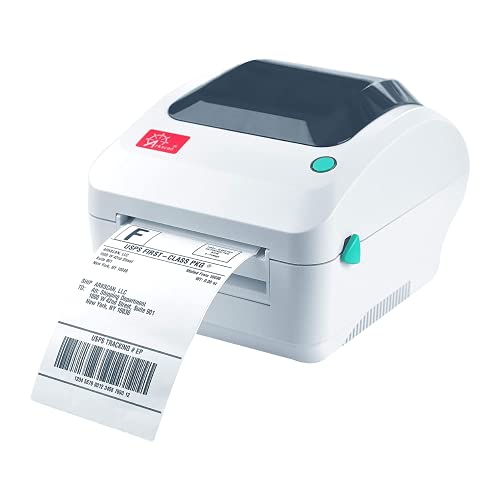
- Supports both roll and fanfold labels
- Prints up to 5 inches per second
- Works with Windows, Mac, Chromebook, and Android
Best For: High-volume shippers using varied label formats
Best for Scalable Barcode Workflows
Brother TD-4550DNWB Thermal Printer
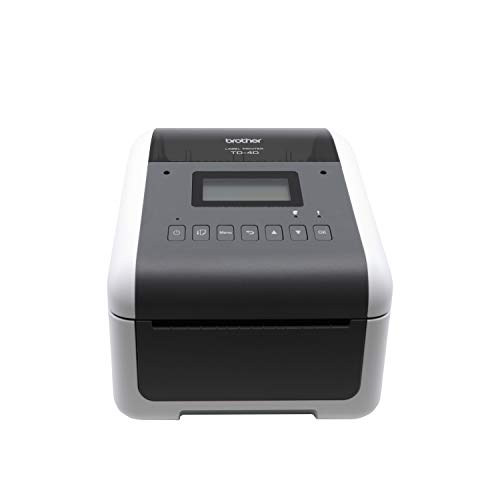
- Prints up to 6 inches per second at 300 dpi
- Supports Ethernet, USB, and Bluetooth
- Designed for barcode labeling from hundreds to thousands of labels
Best For: Growing offices and warehouse operations
Best Wireless Pick
Rollo Wireless Shipping Label Printer

- Prints about one 4x6 label per second
- Wi-Fi, AirPrint, and USB connectivity
- Works with major marketplaces and shipping platforms
Best For: High-volume shipping with flexible wireless printing
Best Commercial-Grade Option
Westinghouse 4x6 Thermal Printer

- Prints up to 6 inches per second
- USB and Ethernet connectivity
- Supports rolls and fanfold labels
Best For: Business, warehouse, and ecommerce shipping stations
Best Bluetooth Value
JADENS Bluetooth Thermal Label Printer

- Bluetooth printing for compatible computers
- App support for Android and iOS
- Handles roll and fanfold labels
Best For: Small businesses needing mobile and desktop printing
Fast Wireless Workhorse
Nelko PL70E Bluetooth Shipping Label Printer

- Prints up to 72 4x6 labels per minute
- Bluetooth app and USB connectivity
- Supports 1.54- to 4.1-inch labels
Best For: Fast, recurring shipping-label batches
Template-Rich Business Pick
NULLTONEX Bluetooth 4x6 Label Printer

- Prints up to 72 labels per minute
- Includes 1,800+ templates and 300+ fonts
- Supports Bluetooth, USB, and labels up to 4.3 inches
Best For: Small-business batches with varied label designs
Compact Space Saver
ETIKEZ PL50E Bluetooth Label Printer

- Compact design for limited workspaces
- Prints up to 60 labels per minute at 203 DPI
- Supports app-based Bluetooth and USB
Best For: Small sellers with limited desk space
Best Overall Value – Rollo USB Shipping Label Printer
For shoppers comparing thermal label printers for large projects, the Rollo USB is a practical shipping-focused option with fast direct-thermal printing, broad platform compatibility, and no ink or toner requirements. It prints one 4×6 label per second at 203 dpi and connects to Windows or Mac computers by USB.
Best For: Small businesses, online sellers, and shipping stations that need quick 4×6 labels plus occasional custom stickers or barcode labels.
Pros:
- Prints at up to 150 mm/s, or about one 4×6 label per second.
- Works with Windows and Mac and supports major marketplaces and shipping platforms.
- Handles labels from 1.57 to 4.1 inches wide for shipping, barcodes, QR codes, and product labels.
Cons:
- USB connectivity is wired rather than wireless.
- Its 203 dpi resolution is less detailed than higher-resolution industrial models.
The Rollo is a strong all-around choice when speed, low consumable costs, and broad shipping compatibility matter more than advanced industrial features or wireless connectivity.
Best for Industrial Labels – LabelTac Pro X Industrial Printer
For thermal label printers for large projects involving safety, facility, or asset labeling, the LabelTac Pro X provides an industrial-oriented workflow. Its LabelSuite software supports custom designs, while the printer accepts supplies from 1/2 to 4 inches wide and uses 300 dpi printing.
Best For: Warehouses, industrial facilities, and offices producing safety signs, pipe markers, asset tags, wire labels, and QR codes.
Pros:
- Supports a wide range of industrial label applications and custom designs.
- Includes LabelSuite software with templates, symbols, and label-design tools.
- Offers 300 dpi resolution, a color LCD, USB and Ethernet connectivity, and a lifetime transferable warranty.
Cons:
- It is more specialized than a basic shipping-label printer.
- Compatible LabelTac supplies are required for the supported applications.
The Pro X stands out for organizations that need durable, purpose-built labeling workflows rather than only standard parcel labels. Its supply flexibility and industrial warranty support ongoing workplace use.
Best for Flexible Media – Arkscan 2054A Shipping Printer
The Arkscan 2054A is a versatile pick among thermal label printers for large projects, supporting both roll and fanfold media while printing at up to 5 inches per second. It works with Windows, Mac, Chromebook, and Android devices through USB and supports labels from 0.75 to 4.25 inches wide.
Best For: High-volume shippers and mixed-use workstations that need standard shipping labels alongside warehouse, product, barcode, or inventory labels.
Pros:
- Supports roll and fanfold labels, with lengths from 0.4 to 90 inches.
- Prints at up to 5 inches per second without ink or toner.
- Works with many shipping services, marketplaces, and label platforms.
- Includes BarTender UltraLite software for Windows label design.
Cons:
- BarTender UltraLite is specified for Windows only.
- Connectivity is through USB rather than a listed wireless connection.
Choose the Arkscan when media flexibility and broad shipping compatibility are priorities. Its support for both roll and fanfold stock can simplify larger or varied labeling workloads.
Best for Scalable Barcode Workflows – Brother TD-4550DNWB Thermal Printer
For businesses scaling from hundreds to thousands of labels, the Brother TD-4550DNWB combines 6-inch-per-second printing with 300 dpi detail. Its Ethernet, USB, and Bluetooth connectivity can help it fit into shipping, inventory, supply-chain, and barcode-labeling workflows.
Best For: Offices and operations teams that need crisp barcodes, small text, and connectivity options for larger recurring label runs.
Pros:
- Prints at up to 6 inches per second at 300 dpi.
- Produces detailed labels, tags, receipts, barcodes, and small fonts.
- Offers Ethernet, USB, and Bluetooth connectivity for flexible integration.
- Uses a spindle-less drop-in design for easier media replacement.
Cons:
- Its listed maximum media width is 4 inches, which may not suit wider labels.
- The printer is designed around Brother label cartridges for this model.
The TD-4550DNWB is a capable choice for growing operations where print clarity and workflow integration are as important as speed. Its connectivity options make it especially suitable for established office or warehouse systems.
Best Wireless Pick – Rollo Wireless Shipping Label Printer
For thermal label printers for large projects, the Rollo Wireless stands out when you need fast, flexible printing across multiple devices. It prints one 4×6 label per second at 203 DPI and supports Wi-Fi, AirPrint, and USB connections.
Best For: High-volume shipping workflows that need wireless access and broad platform compatibility.
Pros:
- Prints at up to 150 mm/s, or approximately one 4×6 label per second.
- Works with iPhone, iPad, Mac, Android, Windows, Chromebook, Linux, and USB-connected devices.
- Supports major shipping platforms and marketplaces, including Amazon, Shopify, Etsy, and eBay.
- Accepts label widths from 1.57 to 4.1 inches for shipping and custom labels.
Cons:
- It does not use Bluetooth, so wireless printing depends on Wi-Fi or AirPrint.
- The included label capacity is listed as 100 sheets, which may require frequent reloading during especially large batches.
The Rollo is a strong large-project option for sellers who value speed, wireless convenience, and compatibility with varied shipping setups. Its custom-label capability also makes it useful beyond package labels.
Best Commercial-Grade Option – Westinghouse 4×6 Thermal Printer
The Westinghouse 4×6 printer is designed for thermal label printers for large projects where consistent desktop performance matters. Its commercial-grade construction, 203 DPI output, and claimed 6-inch-per-second print speed suit regular ecommerce, warehouse, and shipping work.
Best For: Business and warehouse users who prefer a wired USB or Ethernet setup.
Pros:
- Prints at up to 6 inches per second with 203 DPI resolution.
- Supports USB and Ethernet connectivity for desktop and networked workflows.
- Works with fanfold labels and rolls in widths from 0.78 to 4.6 inches.
- Includes starter labels, an internal label holder, USB cable, power adapter, and setup materials.
Cons:
- It is not Bluetooth-capable.
- Ethernet cable and USB-C cable or adapter must be purchased separately.
- Setup may require driver installation and a print test.
Choose the Westinghouse when durability and wired connectivity take priority over mobile convenience. Its broad media support and included accessories make it a practical choice for recurring commercial label runs.
Best Bluetooth Value – JADENS Bluetooth Thermal Label Printer
The JADENS JD268BT is a convenient option among thermal label printers for large projects when wireless printing from a computer or mobile device is important. Its 203 DPI print head handles 4×6 shipping labels and other common sizes without ink or toner.
Best For: Small businesses and home shipping stations that want Bluetooth and USB flexibility.
Pros:
- Supports Bluetooth printing on Windows 8 or later and Mac computers.
- Offers app-based printing for Android and iOS devices.
- Works with roll and fanfold labels from 1.57 to 4.1 inches wide.
- Compatible with popular services and marketplaces including ShipStation, eBay, Amazon, and Shopify.
Cons:
- Android and iOS phones require the JADENS app rather than direct Bluetooth printing.
- Label calibration is needed when changing label types.
- Its listed maximum sheet capacity is 50, which may mean more frequent replenishment for very large batches.
The JADENS offers a useful balance of wireless convenience, common label-size support, and straightforward platform compatibility. It is particularly appealing for smaller operations that alternate between computer and mobile printing.
Fast Wireless Workhorse – Nelko PL70E Bluetooth Shipping Label Printer
For large projects requiring batches of shipping or barcode labels, the Nelko PL70E combines 150 mm/s printing with Bluetooth and USB connectivity. Its 203 DPI output, support for roll and fanfold labels, and compatibility with common selling and shipping platforms make it a practical option for steady home or small-business workflows.
Best For: High-volume shipping-label printing where fast output and flexible device connectivity matter.
Pros:
- Prints up to 72 4×6 labels per minute at 150 mm/s.
- Supports Bluetooth through the NELKO app on iOS and Android, plus USB connections for Windows, Mac, and Chrome OS.
- Handles label widths from 1.54 to 4.1 inches and supports both roll and fanfold media.
- Compact 9 x 5 x 6-inch design uses direct thermal printing without ink or toner.
Cons:
- Bluetooth printing requires the NELKO app rather than direct device pairing.
- Mac computers support USB rather than Bluetooth printing.
- 203 DPI is suitable for standard labels but not intended for high-resolution graphics.
The PL70E is a strong fit for thermal label printers for large projects when speed and platform compatibility take priority. Its app-based Bluetooth workflow requires a little setup, but the broad label-size support and 500-label maximum run make it well suited to recurring batches.
Template-Rich Business Pick – NULLTONEX Bluetooth 4×6 Label Printer
The NULLTONEX thermal shipping label printer is designed for large projects that benefit from quick output and an editing app with reusable templates. It prints at up to 150 mm/s, supports Bluetooth and USB, and works with standard shipping platforms and label widths up to 4.3 inches.
Best For: Small businesses that want batch printing plus built-in design tools for varied label tasks.
Pros:
- Prints up to 72 labels per minute at 203 DPI without ink or toner.
- Offers Bluetooth through the FlashLabel Pro app and a steadier USB connection for computers.
- Includes more than 1,800 templates, 300 fonts, editing tools, and offline template storage.
- Supports Amazon, Shopify, Etsy, USPS, UPS, FedEx, DHL, and label widths from 1.57 to 4.3 inches.
Cons:
- Prints in black and white only.
- The included supply is limited to 25 sheets of 4×6 labels.
- Bluetooth printing depends on the FlashLabel Pro app.
Among thermal label printers for large projects, this model stands out when labels extend beyond routine shipping documents. Its high-speed output supports busy periods, while the template library can reduce repetitive design work for barcodes, mailing labels, and other black-and-white tasks.
Compact Space Saver – ETIKEZ PL50E Bluetooth Label Printer
For large projects in a compact workspace, the ETIKEZ PL50E offers a small-footprint way to print shipping, barcode, and price labels. It supports Bluetooth through the Labelnize app, USB connections for computers, and output speeds of up to 60 pages per minute at 203 DPI.
Best For: Home-based sellers and small operations needing batch label printing in limited desk space.
Pros:
- Compact 7.09 x 3.15 x 2.74-inch design fits easily in tight spaces.
- Supports Bluetooth through the Labelnize app and USB connections for Windows, Mac, and Chrome OS.
- Handles label sizes from 1.57 to 4.1 inches and works with Amazon, eBay, Shopify, UPS, FedEx, and USPS.
- 203 DPI output is suited to shipping labels, QR codes, and barcodes.
Cons:
- Computers cannot connect over Bluetooth; computer printing requires USB.
- Mobile Bluetooth printing requires the Labelnize app and setup steps.
- Its listed speed of up to 60 pages per minute is lower than the 72-label-per-minute rate of some alternatives.
The PL50E is a sensible choice among thermal label printers for large projects when available space is the main constraint. It gives up some speed compared with faster models, but its compact footprint, broad platform support, and flexible label sizing keep it useful for growing shipping workflows.
How We Picked the Best Thermal Label Printers for Large Projects
We focused on the features that matter when label production is frequent or time-sensitive: print consistency, 4 x 6 shipping-label support, connection options, platform compatibility, setup requirements, and suitability for demanding workflows. The selection includes commercial-grade and industrial models alongside more affordable desktop and wireless printers, so different businesses can match capacity to budget.
We also considered whether each printer is practical for common services such as USPS, UPS, FedEx, Amazon, eBay, Etsy, Shopify, PayPal, and ShipStation. Compatibility can vary by operating system and software, so confirm current driver and app support before ordering.
Quick Comparison
| Best For | Recommended Type | Priority Feature |
|---|---|---|
| High-volume shipping stations | Commercial or industrial printer | Durability and consistent throughput |
| Mixed office and warehouse use | Network-capable desktop model | Flexible connectivity and software support |
| Multiple operators or shared workspaces | Wi-Fi or Ethernet printer | Easy access from several devices |
| Mobile or compact work areas | Bluetooth printer | Simple wireless setup and small footprint |
| Lowest upfront cost | Basic USB model | Reliable compatibility with the primary computer |
Key Buying Factors for Thermal Label Printers for Large Projects
Expected Volume and Duty Cycle
Estimate your busiest day rather than your average week. A basic desktop printer may be adequate for occasional batches, but sustained commercial work benefits from stronger construction, better cooling, and a design intended for repeated printing. If downtime would delay fulfillment, prioritize a business-class or industrial model.
Connectivity and Device Support
USB is generally the simplest and most dependable choice for one dedicated workstation. Wi-Fi or Ethernet is more useful when several computers need access, while Bluetooth suits tablets, phones, and flexible packing stations. Check Windows, macOS, Chromebook, Android, and iOS support individually; wireless capability does not guarantee compatibility with every platform.
Labels, Software, and Workflow
Most shipping models support standard 4 x 6 labels, but verify maximum media width, roll or fanfold support, gap sensing, and calibration. Confirm that the printer works with your carrier portals, ecommerce platform, and shipping software. A printer that integrates cleanly can save more time than a slightly faster print specification.
Operating Cost and Maintenance
Direct thermal printers avoid ink and toner, but labels remain an ongoing expense. Compare compatible-label availability and pricing, and look for easy media loading, automatic calibration, and accessible printheads. Keep spare labels available and clean the print path regularly during heavy use.
Who Should Buy Which Thermal Label Printers for Large Projects?
Choose an industrial or commercial-grade model if you run a warehouse, fulfillment operation, or shipping department with large daily batches. A network-ready desktop printer is a strong middle ground for growing businesses that need shared access without industrial hardware. Select a wireless Rollo-style or comparable Wi-Fi model when convenient placement and multi-device access matter. Bluetooth models are best for small businesses, pop-up operations, and mobile packing stations, provided the supported app and operating system meet your needs. For a single computer and a straightforward workflow, a USB printer can deliver the simplest setup and dependable results.
Before buying, calculate peak label volume, confirm software compatibility, and measure the available workspace. Those checks will usually matter more than minor differences in advertised print speed.