The best label printing systems for professional makers make it easier to organize products, packaging, parts, tools, and inventory without slowing down a busy workflow.
This roundup compares portable, industrial, desktop, Bluetooth, and shipping-label options so you can choose a system that fits your materials, work environment, and volume.
Best 10 Label Printing Systems for Professional Makers Picks for 2026
Rugged Field Choice
Brady M710 Portable Label Printer

- Bluetooth and Wi-Fi portable operation
- 3-inch-per-second printing with auto-cut
- Up to 4,500 labels per battery charge
Best For: Field technicians and makers needing durable, mobile labeling
Industrial Shop System
LabelTac Pro X Labeling Printer

- LabelSuite software with templates and symbols
- Handles supplies from 1/2 to 4 inches wide
- Lifetime transferable printer warranty
Best For: Workshops and warehouses creating varied industrial labels
Connected Desktop Organizer

- Bluetooth and USB connectivity
- 900 symbols plus 175 business templates
- Stores up to 90 frequently used labels
Best For: Small businesses and makers handling organization and asset labels
Dual-Roll Desktop Workhorse
DYMO LabelWriter 450 Twin Turbo
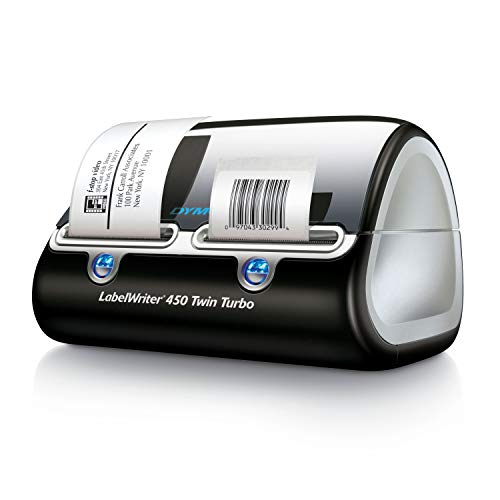
- Switch between two label rolls quickly
- Direct thermal printing needs no ink
- Useful for shipping, filing, and barcodes
Best For: Desktop workshops and offices with routine organization tasks
Rugged Mobile Pick
Brady M210 Handheld Label Maker

- 6-foot drop-resistant construction
- Portable thermal printing at 203 dpi
- App control with smartphone compatibility
Best For: Professional makers labeling equipment and materials in the field
High-Volume Desktop Pick
Brother QL-800 Professional Label Printer

- Up to 93 labels per minute
- 300 dpi black-and-red printing
- Auto-cutter and USB connectivity
Best For: Workshops and small businesses with recurring label production
Industrial Organization Pick
DYMO RhinoPRO 5200 Label Maker

- Industrial hot keys for technical labels
- Prints Code 39 and Code 128 bar codes
- Includes carry case and vinyl label rolls
Best For: Job sites, electrical panels, cables, and asset management
Flexible Wireless Shipping
JADENS Bluetooth Thermal Shipping Label Printer

- USB and wireless printing options
- Supports 1.57–4.1-inch label widths
- Works with major shipping platforms
Best For: Small-business shipping and mobile-friendly label workflows
Portable Creative Labeling
SUPVAN E11 Bluetooth Label Maker

- Built-in keyboard plus Bluetooth app
- Includes four label tapes
- Offers fonts, frames, icons, and templates
Best For: Portable organization and customized workshop labels
High-Resolution 4x6 Output
DYMO LabelWriter 4XL Shipping Label Printer

- Prints 4x6 labels at 300 dpi
- Works with major ecommerce platforms
- Includes 60+ DYMO Connect templates
Best For: Ecommerce sellers needing clear desktop shipping labels
Rugged Field Choice – Brady M710 Portable Label Printer
For professional makers who need label printing systems for professional makers that can move from the shop to the field, the Brady M710 combines portable operation with Bluetooth and Wi-Fi connectivity. It prints monochrome labels at up to 3 inches per second, supports automatic cutting, and is built for demanding work environments.
Best For: Makers, technicians, and field teams printing durable labels across changing work locations.
Pros:
- Portable design with Bluetooth, Wi-Fi, USB, and keypad or software control.
- Prints up to 3 inches per second and automatically cuts labels.
- Battery supports up to 4,500 labels per charge.
- Designed to withstand 4-foot drops, blowing sand, and dust.
Cons:
- Requires Brady Authentic Labels.
- Prints monochrome labels only.
- Its rugged feature set may be more than a basic desktop workflow needs.
The M710 is a strong choice when portability, durability, and long battery life matter more than compact desktop simplicity. Its label-saving and data-import capabilities also support repeatable professional workflows.
Industrial Shop System – LabelTac Pro X Labeling Printer
The LabelTac Pro X is an in-house industrial option for label printing systems for professional makers who need more than basic identification labels. Its LabelSuite software supports custom designs, while compatible supplies cover applications such as safety signage, pipe marking, asset tags, wire labels, QR codes, and warning labels.
Best For: Workshops, warehouses, and offices producing varied industrial labels on demand.
Pros:
- Includes LabelSuite design and print software with templates and symbols.
- Supports supplies from 1/2 inch to 4 inches wide.
- Color LCD helps monitor ribbon levels and print progress.
- Compact chassis and lifetime transferable warranty suit ongoing workplace use.
Cons:
- Uses LabelTac-compatible supplies.
- Requires a computer connection through USB or Ethernet.
- Industrial capabilities may be unnecessary for occasional home labeling.
Choose the Pro X when application flexibility and on-demand industrial printing are priorities. The software and broad supply compatibility make it better suited to makers managing multiple label types than to users seeking a simple handheld device.
Connected Desktop Organizer – Brother PT-D610BT Label Maker
Brother P-Touch PT-D610BT Business Professional Connected Label Maker with Bluetooth®
Check Price On AmazonThe Brother PT-D610BT offers a practical balance of onboard control and connected design tools for label printing systems for professional makers. It connects by Bluetooth or USB, includes a QWERTY keyboard and color LCD preview, and supports labels up to 1 inch wide using Brother Genuine TZe tapes.
Best For: Small businesses and makers organizing merchandise, inventory, assets, and storage.
Pros:
- Bluetooth and USB connectivity support computers and mobile devices.
- Includes 17 fonts, 17 styles, 160 frames, and 900 symbols.
- Stores up to 90 frequently used labels for quick reprinting.
- Offers 175 business-focused templates and an automatic cutter.
Cons:
- Maximum label width is 1 inch.
- Uses Brother Genuine TZe label tapes.
- Its two-line display and monochrome output are less suited to larger signage.
The PT-D610BT is a versatile desktop label maker for repeatable organization and asset-labeling tasks. Its template library and stored-label memory are especially useful when professional makers print similar labels regularly.
Dual-Roll Desktop Workhorse – DYMO LabelWriter 450 Twin Turbo
For desktop label printing systems for professional makers, the DYMO LabelWriter 450 Twin Turbo emphasizes speed and convenience rather than industrial durability. Its two-roll design lets you switch between label types without changing rolls, while direct thermal printing avoids ink and toner.
Best For: Home offices, small workshops, and makers handling shipping, filing, mailing, and barcode labels.
Pros:
- Two rolls allow quick switching between different label types.
- Direct thermal printing eliminates ink and toner costs.
- Prints precise quantities without wasting sheet labels.
- Works with text from Microsoft Word, Excel, Outlook, and Google Contacts.
Cons:
- USB connectivity is the listed connection option.
- Supports media up to 2 3/10 inches wide.
- Best performance requires authentic DYMO LabelWriter labels.
The Twin Turbo is a sensible choice for makers who need efficient desktop labeling and frequently alternate between two label formats. It is less appropriate for wide industrial signage or mobile field work, but well matched to shipping and organization tasks.
Rugged Mobile Pick – Brady M210 Handheld Label Maker
For makers who need label printing systems for professional makers that can travel between work areas, the Brady M210 is a compact thermal printer built for portable, monochrome labeling. Its drop-resistant design, LCD display, and smartphone app control make it practical for professional jobs where durability and mobility matter.
Best For: Professional makers labeling equipment, parts, and work materials on the go.
Pros:
- Resistant to 6-foot drops for demanding work environments.
- Portable handheld design with a 203 dpi thermal print resolution.
- App control and smartphone compatibility support convenient operation.
- Uses labels up to 0.75 inch wide and includes a limited warranty.
Cons:
- Monochrome printing only.
- Print speed is listed at 0.39 pages per minute.
- Designed for narrow labels rather than larger-format signage.
The M210 prioritizes rugged portability over speed and broad media flexibility. It is a sensible choice when durability and field labeling are more important than high-volume desktop production.
High-Volume Desktop Pick – Brother QL-800 Professional Label Printer
The Brother QL-800 is a strong desktop option among label printing systems for professional makers, especially when speed and polished output are priorities. It prints up to 93 labels per minute at 300 dpi and supports distinctive black-and-red printing with compatible Brother DK media.
Best For: Workshops and small businesses producing shipping, office, warehouse, name-badge, and other professional labels.
Pros:
- Prints up to 93 labels per minute at 300 dpi.
- Supports black-and-red output using DK-2251 media.
- Works with Windows and Mac computers through USB connectivity.
- Built-in auto-cutter and support for continuous labels up to 3 feet long.
Cons:
- USB connectivity is the listed printer connection.
- Requires Brother Genuine DK pre-sized labels or continuous-length tape.
- Desktop form factor is less convenient for mobile work than handheld models.
With high throughput, sharp 300 dpi output, and an auto-cutter, the QL-800 is well suited to repeatable production workflows. Its black-and-red capability adds visual emphasis for makers creating attention-grabbing labels.
Industrial Organization Pick – DYMO RhinoPRO 5200 Label Maker
For makers handling wiring, panels, tools, or facility assets, the DYMO RhinoPRO 5200 brings specialized features to label printing systems for professional makers. Its hot keys streamline common industrial formats, while support for Code 39 and Code 128 bar codes helps with asset-management tasks.
Best For: Job sites, electrical work, patch panels, cable identification, and heavy-duty asset labeling.
Pros:
- Supports Code 39 and Code 128 bar codes on 3/4-inch labels.
- Hot keys simplify panel, wire, cable, wrap, and fixed-length labels.
- Designed to meet ANSI and TIA/EIA-606-A labeling standards.
- Includes a carry case and two rolls of DYMO Industrial vinyl labels.
Cons:
- Uses DYMO Industrial labels rather than general-purpose media.
- Push-button control and a portable form factor may be less convenient for large batch jobs.
- Listed output is monochrome.
The RhinoPRO 5200 is more specialized than a general office label printer. Its strongest advantage is workflow efficiency for technical formats and durable industrial identification, particularly on active job sites.
Flexible Wireless Shipping – JADENS Bluetooth Thermal Shipping Label Printer
For professional makers who need label printing systems for professional makers that can move from a desktop to a mobile workflow, the JADENS JD268BT combines USB and wireless printing with direct thermal output. It supports fanfold and roll labels from 1.57 to 4.1 inches wide, making it especially practical for small-business shipping and organization tasks.
Best For: Online sellers and makers who need flexible 4×6 shipping-label printing from Windows, Mac, Android, or iOS devices.
Pros:
- Direct thermal printing requires no ink or toner and produces 203 dpi monochrome labels.
- Supports Bluetooth printing on compatible Windows and Mac devices, plus app-based printing on Android and iOS.
- Works with major shipping and marketplace platforms, including ShipStation, Shopify, Amazon, and eBay.
- Includes setup materials and a one-year warranty with email, phone, and remote support.
Cons:
- Mobile users must use the Jadens printer app rather than Bluetooth printing directly.
- Label size calibration is required when changing label types.
- Its 203 dpi resolution is functional but lower than some higher-resolution professional printers.
The JADENS is a versatile choice when wireless access and broad platform compatibility matter more than premium resolution. Its USB fallback and support for multiple label formats add useful flexibility for growing maker businesses.
Portable Creative Labeling – SUPVAN E11 Bluetooth Label Maker
For makers building organized studios, workshops, or inventory systems, the SUPVAN E11 is one of the more portable label printing systems for professional makers. Its built-in keyboard supports quick standalone labeling, while the Bluetooth app adds design controls for customized labels, templates, icons, and multilingual text.
Best For: Crafters, organizers, and small-workspace makers who want portable labels with decorative customization and minimal margins.
Pros:
- Combines direct keyboard entry with Bluetooth app-based design and printing.
- Includes 30+ fonts, 50+ frames, 660+ icons, and 17 system languages.
- Prints on both continuous and die-cut labels, supporting long content and batch projects.
- Rechargeable 1200 mAh battery offers up to one month of use per charge, according to the supplied specifications.
Cons:
- Its maximum media size is 15 mm by 6 m, so it is not intended for standard 4×6 shipping labels.
- Printing is monochrome and limited to 203 dpi.
- Bluetooth app features require a compatible smartphone.
The E11 prioritizes convenience, portability, and visual customization rather than large-format shipping output. The included continuous and die-cut tapes make it a practical companion for labeling supplies, bins, tools, and finished goods.
High-Resolution 4×6 Output – DYMO LabelWriter 4XL Shipping Label Printer
DYMO LabelWriter 4XL Shipping Label Printer, Prints 4x6 Extra Large Shipping Labels
Check Price On AmazonFor professional makers shipping products at a steady pace, the DYMO LabelWriter 4XL is a focused option among label printing systems for professional makers. It prints standard 4×6 shipping labels directly through popular ecommerce and shipping services, while its 300 dpi output helps keep barcodes, logos, and text crisp.
Best For: Ecommerce sellers and makers who primarily need clear 4×6 shipping, warehouse, barcode, or identification labels.
Pros:
- Prints 4×6 shipping labels and other large-format labels without ink or toner.
- 300 dpi resolution supports clear text, logos, and barcodes.
- Compatible with Amazon, eBay, Etsy, Shopify, ShipStation, and other shipping platforms.
- DYMO Connect software includes more than 60 professional templates and customization options.
Cons:
- Connectivity is USB rather than Bluetooth or Wi-Fi.
- DYMO recommends using authentic DYMO labels for best performance.
- Its primary format is 4×6 media, making it less flexible for very small specialty labels.
The 4XL is best viewed as a dedicated desktop shipping printer. Its higher 300 dpi resolution and broad ecommerce compatibility make it a strong fit when reliable, readable 4×6 output is the main requirement.
How We Picked the Best Label Printing Systems for Professional Makers
We evaluated these systems by looking at print technology, label compatibility, connectivity, portability, durability, setup, and the types of work each printer is designed to handle. The selection includes handheld thermal-transfer machines for job sites, desktop units for offices and workshops, and dedicated shipping-label printers for online sellers.
We also considered whether a system supports specialty materials, multiple label sizes, color accents, battery-powered operation, or software-based template creation. A professional maker may need more than one of these capabilities, so the right choice depends on the balance between flexibility, speed, and operating cost.
Quick Comparison
| System type | Best suited for | Key advantage |
|---|---|---|
| Portable industrial | Field work, equipment, and durable identification | Rugged construction and on-demand printing |
| Desktop connected | Workshops, offices, and organized production areas | Convenient computer or Bluetooth workflows |
| Shipping-label printer | E-commerce fulfillment and mailing | Fast printing of large 4-by-6-inch labels |
| Handheld consumer or prosumer | Bins, cables, shelves, and small-batch projects | Simple operation and portability |
Key Buying Factors for Label Printing Systems for Professional Makers
Print Method and Label Materials
Direct thermal printers are convenient for receipts, barcodes, and shipping labels, but their output can fade with heat, sunlight, or abrasion. Thermal-transfer systems generally offer better durability and broader material choices, including labels suited to cables, machinery, tools, and outdoor use.
Connectivity and Workflow
USB is dependable at a workstation, while Bluetooth and Wi-Fi are more useful when labels must be created from a phone, tablet, or multiple computers. Check software compatibility and whether templates, barcodes, importing, and batch printing are supported.
Label Size, Speed, and Running Cost
Confirm the supported roll or cartridge formats before buying. Small tape labels work well for storage and identification; wider rolls are better for packages, signs, and equipment. Compare replacement-label prices as carefully as the printer’s purchase price, especially for high-volume work.
Portability and Durability
For makers who move between rooms or job sites, prioritize battery operation, protective cases, drop resistance, and easy tape changes. A larger desktop printer may be faster and more comfortable for repeated production, but it is less practical away from a fixed workspace.
Who Should Buy Which Label Printing Systems for Professional Makers?
Choose a rugged Brady or DYMO industrial handheld when labels must withstand demanding environments, cables, tools, or equipment handling. A connected Brother P-Touch model is a strong fit for makers who want flexible tape labeling with computer or Bluetooth control. Desktop Brother and DYMO units are better for organized workshops, offices, barcode work, and repeated label batches.
If your main task is fulfilling online orders, choose a dedicated 4-by-6-inch shipping printer such as a DYMO LabelWriter 4XL or JADENS wireless model. For occasional household, studio, or small-business labeling, a compact Bluetooth or keyboard-driven system can provide the simplest setup. Before ordering, match the printer to your most demanding label material and workload—not just the lowest upfront price.